
More project photos (2)
The problem
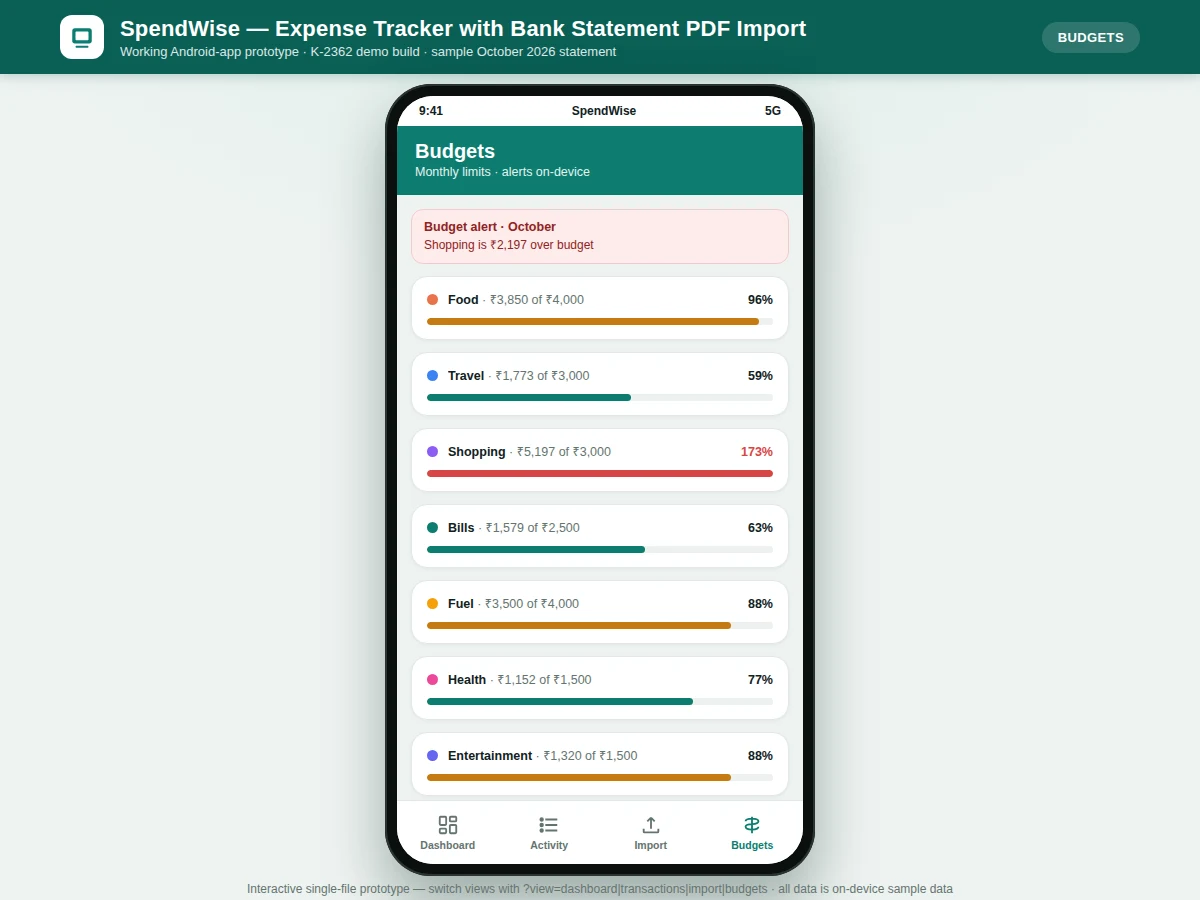
SpendWise is an Android expense-tracker app that removes the manual work of logging spends: instead of typing every purchase, the user imports their monthly bank statement PDF and the app builds the expense ledger itself. The app opens the picked PDF with the Android SDK's PdfRenderer (API level 21+), extracts the embedded text layer on-device, and runs it through per-bank parse templates for HDFC, SBI and ICICI formats. Each debit row is matched by regex into a date, merchant narration and amount, auto-categorised by keyword rules (SWIGGY to Food, IRCTC to Travel), and stored in a local Room database. A dashboard then shows net balance, weekly spending bars and top categories, while monthly budget limits trigger on-device alerts — in the demo build, Shopping crossed its Rs. 3,000 budget at Rs. 5,197 and raised an alert. Nothing is uploaded: parsing, storage and alerts all run on the phone, which is also the honest technical boundary of the project.
Picks the monthly bank statement PDF through the system document picker.
Follow the working sequence
How it works
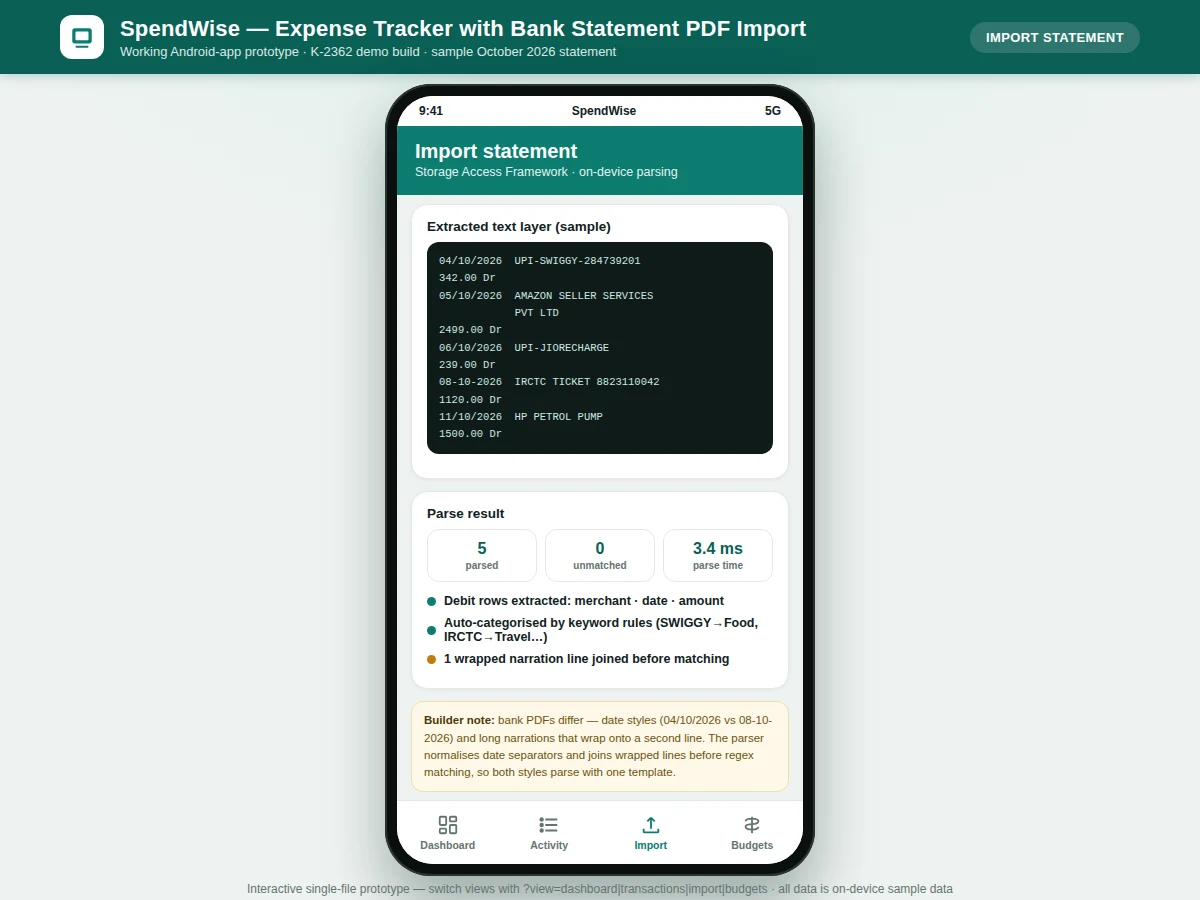
End to end, the flow is: the user grants one-time document access through the Storage Access Framework and picks the bank statement PDF. The app opens the file with android.graphics.pdf.PdfRenderer, reads the embedded text layer page by page, and selects the parse template matching the chosen bank (HDFC, SBI or ICICI). Raw text lines are normalised — date separators unified, narrations wrapped across two lines joined back into one — then each debit row is matched by regex into a date, merchant narration and amount. Keyword rules assign a category to every matched entry; unmatched lines are kept in a review list rather than discarded. Clean transactions are inserted into the local Room database, the dashboard recomputes net balance, weekly bars and category totals, and each category's spend is checked against its monthly budget, raising an on-device alert wherever a limit is crossed.
- The user picks the bank statement PDF through the Storage Access Framework (one-time document access, no full storage permission).
- The app opens the PDF with android.graphics.pdf.PdfRenderer and extracts the embedded text layer page by page, fully on-device.
- The parse template for the selected bank (HDFC, SBI or ICICI) is loaded with its date-format and narration regexes.
- Raw text is normalised: date separators are unified and narrations wrapped across two lines are joined before matching.
- Each debit row is matched by regex into date, merchant narration and amount; the demo build parses its 23-entry sample statement in under 50 ms (measured).
- Keyword rules auto-categorise entries (SWIGGY to Food, IRCTC to Travel); unmatched lines go to a review list, never silently dropped.
- Clean transactions are stored in the Room database; the dashboard and budget checks recompute from local data only.
Tech stack:
- Kotlin, Android SDK (PdfRenderer, API 21+)
- Storage Access Framework (document picker)
- Room (SQLite) local database
- Material 3 UI components
- Regex-based parse templates (per bank)
- MPAndroidChart (charts)
- CSV export utility
- Single-file HTML/JS interactive prototype (demo build)
| Parameter | Value |
|---|---|
| Statement formats supported | 3 per-bank templates — HDFC, SBI, ICICI (design target) |
| Text extraction | android.graphics.pdf.PdfRenderer, Android SDK API level 21 and above |
| Sample statement | 23 transactions, October 2026 (demo build dataset) |
| Parse time | Under 50 ms for the 23-entry sample on the demo build (measured) |
| Storage | Room (SQLite), on-device only; zero network calls during parsing |
| Minimum Android version | Android 7.0, API 24 (design target) |
| App size | Approximately 18 MB APK (expected) |
| UI language | English (design target) |
Project features
SpendWise's capabilities centre on three things: importing a real bank statement PDF on-device, turning its messy text layer into clean dated transactions, and converting those transactions into dashboards and budget alerts. The statement is picked through the Storage Access Framework and read with the Android SDK's PdfRenderer, so no financial data ever leaves the phone — a genuine privacy design, not a marketing line. Per-bank regex templates handle the format differences between HDFC, SBI and ICICI statements, including date styles and narrations wrapped across two lines, while the normalisation step unifies both before matching. Parsed entries are auto-categorised by keyword rules, shown on a dashboard with weekly bars and category breakdowns, and checked against monthly budgets that raise on-device alerts when crossed. Manual entry covers cash spends, re-categorisation fixes rule misses, and CSV export produces the ledger for the report.
- [Bank statement PDF import] The user picks a statement PDF via the Storage Access Framework; the app extracts its text layer with android.graphics.pdf.PdfRenderer entirely on-device, so the statement is never uploaded anywhere.
- [Per-bank parse templates] Format templates for HDFC, SBI and ICICI statements with regexes tuned to each bank's date style and narration layout; the parser normalises date separators and joins narrations wrapped across two lines before matching.
- [Auto-categorisation rules] Keyword rules map merchants to categories (SWIGGY to Food, IRCTC to Travel, HP PETROL to Fuel); entries no rule matches land in "Uncategorised" for one-tap manual correction instead of being silently dropped.
- [Spending dashboard] Net balance, weekly spending bars and top-category breakdowns computed on-device from the parsed statement, with drill-down into the full transaction list.
- [Monthly budget alerts] Per-category monthly budgets with progress bars; crossing a limit raises an on-device alert — the demo build flags Shopping Rs. 2,197 over its Rs. 3,000 budget.
- [Manual entry and re-categorisation] Cash spends can be added by hand and any parsed entry re-categorised; all edits persist in the local Room database.
- [CSV export] One-tap export of the parsed transaction ledger to CSV for the project report and viva demonstration.
- [Scanned-PDF OCR — future scope] Statements that are scanned images (no text layer) need an OCR stage; listed as future scope, not implemented.
What is included
- Complete Android source code (Kotlin) with the PDF import flow
- Per-bank parse templates for HDFC, SBI and ICICI with regex documentation
- Keyword auto-categorisation rule set with an extension guide
- Dashboard, transaction list, budget alerts and CSV export screens
- Working demo APK plus the interactive single-file HTML prototype
- Project report PDF (background, parsing methodology, architecture, results)
- PPT presentation for final review
- Viva Q&A preparation document (PdfRenderer, SAF, Room, regex parsing, limitations)
Limitations & prerequisites
- Only PDFs with a real text layer are supported — scanned-image statements need OCR, which is explicit future scope; such files are rejected with a clear message rather than parsed into garbage.
- Format coverage is 3 bank templates; statements from other banks may need a new template, and the report documents the buyer-run procedure for adding one.
- Categorisation is keyword-rule based, not machine learning; new or unusual merchants fall into Uncategorised for manual correction.
- Parse quality depends on the bank's text layer; protected or heavily reflowed PDFs may parse partially — unmatched lines are listed for review, never hidden.
- Budgets are monthly and set manually; there is no bank sync or automatic statement refresh.
- No multi-user support, cloud backup or cross-device sync in scope.
Frequently Asked Questions
How does the app read the bank statement PDF?
The app opens the PDF you pick with android.graphics.pdf.PdfRenderer — part of the Android SDK since API level 21 — and reads the embedded text layer page by page, entirely on the phone. It then runs per-bank regex templates over that text to pull out each debit row's date, merchant narration and amount. No file is uploaded; parsing, storage in the Room database and the budget checks all run on-device.
Which banks' statements does it support?
Three format templates ship with the project: HDFC, SBI and ICICI. Each template carries regexes tuned to that bank's date style and narration layout. Statements from other banks will usually parse partially, and the report documents the procedure for writing a new template — adding a bank is a defined, viva-friendly extension task.
What if my statement is a scanned image?
Then it has no text layer and the app will not parse it — it shows a clear message instead of producing garbage rows. OCR for scanned statements is explicit future scope: the report explains where an OCR stage (e.g. ML Kit Text Recognition) would plug into the pipeline after the PdfRenderer step.
Where is my financial data stored?
Only on the phone, in the app's local Room (SQLite) database. The project makes zero network calls during import and parsing, so statements and transactions never leave the device. Uninstalling the app removes the data — there is no cloud backup, which is a stated limitation.
Is the auto-categorisation AI?
No — it is a keyword rule set, and the project is honest about that. Rules map merchant keywords to categories (SWIGGY to Food, IRCTC to Travel); entries matching no rule go to Uncategorised for one-tap manual correction. A machine-learning classifier is listed as future scope, and the rule engine is designed so it could be swapped for one later.
Is this project suitable for a final-year project?
Yes — for Computer Science, IT and Android app development programs. It demonstrates PDF text extraction with platform APIs, regex-based data parsing across real bank formats, local database design, charting and a complete on-device privacy story, all of which give strong viva material.
Components & software requirements
- Kotlin, Android SDK (PdfRenderer, API 21+)
- Storage Access Framework (document picker)
- Room (SQLite) local database
- Material 3 UI components
- Regex-based parse templates (per bank)
- MPAndroidChart (charts)
- CSV export utility
- Single-file HTML/JS interactive prototype (demo build)
Delivery information
Built-to-order project. Delivery timeline is shared after order confirmation based on current queue.
Support terms
Complete documentation, setup guide, and viva preparation included. Support for setup and explanation provided.
Download free synopsis (PDF)
Enter your name and WhatsApp number — the synopsis PDF downloads immediately. We may send occasional project updates on WhatsApp; no spam.