
More project photos (2)

The problem
The Exam Countdown Android App answers one plain question for a student facing a semester timetable: how much time is left before each exam, and how much syllabus is actually finished. Students usually carry that answer in separate places — a timetable screenshot for dates, a notebook or notes app for syllabus progress, and memory for revision reminders — so the picture is never in one place when a study session starts. This app puts the three pieces together: a live countdown for the next exam, a per-subject checklist of syllabus topics, and reminders scheduled a set number of days before each exam. Opening the app shows the nearest exam first, the topics still unfinished for that subject, and the overall progress across the semester, so the next study step is visible without hunting through other apps.
Many students revise by feel rather than by a checked list, which makes it easy to spend a week on a strong subject while a weak one stays untouched. A checklist tied to each exam date changes that: progress is counted per subject, the subjects with the most topics left are obvious, and a reminder fires while there is still time to act on it rather than on the night before. The demo semester in this build covers 4 subjects with 6 topics each, 24 topics in total, of which 14 are marked complete in the demo data, giving an overall progress figure of 58% (demo data, rounded to the nearest whole percent).
| This Exam Countdown App | Paper timetable + notebook | Generic countdown widget | |
|---|---|---|---|
| Exam countdown | Live days · hours · minutes · seconds to each dated exam | No countdown; the student works out the gap by hand | A countdown only, with no link to any subject |
| Syllabus tracking | Per-subject checklist of topics, counted into a progress bar per subject | A ticked list on paper, with no automatic totals | None — the widget does not know the syllabus |
| Study reminders | Reminders set 1 day · 3 days · 7 days before an exam (design options) | None, unless the student remembers to set one separately | None, or a single alarm with no exam link |
| Overall picture | One overall progress figure across all subjects in the demo (58% for 14 of 24 demo topics) | Scattered across pages, with no combined figure | A single date only, with no progress at all |
Enters subjects, dates and syllabus topics.
Follow the working sequence
How it works
Using the Exam Countdown Android App is a straight line from entering the timetable to revising with a clear deadline in view. The student first enters each subject with its exam date, time and hall, then adds that subject's syllabus topics to its checklist. The app sorts the exams by date, puts the nearest one at the top, and starts a ticking countdown to it in days, hours, minutes and seconds. As study sessions finish topics, the student ticks them off, and each tick recalculates both the subject's progress bar and the overall semester figure. Before an exam, the app fires the reminders the student set — 1, 3 or 7 days ahead in the design — each naming its subject, so the prompt arrives while there is still time to revise rather than on the morning of the paper.
- Enter each subject with its exam date, time and hall.
- Add the subject's syllabus topics to its checklist, one topic per line.
- The app sorts exams by date and shows the nearest exam first, with a live countdown in days, hours, minutes and seconds.
- Study a topic, then tick it off; the subject's progress bar updates immediately.
- Every tick also recalculates the overall semester progress across all subjects.
- Set a study reminder for a subject, choosing a lead of 1 day, 3 days or 7 days before its exam (design options).
- When the last topic of a subject is ticked, the subject flips to "Ready for revision", and reminders keep firing for the exams still ahead.
Tech stack:
- Android (mobile app platform · Kotlin in the native build)
- HTML · CSS · JavaScript (single-file working demo of the app)
- Local on-device storage (no server or account in the demo)
- Local notifications (scheduled reminders on the device)
- Date and time handling (exam dates · countdown calculation)
- Git (version control)
| Parameter | Value |
|---|---|
| Platform | Android mobile app (demo shown as a single-file web app) |
| Demo subjects | 4 subjects (demo data) |
| Demo syllabus topics | 24 topics in total · 6 topics per subject (demo data) |
| Demo completed topics | 14 topics marked complete (demo data) |
| Demo overall progress | 58% complete (demo data · rounded to the nearest whole percent) |
| Next exam in the demo | Data Structures · 8 December 2026 · 09:30 · Hall B (demo data) |
| Demo exam range | 8 December 2026 to 18 December 2026 (demo data · 4 exam dates) |
| Reminder lead options | 1 day · 3 days · 7 days before an exam (design options) |
| Countdown refresh | Every 1 second (design target for the live display) |
| Exam fields per entry | 4 fields (subject name · exam date · exam time · hall) |
Project features
The Exam Countdown Android App centres on four capabilities: a live countdown to each exam, a per-subject syllabus checklist, study reminders tied to exam dates, and an overall progress view across the semester. The countdown turns an exam date and time into days, hours, minutes and seconds remaining, so the time pressure of the nearest exam is visible at a glance. The checklist breaks each subject into topics that can be ticked off one by one, and each subject's progress bar is recalculated from those ticks. Reminders are scheduled a chosen number of days before an exam, so revision prompts arrive while there is still time to use them. The overall view then combines every subject into a single progress figure, showing which subjects still carry the most unfinished topics.
- [Live exam countdown] Each exam shows a ticking countdown in days, hours, minutes and seconds to its date and time, with the nearest exam shown first so the most urgent paper is never buried.
- [Per-subject syllabus checklist] Every subject carries its own list of syllabus topics, each ticked off individually, so progress reflects finished topics rather than a single guessed percentage.
- [Automatic progress bars] Ticking a topic updates that subject's progress bar and the semester's overall progress figure at once; the demo moves from 14 of 24 topics (58%) as topics are ticked.
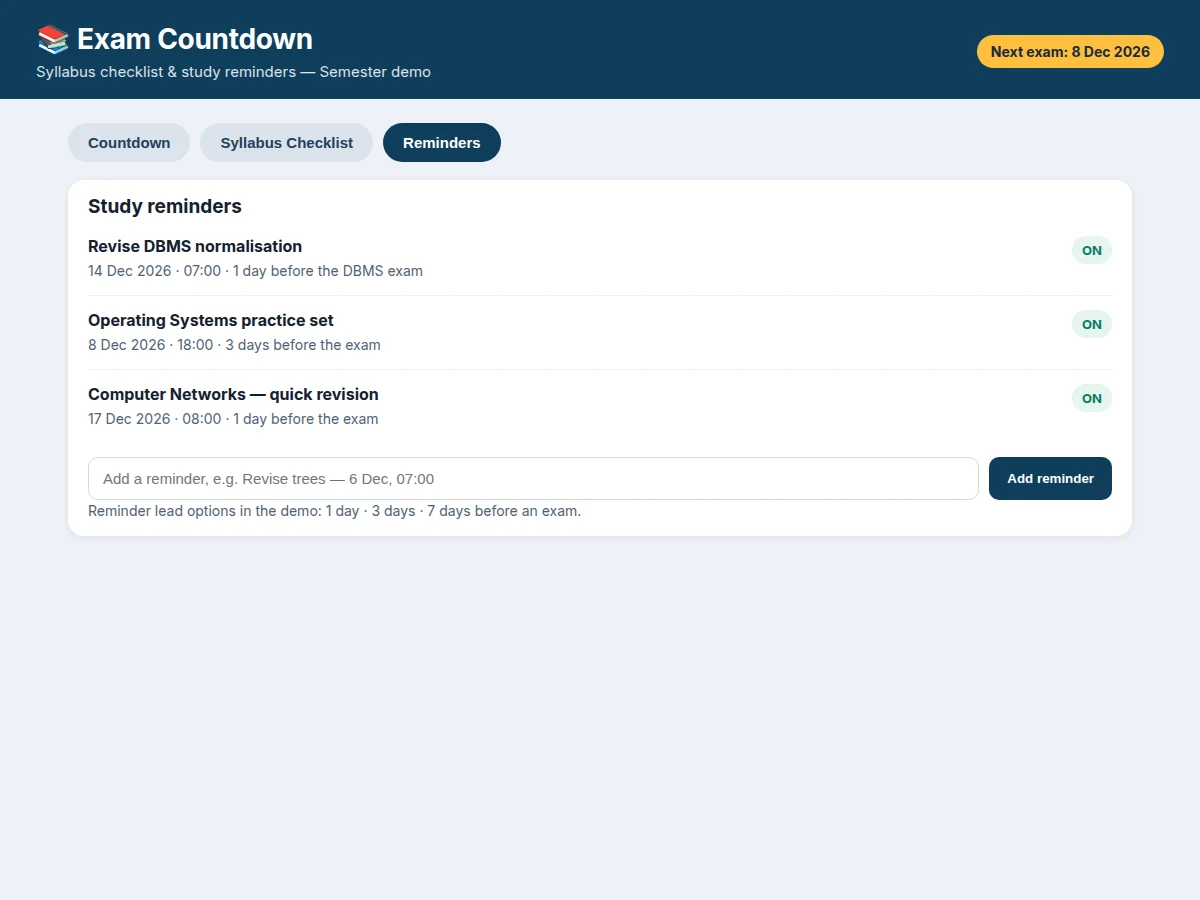
- [Study reminders] A reminder can be set for 1 day, 3 days or 7 days before an exam (design options), with its subject and time shown in the reminders list.
- [Add reminders] New reminders can be added from inside the app, with a subject note and a time, and they appear in the reminders list immediately.
- [Ready-for-revision state] When the last topic of a subject is ticked, that subject changes to a "Ready for revision" state, signalling that the next step is revision rather than first-time study.
- [Past-date handling] If an exam date has already passed, the countdown shows "Exam day" instead of a negative number, so the display never shows a meaningless negative gap.
Builder note from the demo build: the edge case that shaped the design is a subject finishing while other subjects still have topics left — ticking the last topic of Data Structures in the demo must not push the overall figure to 100%, because 10 topics remain elsewhere. That is why progress is always counted from the raw topic ticks across all 4 subjects, never from a per-subject average, and why the finished subject flips to "Ready for revision" instead of disappearing from the list.
What is included
- Complete single-file working demo app (countdown, syllabus checklist, progress bars and reminders features)
- Project report PDF (background, methodology, app design, limitations)
- PPT presentation for final review
- Viva Q&A preparation document (countdown logic, checklist progress calculation, reminder scheduling, limitations)
- Setup and demo walkthrough guidance
- Next step: message on WhatsApp for a quotation stating scope (Android exam countdown app with per-subject syllabus checklists and study reminders), as a built-to-order project with no fixed price
Limitations & prerequisites
- The demo is a single-file web demo of the app's behaviour; the delivered Android build is a native app, and its exact on-device notification behaviour depends on the device's battery and notification settings.
- Reminders in the demo are listed and added on screen; on a real device, reminder delivery depends on the device allowing scheduled local notifications, which some devices restrict.
- Exam dates, times and halls are entered by the student; the app does not fetch an official timetable, so a wrongly entered date gives a wrong countdown.
- Syllabus topics are entered by the student; the app does not verify them against an official syllabus, so completeness reflects what was entered, not an official syllabus.
- Progress counts ticked topics only; it does not measure how well a topic was understood, and ticking a topic early overstates readiness.
- The demo stores data locally in the browser session; it does not sync across devices, and the base build includes no account, backup or cloud sync.
Frequently Asked Questions
How does the countdown work?
It counts down live from the current time to the exam date and time the student entered, showing days, hours, minutes and seconds, and it refreshes every 1 second in the design. Exams are sorted by date with the nearest first, so the most urgent paper is always at the top. If an exam date has already passed, the display shows "Exam day" instead of a negative number.
How is syllabus progress calculated?
Progress is counted from ticked topics, not from a guessed percentage: each subject's bar shows its ticked topics out of its total, and the overall figure counts ticked topics across all subjects. In the demo, 14 of 24 topics are ticked, giving 58%. Ticking one more topic updates both the subject bar and the overall figure at once.
When do study reminders fire?
A reminder fires at the lead the student chose — 1 day, 3 days or 7 days before the exam in the design — and names its subject so the student knows what to revise. The demo lists 3 reminders, one per subject, each with its date, time and lead. On a real device, delivery also depends on the device allowing scheduled local notifications.
Does the app fetch my timetable or syllabus automatically?
No — the student enters each subject, its exam date, time and hall, and its syllabus topics by hand, and the app works from those entries. That keeps the build honest: it never claims an official timetable or syllabus source it does not have. A wrongly entered date gives a wrong countdown, so entries should be checked against the official timetable.
Is this project suitable for a final-year project?
Yes — for Computer Science, IT and Android development programmes, because it combines a complete working mobile-style application with genuinely useful logic: date sorting, live countdown calculation, progress counted from checklist data, and scheduled reminders. Students can demonstrate the full flow in a viva, and the stated limits — manual entry and device-dependent notifications — are open for discussion.
Components & software requirements
- Android (mobile app platform · Kotlin in the native build)
- HTML · CSS · JavaScript (single-file working demo of the app)
- Local on-device storage (no server or account in the demo)
- Local notifications (scheduled reminders on the device)
- Date and time handling (exam dates · countdown calculation)
- Git (version control)
Delivery information
Built-to-order project. Delivery timeline is shared after order confirmation based on current queue.
Support terms
Complete documentation, setup guide, and viva preparation included. Support for setup and explanation provided.
Download free synopsis (PDF)
Enter your name and WhatsApp number — the synopsis PDF downloads immediately. We may send occasional project updates on WhatsApp; no spam.