
More project photos (2)
The problem
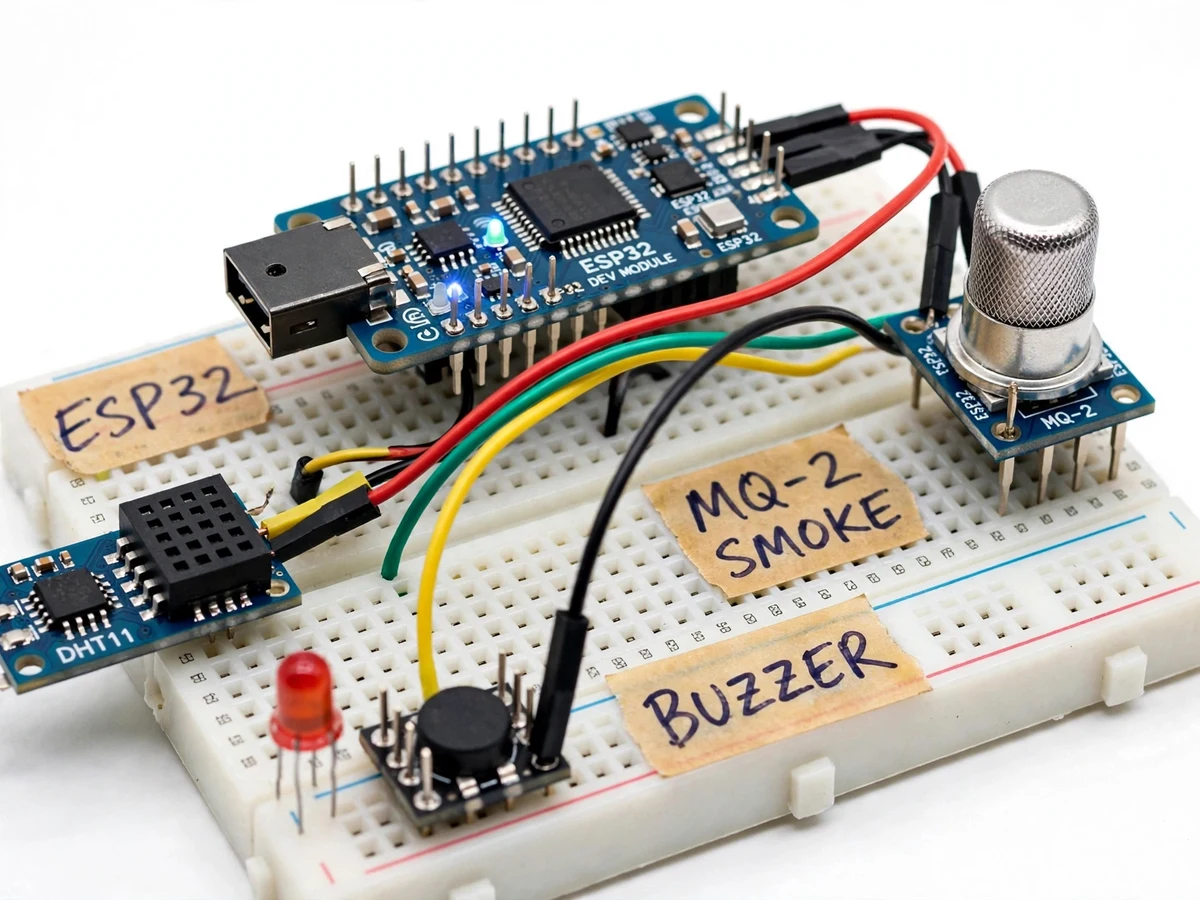
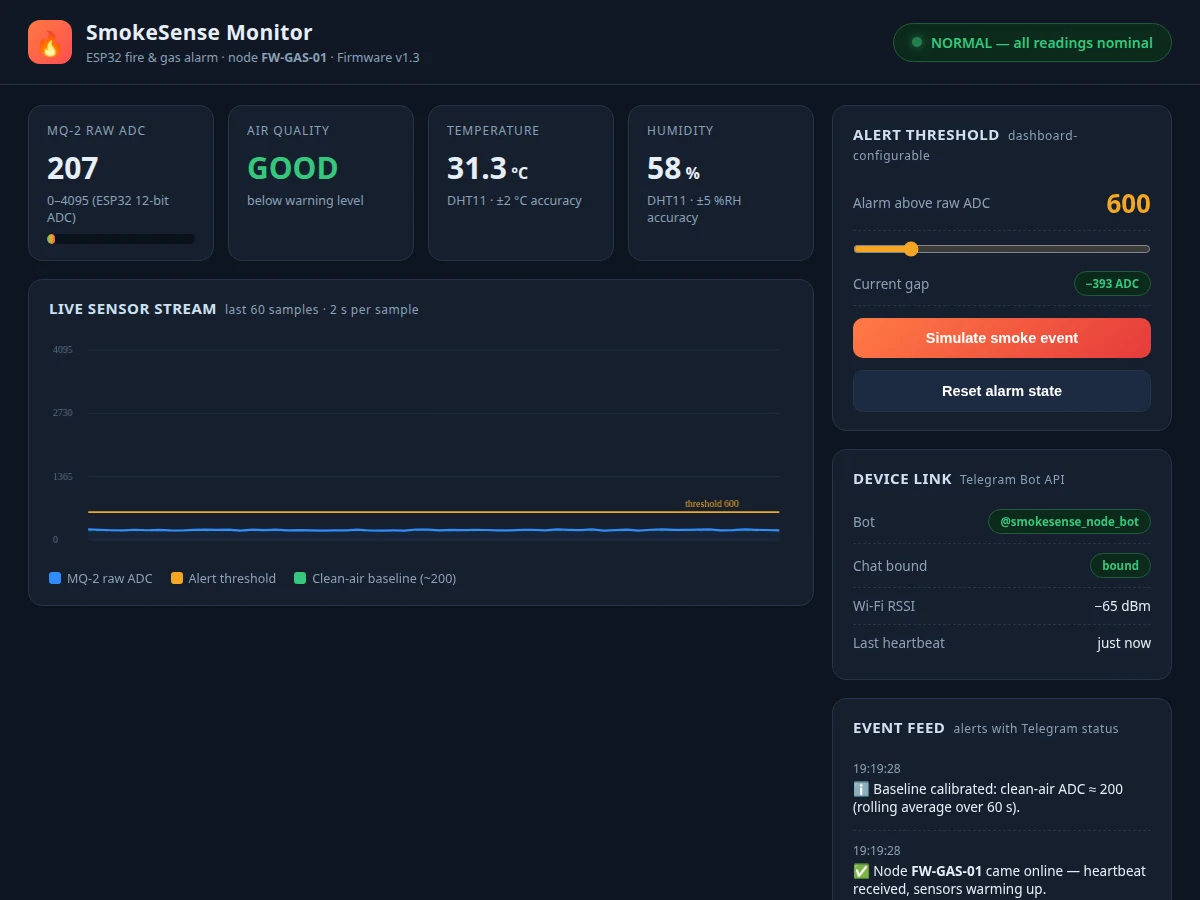
Kitchens, hostel rooms and college labs face a real fire and gas-leak risk, yet cheap commercial alarms only beep locally — if nobody is in the room, nobody knows. Students also struggle to demonstrate a complete IoT alert pipeline in a single project: sensing, local actuation, cloud messaging and a dashboard usually live in separate demos. This project closes that gap with one working build: an ESP32 node that continuously samples an MQ-2 smoke/gas sensor and a DHT11 temperature sensor, drives a local buzzer and warning LED when smoke or heat crosses a threshold, and pushes an instant Telegram alert through the Telegram Bot API with the live readings. A web dashboard renders the sensor stream, lets the student tune the alert threshold, and keeps a timestamped event feed where every Telegram message shows its sent status. The MQ-2 is a combustible-gas and smoke detector, not a calibrated carbon-monoxide instrument — the report states this honestly and keeps all response thresholds as design targets set during calibration, never as measured claims.
Student receiving Telegram alerts and tuning the threshold.
Follow the working sequence
How it works
- The MQ-2 heater is powered for a warm-up period (design target ~3 minutes per the datasheet guidance) before the ESP32 trusts the readings.
- The ESP32 samples the MQ-2 analog output on a 12-bit ADC pin every 2 seconds and reads temperature and humidity from the DHT11.
- A rolling clean-air baseline (60-second average, typically ADC ≈ 150–300 depending on the room) is established; the alarm threshold defaults to 600 raw ADC and is user-tunable.
- When the raw ADC crosses the threshold, the firmware drives the buzzer and red LED and marks the node state as ALARM.
- The firmware sends an HTTPS POST to the Telegram Bot API
sendMessageendpoint with the chat ID, the readings, and a timestamp; the HTTP response code is logged as the delivery status. - The dashboard subscribes to the readings over serial/Wi-Fi (as configured) and updates the live chart, KPI cards and event feed; threshold changes are pushed back to the node and saved in EEPROM.
- When readings fall back below the threshold (with hysteresis), the alarm clears, the buzzer stops, and a recovery notice is sent to the Telegram chat.
Tech stack:
- ESP32 (WROOM-32 dev module)
- Arduino framework · C++
- MQ-2 smoke/gas sensor module
- DHT11 temperature/humidity sensor
- Telegram Bot API (HTTPS)
- HTML · CSS · JavaScript (single-file dashboard)
- EEPROM for threshold persistence
- Serial/Wi-Fi telemetry to dashboard
| Parameter | Value |
|---|---|
| Controller | ESP32-WROOM-32, dual-core Xtensa LX6 up to 240 MHz, 802.11 b/g/n Wi-Fi |
| Gas sensor | MQ-2 module, 5 V operation, heater power < 800 mW (datasheet typical), analog output |
| Sensor detection range | 300–10,000 ppm combustible gases incl. smoke particles (datasheet range; not a calibrated CO meter) |
| ADC resolution | 12-bit, 0–4095 on ESP32 analog pin |
| Clean-air baseline | ADC ≈ 150–300 typical (room-dependent; buyer measures during calibration) |
| Alarm threshold | 600 raw ADC (default, design target; dashboard-configurable 300–2000) |
| Sampling interval | Every 2 seconds (design target) |
| Temperature/humidity | DHT11, ±2 °C, ±5 %RH (datasheet values), 3.3–5 V |
| Alarm outputs | 5 V active buzzer + red LED, local, no network dependency |
| Cloud alert | Telegram Bot API sendMessage, delivery confirmed by HTTP 200 (design target) |
| Power | 5 V USB supply, approximately 250–350 mA during operation (expected) |
Project features
- [MQ-2 smoke and gas sensing] The ESP32 samples the MQ-2 module's analog output on its 12-bit ADC every 2 seconds, with a clean-air baseline routine that averages readings over 60 seconds before arming the alarm.
- [Local buzzer and LED alarm] A 5V active buzzer and red LED fire immediately when the raw ADC crosses the threshold, so the room itself gets a warning independent of the phone alert.
- [Instant Telegram alerts] On every alarm, the firmware calls the Telegram Bot API with the sensor values and timestamp; each alert also logs its delivery status on the dashboard event feed.
- [Configurable threshold] The alarm threshold is adjustable from the dashboard and stored in EEPROM, so the student can set sensitivity during calibration without reflashing.
- [Live sensor dashboard] Single-page web app with KPI cards (raw ADC, air-quality state, temperature, humidity), a 60-sample live chart, and the threshold slider.
- [Event feed with Telegram status] Every alarm, threshold change and recovery notice is timestamped in the feed, with per-message Telegram delivery confirmation.
- [DHT11 temperature cross-check] Temperature readings guard against single-sensor false alarms: a heat spike plus smoke together strengthens the alarm decision, documented in the report.
- [Smoke-test mode] A dashboard button starts a timed manual smoke test, letting the student demonstrate the full alarm-to-Telegram path in the viva.
What is included
- ESP32 firmware (Arduino C++) with sensing, alarm logic, Telegram alerting and EEPROM threshold storage
- Complete wiring diagram and breadboard layout guide
- Single-file web dashboard (live chart, threshold slider, event feed with Telegram status)
- Clean-air baseline calibration procedure with a worksheet
- Project report PDF (background, MQ-2 sensing physics, firmware design, Telegram integration, testing)
- PPT presentation for final review
- Viva Q&A preparation document (sensor behaviour, thresholds vs accuracy, Wi-Fi and Telegram flow)
Limitations & prerequisites
- The MQ-2 is a qualitative smoke/combustible-gas detector, not a calibrated instrument — it cannot report ppm of CO or identify which gas is present.
- All thresholds are design targets, never measured claims: the buyer runs the included calibration procedure in their own room and sets the threshold from their own baseline.
- This is an educational prototype, NOT a certified fire-alarm panel — it must not replace commercial smoke alarms or be relied on for life safety.
- The Telegram alert needs working 2.4 GHz Wi-Fi; a router outage silences the remote alert (the local buzzer still works).
- The MQ-2 heater draws significant current (datasheet < 800 mW), so the node needs a proper 5 V USB supply, not a weak phone charger.
- Telegram's Bot API is a free service; rate limits and delivery timing are outside the project's control.
- Rapid temperature swings (kitchen steam) can briefly raise readings; the dashboard shows the raw stream so the student can reason about it.
Frequently Asked Questions
Is the MQ-2 a carbon-monoxide detector?
No — and the report says so plainly. The MQ-2 is a metal-oxide semiconductor sensor whose resistance falls in the presence of smoke particles and combustible gases (LPG, methane, alcohol vapour). It is a qualitative detector for fire-alarm purposes, not a calibrated CO meter, and the project treats its output as raw ADC values against a design-target threshold rather than a ppm figure.
How do the Telegram alerts actually reach my phone?
The firmware makes an HTTPS POST to Telegram's Bot API with a bot token you create via @BotFather and your chat ID. On every alarm the firmware sends the readings and timestamp; the dashboard event feed records each message's HTTP delivery status, so you can prove in the viva that every alert was dispatched.
What if my Wi-Fi is down during a real event?
The remote Telegram alert depends on 2.4 GHz Wi-Fi — a router outage will block it, which the report lists as an honest limitation. The local alarm path (buzzer + red LED) does not depend on any network at all, so the room still gets an audible warning. The dashboard's device-link panel shows RSSI and heartbeat so link health is visible.
How is the alarm threshold set?
After the warm-up, you run the 60-second baseline routine in clean air and note your room's typical ADC reading (usually 150–300). You then set the alarm threshold on the dashboard (default 600, adjustable 300–2000); it is saved to the node's EEPROM and survives reboots. The report documents this calibration as a procedure you run, not as pre-measured data.
What does the dashboard show?
A live 60-sample chart of the MQ-2 ADC stream with the threshold line drawn on it, KPI cards for raw ADC, air-quality state, temperature and humidity, a threshold slider, a device-link panel (bot, chat binding, RSSI), and a timestamped event feed where every Telegram alert carries its sent status.
Is this project suitable for a final-year project?
Yes — for IoT & Embedded, Electronics/E&TC and Computer/IT programs. It combines embedded sensing, Wi-Fi networking, a real cloud messaging API and a companion web dashboard, and its honest treatment of sensor limits makes strong viva material. Suitable for B.E./B.Tech final-year projects in IoT & Embedded, Electronics / E&TC and Computer / IT.
Components & software requirements
- ESP32 (WROOM-32 dev module)
- Arduino framework · C++
- MQ-2 smoke/gas sensor module
- DHT11 temperature/humidity sensor
- Telegram Bot API (HTTPS)
- HTML · CSS · JavaScript (single-file dashboard)
- EEPROM for threshold persistence
- Serial/Wi-Fi telemetry to dashboard
Delivery information
Built-to-order project. Delivery timeline is shared after order confirmation based on current queue.
Support terms
Complete documentation, setup guide, and viva preparation included. Support for setup and explanation provided.
Download free synopsis (PDF)
Enter your name and email — the synopsis PDF downloads immediately. We may send occasional project updates; no spam, unsubscribe anytime.