
More project photos (3)
The problem
An encrypted password manager desktop app with a local vault answers a common failure: people reuse weak passwords because memorising dozens of strong, unique ones exceeds human memory, and the usual workarounds — a plaintext notes file, browser autofill, or one password reused everywhere — turn a single leak into many. Cloud password managers fix the memory problem but relocate trust: the vault sits on someone else's servers, behind a phishable account. A local-vault desktop app takes the opposite stance. Every credential lives in one encrypted file on the user's own disk, sealed with AES-256-GCM under a 256-bit key derived from a single master password through PBKDF2-HMAC-SHA-256 at 600,000 iterations — the figure the OWASP Password Storage Cheat Sheet currently recommends. Forgetting the master password destroys access by design: no reset link, no backdoor — the exact guarantee a student defends in a viva. Clipboard auto-clear, inactivity auto-lock and a fresh random IV on every save complete the honest engineering.
Students also see the pipeline running in the working demo: the same primitives encrypt a sample vault in the browser, and the settings panel shows the live salt, IV and the measured key-derivation time for that machine.
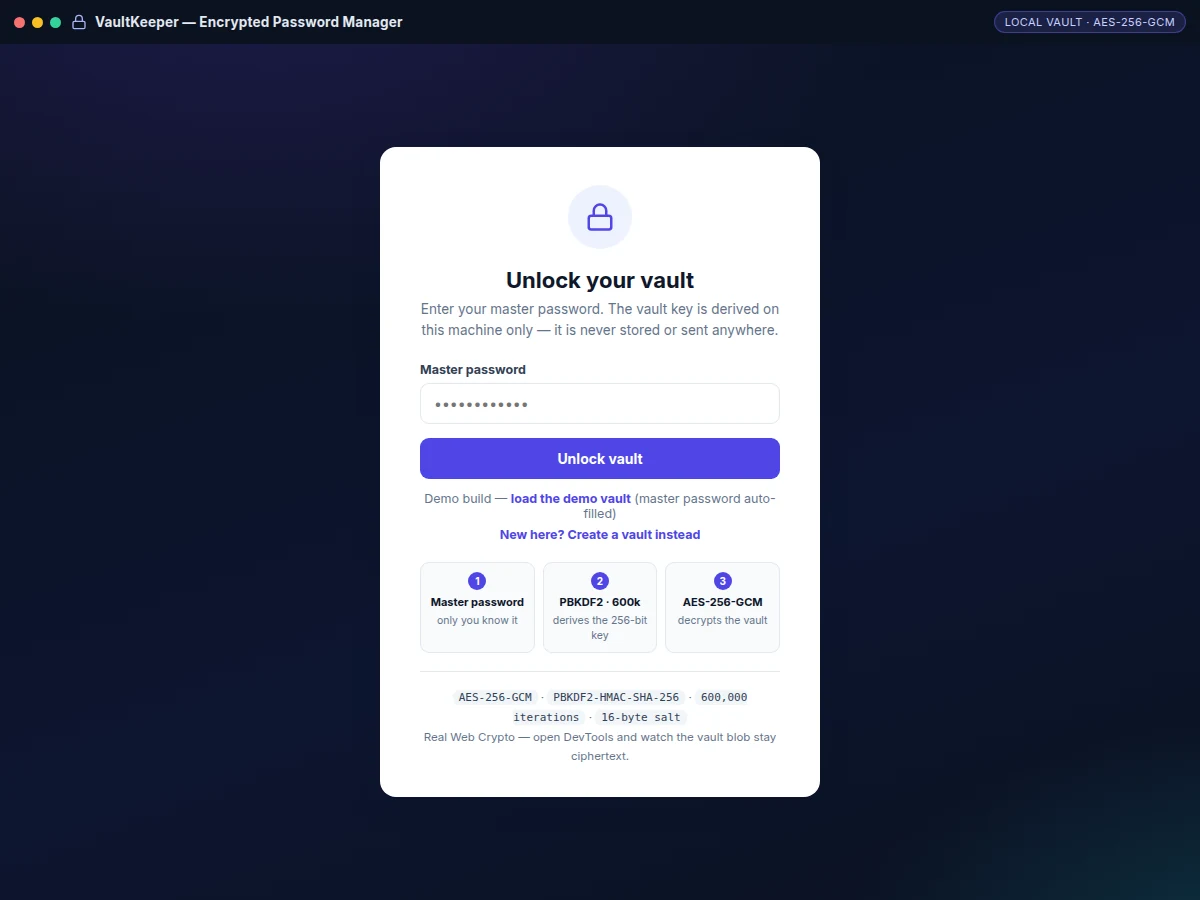
Types the master password to unlock the vault.
Follow the working sequence
How it works
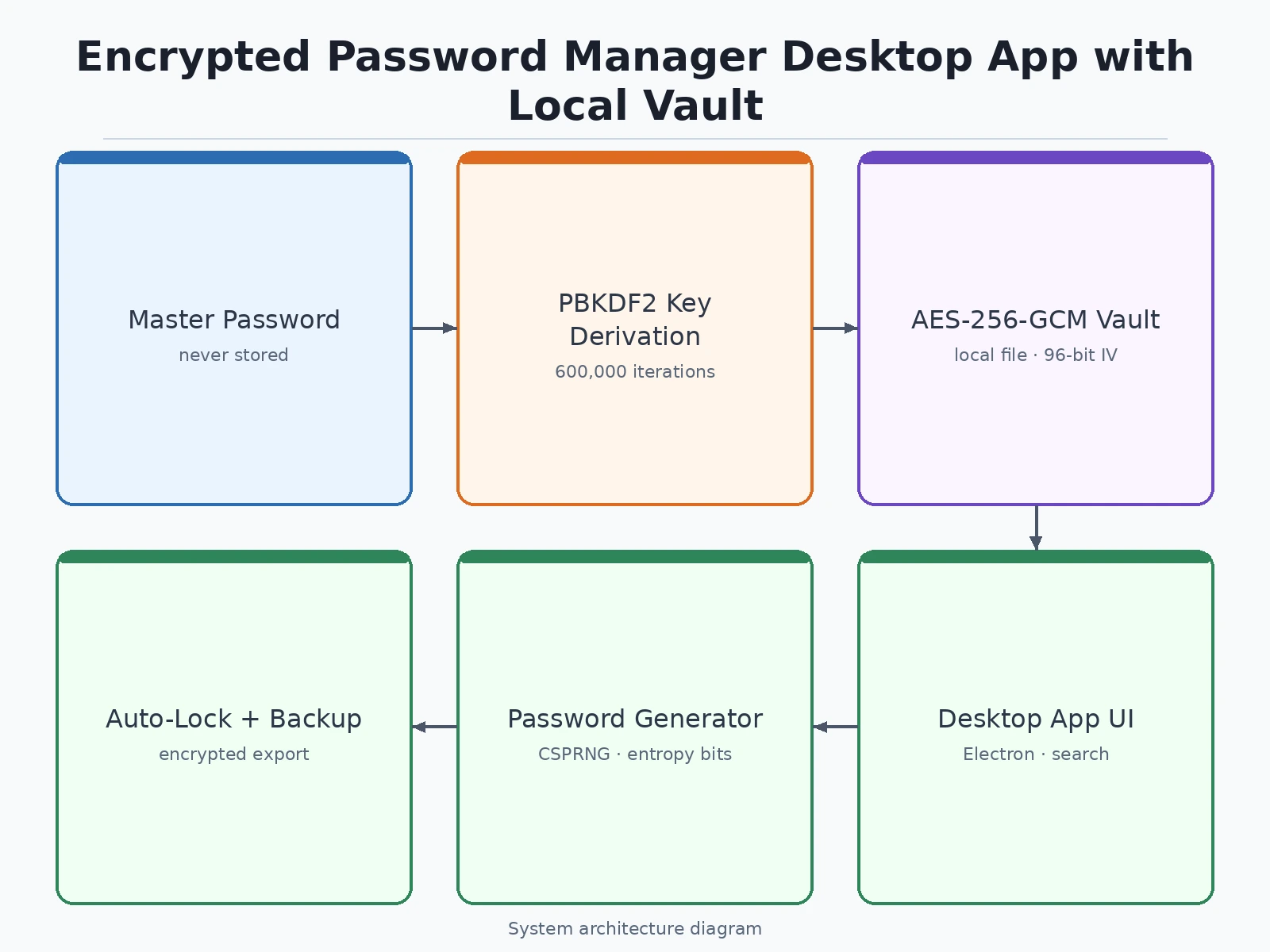
Unlocking the vault is a straight pipeline: master password → key derivation → decryption → vault. The user types one master password; the app combines it with the vault's stored 16-byte random salt and runs PBKDF2-HMAC-SHA-256 for 600,000 iterations — the current OWASP recommendation — producing a 256-bit key that exists only in memory. That key, together with the stored 96-bit IV, decrypts the vault file with AES-256-GCM. Because GCM is authenticated encryption, a wrong password does not produce garbled output — it fails authentication outright, so the app reports an incorrect password and the vault stays sealed. Adding or editing an entry re-serialises the whole vault, picks a brand-new random IV (an IV must never repeat under one key), re-encrypts and overwrites the file. Locking — manual or by the inactivity timer — wipes the key and all plaintext from memory.
- On first run the user chooses a master password (minimum 12 characters); the app generates a 16-byte random salt, derives the 256-bit key with PBKDF2-HMAC-SHA-256 at 600,000 iterations, and encrypts the new vault with AES-256-GCM under a fresh 96-bit IV.
- The vault file on disk stores only four things: the KDF name, the iteration count, the salt and the IV alongside the ciphertext — everything needed to re-derive and decrypt, nothing secret except the password in the user's head.
- On unlock, the stored salt re-derives the key from the typed password; AES-GCM decryption either succeeds or fails authentication — a wrong password yields an error, never partial data.
- Every add, edit or delete re-serialises the full entry list, generates a new random 96-bit IV, re-encrypts and atomically overwrites the vault file.
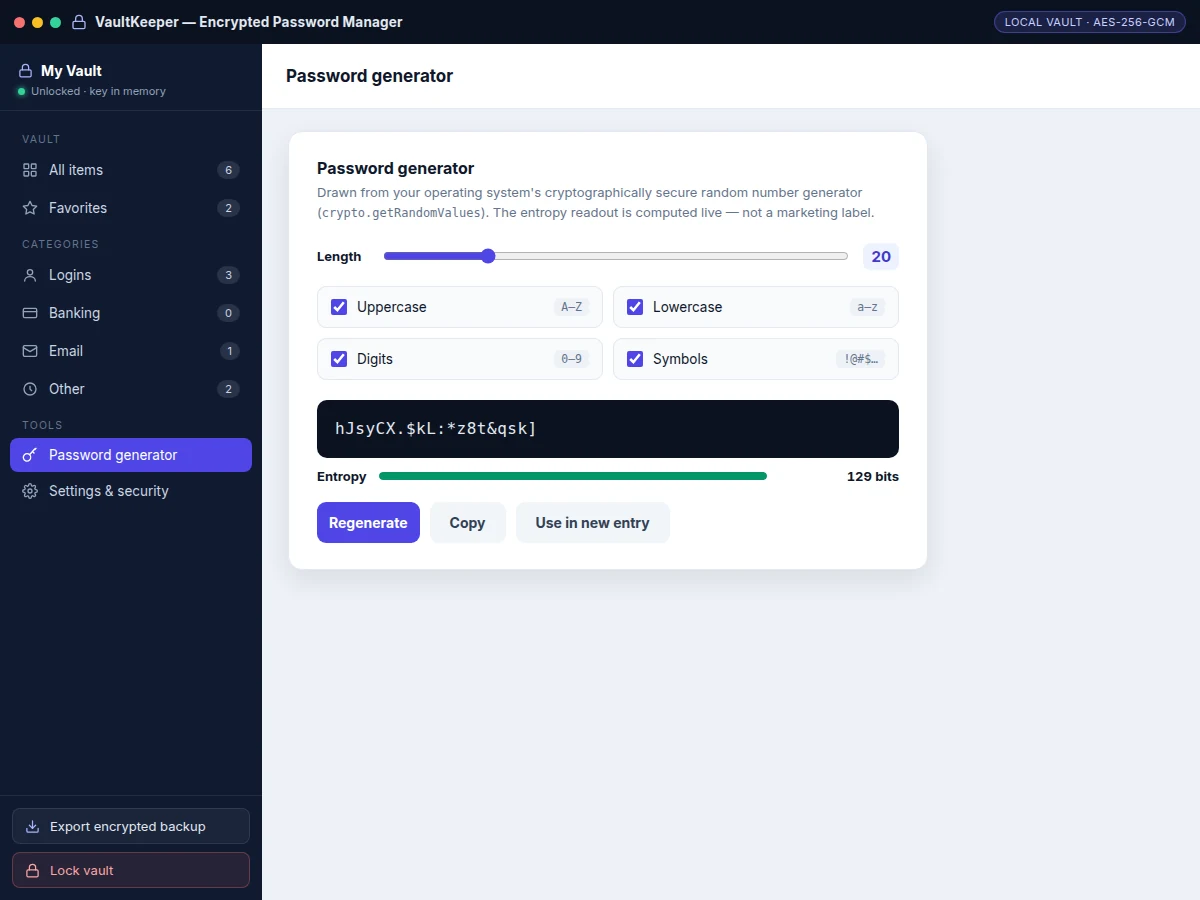
- The generator draws each character from the OS CSPRNG and computes entropy as length × log₂(character pool size), displayed live in bits.
- Copying a password places it on the clipboard and arms the auto-clear timer (default 20 seconds); the inactivity timer (default 5 minutes) wipes the key from memory and returns to the lock screen.
- Export writes the encrypted blob to a JSON backup file; import parses it and runs a trial GCM decryption before accepting it, rejecting tampered files.
Tech stack:
- Electron (desktop shell: main + renderer processes)
- JavaScript · HTML · CSS (application UI)
- Web Crypto API (PBKDF2-HMAC-SHA-256 · AES-256-GCM)
- Node.js (main process and file I/O)
- PBKDF2-HMAC-SHA-256 at 600,000 iterations (key derivation)
- AES-256-GCM with 96-bit IV (vault encryption)
- OS CSPRNG via crypto.getRandomValues (generator)
- JSON vault file (salt · IV · ciphertext)
Software requirements
- Windows 10/11, macOS 12+, or Ubuntu 22.04+ (Expected — Electron targets)
- Node.js 18+ with npm (only needed to build the installer)
- Approximately 150 MB free disk space
- No internet connection required at runtime — the vault never leaves the machine
| Parameter | Value |
|---|---|
| Encryption | AES-256-GCM, 256-bit key |
| Key derivation | PBKDF2-HMAC-SHA-256, 600,000 iterations (OWASP Password Storage Cheat Sheet recommendation) |
| Salt | 16 random bytes per vault, OS CSPRNG |
| IV | 96-bit, fresh random value on every save |
| Key-derivation time | 224 ms (Measured — headless Chromium on the build machine; hardware-dependent) |
| Master password policy | Minimum 12 characters, strength meter shown |
| Generator length | 8–64 characters (configurable) |
| Generator entropy | length × log₂(character pool), displayed live in bits |
| Auto-lock | 1 / 5 / 15 / 30 minutes of inactivity (configurable) |
| Clipboard auto-clear | 10 / 20 / 60 seconds (configurable) |
| Vault storage | Single encrypted JSON file on the local disk |
| Platforms | Windows · macOS · Linux (Expected — Electron builds) |
Project features
The encrypted password manager desktop app is built around four capabilities that carry the whole security story. First, master-password unlock: PBKDF2-HMAC-SHA-256 at 600,000 iterations stretches one memorable password into a 256-bit vault key, and the password itself is never stored anywhere. Second, the AES-256-GCM local vault: every entry is serialised and sealed with authenticated encryption under a fresh 96-bit IV on each save, so the file on disk is pure ciphertext plus a non-secret salt and IV. Third, a password generator that draws from the operating system's CSPRNG and shows the true entropy in bits — length times log-two of the character pool — so a weak configuration is visible rather than hidden. Fourth, inactivity auto-lock plus one-click encrypted backups: the key is wiped from memory after a configurable idle period, and the exported backup is the same authenticated blob, useless without the master password.
- [Master-password vault unlock] One master password derives the 256-bit vault key through PBKDF2-HMAC-SHA-256 at 600,000 iterations; the password itself is never written to disk or memory beyond the derivation step.
- [AES-256-GCM encrypted local vault] All entries are serialised and sealed with authenticated encryption using a fresh 96-bit random IV on every save. The vault file contains only the salt, the IV and ciphertext — nothing readable leaks if the file is copied.
- [Password generator with live entropy readout] Generates 8–64 character passwords from selectable sets (uppercase, lowercase, digits, symbols) using the OS CSPRNG, and displays the real entropy in bits so weak settings are obvious.
- [Search, categories and favorites] Instant filtering across site names, usernames and notes, with grouping into Logins, Banking, Email and Other plus a favorites list for daily-use credentials.
- [Inactivity auto-lock] A configurable 1/5/15/30-minute timer wipes the derived key and all plaintext entries from memory; reopening requires the master password again.
- [Encrypted backup export and import] One click exports the encrypted vault blob as a JSON file; importing re-verifies GCM authentication first, so corrupted or tampered backups are rejected instead of opened.
- [Clipboard auto-clear] Copied passwords are erased from the clipboard after a configurable delay (10/20/60 seconds), shrinking the window any clipboard snooper has.
- [Masked display with per-entry reveal] Passwords stay masked by default in the entry view; reveal and copy are explicit per-entry actions, never a global toggle.
What is included
- Complete Electron desktop app source code (main + renderer)
- Encrypted vault file-format specification (salt · IV · ciphertext layout)
- Working demo of the crypto pipeline using the same primitives
- Setup and build guide (development mode + installer packaging)
- Project report PDF (cryptography background, design decisions, methodology)
- PPT presentation for the final review
- Viva Q&A document (key derivation, authenticated encryption, salt/IV handling, threat model)
Project timeline
- Week 1 (Expected): lock screen, vault list, entry editor and password generator UI with the Web Crypto pipeline wired end to end.
- Week 2 (Expected): auto-lock timer, encrypted backup export/import, clipboard auto-clear, settings panel.
- Week 3 (Expected): installer packaging for Windows/macOS/Linux, testing, report + PPT + viva Q&A preparation.
Support
- Setup assistance over WhatsApp during installation and the first build.
- 30-day bug-fix window on the delivered code (Expected).
- Customization quotes on request — biometric unlock, browser autofill, TOTP storage.
Optional customizations
- OS biometric unlock (Windows Hello / Touch ID) as the key gate instead of a typed password.
- Browser extension for page-aware autofill.
- TOTP one-time-code storage inside the vault.
- Encrypted cloud sync across devices (changes the threat model — quoted separately).
Future scope
- Hardware security-key (FIDO2) as a second unlock factor.
- Breach-exposure check against public leak datasets via k-anonymity API.
- Shared family vaults with per-member access control.
Limitations & prerequisites
- Forgetting the master password makes the vault permanently unrecoverable — by design there is no reset link, recovery key or backdoor in the base build.
- Copied passwords sit in the OS clipboard until the auto-clear timer fires (default 20 seconds) — anything reading the clipboard inside that window can see them.
- Decrypted entries live in memory while the vault is unlocked; cold-boot and memory-dump attacks are outside this student build's threat model.
- The code has not been independently audited by a third party — it is a teaching implementation of standard primitives, not a certified security product.
- No cloud sync, browser autofill or mobile app in the base build — the vault never leaves the machine, which is a design choice, not an oversight.
- PBKDF2 is not memory-hard: OWASP lists Argon2id as its first choice for password storage. PBKDF2-HMAC-SHA-256 is used here because it is native to the Web Crypto API with zero dependencies.
Frequently Asked Questions
Is this project suitable for a final-year project?
Yes — for Computer Science, IT and related programs. It demonstrates applied cryptography (key derivation, authenticated encryption), secure local-storage design and desktop application development, all of which make strong, defensible viva material. Students explain the KDF parameters, the salt/IV handling and the threat model instead of memorising slides.
What happens if I forget the master password?
The vault is lost permanently, by design. The encryption key exists only as a PBKDF2 derivative of the password, so no reset link, support desk or backdoor can recover it — the standard zero-knowledge guarantee. Users are advised to keep an encrypted backup and store the password somewhere physically safe.
Which encryption does it actually use?
AES-256-GCM encrypts the vault, with the 256-bit key derived by PBKDF2-HMAC-SHA-256 at 600,000 iterations — the current OWASP Password Storage Cheat Sheet recommendation. Each vault gets a 16-byte random salt and every save uses a fresh 96-bit IV. No custom ciphers and no invented algorithms anywhere.
Does it need the internet?
No — the app is fully offline. The vault file lives on the local disk and the key is derived on the machine itself, so nothing is ever uploaded, synced or sent anywhere. The only online step is downloading the installer or build dependencies during setup.
Can it be customized?
Realistic options include OS biometric unlock (Windows Hello / Touch ID) as the key gate, a browser extension for autofill, TOTP code storage inside the vault, and encrypted cloud sync. Each is quoted separately because it changes the threat model and the codebase involved.
What will I receive with the project?
The complete Electron source code, the vault file-format specification, a working demo of the crypto pipeline, a setup and build guide, the project report PDF, a review presentation PPT, and a viva Q&A set covering key derivation, authenticated encryption and the honest limitations.
Components & software requirements
- Electron (desktop shell: main + renderer processes)
- JavaScript · HTML · CSS (application UI)
- Web Crypto API (PBKDF2-HMAC-SHA-256 · AES-256-GCM)
- Node.js (main process and file I/O)
- PBKDF2-HMAC-SHA-256 at 600,000 iterations (key derivation)
- AES-256-GCM with 96-bit IV (vault encryption)
- OS CSPRNG via crypto.getRandomValues (generator)
- JSON vault file (salt · IV · ciphertext)
Software requirements
- Windows 10/11, macOS 12+, or Ubuntu 22.04+ (Expected — Electron targets)
- Node.js 18+ with npm (only needed to build the installer)
- Approximately 150 MB free disk space
- No internet connection required at runtime — the vault never leaves the machine
Delivery information
Built-to-order project. Delivery timeline is shared after order confirmation based on current queue.
Support terms
Complete documentation, setup guide, and viva preparation included. Support for setup and explanation provided.
Download free synopsis (PDF)
Enter your name and WhatsApp number — the synopsis PDF downloads immediately. We may send occasional project updates on WhatsApp; no spam.