
More project photos (2)
The problem
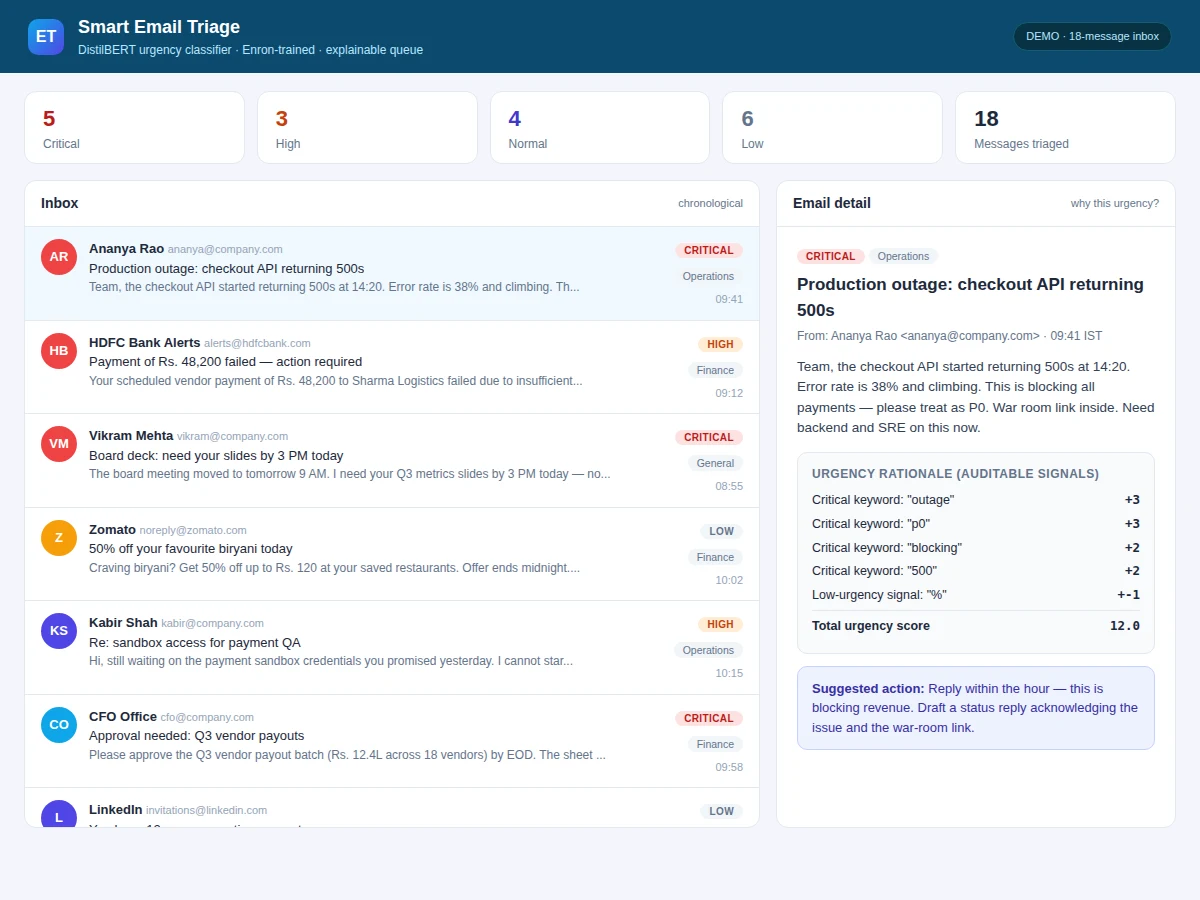
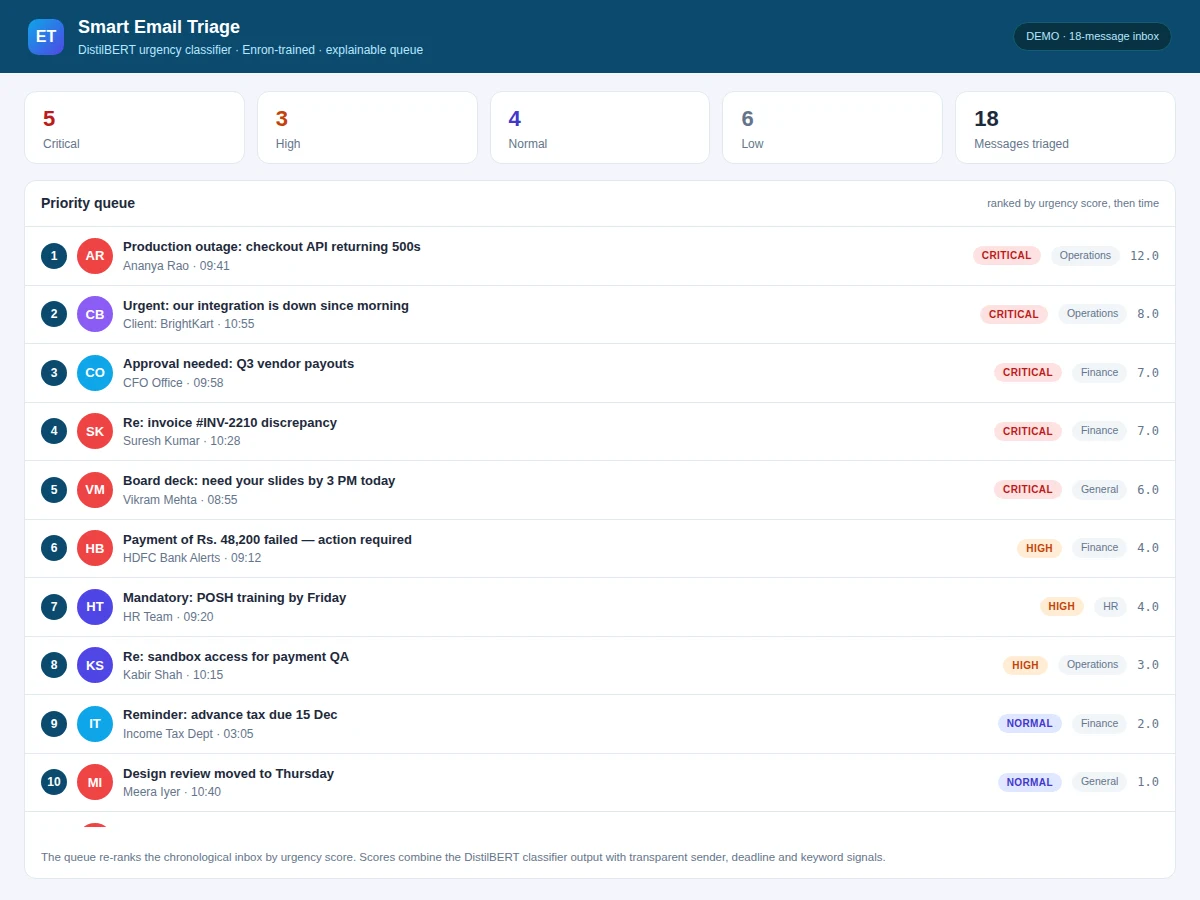
Professionals receive dozens of emails a day, and the important ones hide among newsletters, FYIs and threads that need no action. Chronological inboxes treat a server-outage alert and a lunch invitation identically. This project builds an urgency-aware triage layer: every incoming message is classified by urgency and topic, then the inbox is re-rendered as a priority queue with the most time-sensitive items on top. The classifier is a DistilBERT model fine-tuned on the Enron email corpus — half a million real workplace emails — labeled for urgency and category, supplemented by transparent signals (sender priority lists, deadline mentions, escalation keywords) that the dashboard shows as the rationale for each score. Because the labeling rules and model are both documented, the student can defend every design choice in the viva. The demo triages a realistic 40-message inbox live in the browser.
How it works
- Raw emails (headers, body, timestamps) are parsed and cleaned; quoted reply chains are stripped so classification sees the new content.
- DistilBERT, fine-tuned on urgency-labeled Enron emails, outputs an urgency distribution per message; a second head predicts the topic category.
- A transparent rule layer adjusts scores with sender-priority weights and deadline/expression signals, and records each signal as the rationale.
- Messages are sorted into the priority queue by adjusted urgency, then recency; category filters re-slice the same ranking.
- A template engine maps (urgency, category) pairs to suggested actions, e.g. Critical + Finance → "Reply today — payment deadline".
- The demo evaluates the classifier on a held-out labeled set and shows the confusion matrix and macro-F1 honestly in the metrics panel.
Tech stack:
- Python 3.11, Hugging Face Transformers
- DistilBERT (distilbert-base-uncased)
- Enron Email Dataset (CMU, ~500k emails)
- PyTorch (fine-tuning)
- scikit-learn (metrics)
- Flask + HTML/CSS/JS (demo)
- pandas (data preparation)
Dataset & model details
- Dataset: Enron Email Dataset (Klimt & Yang, CMU, 2004) — ~500,000 real workplace emails from 150 Enron employees, the standard public corpus for email research. A labeled subset is annotated for urgency (4 levels) and topic (5 categories) using documented labeling rules; the rules and the labeled sample ship with the project.
- Task: (1) 4-class urgency classification; (2) 5-class topic classification. Input = email subject + body; output = urgency and category distributions.
- Model: DistilBERT-base (66M parameters) with two classification heads, fine-tuned on the labeled Enron subset.
- Metrics: Macro-F1 and per-class precision/recall on a held-out labeled set, plus a confusion matrix — reported as design targets from the training run, never pre-claimed.
| Parameter | Value |
|---|---|
| Corpus | ~500k Enron emails; labeled subset for training |
| Urgency levels | Critical / High / Normal / Low |
| Topic categories | Finance, Operations, HR, External, Personal |
| Model | DistilBERT-base, ~66M parameters |
| Macro-F1 | Design target on held-out set (reported after training) |
| Demo inbox | 40 realistic preloaded messages, triaged instantly |
| Inference | Under 50 ms per email on CPU (expected) |
Project features
- [Urgency classification] DistilBERT fine-tuned on labeled Enron emails scores every message as Critical, High, Normal or Low urgency.
- [Topic categorization] Messages are grouped into finance, operations, HR, external and personal, so the queue can be filtered by workstream.
- [Transparent rationale] Each urgency score shows its top contributing signals — sender priority, deadline mention, escalation keywords — so the AI is auditable.
- [Priority queue view] The inbox re-renders as a ranked queue with the most urgent items first, separate from the chronological view.
- [Suggested actions] A template-based line per email proposes the next step ("Reply today", "Forward to accounts", "Archive") based on category and urgency.
- [Sender priority lists] VIP senders and mailing lists get configurable weights, demonstrating how domain knowledge plugs into the pipeline.
- [Live web demo] A realistic preloaded inbox is triaged instantly with filters for urgency, category and suggested action.
What is included
- Fine-tuned DistilBERT urgency + topic classifier
- Triage pipeline source (parsing, scoring, rationale, queue rendering)
- Documented urgency/topic labeling rules and labeled sample
- Web demo with realistic preloaded inbox
- Evaluation notebook (confusion matrix, macro-F1, per-class report)
- Project report PDF (background, text classification, methodology, results)
- PPT presentation for final review
- Viva Q&A preparation document (DistilBERT, fine-tuning, F1, class imbalance)
Limitations & prerequisites
- Urgency labels come from documented heuristic rules applied to Enron mail, not human annotators — the report is explicit about this and shows where the rules disagree with spot-checked samples.
- Enron emails are from 2000–2002; modern email phrasing differs, so the demo includes a domain-adaptation discussion.
- The model reads subject and body only; attachments and calendar context are out of scope.
- Suggested actions are templates, not autonomous replies — nothing is sent without a human.
- Macro-F1 is a design target until training executes; the report records the achieved figure.
Frequently Asked Questions
Which dataset trains the classifier?
The Enron Email Dataset — about 500,000 real workplace emails, the standard public corpus for email research. A documented subset is labeled for urgency and topic with published labeling rules.
How is this different from spam filtering?
Spam filtering is binary (spam/not spam). This classifies legitimate mail by urgency and topic, re-ranks the inbox as a priority queue, and explains each score — a harder and more useful task.
Can I see why an email was marked critical?
Yes — every score carries its rationale: the top signals (sender weight, deadline mention, escalation keywords) are shown next to the message.
Does it send replies automatically?
No. It suggests next actions as text; the human stays in control, which is also the honest scope boundary for the viva.
What about privacy?
The demo runs fully locally on the preloaded inbox; the report includes a section on how a real deployment would need on-device processing for private mail.
Is this project suitable for a final-year project?
Yes — for Computer Science, IT and AI/ML programs. It is a complete text-classification system with a real corpus, honest evaluation and a polished dashboard. Suitable for B.E./B.Tech final-year projects in Computer Science, IT and AI & Machine Learning.
Components & software requirements
- Python 3.11, Hugging Face Transformers
- DistilBERT (distilbert-base-uncased)
- Enron Email Dataset (CMU, ~500k emails)
- PyTorch (fine-tuning)
- scikit-learn (metrics)
- Flask + HTML/CSS/JS (demo)
- pandas (data preparation)
Dataset & model details
- Dataset: Enron Email Dataset (Klimt & Yang, CMU, 2004) — ~500,000 real workplace emails from 150 Enron employees, the standard public corpus for email research. A labeled subset is annotated for urgency (4 levels) and topic (5 categories) using documented labeling rules; the rules and the labeled sample ship with the project.
- Task: (1) 4-class urgency classification; (2) 5-class topic classification. Input = email subject + body; output = urgency and category distributions.
- Model: DistilBERT-base (66M parameters) with two classification heads, fine-tuned on the labeled Enron subset.
- Metrics: Macro-F1 and per-class precision/recall on a held-out labeled set, plus a confusion matrix — reported as design targets from the training run, never pre-claimed.
Delivery information
Built-to-order project. Delivery timeline is shared after order confirmation based on current queue.
Support terms
Complete documentation, setup guide, and viva preparation included. Support for setup and explanation provided.