
More project photos (2)
The problem
Electronics and electrical students live with small bench calculations: reading a resistor's color bands, sizing the series resistor for an LED, solving an Ohm's law pair, or working out a 555 timer's frequency from R1, R2 and C. Today that means flipping through color-code charts, scattered web calculators that need internet, or generic calculator apps that know nothing about E12 series values. Each lookup is small, but together they interrupt every lab session and invite silly arithmetic mistakes.
This project builds ElectroKit, a native Android app written in Kotlin that puts those calculations into one offline toolkit. It includes a 4/5/6-band resistor color-code decoder, an LED series-resistor calculator with standard E12 suggestions, an Ohm's law solver that works from any two of V/I/R/P, astable and monostable 555 timer calculators that show the standard formulas, a metric-prefix unit converter, and an on-device calculation history stored with Room. Everything runs without internet, so it works at the lab bench as well as in the classroom.
How it works
- The student installs the app and opens it — no sign-in and no internet needed; the home screen lists the six calculator modules.
- In the resistor module, the student picks 4, 5 or 6 bands, taps a color for each band position, and the app decodes the value, tolerance and temperature coefficient instantly.
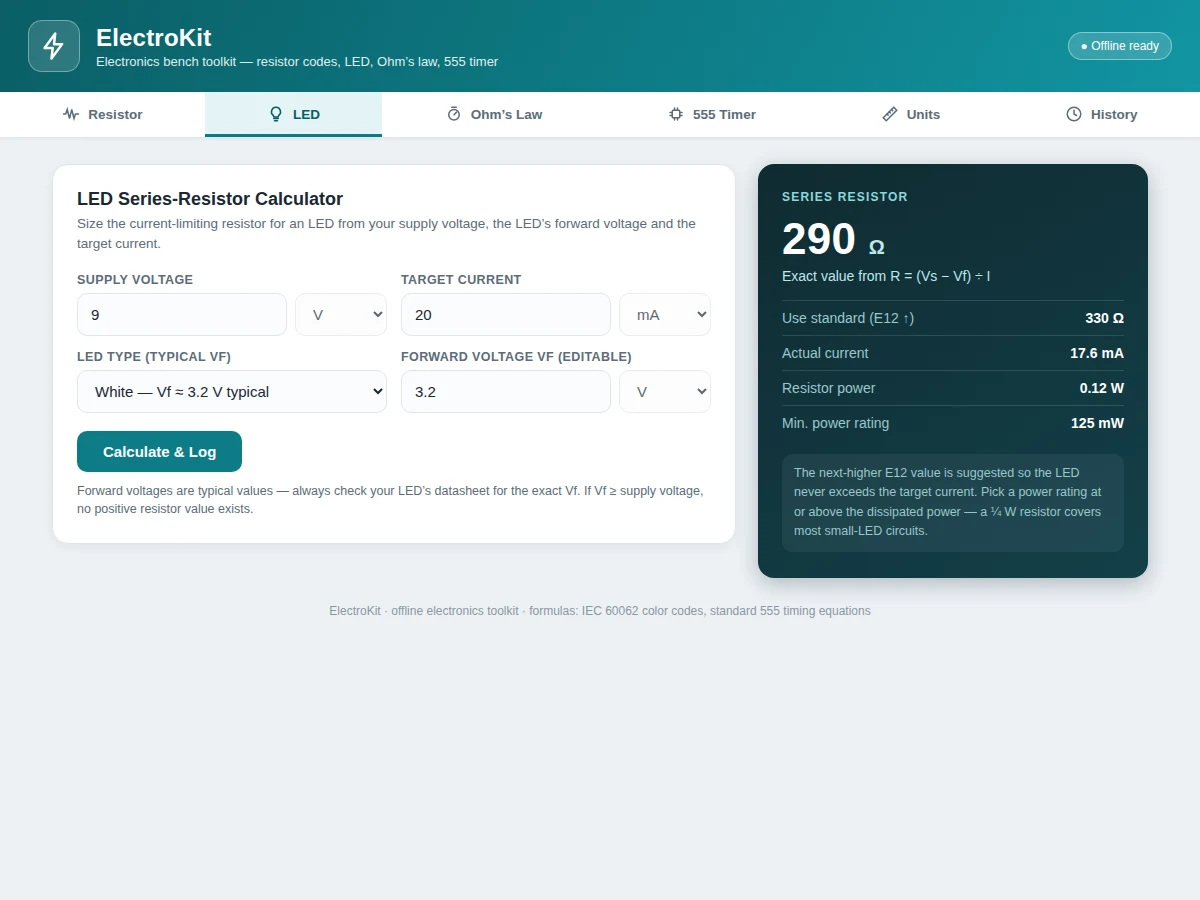
- In the LED module, the student enters supply voltage, selects the LED type (typical Vf shown, editable) and target current; the app returns the exact resistance, the next-higher E12 value, actual current, dissipated power and minimum rating.
- In the Ohm's law module, the student enters any two of V, I, R and P; the solver validates the pair and computes the remaining two values.
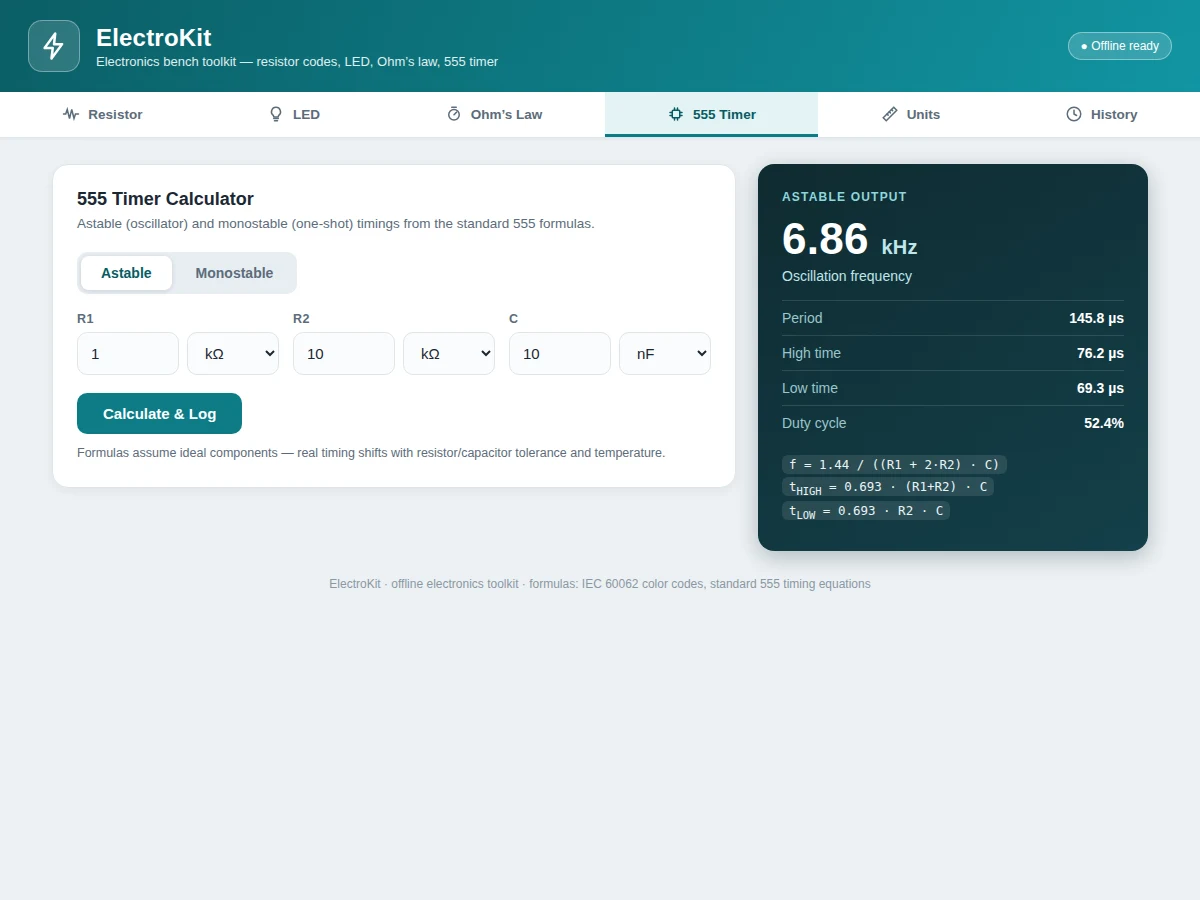
- In the 555 module, the student picks astable or monostable, enters R1/R2/C (or R/C) with unit selectors, and the app computes frequency, duty cycle and timings — or the pulse width — with the formulas displayed.
- Each result is saved to the on-device history automatically, building a timestamped log of the student's bench calculations.
Tech stack:
- Kotlin (native Android)
- Jetpack Compose · Material 3 UI
- Room (on-device history database)
- MVVM (ViewModel · StateFlow)
- Gradle (build system)
- JUnit (formula-layer unit tests)
| Parameter | Value |
|---|---|
| Platform | Native Android app (Kotlin, offline-first) |
| Minimum Android | 8.0 (API 26) — design target |
| Resistor decoder | 4-, 5- and 6-band (IEC 60062 color codes) |
| LED calculator | Exact R + next-higher E12 + power rating |
| 555 timer | Astable and monostable modes |
| Unit converter | p / n / µ / m / k / M / G prefixes |
| History storage | On-device Room database (expected) |
| Internet | Not required after installation |
Project features
- [Resistor color-code decoder] Reads 4, 5 and 6-band resistors: tap a color per band and the app shows the resistance value, tolerance band and, for 6-band parts, the temperature coefficient, with the valid value range. Invalid colors for a band position are disabled so a wrong selection is impossible.
- [LED series-resistor calculator] Enter supply voltage, pick the LED type (typical forward voltage, editable) and target current; the app returns the exact resistor value, the next-higher standard E12 value, the actual current with that resistor, the power it dissipates and a minimum power rating.
- [Ohm's law solver] Enter any two of voltage, current, resistance and power and the solver computes the other two using V=IR, P=VI, P=I²R and P=V²/R, with inputs validated before solving.
- [555 timer calculator] Astable mode takes R1, R2 and C and returns frequency, period, high/low times and duty cycle; monostable mode takes R and C and returns the pulse width. Both show the standard formulas used.
- [Metric-prefix unit converter] Converts between p, n, µ, m, k, M and G for resistance, voltage, current, power, frequency, capacitance and time, with the base-unit value shown alongside.
- [On-device calculation history] Every calculation is saved to a Room database on the phone with a timestamp, so lab readings and revision notes survive app restarts; history can be cleared in one tap and nothing ever leaves the device.
- [Fully offline toolkit] All math runs locally in the app — no account, no server, no internet needed after installation, so every module works at the lab bench.
What is included
- Complete Android source code (Kotlin + Jetpack Compose UI)
- Room database schema for the calculation history
- Build and run instructions (Android Studio)
- Unit tests for the calculation/formula layer
- Project report PDF (background, module design, formulas used, testing)
- PPT presentation for final review
- Viva Q&A preparation document (Android concepts, Room, state management, 555 theory)
- Demo guidance: scripted walkthrough of each calculator module
Limitations & prerequisites
- Results are calculator guidance; component datasheets govern real designs — actual LED forward voltage varies by part and batch.
- Nearest-E12 suggestions are standard-series approximations, not tested recommendations for a specific circuit.
- The 555 formulas assume ideal components; real timing varies with resistor/capacitor tolerance and temperature.
- The resistor decoder depends on the user selecting bands in the correct left-to-right order.
- History is stored on-device only; there is no cloud sync or backup in the base build.
- Minimum Android 8.0 (API 26) is a design target; older versions are not covered in the base build.
Frequently Asked Questions
How accurate are the calculators?
The math uses standard textbook formulas: IEC 60062 color codes, R = (Vs − Vf) / I, the Ohm's law relations, and the classic 555 timing equations. The app computes exactly what those formulas say. Real-world results still depend on component tolerances and temperature, and LED forward voltages are typical values — so treat the app as a design aid and verify final values against datasheets.
Is this project suitable for a final-year project?
Yes — for Electronics & Telecommunication, Electrical, Instrumentation and Computer Engineering programs. It demonstrates native Android development in Kotlin, a Jetpack Compose UI with state management, on-device persistence with Room, and a well-tested formula engine covering real electronics theory that E&TC students already study.
Does the app need internet?
No. Every calculator runs fully offline — there is no account, no server and no ads, and the calculation history stays on the device. An internet connection is needed only once, to transfer the APK to the phone during setup; after installation everything runs locally.
What will I receive with the project?
The complete Kotlin source code with the Jetpack Compose UI, the Room database schema, build instructions for Android Studio, unit tests for the formula layer, the project report PDF, a PPT for the final review, a viva Q&A document, and a scripted demo walkthrough covering each calculator module.
Can it be customized?
Yes. Realistic extensions include an SMD code lookup, a capacitor code decoder, a PCB trace-width calculator, a dark theme, or Bluetooth-linked multimeter readings. Tell us which modules your college expects and the build is adjusted before delivery; each addition is scoped separately from the base build.
Components & software requirements
- Kotlin (native Android)
- Jetpack Compose · Material 3 UI
- Room (on-device history database)
- MVVM (ViewModel · StateFlow)
- Gradle (build system)
- JUnit (formula-layer unit tests)
Delivery information
Built-to-order project. Delivery timeline is shared after order confirmation based on current queue.
Support terms
Complete documentation, setup guide, and viva preparation included. Support for setup and explanation provided.
Download free synopsis (PDF)
Enter your name and email — the synopsis PDF downloads immediately. We may send occasional project updates; no spam, unsubscribe anytime.