
More project photos (2)
The problem
Public EV charging in India has grown fast, but finding a usable charger is still fragmented: every operator runs its own app, tariffs differ by connector and power level, and a driver can arrive to find every plug busy or only free guns their vehicle cannot use. Connector mismatch is a real trip-wrecker — Indian public chargers mix CCS2 and CHAdeMO for DC fast charging with Type 2 and Bharat AC-001 for AC charging, and the standards are not interchangeable. Price is equally opaque: per-kWh rates vary across networks and power levels, with occasional session or parking fees on top.
VoltSpot unifies the discovery step in one native Android app. It shows nearby stations on a map with price-coded pins, filters them by the connector the driver's vehicle actually uses, displays per-connector tariffs with power ratings and live free/total plug counts, compares up to three stations on a 20 kWh reference top-up with the cheapest flagged, and hands off to Google Maps for turn-by-turn navigation. Station and tariff data lives in Firebase Firestore with an on-device Room cache for saved stations.
Looks for a nearby public charger their vehicle can actually plug into.
Follow the working sequence
How it works
- The app requests fine-location permission on first launch and centers the Google Maps view on the user; if permission is denied it falls back to a default city view.
- Station, connector, tariff and availability records load from the Cloud Firestore backend, seeded with the demo dataset of ten Pune stations across real network types.
- The user searches by name, area or network, or taps a connector chip (CCS2, CHAdeMO, Type 2, Bharat AC-001); map pins and the list re-filter instantly and pins recolor by price tier.
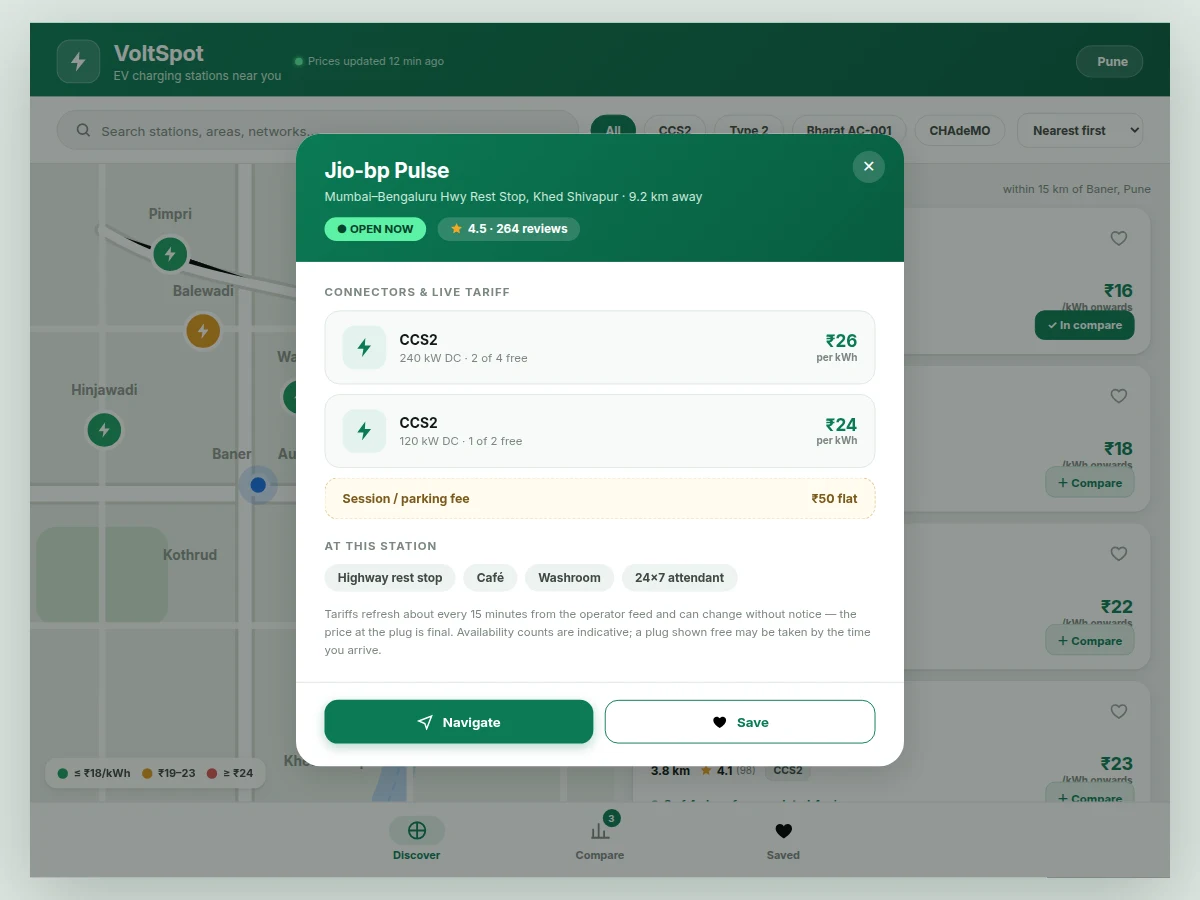
- Tapping a station opens its detail sheet: per-connector kW ratings and ₹/kWh tariffs, session fees, free/total plug counts with sync timestamps, ratings and amenities.
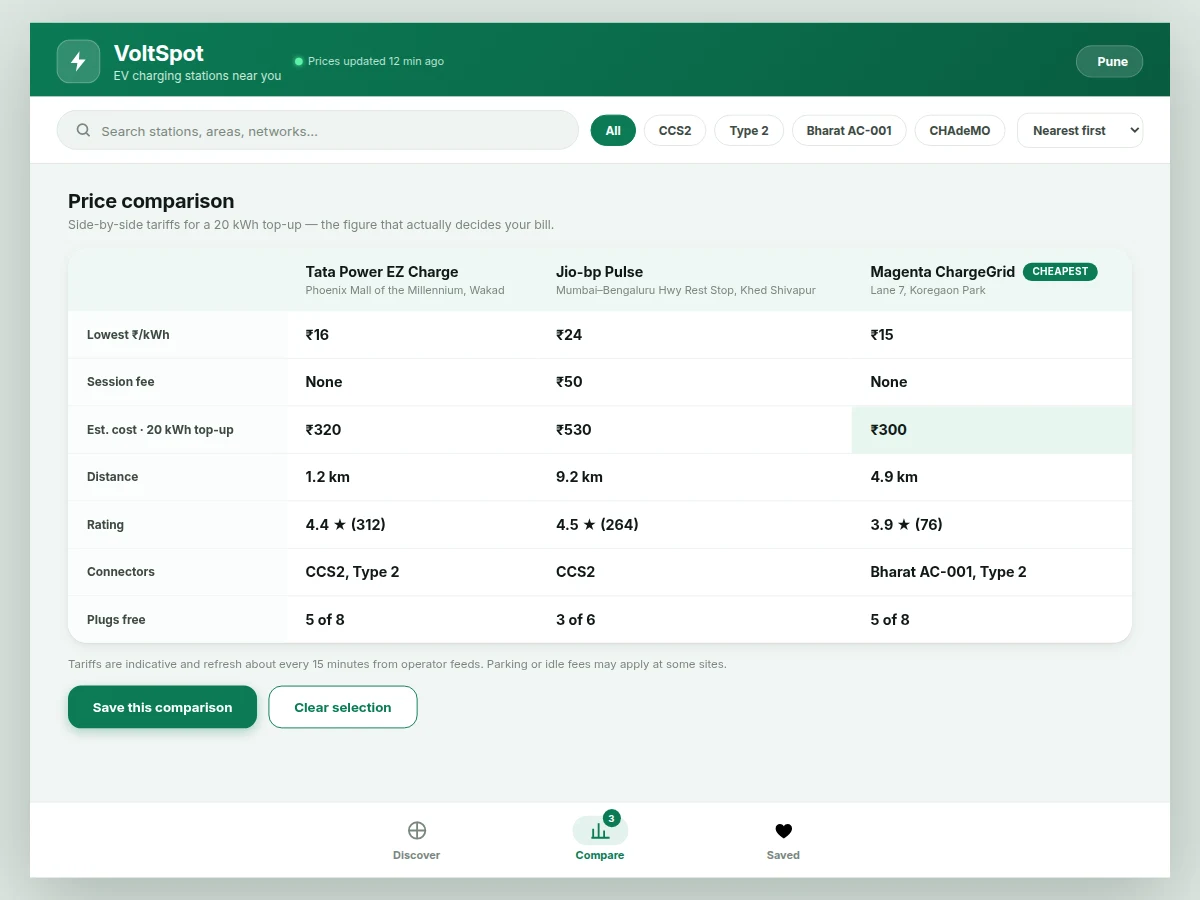
- The + Compare button adds up to three stations; the comparison table computes each station's 20 kWh estimated cost and highlights the cheapest.
- Navigate hands the station coordinates to Google Maps via a geo intent for turn-by-turn directions; the app itself implements no routing engine.
- The heart icon saves a station to the on-device Room cache, keeping it available offline and across restarts.
Tech stack:
- Kotlin (native Android)
- Android SDK · Jetpack
- Google Maps SDK for Android
- Firebase Firestore (station + tariff data)
- Firebase Authentication (user accounts)
- Retrofit · OkHttp (operator REST feeds)
- Room (offline cache)
- Material 3 (Material You UI)
| Parameter | Value |
|---|---|
| Platform | Native Android app (Kotlin) |
| Minimum Android | 8.0 (API 26) — design target |
| Demo station dataset | 10 stations across the Pune region (included) |
| Tariff refresh | Approximately every 15 minutes (design target) |
| Compare slots | Up to 3 stations side by side |
| Cost estimator | 20 kWh reference top-up (fixed reference) |
| Price tiers (map pins) | ≤ ₹18, ₹19–23, ≥ ₹24 per kWh |
| Offline cache | Room database on device (expected) |
| Map SDK | Google Maps SDK for Android (API key required) |
| Internet | Required for live tariffs, availability and map tiles |
Project features
- [Station map and list search] Nearby public charging stations appear as price-coded pins on a Google Maps view alongside a sortable list; search covers station names, areas and network names, with nearest, cheapest and top-rated sorting.
- [Connector-type filters] One-tap chips for CCS2, CHAdeMO, Type 2 and Bharat AC-001 filter both the map pins and the list, so drivers only see chargers their vehicle can physically plug into.
- [Per-connector tariff display] Each station shows every connector with its power rating in kW, per-kWh price in rupees and any session or parking fee, so the true cost is visible before the trip.
- [3-way price comparison] Up to three stations can be compared side by side; the table computes an estimated 20 kWh top-up cost (lowest tariff × 20 plus fees) and flags the cheapest option.
- [Live plug-availability indicators] Free-versus-total plug counts per connector show which stations actually have a gun free right now, with the data timestamped so staleness is visible.
- [Station detail sheets] Tapping a station opens its rating and review count, open status, amenities (café, washroom, parking), address and distance in one sheet.
- [Navigation handoff] A Navigate button fires a standard geo intent that opens Google Maps with turn-by-turn directions to the chosen station's coordinates.
- [Saved stations with offline cache] Favourite stations are stored in an on-device Room database, so they survive restarts and remain viewable without internet.
What is included
- Complete Android source code (Kotlin, Material 3 UI)
- Firestore data schema plus the seeded demo station dataset
- Build and run instructions for Android Studio
- Project report PDF (background, architecture, API design, testing)
- PPT presentation for final review
- Viva Q&A preparation document (Android concepts, Maps SDK, Firebase, location permissions, tariff modelling)
- Demo guidance: scripted walkthrough from search to comparison to navigation
Limitations & prerequisites
- Station coverage is limited to the demo dataset of ten Pune stations; a production rollout needs operator partnerships or live feed integrations.
- Availability counts depend on operator APIs and are labelled indicative — a plug shown free may be taken by the time the driver arrives.
- Tariffs change over time; the price displayed is from the last refresh and the price at the plug is final.
- Booking, reservation and payment are not included — the app finds, filters and compares stations; it does not reserve a plug.
- Navigation hands off to Google Maps; the app implements no routing of its own.
- Distance sorting needs location permission; without it the app falls back to a default city view.
- Map tiles, live tariffs and availability need internet — only saved stations are viewable offline.
Frequently Asked Questions
Is this project suitable for a final-year project?
Yes — for Computer Engineering, IT and Electrical Engineering programs. It demonstrates native Android development in Kotlin, the Google Maps SDK, a Firebase Firestore backend, REST integration with Retrofit, runtime location permissions, on-device caching with Room, and honest tariff modelling — a complete, demoable mobile system with real-world relevance to India's EV rollout.
Where do the station and price data come from?
The Firestore backend ships seeded with a demo dataset of ten Pune stations modelled on real network types, each with connectors, kW ratings, per-kWh tariffs, fees and plug counts. In production the same schema would be fed by operator APIs. Tariffs refresh on a roughly 15-minute design target and every price is labelled indicative, because the price at the plug is always final.
Does the app book a charging slot or take payment?
No — booking and payment are deliberately out of scope. Reserving a plug needs a commercial agreement and API access with each charge-point operator, which a student project cannot credibly include. The app's job is finding the right charger at the right price and navigating there; slot reservation is documented as future scope in the report.
Which connector types are supported?
CCS2 and CHAdeMO for DC fast charging, plus Type 2 and Bharat AC-001 for AC charging — the connector mix actually deployed on Indian public chargers. Each station lists its connectors with power ratings and per-connector tariffs, and the filter chips hide stations the driver's vehicle cannot use. New standards can be added as data without code changes.
Does the app work offline?
Partly. Saved stations are cached in the on-device Room database and remain viewable without internet. Live maps, tariff refreshes and availability counts need a connection, and the app says so clearly instead of showing stale data silently. The base build includes no offline map tiles.
Can it be customized?
Yes. Realistic extensions include a multi-stop trip planner, per-kilometre running-cost tracking, more cities via operator feed partnerships, in-app station reviews and photos, or a dark theme. Tell us which additions your college expects and the build is scoped accordingly; each addition is quoted separately from the base build.
Components & software requirements
- Kotlin (native Android)
- Android SDK · Jetpack
- Google Maps SDK for Android
- Firebase Firestore (station + tariff data)
- Firebase Authentication (user accounts)
- Retrofit · OkHttp (operator REST feeds)
- Room (offline cache)
- Material 3 (Material You UI)
Delivery information
Built-to-order project. Delivery timeline is shared after order confirmation based on current queue.
Support terms
Complete documentation, setup guide, and viva preparation included. Support for setup and explanation provided.
Download free synopsis (PDF)
Enter your name and email — the synopsis PDF downloads immediately. We may send occasional project updates; no spam, unsubscribe anytime.