
More project photos (2)
The problem
Reading on a phone is now the default for many students, yet most phone reading apps treat a book as a flat file: the reader can scroll, but the notes, highlights and sense of progress that a paper book gives are missing. A student preparing for a viva from an e-book cannot mark the passage the guide asked about, cannot find last week's note, and cannot see how far through the book they are. Highlights often vanish after a reinstall, notes live in a separate app or on paper, and progress is guessed from a page number with no sense of time spent. This project builds an Android e-book reader in Kotlin that restores all three: it opens EPUB files, lets the reader highlight passages and attach notes, saves bookmarks, and tracks reading progress per book in a local Room database, with a library view, adjustable fonts, a night mode and a reading-statistics screen.
This is a built-to-order software project: the native Android app in Kotlin, the EPUB import and annotation engine, the Room database, the reading-statistics screen, and the complete viva kit (report, PPT, Q&A) are prepared fresh for you.
Concept
The app is a native Android reader built in Kotlin with Jetpack Compose around a local Room database. An EPUB file is an archive: the parser unpacks the container, reads the table of contents, and extracts each chapter's XHTML text into Room tables for books, chapters, highlights, notes, bookmarks and reading sessions. The library screen lists imported books with progress computed from the saved reading position. The reading view renders chapters as flowing serif text; selecting a passage shows an action bar that creates a coloured highlight or attaches a typed note, both stored with the chapter and the passage's position. A bookmark stores the current chapter and scroll position. A WorkManager task records reading-session time, and the statistics screen aggregates it into minutes per day, a day streak and per-book progress. Every read and write goes to the local database, so the app needs no account, no server and no internet connection.
The reader imports a book and opens it in the app.
Follow the working sequence
How it works
A book travels through a short, visible chain: the user imports an EPUB file, the parser unpacks the container and extracts the chapter text into the local Room database, the library lists the book with its progress, and opening it renders the chapters as flowing text. Selecting a passage shows an action bar: Highlight wraps the selection in a coloured span and stores the passage with its chapter and position, while Add note stores the same passage plus the typed note. A bookmark stores the current chapter and scroll position, and tapping it later restores that exact spot. While the reader reads, a background task records session time, and the statistics screen aggregates it into minutes per day, a day streak and per-book progress — all on the device, with no account and no internet connection.
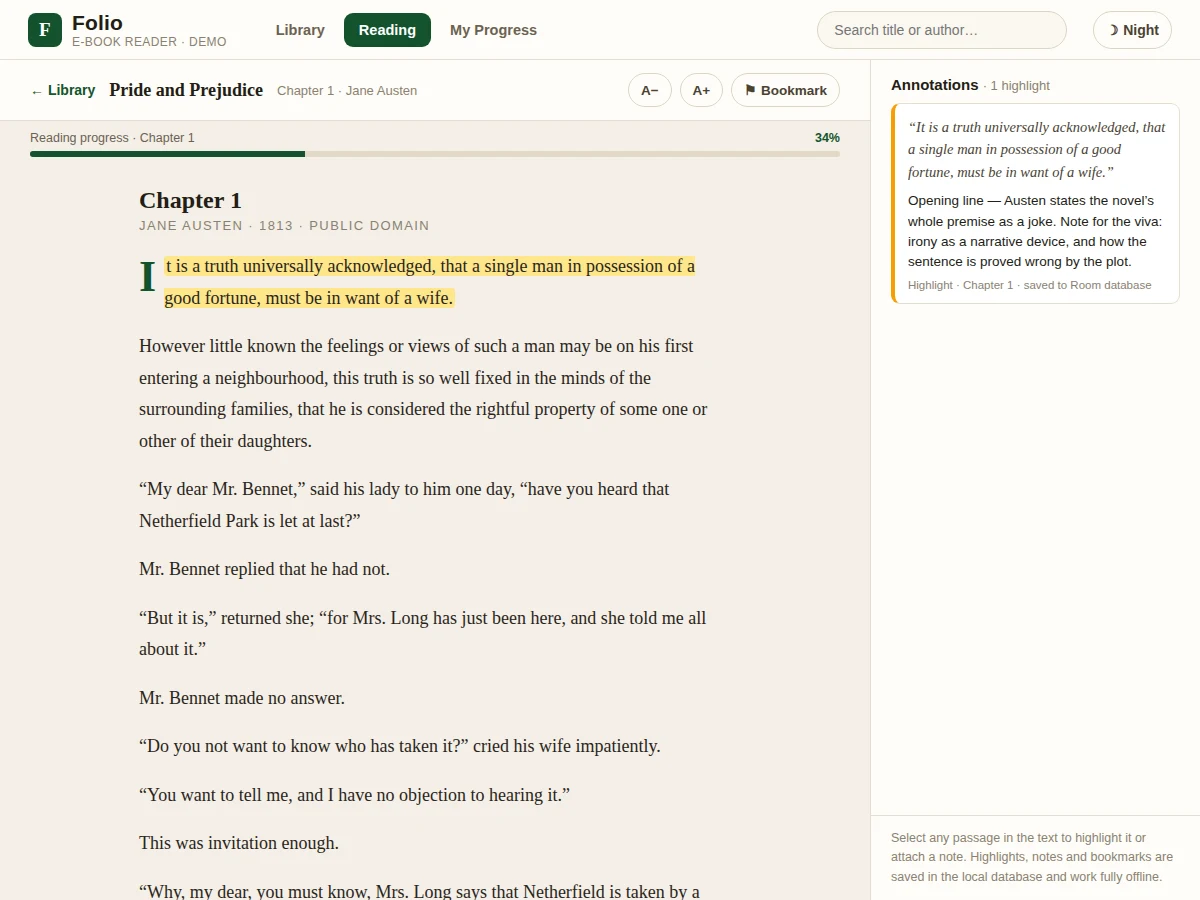
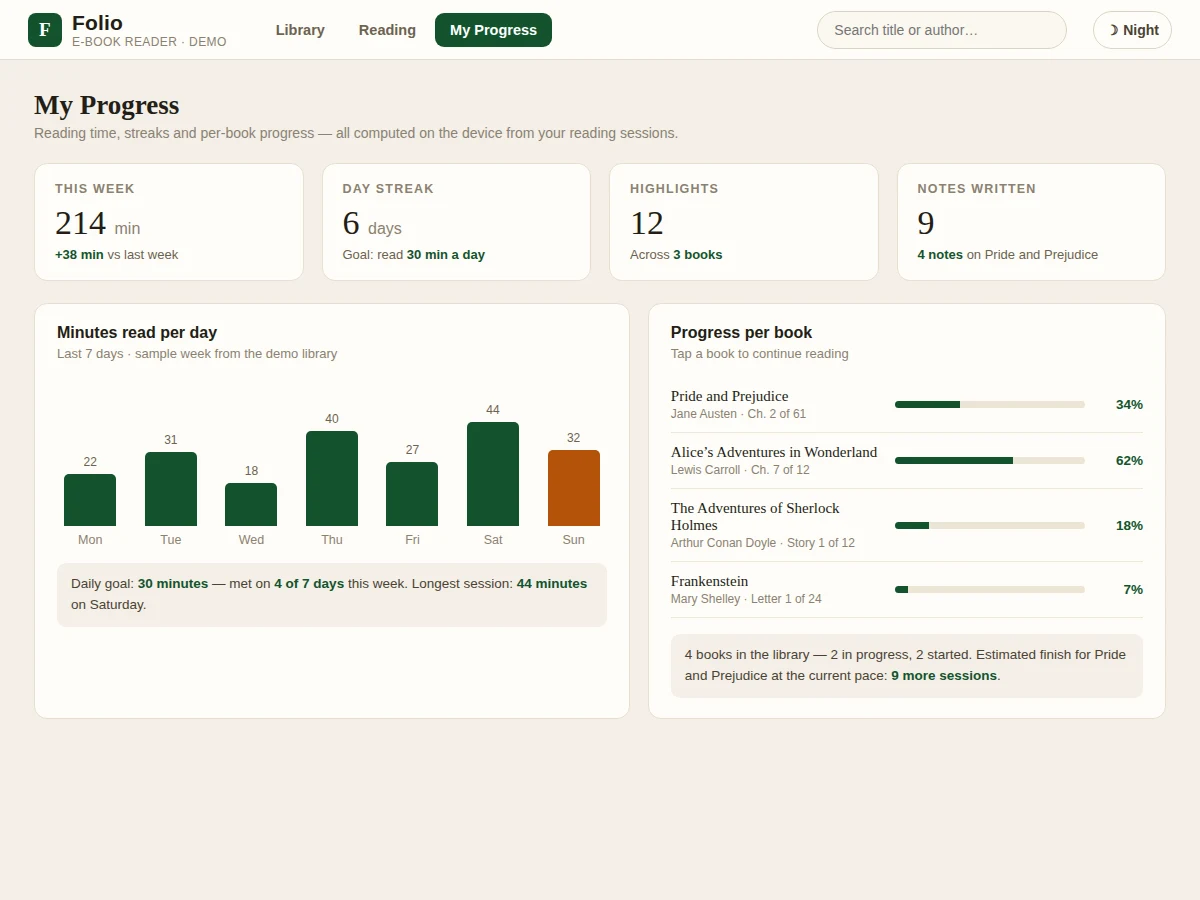
Builder note from the demo build: the demo library holds 4 public-domain books (Pride and Prejudice, Alice's Adventures in Wonderland, The Adventures of Sherlock Holmes, Frankenstein); the reading view renders 13 paragraphs of Pride and Prejudice Chapters 1 and 2; selecting the opening sentence and adding a note stores 1 annotation and renders it in the annotations panel, and the statistics view reports 214 minutes read in the sample week with a 6-day streak.
- The user imports an EPUB file from device storage; the parser unpacks the container, reads the table of contents and extracts each chapter's XHTML text.
- The chapters and book metadata are stored in the Room database, and the library screen lists the book with its cover, author, page count and progress.
- Opening a book loads its chapters into the reading view, rendered as flowing serif text with the saved position restored.
- The reader selects a passage; the action bar offers Highlight, which stores the passage with its chapter and position, or Add note, which stores the passage plus the typed note.
- The bookmark button saves the current chapter and scroll position; tapping the bookmark later returns to that exact spot.
- The progress bar and percentage update from the reading position, and a background task records session time while the book is open.
- The statistics screen aggregates sessions into minutes read per day, a day streak, highlights and notes counts, and per-book progress.
Tech stack:
- Kotlin · Jetpack Compose
- Room Database · local storage
- epublib EPUB parser
- Android Jetpack ViewModel
- WorkManager · session timing
- Material Design 3
- HTML · CSS · JavaScript demo
- Git
| Parameter | Value |
|---|---|
| Application type | Native Android app · Kotlin + Jetpack Compose (design) |
| Minimum Android version | Android 8.0 · API level 26 (design target) |
| EPUB support | EPUB 2 and EPUB 3 files via epublib (design) |
| Sample books in demo | 4 public-domain books (counted in the demo build) |
| Demo reading text | 13 paragraphs of Pride and Prejudice Chapters 1–2 (counted in the demo build) |
| Highlights per book | No fixed limit (design) |
| Text size | 5 steps, approximately 15–22 sp (design range) |
| Daily reading goal | 30 minutes per day (configurable, design default) |
| Storage | Local Room database · no account · no server (design) |
| Offline behaviour | All features work offline (design) |
| Device needs | At least 2 GB RAM and approximately 100 MB free storage (expected) |
| Work plan | 100 hours total (planned) |
Project features
The reader ships with seven working capabilities: EPUB import with a library that shows progress per book, text-selection highlights in colour, notes attached to passages, bookmarks that return the reader to a saved position, reading progress computed from position and session time, adjustable font size with a night mode, and a statistics screen reporting minutes per day, day streaks and per-book progress. The annotation system is the part that makes this project more than a viewer: a highlight stores the passage with its chapter and position, a note stores the passage plus the student's own words, and both live in the local Room database so they survive app restarts and work fully offline. The statistics screen turns reading into a measurable habit: minutes per day, a day streak and a configurable daily goal, all computed on the device from the reader's own sessions.
- [EPUB import and library] Import EPUB files from device storage; the library shows each book's cover, author, page count and reading progress, so the reader always knows where every book stands.
- [Text-selection highlights] Select any passage in the reading view to create a coloured highlight, stored with its chapter and position in the local Room database.
- [Notes on passages] Attach a typed note to any highlighted passage; notes are listed in the annotations panel with the quoted passage, so last week's thinking is one tap away.
- [Bookmarks] Save the current chapter and position with one tap and return to exactly that spot later, even after the app is closed and reopened.
- [Reading progress per book] A progress bar and percentage per book, computed from the saved reading position and session time, shown in the library and in the reading view.
- [Adjustable font size and night mode] Text size adjusts in steps for comfortable reading, and night mode switches the reading view to a dark theme for low-light use.
- [Reading statistics] Minutes read per day, a day streak, highlights and notes counts, and per-book progress, with a configurable daily reading goal, all computed on the device.
Optional on request — not part of the base build: PDF support, cloud sync of highlights and notes, dictionary lookup on long-press, and text-to-speech reading. Future scope: a shared-annotation mode for study groups and a reading-challenge view.
What is included
- Complete Kotlin source code (Jetpack Compose UI, EPUB import with epublib, Room database for books, highlights, notes, bookmarks and sessions, reading-statistics screen)
- Interactive web demo of the app (the three views shown on this page): library with 4 sample books, reading view with a highlight and a note, and the reading-progress statistics screen
- Project report PDF (background, EPUB parsing, annotation design, Room schema, testing against the sample books, limitations)
- PPT presentation for final review
- Viva Q&A preparation document (EPUB format, Room database design, Jetpack Compose, WorkManager session timing, offline design, limitations)
- Specific next step: message on WhatsApp for a quotation stating scope (Android e-book reader in Kotlin with EPUB import, highlights and notes, bookmarks, reading progress and statistics), with delivery under the 100-hour work plan as a built-to-order project
Requirements
- Android Studio (latest stable release, expected) with Kotlin and Jetpack Compose for building the app
- An Android phone or tablet running Android 8.0 or later (design target), with at least 2 GB RAM (expected) and approximately 100 MB free storage (expected)
- EPUB files for testing — 4 public-domain sample books are included with the demo (Pride and Prejudice, Alice's Adventures in Wonderland, The Adventures of Sherlock Holmes, Frankenstein)
- No internet connection is required for any feature: import, reading, highlights, notes, bookmarks and statistics all work fully offline
Work plan & timeline
Total work plan: 100 hours, split across five phases. Phase 1, requirements and EPUB study: 10 hours — the EPUB container format, XHTML chapter files and the epublib parser, with the four public-domain sample books used for testing. Phase 2, library and EPUB import: 25 hours — the book-import flow, the Room database schema for books, chapters, highlights, notes, bookmarks and sessions, and the library screen with progress bars. Phase 3, the reading view: 30 hours — chapter rendering, text selection with a highlight-and-note action, font-size and night-mode controls, bookmark save and restore, and progress calculation from scroll position and session time. Phase 4, statistics and polish: 15 hours — the minutes-per-day chart, day streak, per-book progress list and daily reading goal. Phase 5, testing and documentation: 20 hours — checking the demo flows against the sample books, plus the report, PPT and viva Q&A.
Support
Support covers setup help for the delivered code, a walkthrough of the app and the demo, and fixes for defects in the delivered code. Guidance is also provided for adapting the report and presentation to the student's college format and for answering guide questions about the EPUB format, Room database design, Jetpack Compose, WorkManager session timing and offline design. Support does not cover choosing a different EPUB parser's paid plan, and it does not invent reading statistics that were not produced by the app.
Limitations & prerequisites
- EPUB only in the base build: PDF files are not supported as shipped — PDF support is an optional extension, not part of the base build.
- DRM-protected EPUB files cannot be imported; the parser works with standard, unprotected EPUB files only.
- Highlights are tied to chapter text positions, so re-importing a different edition of the same book may shift stored highlight positions.
- Reading statistics count time spent reading inside this app only; time spent in other readers is not included.
- The demo's statistics (214 minutes in a week, 6-day streak) are labelled sample data from the demo library, not a real user's reading history.
- Progress is computed from scroll position and session time, so it is an estimate of how far through a book the reader is, not a page-accurate measure.
Frequently Asked Questions
Is this project suitable for a final-year project?
Yes — this project suits Computer Science, IT and Android application development final-year programmes because it demonstrates native Android development in Kotlin with Jetpack Compose, EPUB parsing with epublib, a Room database schema for books, highlights, notes, bookmarks and sessions, and a reading-statistics screen, all working offline with a demo a reviewer can operate. The work plan totals 100 hours across EPUB study, library and import, the reading view, statistics and polish, and testing with documentation.
Does the app need internet?
No — every feature works fully offline: EPUB import, reading, highlights, notes, bookmarks and reading statistics all run on the device, with all data stored in the local Room database and no account, no server and no connection needed at any point. The only place internet would ever matter is if cloud sync were added later, which is listed as an optional extension and is not part of the base build.
Which book formats does it open?
EPUB 2 and EPUB 3 files, parsed with the epublib library — the standard, unprotected EPUB format used by public-domain libraries such as Project Gutenberg, so the four sample books and any other standard EPUB open directly in the app reader. DRM-protected EPUB files cannot be imported, and PDF files are not supported in the base build; PDF support can be added as an optional extension, quoted separately after the requirements are fixed.
What is the main technology used?
Kotlin with Jetpack Compose for the native Android interface: EPUB files are parsed with epublib, and books, chapters, highlights, notes, bookmarks and reading sessions are stored in a Room database, with ViewModel holding the screen state and WorkManager recording session time. The interface follows Material Design 3, and the project page shows a working web demo of the library, reading view and statistics screen.
Can this project be customised?
Yes, within realistic limits: PDF support, cloud sync of highlights and notes, dictionary lookup on long-press and text-to-speech reading can each be added as separate extensions, and the interface can be restyled or rearranged for a college's format without touching the annotation engine. Extra book formats or a shared-annotation mode for study groups are also possible, and any customisation is quoted after the requirements are fixed.
How do I get a quotation?
Message on WhatsApp for a quotation stating scope (Android e-book reader in Kotlin with EPUB import, highlights and notes, bookmarks, reading progress and statistics), with delivery under the 100-hour work plan as a built-to-order project, and the final price is confirmed after the scope and any customisation are locked. No fixed price is listed on this page.
Components & software requirements
- Kotlin · Jetpack Compose
- Room Database · local storage
- epublib EPUB parser
- Android Jetpack ViewModel
- WorkManager · session timing
- Material Design 3
- HTML · CSS · JavaScript demo
- Git
Delivery information
Built-to-order project. Delivery timeline is shared after order confirmation based on current queue.
Support terms
Complete documentation, setup guide, and viva preparation included. Support for setup and explanation provided.
Download free synopsis (PDF)
Enter your name and WhatsApp number — the synopsis PDF downloads immediately. We may send occasional project updates on WhatsApp; no spam.