
More project photos (2)
The problem
MentorLink is a native Android app that connects college students with alumni mentors through interest-based matching. A student creates a profile, selects interest tags such as Android Development, Machine Learning or Startups, and the app ranks alumni mentors by Jaccard similarity — shared interests divided by all distinct interests — so every recommendation carries an explainable score. Each mentor profile shows the exact overlap arithmetic, the shared tags, and weekly availability; the student then sends a mentorship request with a topic and message and books a session slot. The backend is Firebase Authentication plus Cloud Firestore, with collections for students, mentors, requests and sessions. The problem it solves is concrete: most colleges run alumni mentorship through spreadsheets, WhatsApp groups or one annual meet, so a student who needs guidance on placements or interviews rarely finds the right senior. MentorLink replaces that ad-hoc process with a searchable, ranked directory and a structured request-to-session flow.
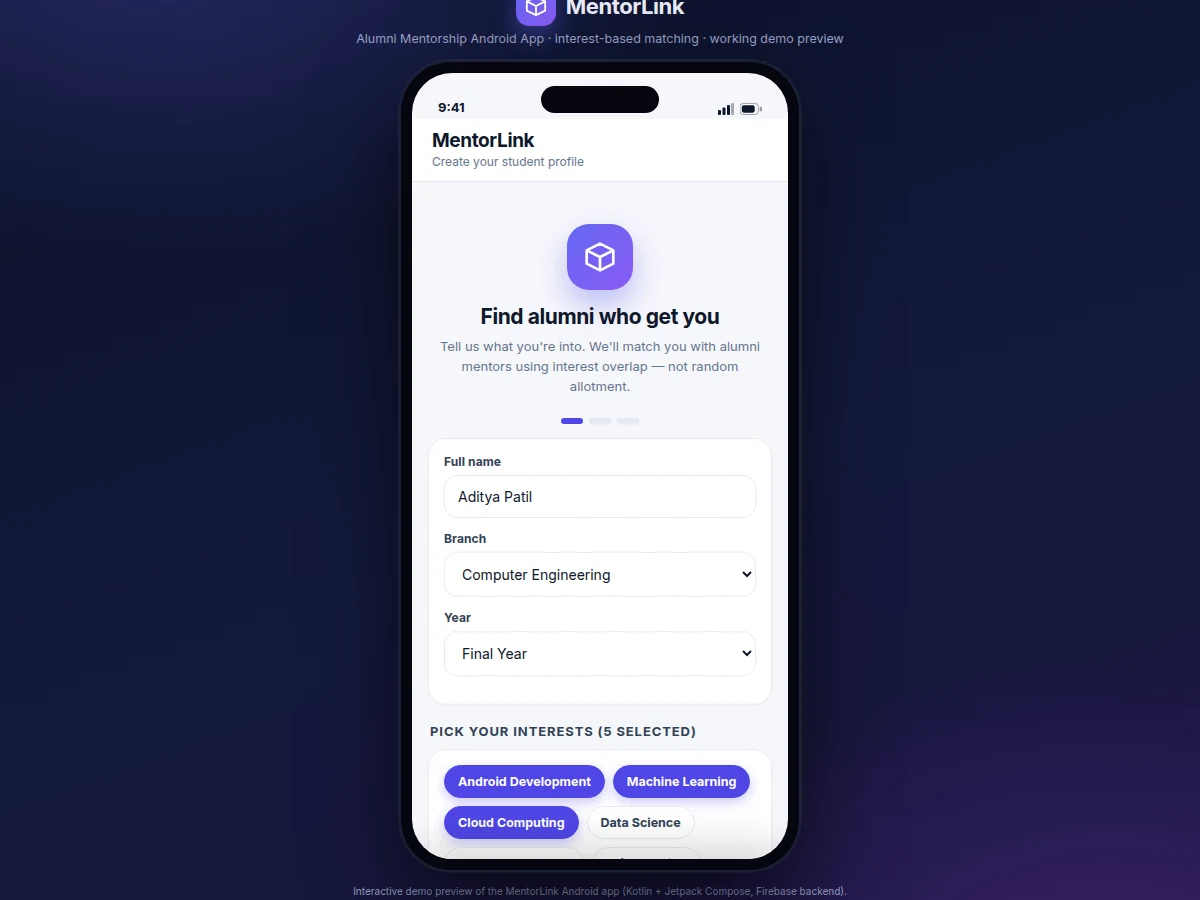
Creates a profile and picks interest tags in the MentorLink app.
Follow the working sequence
How it works
From the student's first tap to a booked session, MentorLink runs a closed loop: sign-up, tag-based profiling, ranked discovery, request, and booking. The student signs in with Firebase Authentication, then completes onboarding by entering name, branch and year and selecting interest tags; the profile is saved as a document in the students collection of Cloud Firestore. Alumni profiles — name, role, company, graduation batch and expertise tags — live in the mentors collection, seeded by the college. When the directory opens, the app computes the Jaccard similarity between the student's tag set and every mentor's tag set, sorts mentors by score, rendering each card with its percentage and shared-interest count. Opening a profile reveals the arithmetic alongside the mentor's availability for the next seven days. The student picks a topic chip, writes a message, optionally selects a slot, and sends the request; the mentor's accept or decline updates the request status, and an acceptance creates a booked session under Requests.
- The student registers with email and password through Firebase Authentication and completes the onboarding form: name, branch, year and interest tags.
- The profile, including the tag set, is written as a document in the
studentscollection in Cloud Firestore. - Alumni profiles with expertise tags and weekly availability are stored in the
mentorscollection (seeded by the college in the shipped build). - Opening the directory triggers the matching engine: Jaccard similarity is computed between the student's tags and each mentor's tags, and mentors are sorted by score.
- Each mentor card displays the match percentage, shared-interest count and a progress bar; search filters by name, role, company or skill.
- The mentor detail screen shows the exact match arithmetic (shared ÷ distinct = score), shared tags highlighted, bio, and day/slot pickers for the next 7 days.
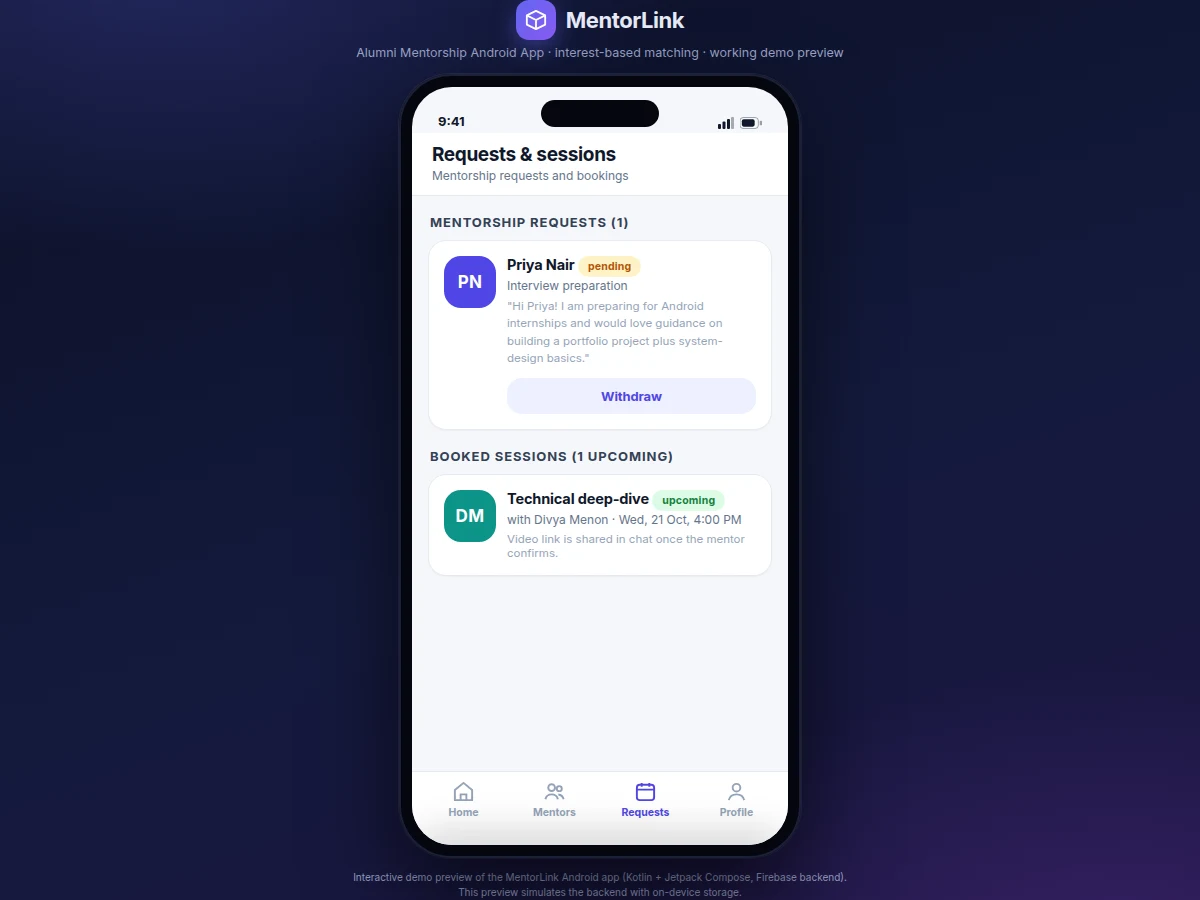
- The student sends a request with a topic chip, message and optional slot; it is stored in
requestswith status pending. - The mentor accepts or declines; an acceptance creates a
sessionsdocument, and the student sees the booked session with date and slot under Requests.
Tech stack:
- Kotlin + Jetpack Compose
- Firebase Authentication
- Cloud Firestore
- Firebase Cloud Messaging (optional)
- Android Studio
- Material Design 3
- JUnit (unit tests)
- Git
| Parameter | Value |
|---|---|
| Platform | Native Android app (Kotlin + Jetpack Compose) |
| Minimum Android version | 7.0 (API 24) (design target) |
| Backend | Firebase Authentication + Cloud Firestore |
| Match algorithm | Jaccard similarity: J(A,B) = |A ∩ B| / |A ∪ B| |
| Match score range | 0.00 – 1.00, computed live on device |
| Interest vocabulary | 16 tags in the demo seed (configurable) |
| Seeded alumni directory | 8 mentor profiles (demo seed) |
| Booking window | 7 days ahead (configurable) |
| Expected APK size | Approximately 18–25 MB (expected) |
| Internet requirement | Required for sign-in, sync and requests; Firestore cache permits offline reads (expected) |
Project features
The app stands on four pillars: an explainable matching engine, transparent mentor profiles, a structured request flow, and two-tap session booking. The matching engine computes Jaccard similarity live on the device — shared tags divided by distinct tags — so a student sees exactly why one mentor ranks at 50% and another at 43%, with the shared interests named on every card. Mentor profiles go beyond a name list: role, company, graduation batch, location, expertise tags with shared ones highlighted, a short bio, and a mentoring record. The request flow keeps outreach professional: topic chips such as career guidance, resume review and interview preparation, a personal message field, and an optional preferred slot travel together in one request carrying pending, accepted or declined status. Finally, each mentor publishes availability for the next seven days, so booking a session means picking a day and a slot, with every confirmation tracked on a single Requests screen.
- [Interest-tag onboarding] The student signs up and picks interests from a 16-tag vocabulary (Android Development, Machine Learning, Cloud Computing, Startups, Placements and more). The tag set drives all matching and can be edited later from the profile screen.
- [Jaccard interest matching] Every mentor is scored as shared tags ÷ distinct tags across both sets, computed live in the app and rendered as a percentage with a progress bar. Measured on the demo build, a student tagged Android Development, Machine Learning, Cloud Computing, Startups and Placements scores Priya Nair 0.50 (3 shared of 6 distinct interests), Divya Menon 0.43 (3 of 7), three alumni 0.29, two 0.125, and a zero-overlap profile 0.00 — the ranking is arithmetic, not a black box.
- [Ranked alumni directory with search] Mentor cards show photo-initial avatar, name, role, company, shared-interest count, rating and mentees mentored, sorted by match score. A search bar filters by name, role, company or skill.
- [Transparent match breakdown] Opening a profile reveals the full calculation — for example J = 3/6 = 0.50 — with shared tags highlighted in green, so the student trusts why this mentor was recommended.
- [Mentorship request flow] Topic chips (career guidance, resume review, interview preparation, higher studies, startup advice, technical deep-dive) plus a personal message and an optional preferred slot go out as one request; statuses move from pending to accepted or declined.
- [Session slot booking] Each mentor's next seven days of availability render as day and slot pickers. Accepting a request creates a booked session entry with date, slot and topic under Requests.
- [Firebase backend] Firebase Authentication (email and password sign-in) plus Cloud Firestore collections for students, mentors, requests and sessions, with security rules so users only read and write their own data. The interactive demo preview simulates this backend with on-device storage.
- [Optional: push reminders] Firebase Cloud Messaging reminders for upcoming sessions can be added as an optional extension; the base build tracks sessions without them.
What is included
- Complete Kotlin + Jetpack Compose Android source code
- Firebase setup guide: Authentication, Firestore collections and security rules
- Seeded demo data: 8 alumni profiles, 16-tag vocabulary, availability generator
- Matching-engine module (Jaccard) with unit-test notes
- Interactive HTML demo preview of all app screens
- Project report PDF (background, architecture, matching algorithm, methodology, results)
- PPT presentation for final review
- Viva Q&A preparation document (Kotlin, Compose, Firebase, Jaccard similarity, app architecture)
Limitations & prerequisites
- Match quality depends on honest tagging — vague or inflated interest tags produce weak matches, and the base build does no NLP on free-text bios.
- The shipped build needs real alumni profiles onboarded by the college; the demo ships with a seeded 8-mentor directory.
- A request only becomes a session if the mentor responds — no response-time guarantee is built into the base app.
- Video meetings are coordinated, not hosted: the app records the session and shares a link, with no in-app video calling in the base build.
- Push reminders need a Firebase project owned by the buyer with Cloud Messaging enabled; the base build tracks sessions without them.
- The interactive demo preview simulates the backend with on-device storage; production use needs Firebase project configuration.
Frequently Asked Questions
How does the interest-based matching actually work?
Every student and every mentor carries a set of interest tags. The app computes the Jaccard similarity between the two sets — the number of tags they share divided by the total number of distinct tags across both sets — which produces a score between 0 and 1. Mentors are then ranked by that score, highest first, so the top of the list is always the alumnus whose interests overlap yours the most. On the demo's seeded directory, a student tagged Android Development, Machine Learning, Cloud Computing, Startups and Placements scores Priya Nair 0.50 (3 shared of 6 distinct), Divya Menon 0.43, and a zero-overlap profile 0.00. Ties are broken by mentor rating, and the profile screen shows the full arithmetic so the ranking is never a mystery.
How is this different from the alumni mentorship web portal already on the site?
The existing page is a web portal you open in a browser; this is a native Android app built with Kotlin and Jetpack Compose that installs on the student's phone. It adds a mobile-first request-and-booking flow, offline-tolerant reads through Firestore caching, and optional push reminders for upcoming sessions — designed for weekly use rather than occasional browsing. The two are complementary: the portal informs, the app connects and schedules.
What does the backend look like?
Firebase. Firebase Authentication handles email-and-password sign-in for students, mentors and admins, while Cloud Firestore stores four collections — students, mentors, requests and sessions — guarded by security rules so every user can only read and write their own private data. Push reminders for upcoming sessions remain an optional add-on through Firebase Cloud Messaging, and the data model is documented collection by collection in the report. The interactive demo preview you can try simulates this backend with on-device storage so the matching, requests and booking all work without a Firebase project.
Can this project be customized for my college?
Yes. Realistic customizations include your college's branding and a real alumni seed dataset, an admin panel for the training-and-placement cell to manage mentors, in-app chat between student and mentor, video-call links attached to accepted sessions, and extra roles such as faculty coordinators. Anything beyond the base feature list is scoped separately with its own timeline.
Is this project suitable for a final-year project?
Yes — for Computer Science, Information Technology and related programs with a mobile-application or software-engineering component. It demonstrates native Android development with Kotlin and Jetpack Compose, Firebase Authentication and Cloud Firestore integration, a genuine set-similarity algorithm driving the matching engine, and complete user flows from onboarding to session booking. The explainable match score also gives strong viva material, since every recommendation can be derived on paper.
Components & software requirements
- Kotlin + Jetpack Compose
- Firebase Authentication
- Cloud Firestore
- Firebase Cloud Messaging (optional)
- Android Studio
- Material Design 3
- JUnit (unit tests)
- Git
Delivery information
Built-to-order project. Delivery timeline is shared after order confirmation based on current queue.
Support terms
Complete documentation, setup guide, and viva preparation included. Support for setup and explanation provided.
Download free synopsis (PDF)
Enter your name and WhatsApp number — the synopsis PDF downloads immediately. We may send occasional project updates on WhatsApp; no spam.