
More project photos (2)
The problem
Driver drowsiness detection is the problem of recognizing when a person behind the wheel is falling asleep, in time to warn them. Driver drowsiness detection matters because microsleeps — eye closures lasting only a few seconds — can happen without the driver realizing, and a camera that never blinks is a practical way to catch them. The core signal is the Eye Aspect Ratio (EAR): six facial landmark points around each eye define the ratio of eye height to eye width, introduced by Soukupová and Čech (2016), sitting near 0.3 for an open eye and collapsing toward zero as the eye closes. A single low reading means little — people blink — so a working system must pair the ratio with a consecutive-frame counter that separates a 200 ms blink from a genuine multi-second closure, cross-checked by a learned classifier. That combination — landmarks, EAR, a frame counter, and a CNN second opinion — is exactly what this project implements.
Note on scope: this build is deliberately camera-based. An ordinary webcam feeds dlib's 68-point landmark model; the EAR formula and a CNN eye-state classifier do the rest. It is not a wearable eye-tracking sensor build — there are no glasses, IR sensors, or steering-wheel hardware on the driver. The only physical component is the camera, which keeps the whole system reproducible on any laptop.
How it works
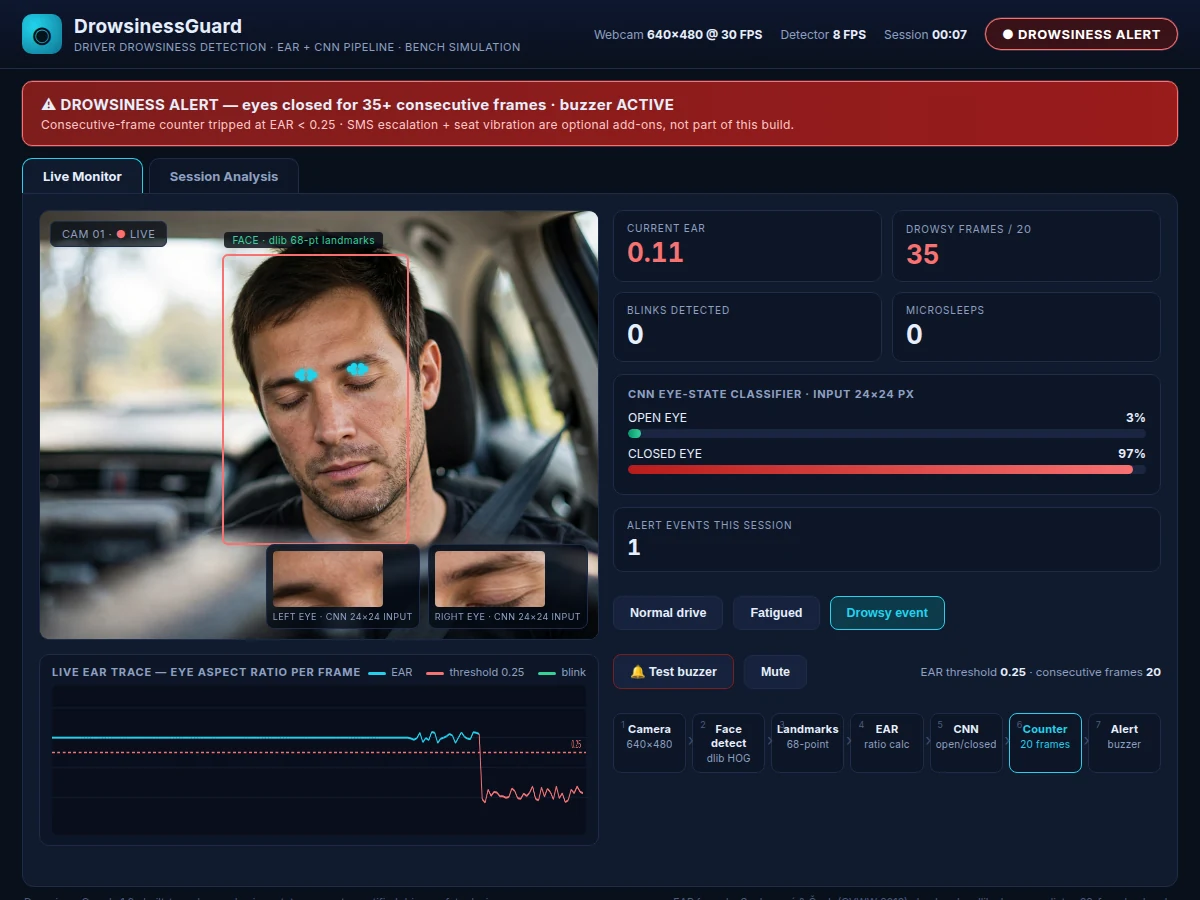
End to end, the system works like this. A dashboard-mounted webcam captures the driver at 640×480 and 30 FPS. Each frame goes to dlib's HOG-based face detector, and the 68-point shape predictor marks the eyes with six points each. From those points the Eye Aspect Ratio is computed — the sum of the two vertical eye distances divided by twice the horizontal eye width — giving a value near 0.3 for open eyes that falls toward zero as they close. In parallel, each eye is cropped, resized to 24×24 px, and passed through a CNN that outputs open-versus-closed probabilities. A consecutive-frame counter watches the EAR stream: if it stays below 0.25 for 20 frames the driver is declared drowsy, while shorter dips are counted as blinks and reset the counter. On a drowsy declaration the buzzer fires and the dashboard raises a red alert banner, and the event is written to the session log with its frame count.
- The webcam grabs frames at 640×480 px and 30 FPS; the detector loop processes them at approximately 8 FPS on a laptop CPU (expected).
- dlib's HOG face detector locates the driver's face; the 68-point shape predictor returns landmarks, with points 36–41 and 42–47 marking the eyes.
- EAR is computed per eye with the Soukupová and Čech (2016) formula and averaged: open eyes read approximately 0.28–0.33, closed eyes below 0.15.
- Each eye region is cropped, converted to grayscale, resized to 24×24 px, and classified open/closed by the trained CNN.
- The consecutive-frame counter increments while EAR stays below 0.25 and resets the instant EAR recovers — a normal blink spans only 2–6 detector frames, far short of the 20-frame gate.
- When the counter reaches 20 frames (approximately 2.5 s at 8 FPS), the state flips to drowsy: the buzzer sounds and the dashboard raises the alert banner.
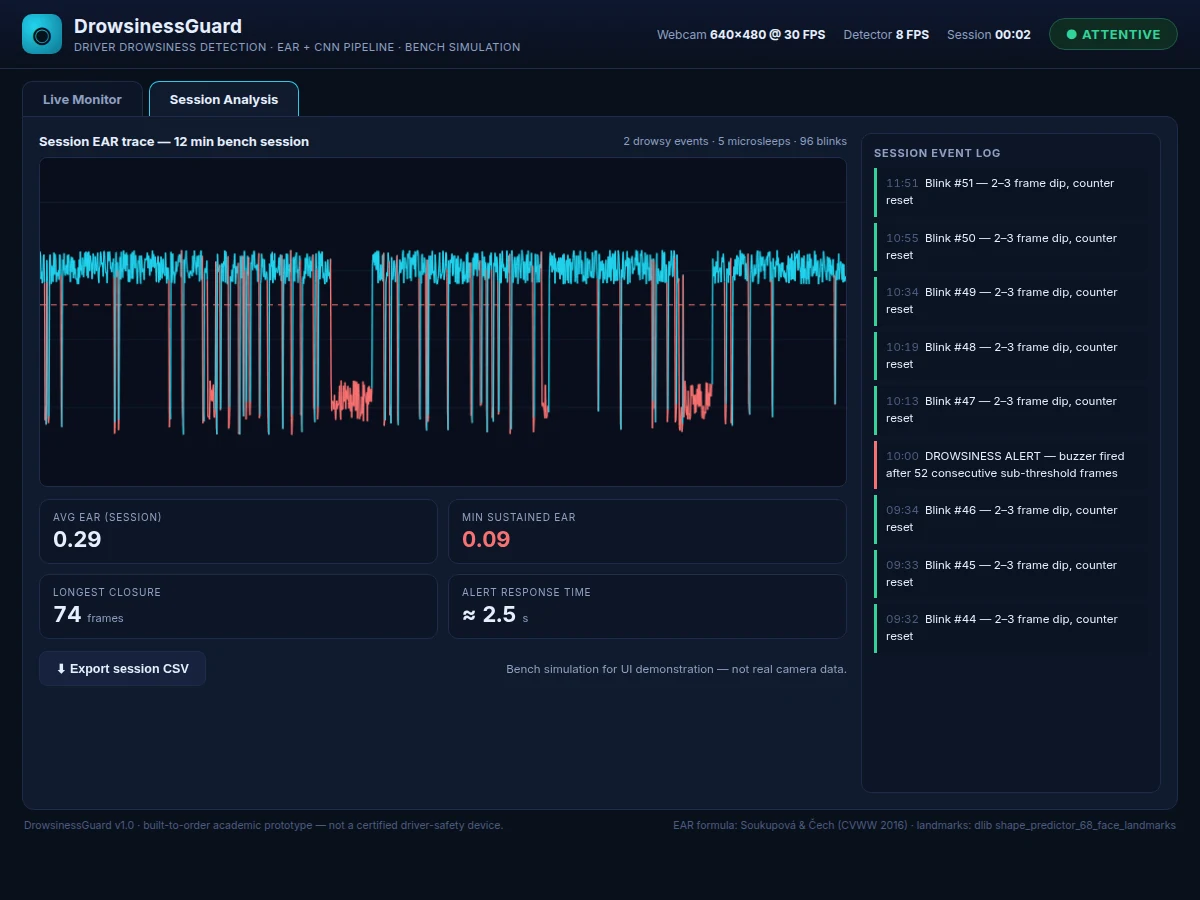
- Every frame's EAR, plus blink, microsleep, and alert events, is appended to the session log, which the analysis view plots with CSV export.
Tech stack:
- Python 3
- OpenCV (video capture & preprocessing)
- dlib (HOG face detector · 68-point landmarks)
- TensorFlow · Keras (CNN training & inference)
- NumPy
- CEW dataset (Closed Eyes in the Wild)
- HTML · CSS · JavaScript (live dashboard)
- Git
Dataset & model details
- Dataset: Closed Eyes in the Wild (CEW) — an open/closed eye image dataset used in published driver-drowsiness CNN studies (commonly paired with YawDD in the literature). Classes: open eye, closed eye.
- Task: Binary image classification; input = 24×24×1 grayscale eye crop, output = probabilities for open vs closed eye.
- Model: Lightweight custom CNN (convolution–pooling blocks, dropout, dense head, 2-way softmax) trained from scratch on CEW; trained weights ship with the project.
- Metrics: Validation accuracy (design target approximately 90%), per-class precision/recall/F1, confusion matrix. No accuracy is claimed as measured until the training run is executed for the order.
| Parameter | Value |
|---|---|
| Camera input | 640 × 480 px at 30 FPS (typical webcam) |
| Detector rate | Approximately 8 FPS on a laptop CPU (expected) |
| Face detection | dlib HOG detector (library component) |
| Landmark model | dlib shape_predictor_68_face_landmarks, 68 points |
| EAR formula | Soukupová & Čech, 2016 (published method) |
| EAR drowsiness threshold | 0.25 (design parameter) |
| Consecutive-frame gate | 20 frames (design parameter) |
| CNN input | 24 × 24 px grayscale eye crop |
| Alert latency | Approximately 2.5 s after sustained eye closure (expected, 20 frames at 8 FPS) |
| Alert output | Buzzer (WebAudio in the demo; hardware buzzer wiring covered in deployment notes) |
| Bench observation | The 0.25 threshold tripped the alert after 20 consecutive sub-threshold frames in this build's bench simulation (observed, not a road measurement) |
Project features
At its core, this project delivers four working capabilities. First, a real-time face-and-landmark pipeline: dlib's HOG face detector finds the driver in each 640×480 frame and the 68-point shape predictor localizes both eyes. Second, EAR computation with a consecutive-frame counter — the geometric heart of the system — where a sub-0.25 reading must persist for 20 frames before anything is called drowsy, so ordinary blinks never trigger false alarms. Third, a CNN eye-state classifier trained on the CEW dataset that independently labels each 24×24 eye crop as open or closed, giving the geometry-based decision a learned second opinion. Fourth, an alerting and monitoring layer: a buzzer fires on confirmed drowsiness while the dashboard streams the live EAR trace, blink counts, CNN confidences, and a session event log. Each capability is implemented in the delivered code, not mocked.
- [68-point landmark pipeline] dlib's HOG detector plus the shape_predictor_68_face_landmarks model localize both eyes in every frame; the six points per eye (36–41 and 42–47) feed the EAR formula directly.
- [EAR computation with frame counter] EAR is computed per frame and a sub-0.25 reading must persist for 20 consecutive frames before the state flips to drowsy — a blink spans only 2–6 frames at the detector's rate, so it resets the counter harmlessly.
- [CNN eye-state classifier] A lightweight CNN trained on the Closed Eyes in the Wild (CEW) dataset labels each 24×24 px eye crop as open or closed, cross-checking the geometric threshold on every frame.
- [Buzzer alert with test mode] Confirmed drowsiness fires the buzzer; the dashboard includes a buzzer test button and a mute control.
- [Live monitoring dashboard] Streams the EAR trace with the 0.25 threshold line, blink and microsleep counters, CNN open/closed confidences, and a status pill (Attentive / Fatigue signs / Drowsiness alert).
- [Session analysis view] Plots a full bench-session EAR history with marked drowsy events, a timestamped event log, and CSV export of the trace.
- [Training notebook] The CEW training pipeline — preprocessing, augmentation, model definition, and evaluation — ships as a reproducible Jupyter notebook.
Configurable: the EAR threshold, the consecutive-frame gate, and the camera source are parameters, not hardcoded values. Optional add-ons, not part of the base build: SMS escalation to a registered number, seat-vibration output, and night-vision IR camera support.
What is included
- Complete Python detection pipeline (capture, landmarks, EAR, CNN inference, counter, alerts)
- Trained CNN eye-state classifier (weights plus preprocessing code)
- Live monitoring dashboard as a single-file web app
- CEW training and evaluation Jupyter notebook
- Project report PDF (background, EAR theory, pipeline design, methodology, results)
- PPT presentation for final review
- Viva Q&A preparation document (EAR formula, dlib landmarks, CNN design, blink-vs-drowsiness logic)
Limitations & prerequisites
- Glasses, and especially sunglasses, reduce landmark accuracy; heavy frames can break eye localization entirely.
- Night driving needs an IR camera with IR illumination — not implemented; the base build assumes daylight or cabin lighting.
- The system watches eye closure only; it cannot detect distraction, intoxication, or medical events.
- Landmark tracking degrades with large head turns — the driver must face roughly toward the camera.
- CEW is a curated image dataset; real cabin lighting, vibration, and camera angles differ, so each installation needs a short calibration step.
- This is an academic prototype, not a certified driver-safety device; it must not be relied upon for real road safety.
- Webcam mounting position affects results; the demo assumes a dashboard-mounted, driver-facing camera.
Frequently Asked Questions
How is this different from eye-tracking sensor projects?
This project uses only an ordinary webcam — no wearable sensors, no eye-tracking glasses, no IR hardware on the driver. The pipeline is dlib 68-point landmarks, the EAR formula, a CNN eye-state classifier, a consecutive-frame counter, and a buzzer. Sensor builds measure gaze with dedicated hardware; this one does everything in software from a camera feed, which makes it cheaper to reproduce but dependent on lighting and camera angle.
Which dataset and model are used?
The CNN trains on the Closed Eyes in the Wild (CEW) dataset of labeled open-eye and closed-eye crops, used in published drowsiness-detection work. The model is a lightweight custom CNN taking 24×24 px grayscale eye crops and outputting open/closed probabilities. The design target is approximately 90% validation accuracy; the report documents the actual figure achieved in the built-to-order training run.
How does it tell a blink from drowsiness?
Geometry plus time. A blink drives EAR below 0.25 for only 2–6 frames at the detector's approximately 8 FPS rate, and the counter resets the instant EAR recovers. Drowsiness is declared only after 20 consecutive sub-threshold frames — about 2.5 seconds of continuous closure. The CNN's independent open/closed verdict cross-checks the geometric threshold on every frame.
What hardware do I need to demo it?
A laptop with a webcam is enough: the pipeline processes 640×480 frames at approximately 8 FPS on a CPU, and the dashboard is a single HTML file. For a physical demo, add any USB webcam mounted facing the driver and a buzzer module wired per the deployment notes. No GPU, no special sensors, and no internet connection are required.
Is this project suitable for a final-year project?
Yes — for Computer Science, IT, and AI & Machine Learning programs. It combines classical computer vision (facial landmarks, the EAR formula) with a trained CNN, a real-time decision pipeline, and an honest evaluation story: threshold tuning, blink-versus-drowsiness logic, and dataset limits give examiners concrete technical material to probe.
Components & software requirements
- Python 3
- OpenCV (video capture & preprocessing)
- dlib (HOG face detector · 68-point landmarks)
- TensorFlow · Keras (CNN training & inference)
- NumPy
- CEW dataset (Closed Eyes in the Wild)
- HTML · CSS · JavaScript (live dashboard)
- Git
Dataset & model details
- Dataset: Closed Eyes in the Wild (CEW) — an open/closed eye image dataset used in published driver-drowsiness CNN studies (commonly paired with YawDD in the literature). Classes: open eye, closed eye.
- Task: Binary image classification; input = 24×24×1 grayscale eye crop, output = probabilities for open vs closed eye.
- Model: Lightweight custom CNN (convolution–pooling blocks, dropout, dense head, 2-way softmax) trained from scratch on CEW; trained weights ship with the project.
- Metrics: Validation accuracy (design target approximately 90%), per-class precision/recall/F1, confusion matrix. No accuracy is claimed as measured until the training run is executed for the order.
Delivery information
Built-to-order project. Delivery timeline is shared after order confirmation based on current queue.
Support terms
Complete documentation, setup guide, and viva preparation included. Support for setup and explanation provided.
Download free synopsis (PDF)
Enter your name and WhatsApp number — the synopsis PDF downloads immediately. We may send occasional project updates on WhatsApp; no spam.