
More project photos (3)
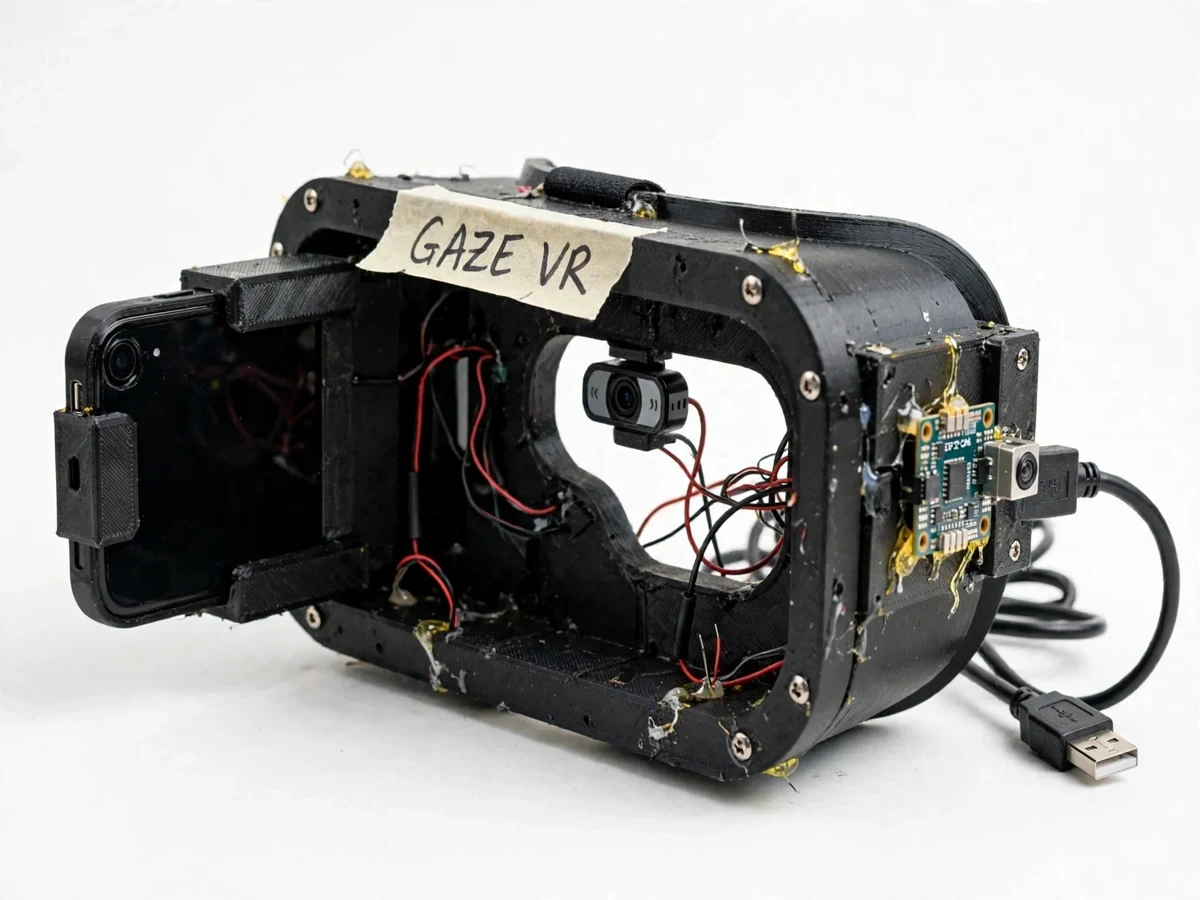

The problem
DPVR launched the P1 Max Eye on 23 November 2026, an enterprise VR headset with binocular eye tracking at up to 220 Hz, priced at US$999 including the eye-tracking licence (all reported). Two 400 by 400-pixel eye cameras, one per eye, feed a multi-light-source module, and gaze data comes out at 120 to 220 Hz in the current firmware, with Unity and Unreal SDKs exposing raw per-eye data and a combined gaze point. This student build takes the same idea to a lab bench: a smartphone slotted into a 3D-printed viewer shell becomes the display, a small USB webcam mounted inside the viewer watches one eye, and a laptop runs MediaPipe Iris gaze estimation, mapping pupil position to screen coordinates after a 9-point calibration, so looking at a menu tile and holding the gaze selects it.
Eye tracking matters because it turns looking into an input: hands-free menu control, attention measurement for usability studies, and an interaction path for users who cannot easily use a controller. The honest student version keeps the interaction idea and drops what a college bench cannot reproduce — the 220 Hz sampling, the infrared illumination and the per-eye SDK data. A 30 fps webcam is the honest sampling rate here, and the gap is stated plainly in the limitations. The dashboard is what makes the build demonstrable in a review: it logs fixations and saccades and draws an attention heatmap over the viewed scene, so the examiner sees where attention went, not just that a menu opened.
| This student build | DPVR P1 Max Eye (reported) | XREAL Aura-Inspired AR Glasses (live page) | Driver Drowsiness Detection using Eye Aspect Ratio (live page) | |
|---|---|---|---|---|
| What it is | DIY eye-tracking VR headset: phone in a printed viewer shell, eye camera inside, laptop gaze pipeline, dashboard with heatmap | Enterprise VR headset with binocular eye tracking, launched 23 November 2026 at US$999 including the eye-tracking licence | Monocular optical see-through AR glasses: OLED reflected off a beam-splitter film, head-tracked HUD, phone companion app | Live project page: webcam eye-aspect-ratio tracking with a CNN cross-check on the CEW dataset; buzzer alerts on prolonged eye closure |
| Where gaze is measured | One eye, from a visible-light USB webcam inside the viewer; MediaPipe Iris landmarks on a laptop | Both eyes, from two 400 by 400-pixel eye cameras with a multi-light-source module | Nowhere — it tracks head orientation with an MPU6050 sensor, not the eyes | Both eyes, from a webcam facing the driver; eye aspect ratio from facial landmarks |
| Interaction | Look and hold: gaze-dwell selection (design target about 800 ms) drives a VR menu | Gaze data at 120 to 220 Hz via Unity and Unreal SDKs, raw per-eye data plus a combined gaze point | Head turns move a compass HUD; temple button cycles pages; voice via the phone | No interaction — it watches and alerts when the eyes stay closed too long |
| Hardware | Smartphone, 3D-printed viewer shell, USB webcam eye camera, optional ESP32-CAM module, laptop | Qualcomm Snapdragon XR2, 8 GB RAM, 128 GB storage, 3664 by 1920 display, 4000 mAh battery (reported) | ESP32, MPU6050, SSD1306 OLED, beam-splitter film, 3D-printed glasses frame | Webcam and a laptop running OpenCV and dlib; CNN eye-state classifier; buzzer alert on confirmed drowsiness |
| Validation | Buyer-run procedure: 9-point calibration, dwell-select demo, fixation log and heatmap checked against the scene; no accuracy claim made in advance | DPVR reports 0.5 to 1 degree accuracy and under 5 ms algorithm latency, with 9-point calibration and tracking to 30 degrees in each direction | Yaw drift observed after two minutes of wear and corrected by re-zeroing with the temple button | EAR below 0.25 for 20 consecutive frames fires the buzzer; CNN cross-checks each eye crop; design-target about 90% validation accuracy |
| Honesty line | A single visible-light camera at 30 fps doing gaze estimation in software — honest student-scale eye tracking, not DPVR's hardware | Commercial product — this build does not reproduce it, and its figures are reported, never this build's results | Head tracking, not eye tracking — the two projects share a headset, not a sensor | Drowsiness detection, not gaze control — it measures whether eyes are open, not where they look |
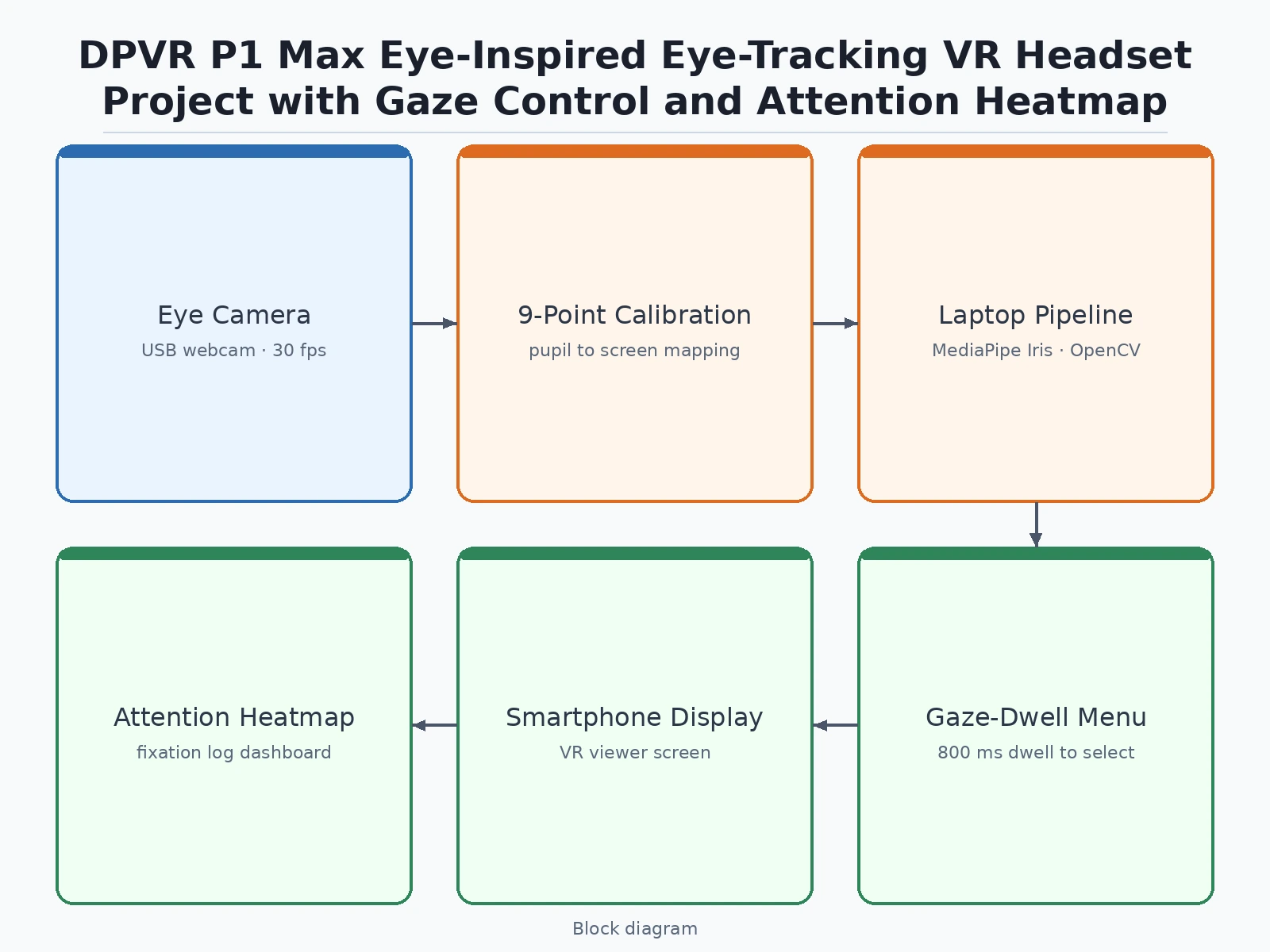
A USB webcam mounted inside the viewer watches one eye at 30 fps and sends each frame to the laptop.
Follow the working sequence
How it works
The loop runs from the eye to the screen and back. The camera inside the viewer captures the eye at 30 fps and sends each frame to the laptop, where MediaPipe Face Mesh finds 468 3D landmarks and the refined iris landmarks give the pupil centre. The 9-point calibration maps that pupil position to screen coordinates, and a smoothing step steadies the raw signal before it becomes a gaze cursor on the VR menu. When the cursor rests on a tile for the design-target dwell of about 800 ms, the tile is selected, the dashboard records a fixation with its duration, and the heatmap over the viewed scene gains warmth at that spot. A saccade — a fast jump of the gaze — is counted separately, so the log distinguishes looking from moving between looks.
- The builder prints the viewer shell: a two-part 3D-printed case with a phone slot at the front, a mount for the eye camera inside, and a foam face pad, sized for the phone used in the demo.
- The builder mounts the eye camera: a small USB webcam is fixed inside the viewer aimed at one eye, angled slightly upward from below the eye line so the phone screen's reflection stays out of the frame, and its cable is routed out of the shell.
- The builder installs the gaze pipeline on the laptop: Python with OpenCV and MediaPipe, reading the webcam feed and running Face Mesh with refined iris landmarks to get the pupil centre each frame.
- The builder runs the 9-point calibration: the wearer looks at nine points in turn while the pipeline records pupil positions, building the mapping from eye to screen coordinates; the mapping is saved and reloaded for later sessions.
- The builder adds smoothing: a short moving average over recent gaze samples plus a small dead zone around the cursor, so the natural tremor of the eye does not make the cursor shake on the menu.
- The builder wires the VR menu: a phone-side menu scene with four tiles, where a dwell of about 800 ms on a tile (design target) selects it and shows a progress ring while the gaze holds.
- The builder runs the demo: the wearer calibrates, selects menu tiles by looking, and the dashboard logs fixations and saccades and draws the attention heatmap over the scene for the examiner to inspect.
Tech stack:
- Smartphone · viewer display and VR scene
- 3D-printed viewer shell · PLA with phone slot
- USB webcam · eye camera inside the viewer
- ESP32-CAM · OV2640 2 MP eye camera (optional)
- MediaPipe Iris · 468 3D face landmarks
- Python · OpenCV gaze pipeline on laptop
- HTML · CSS · JavaScript dashboard
- 9-point calibration · dwell-select menu
How DPVR P1 Max Eye works — and what this build does instead
- The DPVR P1 Max Eye launch: DPVR announced the P1 Max Eye on 23 November 2026 (press release via EINPresswire), an enterprise VR headset with binocular eye tracking for businesses, research institutions and application developers, at a standard price of US$999 including the eye-tracking licence (all reported). It is built on the DPVR P1 Max enterprise headset with a Qualcomm Snapdragon XR2, 8 GB of RAM, 128 GB of storage, a combined 3664 by 1920 display and a 4000 mAh battery (reported).
- How its eye tracking works: Two 400 by 400-pixel eye cameras, one per eye, work with a multi-light-source module to capture each eye separately, and the gaze data comes out at 120 to 220 Hz in the current firmware. DPVR reports an accuracy of 0.5 to 1 degree and algorithm latency under 5 ms, with a 9-point calibration and tracking up to 30 degrees up, down, left and right of the optical axis. Unity and Unreal SDKs expose raw data from both eyes and a combined gaze point, so researchers can measure visual stimuli against eye movement directly.
- Why binocular, infrared tracking is the hard part: Tracking both eyes separately with dedicated cameras and controlled lighting is what buys the sampling rate and the reported accuracy — the cameras see the pupil clearly in any room light, and two eyes give a depth check that one eye cannot. A visible-light webcam has neither advantage: room light changes the image, reflections from the display creep into the frame, and a single eye gives no depth cross-check, which is why the student build is slower and less precise by design.
- What this build does instead: The student build replaces DPVR's two infrared eye cameras with one visible-light USB webcam (or an optional ESP32-CAM) inside a printed viewer, replaces its 120 to 220 Hz gaze output with a 30 fps webcam feed, replaces its per-eye SDK data with MediaPipe Iris landmarks computed on a laptop, and replaces its reported 0.5 to 1 degree accuracy with a design-target dwell of about 800 ms and no accuracy claim at all. The US$999 price, the 220 Hz rate and the accuracy figures are DPVR's reported figures, never this build's.
| Parameter | Value |
|---|---|
| Build type | Hybrid hardware and software build · viewer headset plus laptop gaze pipeline plus dashboard |
| Viewer | 3D-printed two-part shell · PLA · phone slot at the front · eye-camera mount inside · foam face pad · design-target size fits phones of about 5.5 to 6.7 inches (design target) |
| Display | Smartphone screen · resolution and refresh depend on the phone used in the demo (no fixed value claimed) |
| Eye camera (base) | USB webcam · 720p design target · 30 fps honest sampling rate (design target) |
| Eye camera (optional) | ESP32-CAM module · OV2640 2 MP sensor · up to 1600 × 1200 pixels · up to 30 fps · 5 V board input (Datasheet values, OmniVision / AI-Thinker module listings) |
| Gaze estimation | MediaPipe Iris · Face Mesh 468 3D face landmarks · iris centres at landmarks 468 and 473 · refined iris landmarks from Face Mesh with refine_landmarks enabled (Google MediaPipe documentation) |
| Calibration | 9-point · maps pupil position to screen coordinates · recalibration under a minute (design target) |
| Dwell select | Design target about 800 ms hold to select a menu tile · progress ring shown while the gaze holds (design target) |
| Sampling | 30 fps from the webcam · the student build does not match the DPVR P1 Max Eye 120 to 220 Hz gaze output (reported) · the gap is a stated limitation |
| Dashboard | Fixation log with position and duration · saccade count · attention heatmap over the viewed scene (design) |
| Link | USB cable from the eye camera to the laptop · optional ESP32-CAM streams over Wi-Fi 802.11 b/g/n (design) |
| Power | Laptop USB 5 V for the webcam · ESP32-CAM 5 V board input where the optional module is used (design) |
| Trend reference | DPVR P1 Max Eye: launched 23 November 2026 · press release via EINPresswire · standard price US$999 including the eye-tracking licence · binocular eye tracking up to 220 Hz · two 400 × 400-pixel eye cameras · multi-light-source module · gaze data 120–220 Hz in current firmware · accuracy 0.5–1° and latency under 5 ms (DPVR reports) · 9-point calibration · tracking to 30° in each direction · Qualcomm Snapdragon XR2 · 8 GB RAM · 128 GB storage · 3664 × 1920 display · 4000 mAh battery · Unity + Unreal SDKs with raw per-eye data and a combined gaze point (all reported). None of these figures describe this student build. |
| Builder note | The most common failure while building the demo was the dwell timer: the first version reset the dwell clock on every pointer-move event, so the tile could never reach 800 ms while the hand trembled even slightly. The fix was a steady-position check with a small dead zone around the cursor, so only a real move away from the tile resets the timer — the same smoothing the real pipeline needs, because raw iris coordinates are jittery and a gaze cursor must be steadied before it can select anything. On the hardware side, mount the eye camera below the eye line and angled slightly upward: mounted straight ahead it catches the phone screen's reflection in the frame (design guidance, not a measured result). |
Project features
Four capabilities carry this build. First, 9-point calibration: the wearer looks at nine points in turn and the pipeline learns the mapping from pupil position to screen coordinates, the same routine the DPVR P1 Max Eye uses, so the demo starts from a measured mapping rather than a guess. Second, gaze-dwell menu selection: holding the gaze on a VR menu tile for a design-target 800 ms selects it, giving hands-free control with no controller in the wearer's hand. Third, an attention heatmap: every fixation is logged with its duration and drawn onto the viewed scene, so the dashboard shows where attention actually spent time. Fourth, a MediaPipe Iris gaze pipeline on an ordinary laptop: the 468-landmark face mesh with its iris landmarks turns a cheap webcam into a gaze sensor, which is the whole point of the project — eye tracking without specialist hardware.
- [9-point calibration] The wearer looks at nine points in turn while the pipeline records pupil position at each, building the mapping from eye to screen coordinates; recalibration takes under a minute and is repeated whenever the headset is refitted — implemented in the base build.
- [Gaze-dwell VR menu selection] Looking at a menu tile and holding the gaze for a design target of about 800 ms selects it, with a visible progress ring on the tile so the wearer sees the dwell filling; moving the gaze away cancels the selection — implemented in the base build.
- [Attention heatmap and fixation log] Every fixation is logged with its screen position and duration, saccades are counted, and the dashboard draws a heatmap over the viewed scene so the brightest zones show where attention spent the most time — implemented in the base build.
- [MediaPipe Iris gaze estimation] The laptop pipeline uses MediaPipe Face Mesh with refined iris landmarks — 468 3D face landmarks, with iris centres at landmarks 468 and 473 — to estimate where the eye is pointing from ordinary webcam frames — implemented in the base build.
- [Eye camera inside the viewer] A small USB webcam mounts inside the viewer shell aimed at one eye, so the eye is framed without blocking the phone display; the camera feed runs at 30 fps and the laptop does all the processing — implemented in the base build.
- [Optional ESP32-CAM eye camera] An ESP32-CAM module with an OV2640 2 MP sensor can replace the USB webcam, streaming frames to the laptop over Wi-Fi; it keeps the viewer cable-free but adds wireless latency, so it is an option, not the default — optional in the base build, quoted as a hardware add-on.
- [Blink-to-click and foveated rendering] Future scope only, not implemented: using a blink as a click, and rendering the gazed-at region sharper than the rest, are listed as extensions, since the base build selects by dwell and renders the whole scene uniformly.
What is included
- Working prototype (3D-printed viewer shell with phone slot, foam face pad, USB webcam eye camera mounted inside, cable routed out of the shell, and optional ESP32-CAM module)
- Laptop gaze pipeline (Python with OpenCV and MediaPipe Iris, 9-point calibration, smoothing with moving average and dead zone, dwell-select logic, fixation and saccade logging)
- VR menu demo and dashboard (four-tile VR menu scene with dwell progress rings, attention heatmap over the viewed scene, recent-fixations list, calibration grid view)
- Setup and calibration guide (viewer printing and assembly, camera mounting angle, calibration procedure, demo walkthrough, lighting setup)
- Project report PDF (DPVR P1 Max Eye background with reported figures labelled as reported, eye-tracking concept, viewer design, gaze pipeline, the student's own calibration and dwell runs, honest limits)
- PPT presentation for final review
- Viva Q&A preparation document (binocular vs monocular eye tracking, MediaPipe Iris landmarks, 9-point calibration, dwell selection, 30 fps vs 220 Hz, DPVR vs the student build, limitations)
Work plan & timeline
Total work plan: 100 hours, split across six phases. Phase 1, background study and parts: 14 hours — reading the DPVR P1 Max Eye launch coverage and the MediaPipe Iris and ESP32-CAM documentation, sourcing the webcam, ESP32-CAM module, filament and foam, and printing the first viewer shell. Phase 2, viewer build: 20 hours — printing and fitting the shell, mounting the eye camera at the right angle, routing the cable, and the first successful wear test with a phone in the slot. Phase 3, gaze pipeline: 24 hours — the Python and MediaPipe pipeline, pupil-centre extraction, the 9-point calibration mapping, and the smoothing step that steadies the gaze cursor. Phase 4, menu and dashboard: 16 hours — the VR menu scene with dwell selection, the fixation log and saccade counter, and the attention heatmap drawn over the viewed scene. Phase 5, validation: 14 hours — repeated calibration and dwell runs with 3 different wearers, recording where the mapping drifts and how lighting changes the result, with results written into the report. Phase 6, review preparation: 12 hours — presentation slides, a demo walkthrough, and the question-and-answer document for the review.
Support
Support covers setup help for the delivered viewer shell, eye camera and laptop gaze pipeline, a walkthrough of 9-point calibration, dwell tuning and the heatmap dashboard, plus fixes for defects in the delivered code. Guidance is also provided for adapting the report and presentation to the student's college format and for answering guide questions about binocular eye tracking, MediaPipe Iris landmarks, calibration drift and the DPVR P1 Max Eye launch. Support does not cover re-running the calibration and dwell validation beyond the setup walkthrough, and it does not invent results for runs or observations that were not made.
Limitations & prerequisites
- 30 fps, not 220 Hz: the student build samples gaze from a webcam at 30 fps, while the DPVR P1 Max Eye reports gaze data at 120 to 220 Hz. Fast eye movements between frames are missed, and the gap is a stated limit of this build, not a tuning problem.
- Calibration drifts: the 9-point mapping is valid for one wearer and one fitting. Refitting the headset, a different wearer, or a long session shifts the mapping, so recalibration between demonstrations is part of the procedure.
- Lighting dependent: the visible-light eye camera needs steady indoor light. Dim rooms, backlight and reflections from the phone screen degrade the pupil image, and the build has no infrared illumination to fall back on.
- Glasses and reflections: spectacles, contact-lens glare and screen reflections can hide the pupil from the camera, so some wearers calibrate worse than others and the report says so.
- One eye only: the student build watches a single eye, so it has no binocular depth check and no per-eye data like the DPVR SDKs provide; the combined gaze point is an estimate from one eye.
- No accuracy claim: no measured gaze accuracy is claimed for this build. The report records calibration runs and dwell success, never an accuracy figure in degrees.
- Not a medical or diagnostic device: the build must never be presented as a vision test, a diagnostic tool or a clinical attention measure. It is an engineering demonstration of gaze interaction and attention logging.
- Wear safely: take regular breaks during wear, keep the phone brightness comfortable, and never wear the headset while walking, driving or cycling.
Frequently Asked Questions
Is this project suitable for a final-year project?
Yes, for IoT and Embedded Systems, Electronics and Computer Engineering programmes, because it combines a printed wearable, computer vision, calibration mathematics and a working dashboard around a launch from today. The report documents the DPVR P1 Max Eye launch with its figures labelled as reported, the gaze pipeline, the student's own calibration runs and the honest limits, so the work reads as engineering.
Is this the real DPVR P1 Max Eye?
No — this build is a student-scale headset inspired by the DPVR P1 Max Eye, the enterprise VR headset with binocular eye tracking launched on 23 November 2026 at US$999 (reported). The commercial headset uses two dedicated eye cameras and reports gaze data up to 220 Hz; this build uses one webcam and a laptop, samples at 30 fps, and claims no accuracy figure.
How accurate is the student build's gaze tracking?
No accuracy figure is claimed, because none was measured. What the build demonstrates is repeatable: a 9-point calibration maps pupil position to screen coordinates, a dwell of about 800 ms selects a menu tile, and the dashboard logs fixations. The report records calibration runs and where the mapping drifts, rather than inventing a number in degrees.
What does the attention heatmap actually show?
It shows where the wearer looked, and for how long. Every fixation is logged with its screen position and duration, saccades are counted separately, and the heatmap draws warmth onto the viewed scene at each fixation point. Bright zones mean attention spent time there; the map is a record of one session, not a claim about what the wearer understood.
How is this different from the AR glasses and drowsiness projects already on the site?
The XREAL Aura-inspired AR glasses track head orientation with a motion sensor, not the eyes — they never measure gaze. The driver drowsiness project measures whether the eyes are open using eye aspect ratio plus a CNN cross-check, and alerts on prolonged closure. This build measures where the eye is looking and uses that as the input itself, which is a different sensor, a different pipeline and a different demonstration.
What will I receive with the project?
You receive the working prototype — the 3D-printed viewer shell with phone slot, foam face pad and USB webcam eye camera mounted inside, plus the optional ESP32-CAM module — along with the laptop gaze pipeline with 9-point calibration, the VR menu demo and heatmap dashboard, the setup and calibration guide, the report, presentation and Q&A document.
Components & software requirements
- Smartphone · viewer display and VR scene
- 3D-printed viewer shell · PLA with phone slot
- USB webcam · eye camera inside the viewer
- ESP32-CAM · OV2640 2 MP eye camera (optional)
- MediaPipe Iris · 468 3D face landmarks
- Python · OpenCV gaze pipeline on laptop
- HTML · CSS · JavaScript dashboard
- 9-point calibration · dwell-select menu
How DPVR P1 Max Eye works — and what this build does instead
- The DPVR P1 Max Eye launch: DPVR announced the P1 Max Eye on 23 November 2026 (press release via EINPresswire), an enterprise VR headset with binocular eye tracking for businesses, research institutions and application developers, at a standard price of US$999 including the eye-tracking licence (all reported). It is built on the DPVR P1 Max enterprise headset with a Qualcomm Snapdragon XR2, 8 GB of RAM, 128 GB of storage, a combined 3664 by 1920 display and a 4000 mAh battery (reported).
- How its eye tracking works: Two 400 by 400-pixel eye cameras, one per eye, work with a multi-light-source module to capture each eye separately, and the gaze data comes out at 120 to 220 Hz in the current firmware. DPVR reports an accuracy of 0.5 to 1 degree and algorithm latency under 5 ms, with a 9-point calibration and tracking up to 30 degrees up, down, left and right of the optical axis. Unity and Unreal SDKs expose raw data from both eyes and a combined gaze point, so researchers can measure visual stimuli against eye movement directly.
- Why binocular, infrared tracking is the hard part: Tracking both eyes separately with dedicated cameras and controlled lighting is what buys the sampling rate and the reported accuracy — the cameras see the pupil clearly in any room light, and two eyes give a depth check that one eye cannot. A visible-light webcam has neither advantage: room light changes the image, reflections from the display creep into the frame, and a single eye gives no depth cross-check, which is why the student build is slower and less precise by design.
- What this build does instead: The student build replaces DPVR's two infrared eye cameras with one visible-light USB webcam (or an optional ESP32-CAM) inside a printed viewer, replaces its 120 to 220 Hz gaze output with a 30 fps webcam feed, replaces its per-eye SDK data with MediaPipe Iris landmarks computed on a laptop, and replaces its reported 0.5 to 1 degree accuracy with a design-target dwell of about 800 ms and no accuracy claim at all. The US$999 price, the 220 Hz rate and the accuracy figures are DPVR's reported figures, never this build's.
Delivery information
Built-to-order project. Delivery timeline is shared after order confirmation based on current queue.
Support terms
Complete documentation, setup guide, and viva preparation included. Support for setup and explanation provided.
Download free synopsis (PDF)
Enter your name and WhatsApp number — the synopsis PDF downloads immediately. We may send occasional project updates on WhatsApp; no spam.