
More project photos (3)

The problem
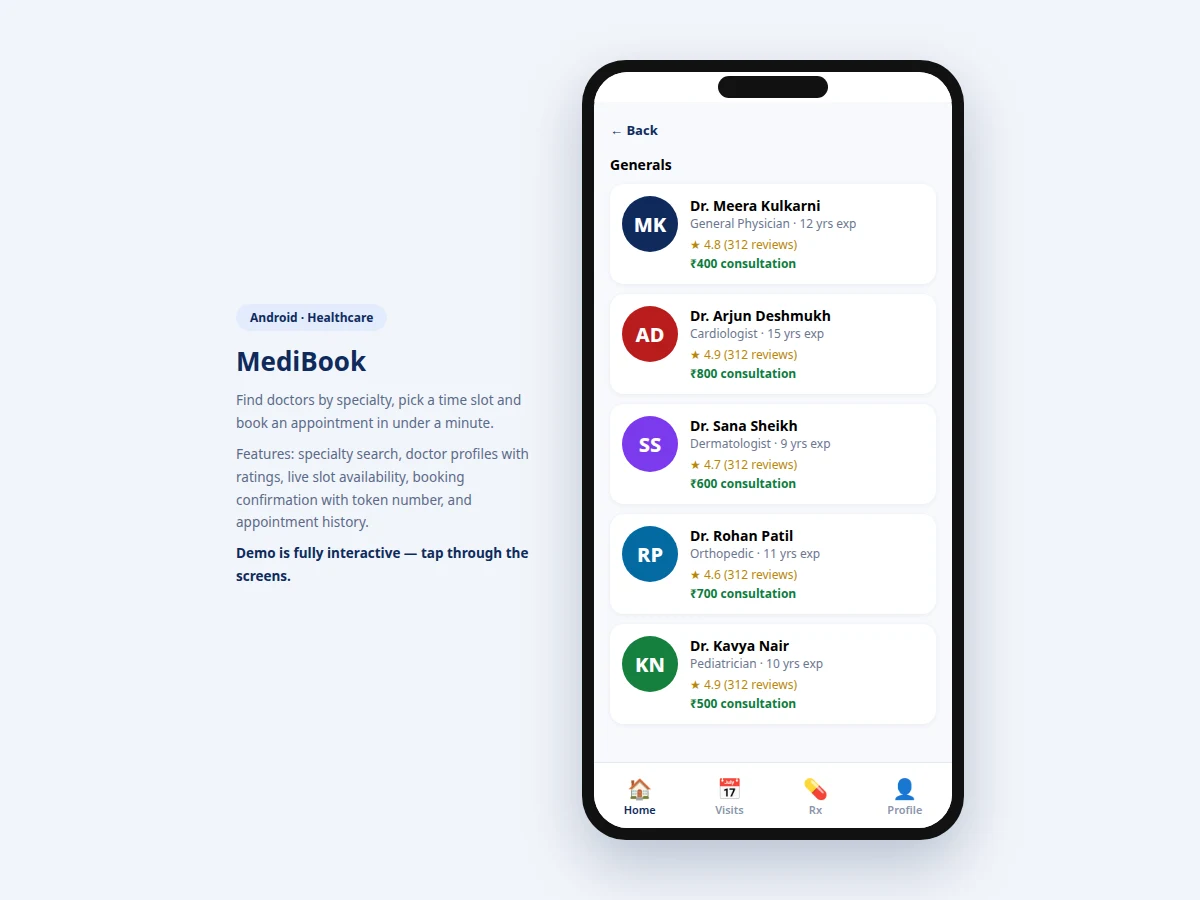
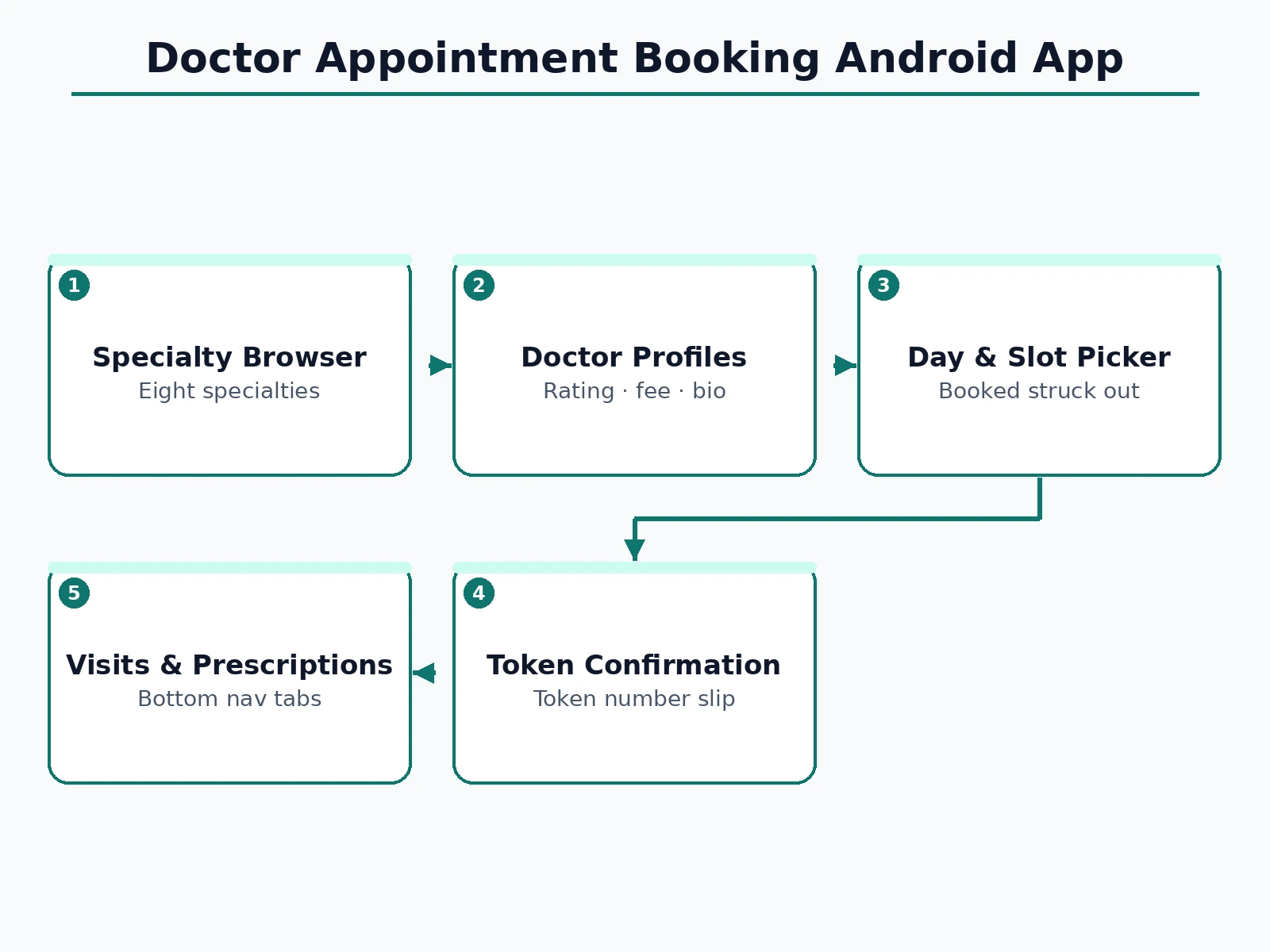
Booking a doctor in most Indian cities still means calling the clinic, waiting on hold, or physically standing in a morning queue for a token — then waiting hours past the supposed time. Meanwhile clinics lose track of no-shows and overbook popular doctors. This project builds the patient side of the fix as a native-style Android application: specialty browsing (General, Cardio, Skin, Ortho, Child, Eye, Dental, Neuro), doctor cards with ratings and fees, detailed profiles with bio and qualifications, a day picker plus a slot grid that marks booked slots as unavailable, and a confirmation screen with the token number, day, slot and fee. The interaction is deliberately short: specialty → doctor → slot → confirmed. The codebase is structured the way a real clinic app would be — data layer, booking state machine, and UI screens — so it extends naturally to a backend with real availability, push reminders and payment.
Searches doctors and books appointment slots.
Follow the working sequence
How it works
- The home screen loads specialties and top-rated doctors from the app's data layer.
- Tapping a specialty filters the doctor list; each card shows rating, experience and fee for comparison.
- Opening a doctor shows the full profile — bio, qualifications, rating — plus a day picker (next 4 days).
- Selecting a day renders that day's slot grid; booked slots are marked unavailable based on the day's booking state.
- The user picks a free slot, which enables the Confirm button; confirming writes the booking and generates a token number.
- The confirmation screen shows token, doctor, day, slot and fee, and the booking appears under the Visits tab.
Tech stack:
- Android (Kotlin) — native app target
- MVVM architecture (data layer, booking state)
- REST API design (doctors, slots, bookings)
- Material Design components
- Push notifications (appointment reminders, planned backend)
| Parameter | Value |
|---|---|
| Screens | 4 (home, doctor list, profile + slots, confirmation) |
| Specialties | 8 (General, Cardio, Skin, Ortho, Child, Eye, Dental, Neuro) |
| Demo doctors | 5 complete profiles |
| Slot model | Per-day grid, booked slots marked unavailable |
| Booking output | Token number + day + slot + fee |
| Target | Android 8.0 (API 26) and above (design target) |
| Backend | REST API design included; demo runs on local data |
Project features
- [Specialty browser] Eight specialties with icons on the home screen; tapping one filters the doctor list instantly.
- [Doctor profiles] Photo-initial avatar, qualification bio, years of experience, star rating with review count, and upfront consultation fee.
- [Day and slot picker] Four-day picker plus a time-slot grid; already-booked slots render struck-through and cannot be selected.
- [Token confirmation] Booking generates a token number with doctor, day, slot and fee — the exact slip a patient shows at reception.
- [Top-rated strip] Home screen surfaces the highest-rated doctors nearby for quick booking without searching.
- [Bottom navigation] Home, Visits, Prescriptions and Profile tabs structure the app like a production health app.
- [Realistic demo data] Five complete doctor profiles across specialties with believable schedules, fees and reviews for demonstration.
What is included
- Complete Android app source code (Kotlin)
- REST API design document (doctors, slots, bookings endpoints)
- App icon and graphic assets
- Project report PDF (background, mobile UX design, booking state machine, methodology)
- PPT presentation for final review
- Viva Q&A preparation document (Android lifecycle, MVVM, REST, slot concurrency)
Limitations & prerequisites
- The demo runs on local data — real slot availability needs the clinic backend, whose API is designed and documented but not hosted.
- No payment integration in this version; the confirmation states "pay at clinic", with UPI prepayment listed as future scope.
- Reminder notifications need the backend push setup; the app-side handling is designed, not live.
- Doctor-side (schedule management) screens are out of scope — this is the patient booking app.
- Slot concurrency (two patients grabbing the last slot) is handled by the backend design, not demonstrable in the offline demo.
Frequently Asked Questions
How do booked slots get marked unavailable?
Each day has a booking state; the slot grid reads it and renders taken slots struck-through and unclickable. In production this state comes from the backend API.
What does the patient show at the clinic?
The confirmation screen: token number, doctor name, day, slot and fee. It is designed to work as the digital replacement for the paper token slip.
Can patients cancel or reschedule?
The Visits tab is designed for that; cancellation flow with slot release is specified in the API design document as the next build step.
How is this different from Practo?
It is not competing with Practo — it is a final-year project demonstrating the complete booking flow (search → profile → slots → token) that any clinic could white-label, with clean, explainable code.
Does it handle emergencies?
No — it books routine consultations. The app states this clearly; emergency care needs a hospital, not an appointment slot.
Is this project suitable for a final-year project?
Yes — for Computer Science, IT and mobile-development programs. It demonstrates Android UI, state management, API design and a complete real-world user journey. Suitable for B.E./B.Tech final-year projects in Computer Science, Information Technology and Mobile Application Development.
Components & software requirements
- Android (Kotlin) — native app target
- MVVM architecture (data layer, booking state)
- REST API design (doctors, slots, bookings)
- Material Design components
- Push notifications (appointment reminders, planned backend)
Delivery information
Built-to-order project. Delivery timeline is shared after order confirmation based on current queue.
Support terms
Complete documentation, setup guide, and viva preparation included. Support for setup and explanation provided.
Download free synopsis (PDF)
Enter your name and WhatsApp number — the synopsis PDF downloads immediately. We may send occasional project updates on WhatsApp; no spam.