
More project photos (3)
The problem
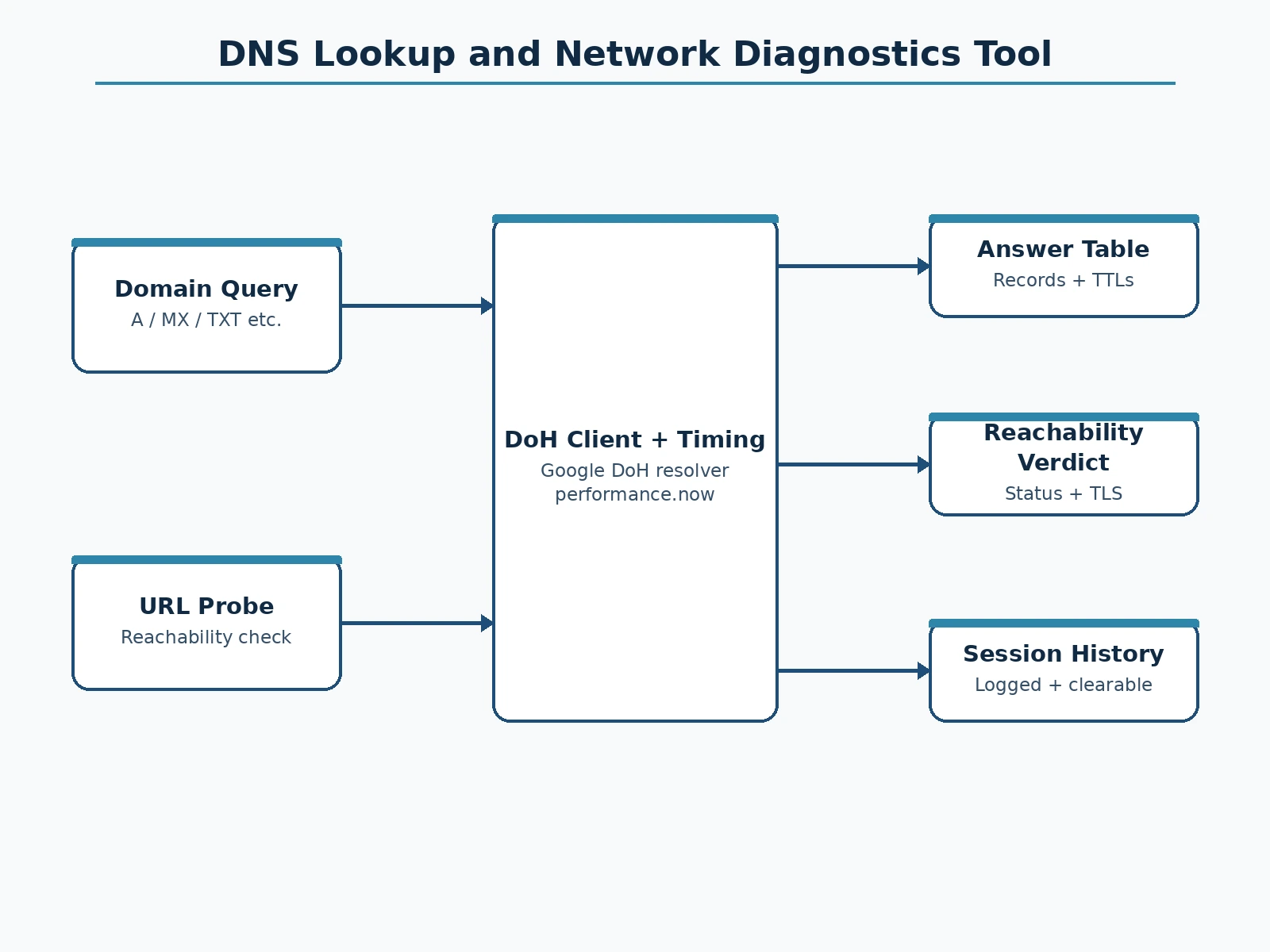
Debugging "is it DNS or is it the server?" is a daily chore for developers and network admins, yet the usual toolbox is a terminal full of memorised flags — dig, nslookup, curl with timing templates — none of which keep a history or present answers readably. This project builds NetProbe, a desktop diagnostics utility with a clean three-tab interface: DNS Lookup, Reachability and Query History. The DNS tab sends the query to Google's public DNS-over-HTTPS endpoint (https://dns.google/resolve) and renders the answer records — name, type, TTL, data — in a table with the measured query time. The Reachability tab probes any URL with a real HTTP fetch and reports status, round-trip milliseconds, an estimated DNS-plus-connect phase and TLS presence, with a terminal-style verdict line. The History tab logs every query of the session with timestamps. Because the sandbox the demo runs in has no external network, the build ships with a genuinely captured resolver response (example.com A records, captured 23 September 2026) displayed behind an honest "captured response" badge — press Lookup on a connected machine and it is replaced by live data. The implementation is a single self-contained HTML/CSS/JS app with zero dependencies, making the full networking logic auditable in one file.
Types a domain and picks a DNS record type.
Follow the working sequence
How it works
- The user types a domain, picks a record type (A, AAAA, MX, TXT, NS, CNAME, SOA) and presses Lookup.
- The app issues a fetch to https://dns.google/resolve?name=
&type= and starts a performance timer. - The JSON answer section is parsed; each record's name, type, TTL and data become a table row, and the elapsed milliseconds are shown.
- If the network is unreachable, the app falls back to its embedded captured response for known queries and keeps the "captured" badge visible.
- On the Reachability tab, the user enters a URL and presses Check; the app fetches it, times the round trip, and classifies the result as healthy, opaque or failed.
- Every lookup — DNS or reachability — is appended to the session history with a timestamp and a success/failure pill.
Tech stack:
- HTML5, CSS3, vanilla JavaScript (ES6+)
- Fetch API with performance.now() timing
- DNS-over-HTTPS (Google public resolver)
- Canvas-free DOM rendering
- No build tools, no frameworks, no dependencies
| Parameter | Value |
|---|---|
| Resolver | Google public DNS-over-HTTPS (dns.google) |
| Record types | A, AAAA, CNAME, MX, TXT, NS, SOA |
| Query timing | performance.now() resolution, ~1 ms granularity (expected) |
| Reachability method | HTTP fetch with CORS / no-cors fallback (expected) |
| History storage | In-memory session log (cleared on reload) |
| Offline behaviour | Embedded captured fixture for example.com A/MX/TXT, labelled |
| Footprint | Single HTML file, ~12 KB (expected) |
| Browser support | Any modern Chromium/Firefox (expected) |
Project features
- [DNS-over-HTTPS lookups] Real queries against Google's public DoH resolver for A, AAAA, CNAME, MX, TXT, NS and SOA records — no mocked answers.
- [Answer table with TTLs] Live record name, type, TTL and rdata rendered in a readable table, plus the measured query round-trip time.
- [HTTP reachability probe] Fetches any URL and reports status, total round-trip, estimated DNS-plus-connect phase and TLS presence with a verdict line.
- [CORS-honest reporting] Distinguishes full responses from opaque no-cors results, explaining exactly what could and could not be read.
- [Session query history] Every DNS and reachability lookup is logged with a timestamp and can be cleared in one click.
- [Captured offline fixtures] Ships with a genuinely captured resolver response so the UI demonstrates fully even without connectivity, clearly labelled.
- [Zero-dependency build] Single HTML/CSS/JS file — the entire DoH client, timing logic and rendering are auditable without a build step.
What is included
- Complete single-file diagnostic app source (HTML/CSS/JS)
- Captured DoH fixture responses with capture notes
- Three screenshot-ready demo views (lookup, reachability, history)
- Project report PDF (DNS/DoH background, design, code walkthrough, limitations)
- PPT presentation for final review
- Viva Q&A preparation document (DNS record types, DoH vs classic DNS, CORS, timing)
- Setup and usage guide
Limitations & prerequisites
- Needs internet access for live lookups; the sandbox demo shows the captured fixture instead — this is labelled in the UI, not hidden.
- Reachability timing measures the browser's fetch path, not ICMP ping or traceroute; per-phase numbers are estimates from the total.
- Status codes and headers are readable only when the target permits CORS; otherwise the probe reports an opaque-but-reachable result.
- No bulk or scripted probing — one interactive query at a time, by design for a teaching tool.
- The query history is in-memory only; it does not persist across reloads (localStorage persistence is listed as an extension).
Frequently Asked Questions
How is this different from running dig in a terminal?
The resolver data is identical — it is the same public DoH endpoint a dig +https query would hit. The difference is presentation: a readable answer table, measured timings, an honest offline fallback and a timestamped history instead of scrollback.
Why DNS-over-HTTPS instead of classic DNS?
DoH works over port 443 from any network, needs no raw-socket privileges, and returns structured JSON — ideal for a browser-based teaching tool. The report contrasts it with port-53 DNS.
What happens without internet?
The app detects the failed fetch and restores its embedded, genuinely captured resolver response, keeping a visible "captured response" badge so nobody mistakes it for live data.
Can it diagnose why a site is down?
Partially: it separates DNS failure (no records) from HTTP failure (host unreachable / error status), which covers the two most common causes. Packet-level diagnosis is out of scope.
Is this project suitable for a final-year project?
Yes — for Computer Science, IT and related programs. It demonstrates real protocol use (DNS concepts via DoH JSON), async JavaScript, honest error handling and measurable networking behaviour. Suitable for B.E./B.Tech final-year projects in Computer Science, IT and related programs.
Components & software requirements
- HTML5, CSS3, vanilla JavaScript (ES6+)
- Fetch API with performance.now() timing
- DNS-over-HTTPS (Google public resolver)
- Canvas-free DOM rendering
- No build tools, no frameworks, no dependencies
Delivery information
Built-to-order project. Delivery timeline is shared after order confirmation based on current queue.
Support terms
Complete documentation, setup guide, and viva preparation included. Support for setup and explanation provided.
Download free synopsis (PDF)
Enter your name and WhatsApp number — the synopsis PDF downloads immediately. We may send occasional project updates on WhatsApp; no spam.