
More project photos (2)

The problem
Screen time keeps climbing — the average student spends four to five hours a day on their phone, much of it in a handful of social apps that are engineered to keep them there. Existing wellbeing tools either ship only inside the OS settings (thin dashboards with no enforcement) or are blunt app blockers with no insight into where the time actually went. This project fills the gap between the two: a full Android digital-detox app that first measures precisely (per-app foreground time via the UsageStats API, pickups, longest unused stretch), then acts on the measurement (per-app daily limits with a lock screen, pomodoro focus sessions with a blocked-apps list), and finally keeps the user honest (weekly reports and a wellbeing score). Because all data lives in a local Room database, the app is also a clean case study in privacy-respecting mobile design: no accounts, no analytics SDK, nothing leaves the phone.
Grants the package-access permission once; sets daily app limits and focus session lengths.
Follow the working sequence
How it works
- On first launch the app requests the PACKAGE_USAGE_STATS permission and explains why; without it no tracking runs.
- A foreground service polls UsageStatsManager for per-app foreground time in 5-minute windows and writes daily aggregates into a Room database.
- The dashboard renders today's totals, the 7-day chart, per-app bars and the wellbeing score from those aggregates, refreshed on every resume.
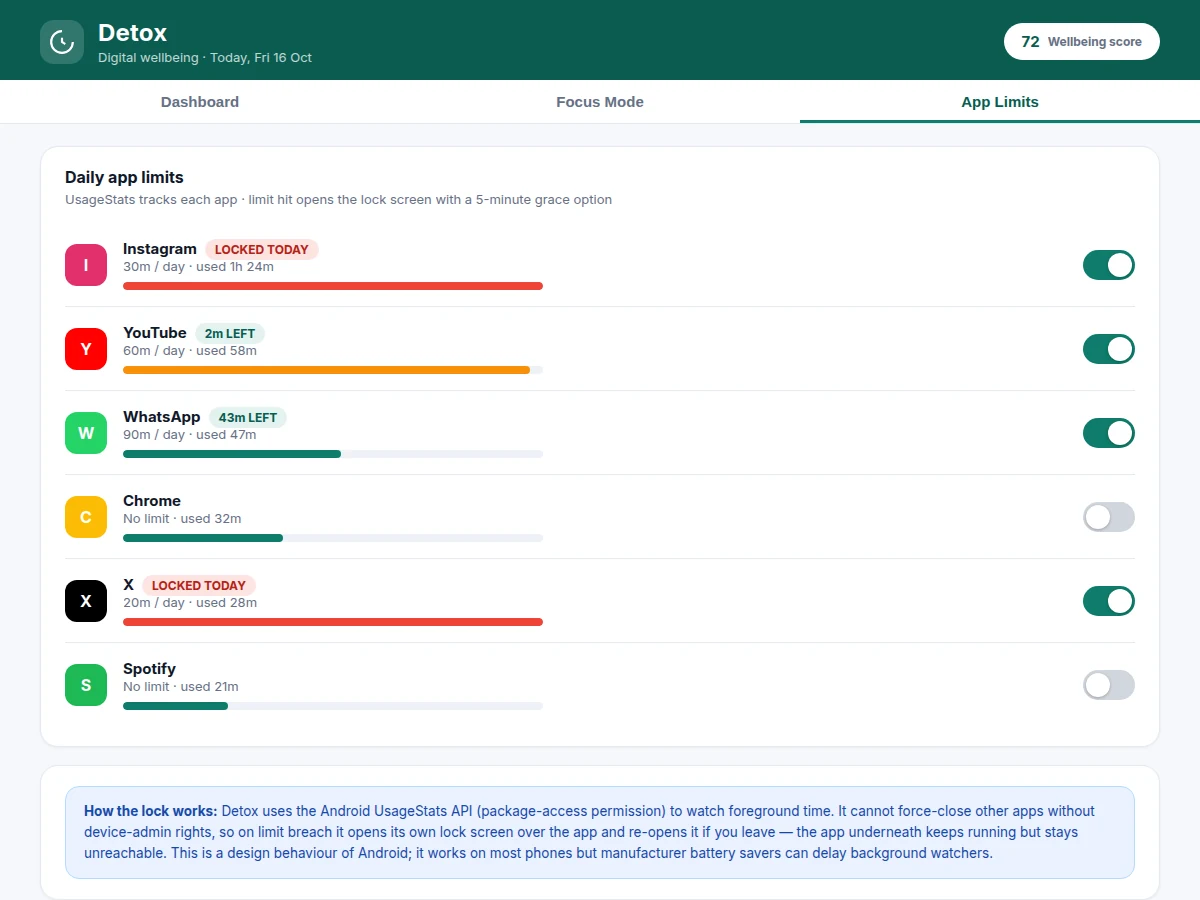
- Each configured limit is checked on every poll; when an app crosses its daily limit the lock-screen activity launches over it with the grace-option flow.
- In focus mode the timer runs a countdown; selected blocked apps trigger the same overlay if opened, and completed sessions are logged for the weekly report.
- At midnight a WorkManager job rolls the day's records into weekly aggregates and recomputes the score, so reports are always current.
Tech stack:
- Kotlin, Android Jetpack (ViewModel, LiveData, Navigation)
- UsageStatsManager API (usage tracking)
- Room (local on-device database)
- WorkManager (background polling & daily rollups)
- Foreground Service (usage watcher)
- MPAndroidChart (charts) · Material 3 components
| Parameter | Value |
|---|---|
| Minimum Android version | Android 8.0 (API level 26, design target) |
| Target SDK | API level 34 (design target) |
| Usage data source | UsageStatsManager (READ-only; foreground time, no content) |
| Polling interval | 5 minutes (design target) |
| Limit granularity | Per app, per day, in minutes |
| Focus sessions | 15 / 25 / 45 / 60 minutes (pomodoro) |
| Max pauses per focus session | 2 pauses (design target) |
| Grace option on lockout | 5 minutes, once per app per day (design target) |
| Local database | Room, approximately 1 MB per year of history (estimated) |
| Codebase size | Approximately 6,000 lines of Kotlin (design target) |
Project features
- [App-usage tracking dashboard] Per-app foreground time, daily totals, a 7-day screen-time chart, pickup count and longest unused stretch — all read from the UsageStats API with explicit package-access permission.
- [Daily app limits with lockout] Set a per-app daily limit (e.g. 30 minutes for Instagram); when it is hit, the app's own lock screen opens over the app and re-locks if dismissed, with a single 5-minute grace option per day.
- [Focus mode timer] Pomodoro sessions of 15, 25, 45 or 60 minutes with a countdown ring, a blocked-apps list, and session logging — pauses are capped at 2 per session so the mode cannot be gamed.
- [Weekly reports & wellbeing score] Daily/weekly summaries, top-app breakdowns, limit-breach counts and a 0–100 wellbeing score computed from screen time, pickups and breaches.
- [Fully on-device privacy] Usage history, limits and session logs live in a local Room database; no user accounts, no analytics SDK, and no data uploaded anywhere — the report documents this architecture.
- [Honest Android-limit design] The lock works within real platform constraints: without device-admin rights Android apps cannot force-close others, so the design uses an overlay lock screen with re-lock behaviour — documented as design behaviour, not claimed as system-level blocking.
- [Allowlist for essentials] Calls, alarms, SMS and a user-chosen allowlist keep working through focus sessions and lockouts, so the app is usable as a daily driver.
- [Demo-mode data generator (optional)] A developer option that seeds realistic usage history so report screens can be demonstrated before a week of real data accumulates.
What is included
- Complete Kotlin Android app source (MVVM, Jetpack, Material 3 UI)
- UsageStats-based tracking service + Room database layer
- Lock-screen and focus-mode implementations with allowlist logic
- Report screens (daily/weekly, wellbeing score) wired to real data
- Signed debug APK for demonstration on the student's own device
- Project report PDF (background, UsageStats API study, architecture, privacy design, limitations)
- PPT presentation for final review
- Viva Q&A preparation document (UsageStats permission model, background execution, Room, WorkManager)
Limitations & prerequisites
- The UsageStats API reports only foreground time — it cannot see in-app content, keystrokes or what you did inside an app; the report states this limit plainly.
- Without device-admin rights no app can force-close another Android app; lockout is an overlay with re-lock behaviour, which is the honest platform maximum.
- Tracking needs the package-access permission granted by the user; if revoked or if a manufacturer battery saver kills the watcher, gaps appear in the data.
- OEM-specific background-execution quirks (e.g. aggressive Chinese-ROM battery savers) can delay polling — documented as a known platform variable, not claimed as universally tested.
- Cross-device sync is out of scope — everything is local to one phone by design.
Frequently Asked Questions
How does the app track usage?
Through Android's UsageStatsManager API, which reports how long each app was in the foreground. The app requests the special package-access permission for this; it cannot read messages, keystrokes or in-app content — only foreground time per package, which the report states explicitly.
Can it really block apps like Instagram?
Within Android's real limits. Without device-admin rights no app can force-close another, so Detox opens its own lock screen over the app when the limit is hit and re-opens it if dismissed. It is effective as a friction tool but is documented as overlay-based, not system-level blocking.
Where does my usage data go?
Nowhere — everything is stored in a local Room database on the phone. There are no user accounts and no analytics SDK, so there is nothing to leak. This privacy-by-design architecture is documented in the report and makes a strong viva talking point.
Why does tracking stop on some phones?
Some manufacturers' battery savers kill background services aggressively, so the 5-minute polling watcher can be delayed or stopped and gaps appear in the charts. The report documents this as a known platform variable with the standard mitigation (exempting the app from battery optimization), which is exactly the kind of real-world Android constraint examiners like to discuss.
Does the focus timer use the pomodoro technique?
Yes — 15, 25, 45 and 60-minute sessions with at most 2 pauses each, mirroring pomodoro discipline: a fixed work block with no escapes. A blocked-apps list keeps social apps unreachable while the timer runs, and every completed session is logged into the weekly report alongside screen-time stats so progress compounds visibly.
Is this project suitable for a final-year project?
Yes — for Computer Science, IT and mobile-application programs. It demonstrates the UsageStats API, background execution with WorkManager, local Room databases, permission and privacy design, and an honest treatment of real platform limits — a complete, defensible mobile-system build for the final review.
Components & software requirements
- Kotlin, Android Jetpack (ViewModel, LiveData, Navigation)
- UsageStatsManager API (usage tracking)
- Room (local on-device database)
- WorkManager (background polling & daily rollups)
- Foreground Service (usage watcher)
- MPAndroidChart (charts) · Material 3 components
Delivery information
Built-to-order project. Delivery timeline is shared after order confirmation based on current queue.
Support terms
Complete documentation, setup guide, and viva preparation included. Support for setup and explanation provided.
Download free synopsis (PDF)
Enter your name and WhatsApp number — the synopsis PDF downloads immediately. We may send occasional project updates on WhatsApp; no spam.