
More project photos (2)

The problem
Most students who build the Snake game for their final submission ship the same bare version: a snake that moves, eats and grows, with no progression, no difficulty control and no record of past games. That version is easy to build, but easy to dismiss in a review — there is nothing to discuss beyond the movement loop, and nothing that shows design decisions. The Desktop Snake Game with Levels, Speed Control and High Scores (Python) fixes that gap. It keeps the classic game — a snake on a 20 by 20 grid that eats food and grows — and adds three systems a reviewer can probe: a level system that raises difficulty every 5 foods eaten, a speed control with four presets and a manual slider from 60 to 250 milliseconds per step, and a persistent top-5 high-score table saved between sessions. Each system is small enough to explain in a viva and visible enough to demonstrate live.
Steers the snake with arrow keys or WASD.
Follow the working sequence
How it works
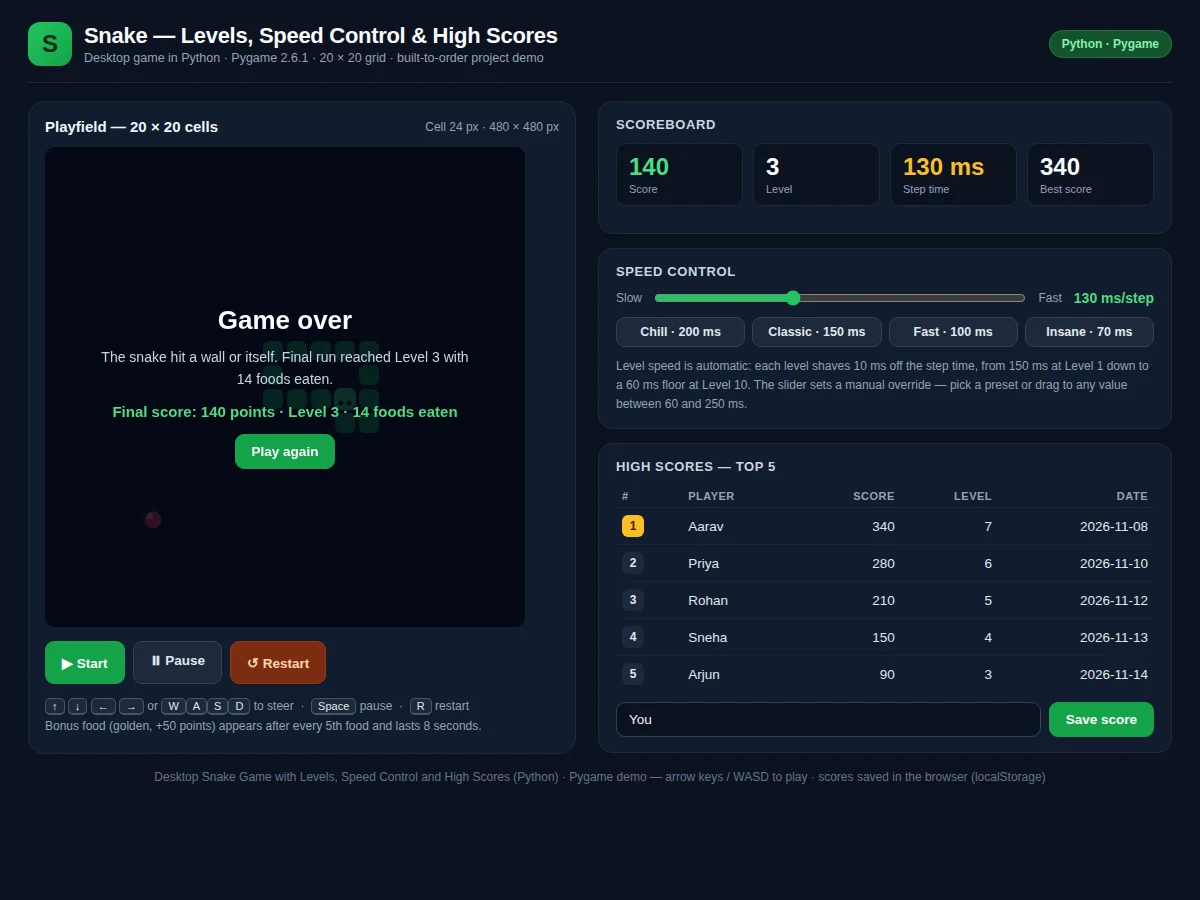
The game is a single Python program built on Pygame 2.6.1. It opens a 480 by 480 pixel window split into a 20 by 20 grid of 24 pixel cells, with a 3-segment snake in the centre moving right and one red food on a random free cell. A clock-driven loop moves the snake one cell per step, 150 milliseconds per step at Level 1, then checks three things: food reached, wall hit, or its own body hit. Eating adds 10 points and grows the snake by one segment; every 5 foods eaten raises the level by 1 and cuts 10 milliseconds off the step time, down to a 60 millisecond floor at Level 10. A golden bonus food worth 50 points appears after every 5th food and vanishes after 8 seconds. Score, level and step time show beside the playfield, and when the run ends a top-5 table updates from a JSON file saved on disk.
- The game opens a 480 × 480 px Pygame window and draws a 20 × 20 grid of 24 px cells; the snake starts as 3 segments in the centre, moving right.
- A clock-driven loop advances the snake one cell per step — 150 ms per step at Level 1 — paced by pygame.time.Clock so the step time stays steady.
- Arrow keys or WASD set the next direction; the input handler rejects a direct reversal so the snake cannot run into its own neck.
- When the head reaches the red food, the score rises by 10 points, the snake grows by one segment, and a new food spawns on a random free cell.
- Every 5 foods eaten raises the level by 1 and cuts 10 ms off the step time, down to a 60 ms floor at Level 10; a golden bonus food worth 50 points appears after every 5th food and lasts 8 seconds.
- Hitting a wall or any body segment ends the run; the game-over screen shows the final score, level and foods eaten.
- If the score makes the top 5, the player enters a name and the entry — score, level and date — is saved to a JSON file and shown in the high-score table on the next run.
- The step timing was bench-checked in the web demo: the 140 ms Level-2 target averaged 160.8 ms over 135 measured steps (range 130.4–221.4 ms) in headless Chromium; the gap is browser timer scheduling, and the Python build paces steps with pygame.time.Clock instead.
Tech stack:
- Python 3.11
- Pygame 2.6.1
- JSON high-score storage
- pygame.time.Clock game loop
- HTML5 canvas web demo
- Git
| Parameter | Value |
|---|---|
| Grid | 20 × 20 cells |
| Cell size | 24 px (design value) |
| Playfield | 480 × 480 px (design value) |
| Starting snake length | 3 segments |
| Starting speed | 150 ms per step at Level 1 |
| Speed per level | −10 ms per level, floor 60 ms per step at Level 10 |
| Foods per level | 5 foods |
| Score per food | 10 points |
| Bonus food | 50 points, appears every 5 foods, lasts 8 seconds |
| High-score table | Top 5 entries, saved in a JSON file |
| Python version | 3.11 or newer |
| Library | Pygame 2.6.1 |
| Bench-checked step timing | 140 ms target averaged 160.8 ms over 135 measured steps in headless Chromium (range 130.4–221.4 ms) |
Project features
Three systems carry this project beyond a basic Snake clone. First, the level system: every 5 foods eaten raises the level by 1, and each level cuts 10 milliseconds off the step time, from 150 milliseconds at Level 1 to a 60 millisecond floor at Level 10, so the game gets measurably harder the longer a run lasts. Second, the speed control: four presets — Chill at 200 milliseconds, Classic at 150, Fast at 100 and Insane at 70 — plus a manual slider covering 60 to 250 milliseconds per step, so a player can practise slowly or chase the top speed. Third, the persistent high-score table: the best 5 runs are saved with player name, level reached and date, so scores survive between sessions and a class can compare results. Around these three sit the supporting systems — a 50-point bonus food, pause and restart, wall and self-collision detection, and a live scoreboard — each small, each demonstrable.
- [Level progression] Every 5 foods eaten raises the level by 1, up to Level 10 and beyond; each level cuts 10 ms off the step time, so difficulty rises measurably through a run.
- [Speed control] Four presets — Chill 200 ms, Classic 150 ms, Fast 100 ms, Insane 70 ms per step — plus a manual slider from 60 to 250 ms per step for any pace in between.
- [Persistent high-score table] The best 5 runs are saved with player name, score, level reached and date in a JSON file, so scores survive between sessions.
- [Bonus food] A golden food worth 50 points appears after every 5th food eaten and disappears after 8 seconds if not collected.
- [Pause, restart and game-over flow] Space pauses the run, R restarts it, and the game-over screen shows the final score, level and foods eaten, with a name entry when the score qualifies for the top 5.
- [Wall and self-collision detection] The run ends when the snake hits a wall or its own body; the grid, food spawn and collision checks live in one readable module.
- [Keyboard controls] Arrow keys or WASD steer the snake; the input handler rejects a direct reversal, so the snake cannot turn back into its own neck.
- [Live scoreboard] Score, level, current step time and best score update every step and stay visible beside the playfield.
What is included
- Complete Python source code (Pygame 2.6.1) with the level system, speed control and JSON high-score storage
- Working browser demo of the same game rules, for showing the game without installing anything
- Project report PDF (background, grid and level arithmetic, methodology, timing measurements, results)
- PPT presentation for final review
- Viva Q&A preparation document (game loop, grid mathematics, event handling, file persistence)
Limitations & prerequisites
- Single-player only — no online multiplayer or two-player mode in the base build.
- Fixed 20 × 20 grid — the playfield size is a design constant, not a setting.
- Keyboard controls only — no touch or mobile version; the game needs a keyboard.
- No sound effects in the base build — movement, eating and level-up are silent.
- At the 60 ms step-time floor (Level 10), the snake crosses the 20-cell grid in 1.2 seconds — the practical reflex limit with arrow keys.
- The Python build needs Python 3.11 or newer and a one-time
pip install pygame(Pygame 2.6.1); it does not run in a browser without the separate web demo. - High scores are stored locally in a JSON file — scores do not sync between computers.
Frequently Asked Questions
Is this project suitable for a final-year project?
Yes — it fits Computer Science and IT programmes. It demonstrates game-loop design, grid mathematics, event handling, state management and file persistence in one small, complete program, and the levels, speed control and high-score systems give a reviewer three distinct features to question in the viva. The report documents the grid arithmetic, the level-speed ladder and the timing measurements, so the student can defend every number on the page.
What is the main technology used?
Python 3.11 with Pygame 2.6.1, the library that draws the window, reads the keyboard and drives the game loop. Pygame was chosen because the whole game — grid, snake, food, collision checks and scoreboard — fits in a single readable module, and its clock keeps the step timing steady at the configured milliseconds per step. High scores are saved with Python's built-in JSON module, so no database or extra dependency is needed. The browser demo in the delivery is a JavaScript replica of the same rules for showing the game without installing anything.
Can the speed and levels be changed?
Yes — both are configuration, not hard-coded behaviour. The starting step time (150 ms), the per-level cut (10 ms), the floor (60 ms) and the foods per level (5) are constants at the top of the game module, so a student can retune the whole difficulty curve by editing four numbers. The four speed presets and the 60–250 ms slider are part of the shipped interface, so the change is visible immediately without editing code.
How are high scores saved?
The top 5 scores are written to a JSON file on the player's computer after every qualifying run, with the player name, score, level reached and date. The file is read back when the game starts, so the table survives closing and reopening the game. Only the best 5 entries are kept, and a lower score never overwrites a higher one. The web demo uses the browser's local storage for the same table, since a web page cannot write to disk.
Does this project need the internet?
No — the desktop game runs fully offline once Python and Pygame are installed. The grid, levels, speed control and high-score file all work with no network connection, and the game can be demonstrated in a lab or viva room without Wi-Fi. The only online step is the one-time pip install pygame to fetch the library. The browser demo also runs offline after download.
What are the main limitations?
It is a single-player, single-window desktop game with keyboard controls only — there is no online multiplayer, no touch or mobile version, and no sound effects in the base build. The playfield is fixed at 20 by 20 cells, so the difficulty ceiling is the 60 ms step-time floor. At 60 ms per step the snake crosses the 20-cell grid in 1.2 seconds, which is the practical reflex limit with arrow keys. Sound, touch controls and a larger grid are listed as future scope in the report.
Components & software requirements
- Python 3.11
- Pygame 2.6.1
- JSON high-score storage
- pygame.time.Clock game loop
- HTML5 canvas web demo
- Git
Delivery information
Built-to-order project. Delivery timeline is shared after order confirmation based on current queue.
Support terms
Complete documentation, setup guide, and viva preparation included. Support for setup and explanation provided.
Download free synopsis (PDF)
Enter your name and WhatsApp number — the synopsis PDF downloads immediately. We may send occasional project updates on WhatsApp; no spam.