
More project photos (2)
The problem
Students and developers copy dozens of fragments every day — code snippets, links, terminal commands, email replies, reference notes — and the operating system remembers only the last one. Windows' built-in clipboard history is session-limited, unsearchable in any serious way, and forgets everything on reboot; anything copied an hour ago is effectively lost, and frequently reused text gets retyped or hunted down again and again. The polished third-party clipboard managers that solve this are usually paid, closed-source, or cloud-synced — all three are reasons students avoid them. This project builds a free, local-first alternative: a Windows desktop application that automatically captures every text copy into a searchable history with the source application, timestamp and category attached, and maintains a snippet library where reusable text lives permanently with one-click paste. Search is powered by a real full-text index, a global hotkey brings up a quick-paste popup from anywhere, and privacy is handled honestly — password fields are skipped, sensitive apps can be excluded, and the database can be encrypted.
Copies text in any Windows app; the copy event starts the pipeline.
Follow the working sequence
How it works
- The clipboard monitor thread watches the Windows clipboard sequence number and wakes on every change.
- New text is read, hashed and compared against recent clips — exact duplicates are skipped so re-copies don't spam the history.
- The rule-based classifier examines the text (indentation, code keywords, URL patterns, command shapes) and assigns a category, which the user can change.
- The clip is inserted into SQLite with its metadata, and the FTS5 index is updated so it is searchable immediately.
- The PyQt6 interface refreshes the history list; the global hotkey service stays armed so Ctrl+Shift+V can raise the quick-paste popup from any app.
- Copying a snippet or pressing a clip's Copy button writes that text back to the OS clipboard — the user pastes with Ctrl+V as normal.
Tech stack:
- Python 3.10+
- PyQt6
- pywin32 · clipboard + hotkey hooks
- SQLite · FTS5 full-text search
- Threading · background monitor
- PyInstaller · exe packaging
- Regex content classifier
- JSON · CSV export
| Parameter | Value |
|---|---|
| Platform | Windows 10/11 (primary target; Linux via xclip polling as reduced-fidelity option) |
| Capture | Every text clipboard change, with timestamp + source application |
| Storage | Local SQLite database, FTS5 full-text index |
| History limit | 1,000 clips by default (configurable; design target) |
| Search | Full-text over all clips; sub-second result design target on a typical student laptop |
| Quick-paste hotkey | Ctrl+Shift+V default (configurable) |
| Privacy | Password-field skipping, excluded-apps list, 30-day trash, optional AES-256 database encryption |
| Packaging | Single .exe installer via PyInstaller |
| Footprint | Approximately 50 MB installed; a 1,000-clip database is a few MB (expected) |
| Network | None required — fully offline, local-first by design |
Project features
- [Automatic clipboard capture] A background monitor watches the Windows clipboard and records every text copy with its timestamp, source application name and a content hash for deduplication, so the history stays clean across sessions and reboots.
- [Full-text searchable history] Every clip is indexed with SQLite FTS5, so the search box returns relevant clips with a design target of well under a second; filter chips narrow results by content type (Text, Code, Links, Images) and time range (Today, This week).
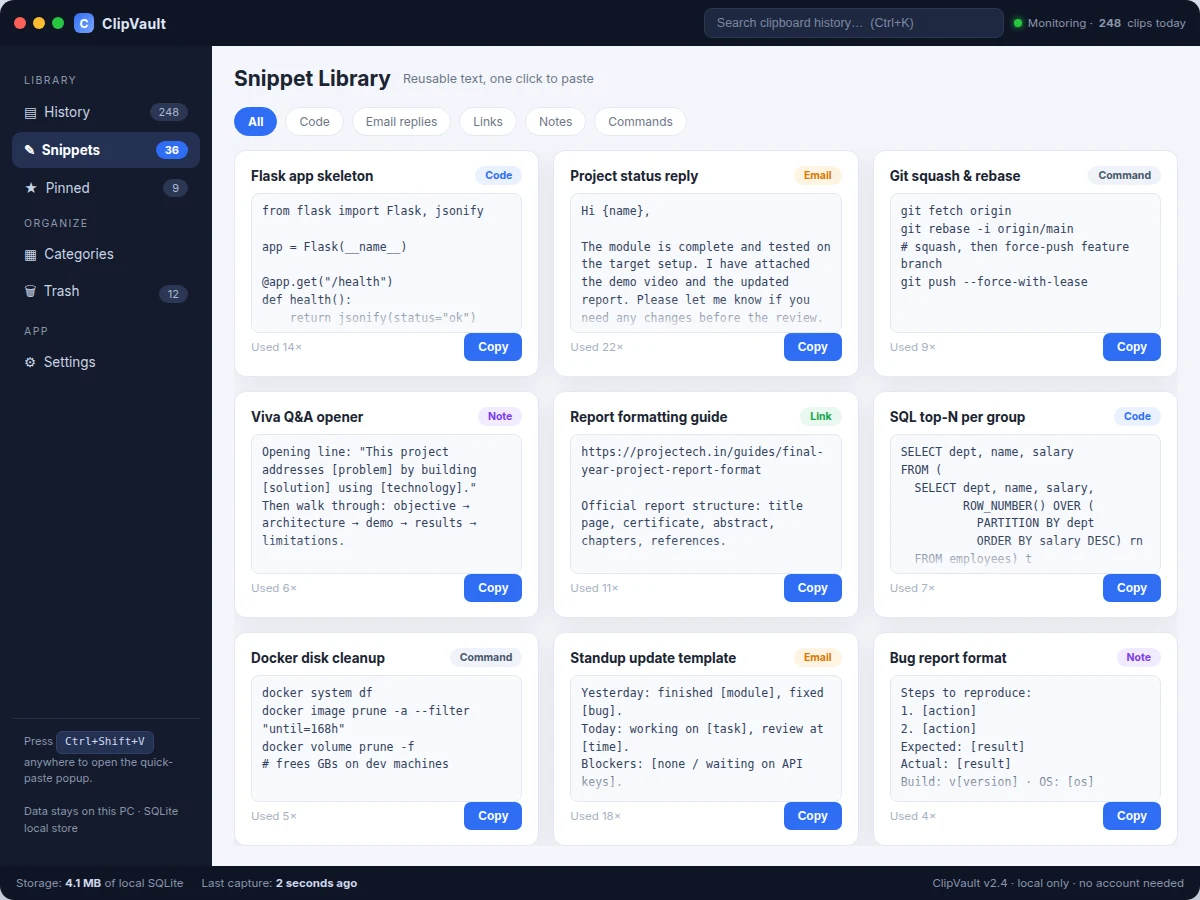
- [Snippet library with one-click paste] Reusable text — code templates, email replies, shell commands, links, notes — lives in a categorized grid with per-snippet usage counters; the Copy button writes the snippet straight back to the clipboard, ready to paste.
- [Pinning, tags and auto-categorization] Frequently used clips can be pinned, tagged, and are automatically sorted into Code, Links, Notes, Emails and Commands by a rule-based classifier that the user can correct per clip.
- [Global quick-paste hotkey] Ctrl+Shift+V (configurable) opens a compact search popup from any application, so a clip is pasted without ever switching windows.
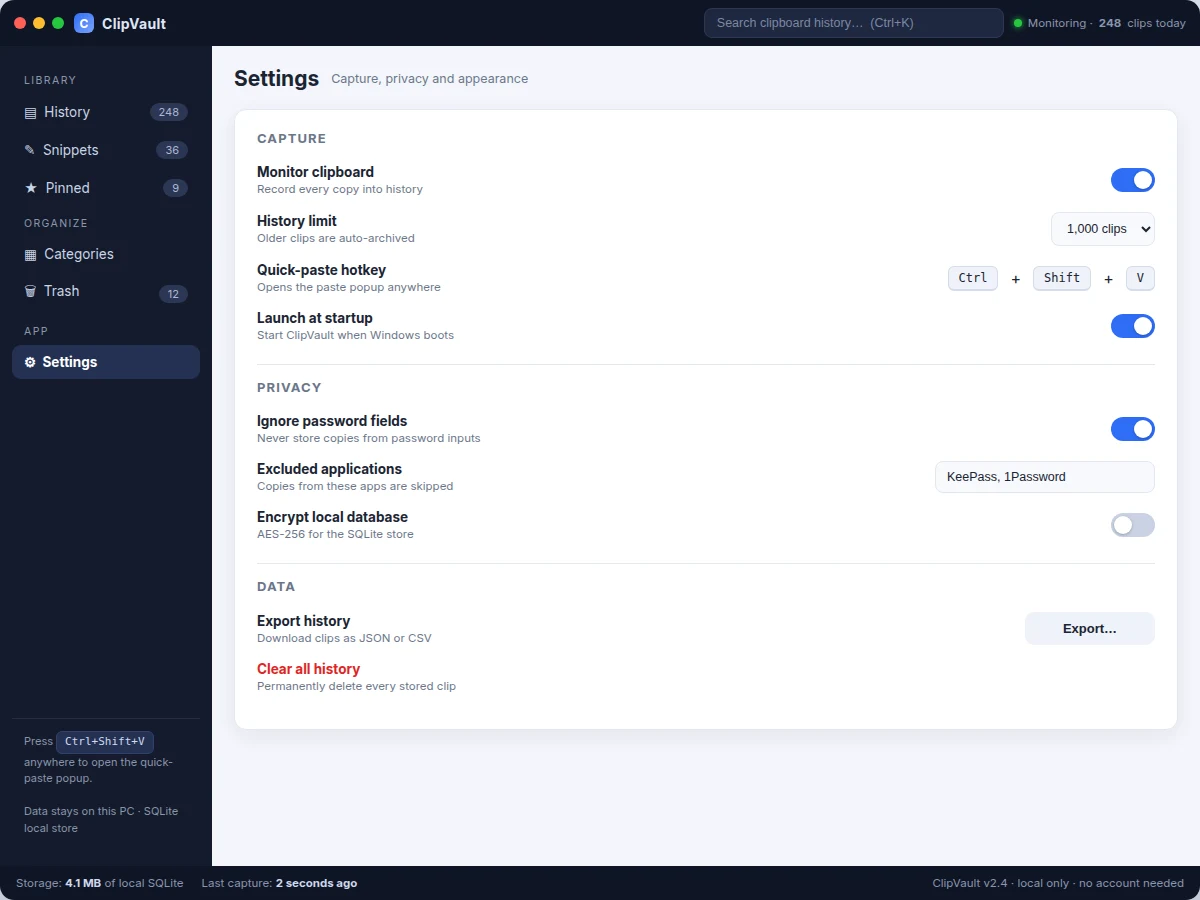
- [Privacy-first local storage] Password fields are skipped where the OS exposes control types, named applications can be excluded from capture entirely, deleted clips sit in a 30-day trash, and the SQLite store can be encrypted with AES-256. No account, no cloud, no telemetry.
- [Rich clip detail panel] Selecting a clip shows its full preview, metadata (source app, time, character and line counts, category), editable tags, and a "previously copied nearby" list for context.
What is included
- Complete ClipVault desktop application source code (Python + PyQt6)
- Packaged Windows installer (.exe) built with PyInstaller
- SQLite schema with the FTS5 search index and sample seed data
- Setup and build guide (dependencies, running from source, rebuilding the installer)
- Project report PDF (background, clipboard APIs, database design, classifier rules, privacy model)
- PPT presentation for final review
- Viva Q&A preparation document (OS clipboard APIs, FTS indexing, threading, PyQt6, packaging)
Limitations & prerequisites
- Windows-first build: the base project targets Windows 10/11; Linux capture via xclip polling is a reduced-fidelity option, and macOS is not in the base scope.
- Text clips only in the base build — image and file-path clips with thumbnails are listed as future scope, not implemented.
- Password-field skipping depends on what the OS exposes about control types; it is a best-effort filter, not a guarantee — the excluded-applications list is the reliable control for password managers.
- The global hotkey can clash with shortcuts in other applications; it is configurable, but resolving a clash is the user's job.
- Search-speed and footprint figures are design targets measured on the buyer's own machine during the demo, not lab-certified benchmarks.
- Capture requires a logged-in user session; nothing is recorded on the lock screen or in other user accounts.
- This is a productivity utility, not a security product: database encryption protects data at rest, not on a compromised machine.
Frequently Asked Questions
What exactly does it capture?
Every piece of text you copy — from VS Code, the browser, terminals, documents — stored with the time, the source application and an automatic category. Exact duplicates are skipped, and you can delete anything or clear the history at any time.
Is any of my clipboard data sent to the internet?
No. The database lives on your own PC, the app needs no account and makes no network calls at all. Export is a local JSON/CSV download you trigger yourself.
How is this different from the Windows clipboard history (Win+V)?
Win+V is session-limited, barely searchable and forgets on reboot. ClipVault keeps a persistent, full-text-searchable history across reboots, adds a snippet library with usage tracking, pinning, tags, automatic categories, a global quick-paste hotkey and privacy controls.
Will it store passwords I copy?
It skips password-masked fields wherever the OS exposes the control type, and you can exclude password managers (KeePass, 1Password and similar) by name so nothing from them is ever recorded. For full certainty, excluded apps are the control to rely on.
Can the hotkey and history size be changed?
Yes — both are in Settings, along with launch-at-startup, the excluded-applications list, database encryption and export. The demo walks through each option.
Is this project suitable for a final-year project?
Yes — for Computer Science, IT and Software Engineering programs. It demonstrates OS-level integration (clipboard APIs, global hotkeys), database design with full-text search, multithreading, desktop UI engineering with PyQt6 and application packaging — all strong viva material. Suitable for B.E./B.Tech final-year projects in Computer Science, Information Technology and Software Engineering.
Components & software requirements
- Python 3.10+
- PyQt6
- pywin32 · clipboard + hotkey hooks
- SQLite · FTS5 full-text search
- Threading · background monitor
- PyInstaller · exe packaging
- Regex content classifier
- JSON · CSV export
Delivery information
Built-to-order project. Delivery timeline is shared after order confirmation based on current queue.
Support terms
Complete documentation, setup guide, and viva preparation included. Support for setup and explanation provided.
Download free synopsis (PDF)
Enter your name and email — the synopsis PDF downloads immediately. We may send occasional project updates; no spam, unsubscribe anytime.