
More project photos (2)
The problem
Millions of daily-wage workers find work through labor chowks and word of mouth — showing up at dawn hoping a contractor needs hands that day. No work means no pay, and there is no record of wages promised versus wages paid. General job portals ignore this segment entirely: they assume resumes, email IDs and English fluency. This project builds a job finder designed for how daily-wage work actually happens: hyperlocal listings (within a few km), daily wage stated upfront on every card, timing and distance visible before tapping, one-tap apply with no resume, and application tracking so the worker knows whether the contractor responded. Contractor verification badges and ratings add a layer of trust to an informal market. The demo ships with realistic listings across six work categories, a full job-detail flow with requirements, and an applications screen showing accepted and pending states.
How it works
- The home feed loads today's listings near the worker's location, each card showing work title, contractor, wage, timing and distance.
- Filter chips narrow the feed by work category; the list re-renders instantly.
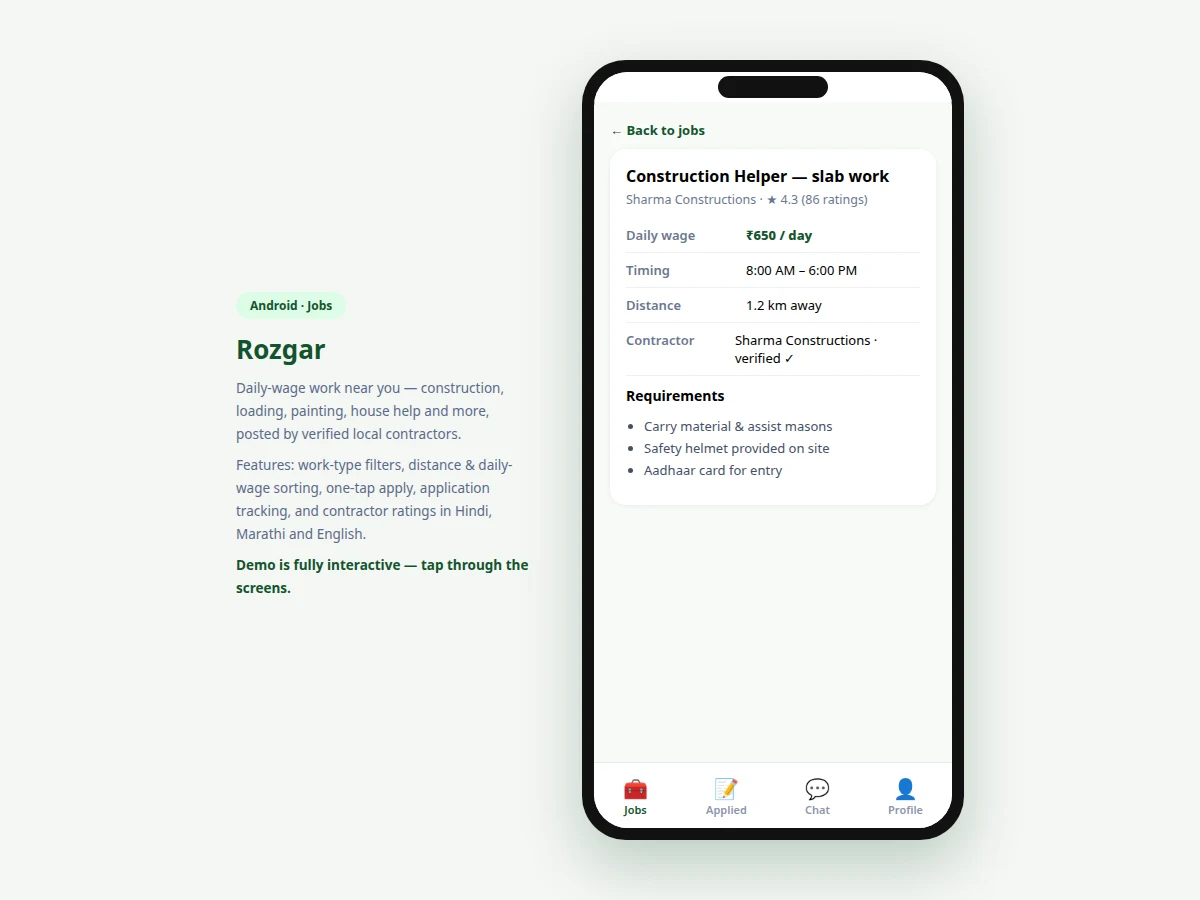
- Tapping a card opens the detail screen: full requirements, contractor verification status and rating, wage, timing and distance.
- The Apply button sends the application to the contractor (demo: recorded locally with a pending status).
- The confirmation screen explains what happens next — contractor response within ~2 hours via SMS and app notification.
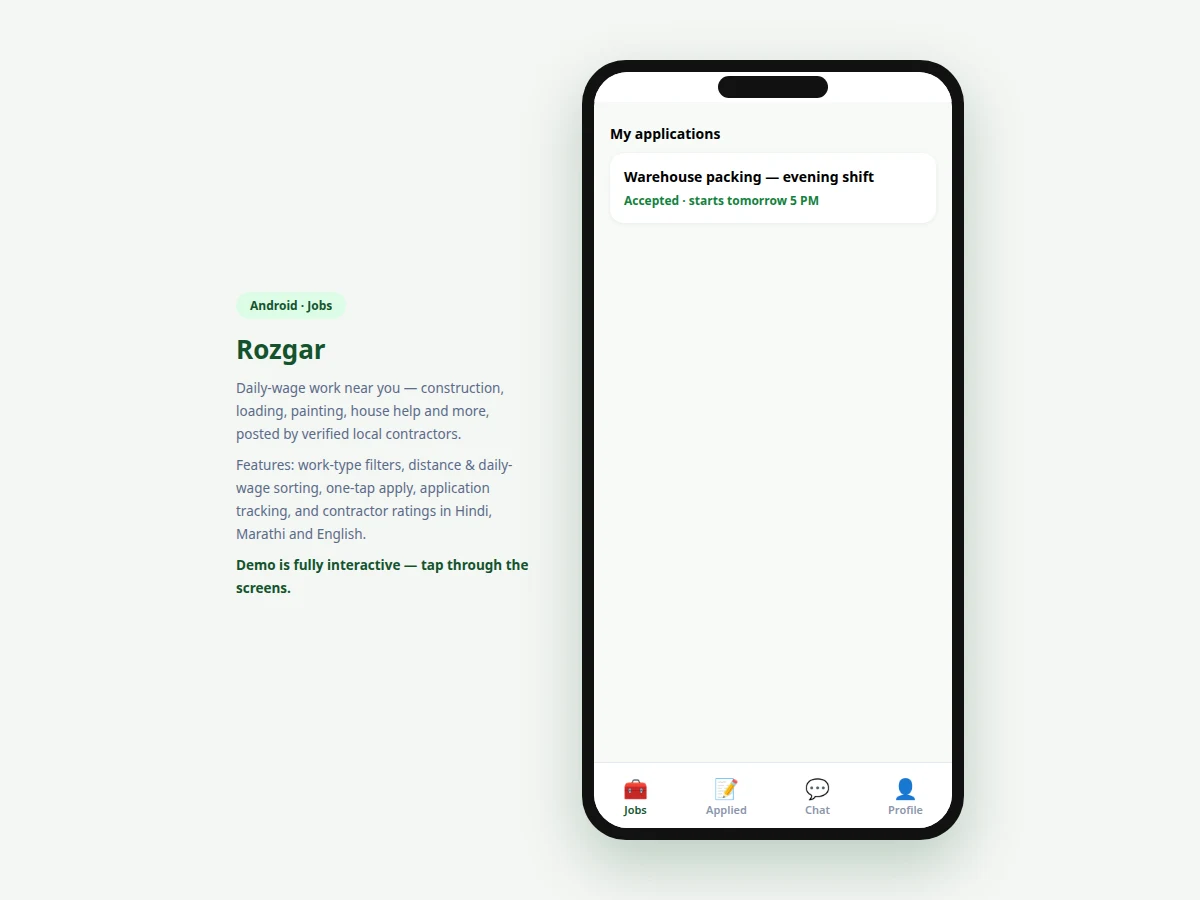
- The Applications tab lists every application with its current status, accepted ones showing start time.
Tech stack:
- Android (Kotlin) — native app target
- MVVM architecture
- REST API design (listings, applications, contractors)
- Location services (distance sorting)
- Push notifications + SMS fallback (status updates)
| Parameter | Value |
|---|---|
| Screens | 4 (feed, job detail, confirmation, applications) |
| Work categories | 6 (Construction, Painting, Loading, Farm, Shop, Security) |
| Demo listings | 6 realistic postings with wages ₹500–800/day |
| Apply flow | One tap, no resume |
| Languages | English + Hindi/Marathi cues (design target) |
| Target | Android 8.0 (API 26) and above (design target) |
| Backend | REST API design included; demo runs on local data |
Project features
- [Hyperlocal job feed] Listings sorted by distance with wage, timing and distance on every card — the three facts a worker needs before anything else.
- [Work-type filters] One-tap chips for Construction, Painting, Loading, Farm, Shop and Security filter the feed instantly.
- [Upfront daily wage] Every listing states the per-day wage prominently; no "salary discussed later" listings allowed by design.
- [Job detail pages] Requirements list, contractor name with verification badge and rating, exact timing, and distance from the worker.
- [One-tap apply] No resume, no cover letter — a single tap sends the application; the contractor typically responds within hours.
- [Application tracking] Applied, accepted and pending states with plain-language status lines ("Accepted · starts tomorrow 5 PM").
- [Multilingual cues] Hindi/Marathi labels alongside English ("रोज़गार · Rozgar") and large touch targets for first-time smartphone users.
What is included
- Complete Android app source code (Kotlin)
- REST API design document (listings, applications, contractor verification)
- App icon and graphic assets
- Project report PDF (background, inclusive UX design, matching flow, methodology)
- PPT presentation for final review
- Viva Q&A preparation document (Android, location services, multilingual UI, trust design)
Limitations & prerequisites
- The demo runs on local data; live contractor postings and real applications need the backend, whose API is designed and documented but not hosted.
- Contractor verification in production needs a real KYC process — the demo shows the badge UI, not a verification pipeline.
- Wage-payment disputes and escrow are out of scope; the app connects worker and contractor but does not process payments in this version.
- Location accuracy depends on the phone's GPS; distance figures in the demo are illustrative.
- Chat between worker and contractor is designed but not implemented — status updates go via SMS/push in the current scope.
Frequently Asked Questions
Who is this app actually for?
Daily-wage workers — construction helpers, loaders, painters, farm labour — who today depend on labor chowks and middlemen. The whole UX (big buttons, upfront wages, Hindi/Marathi cues) is designed for first-time smartphone users.
How do workers apply without a resume?
They don't need one. Contractors hiring daily-wage help care about availability and proximity, not CVs — so applying is one tap, and the contractor sees the worker's profile with past ratings.
How is contractor fraud handled?
The design includes contractor verification badges, public ratings from workers, and wage-upfront rules. Real KYC integration is specified as the production step.
Does the app take a commission?
The project scope keeps the marketplace free for workers; the monetization model (contractor posting plans) is discussed in the report's future-scope section, not implemented.
What about workers without smartphones?
The design includes SMS fallback for application status, so a worker with a feature phone still gets "accepted" messages. Full app features need Android.
Is this project suitable for a final-year project?
Yes — for Computer Science, IT and mobile-development programs. It demonstrates inclusive UX design, location-based listing, application state tracking and a socially meaningful problem. Suitable for B.E./B.Tech final-year projects in Computer Science, Information Technology and Mobile Application Development.
Components & software requirements
- Android (Kotlin) — native app target
- MVVM architecture
- REST API design (listings, applications, contractors)
- Location services (distance sorting)
- Push notifications + SMS fallback (status updates)
Delivery information
Built-to-order project. Delivery timeline is shared after order confirmation based on current queue.
Support terms
Complete documentation, setup guide, and viva preparation included. Support for setup and explanation provided.