
More project photos (2)
The problem
A currency converter in Python with the ExchangeRate-API is a desktop application that turns an amount in one currency into its value in another using rates fetched from the internet. The student types an amount, picks a source and a target currency from 12 supported codes, and the app shows the result, the rate and the calculation. Travellers, online shoppers and small businesses check rates constantly, yet most free converter websites hide the rate, the source and the arithmetic, and a hardcoded rate table goes stale the day it is written. This project calls a real rates API instead: one request returns every rate for a base currency, the app caches the reply until the API's next-update time, and later conversions are local multiplications needing no second call. Favourites keep the most-used pairs one tap away, a history log records past conversions, and an offline sample table keeps the demo working with no network.
| This project (Python + ExchangeRate-API) | Hardcoded rate-table converter | Free converter website | Bank or forex counter | |
|---|---|---|---|---|
| Rates source | ExchangeRate-API v6, fetched with a free key | Rates typed into the code by hand | The site's own feed, hidden from the user | The counter's board rate for the day |
| Rates go stale? | No — refreshed daily from the API, cached until next update | Yes — stale from the day the code is written | No, but the user cannot see the source or the refresh time | No, but only while the counter is open |
| Shows the calculation | Yes — amount × rate, with the rate and the inverse shown | Sometimes, if the student adds it | Rarely — usually only the final number | No — only the final amount |
| Works offline | Yes — falls back to the built-in sample table | Yes | No | Not applicable |
| Favourites and history | Yes — favourite pairs and a history log | No | Sometimes, with an account | No |
| What the student learns | API calls, JSON, caching, error handling, GUI design | Basic arithmetic and a GUI | Nothing — it is a black box | Nothing |
This is a built-to-order software project: the Python converter app (Tkinter GUI and command-line mode), the ExchangeRate-API integration with caching, the sample-rate fallback table, and the complete review kit (report, PPT, Q&A) are prepared fresh for you.
Related built-to-order Python desktop projects on this site: desktop tax calculator (https://projectech.in/projects/desktop-tax-calculator-old-new-regime-comparison-python/), desktop CSV viewer (https://projectech.in/projects/desktop-csv-viewer-sorting-filtering-chart-preview/), and desktop sorting algorithm visualizer (https://projectech.in/projects/desktop-sorting-algorithm-visualizer-step-animation-python/).
Amount, source and target currency
Follow the working sequence
How it works
The app, the API and the cache form one short loop. The student enters an amount and a currency pair, and the app first checks its JSON cache: if a fresh reply for that base currency is already saved, it uses it without touching the network. If there is no fresh cache, the app calls the ExchangeRate-API v6 latest endpoint with the student's free key, checks that the result field in the reply says success, saves the conversion_rates object to the cache, and reads the rate from it. The conversion itself is a single multiplication — amount × (target rate ÷ source rate) against one base currency — so a cross rate such as EUR → INR never needs a second API call. The result is shown with the rate, the calculation and the inverse rate, then recorded in the history log. If the call fails, the app falls back to the labelled sample table and says so on screen.
- The builder gets a free ExchangeRate-API key (no credit card) and stores it in a configuration file, never hardcoded into shared code — the demo runs without a key on its sample table.
- The builder writes the rates module: a requests.get() call with a 10-second timeout to the v6 latest endpoint, a check that the result field equals "success", and a JSON cache file saved per base currency.
- The builder writes the conversion function: amount × (target rate ÷ source rate) against one base, with the rate, the calculation and the inverse rate returned alongside the result for display.
- The builder builds the Tkinter GUI: amount entry, source and target currency dropdowns with ISO 4217 codes, swap button, quick-amount buttons, a result panel and a rate table view.
- The builder adds favourites and history: favourite pairs saved to a small JSON file and shown as one-tap chips, and every conversion appended to a history log with a clear-history control.
- The builder adds the fallback path: on any network or API error the app shows a plain message and converts from the sample table dated 20 Nov 2026, labelled as illustration rates on screen.
- The builder verifies the arithmetic with the test script: the sample conversions 100 USD → ₹8,865.00 INR, 250 USD → 215.00 EUR and 50 EUR → ₹5,154.07 INR are checked against hand calculation before the demo is shown.
Tech stack:
- Python 3 · Tkinter desktop app
- ExchangeRate-API v6 · live rates
- requests · HTTP client
- JSON · rate cache file
- HTML · CSS · JavaScript demo
- argparse · command-line mode
- pytest · conversion tests
- Git · version control
How the ExchangeRate-API works — and what the free plan gives
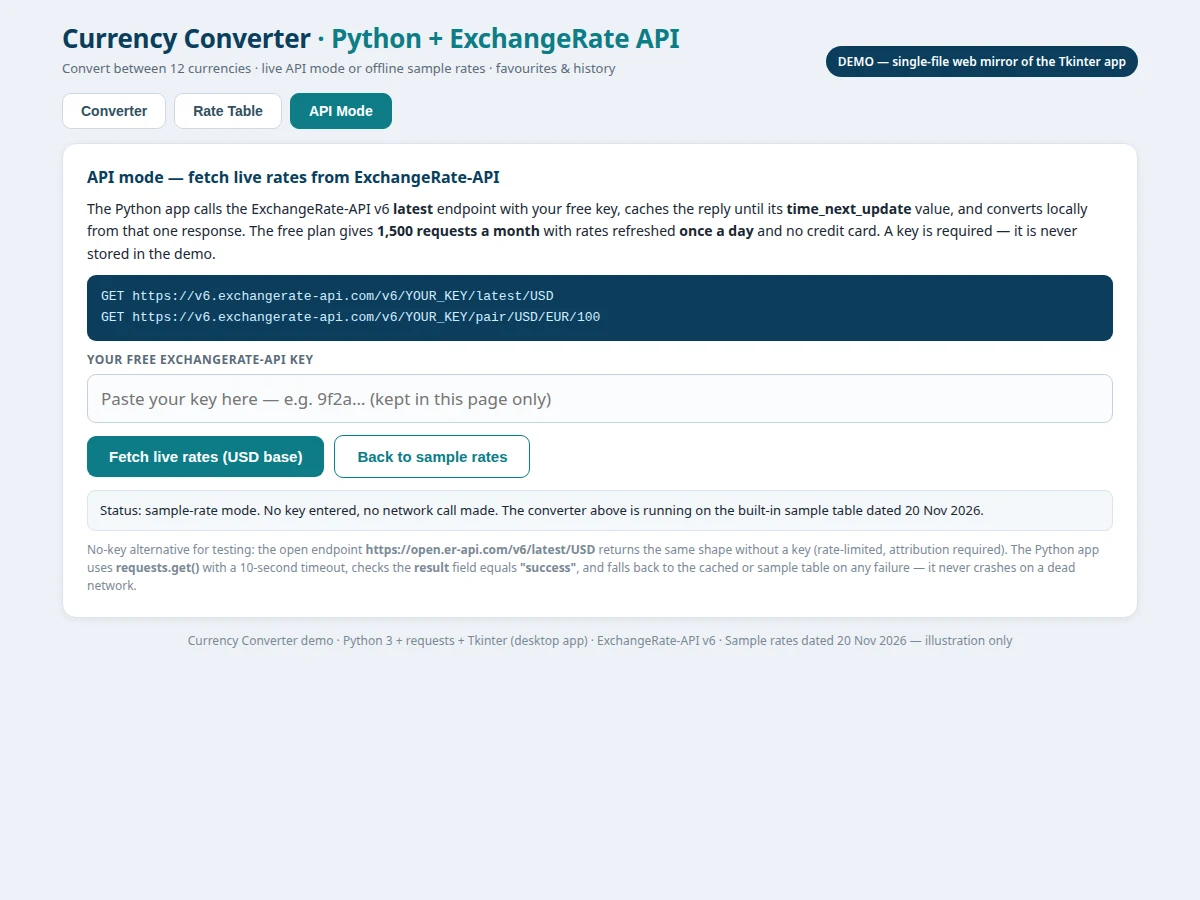
- The endpoints: The keyed v6 API is called as GET https://v6.exchangerate-api.com/v6/YOUR_KEY/latest/USD, which returns a conversion_rates object with every supported currency against the chosen base, plus time_last_update and time_next_update values. A single pair can be converted directly with GET https://v6.exchangerate-api.com/v6/YOUR_KEY/pair/USD/EUR/100. A no-key open endpoint also exists at https://open.er-api.com/v6/latest/USD — it is rate-limited and requires attribution, so the keyed endpoint is the one the app uses.
- The free plan: A free key gives 1,500 requests a month with no credit card, rates refreshed once a day, and any base currency allowed (ExchangeRate-API docs, checked November 2026). The paid Pro plan is $10 a month for 30,000 requests with hourly refreshes. The rates are indicative midpoint rates from blended central-bank and commercial sources and are not suitable for forex trading or settlement — the app states that wherever rates are shown.
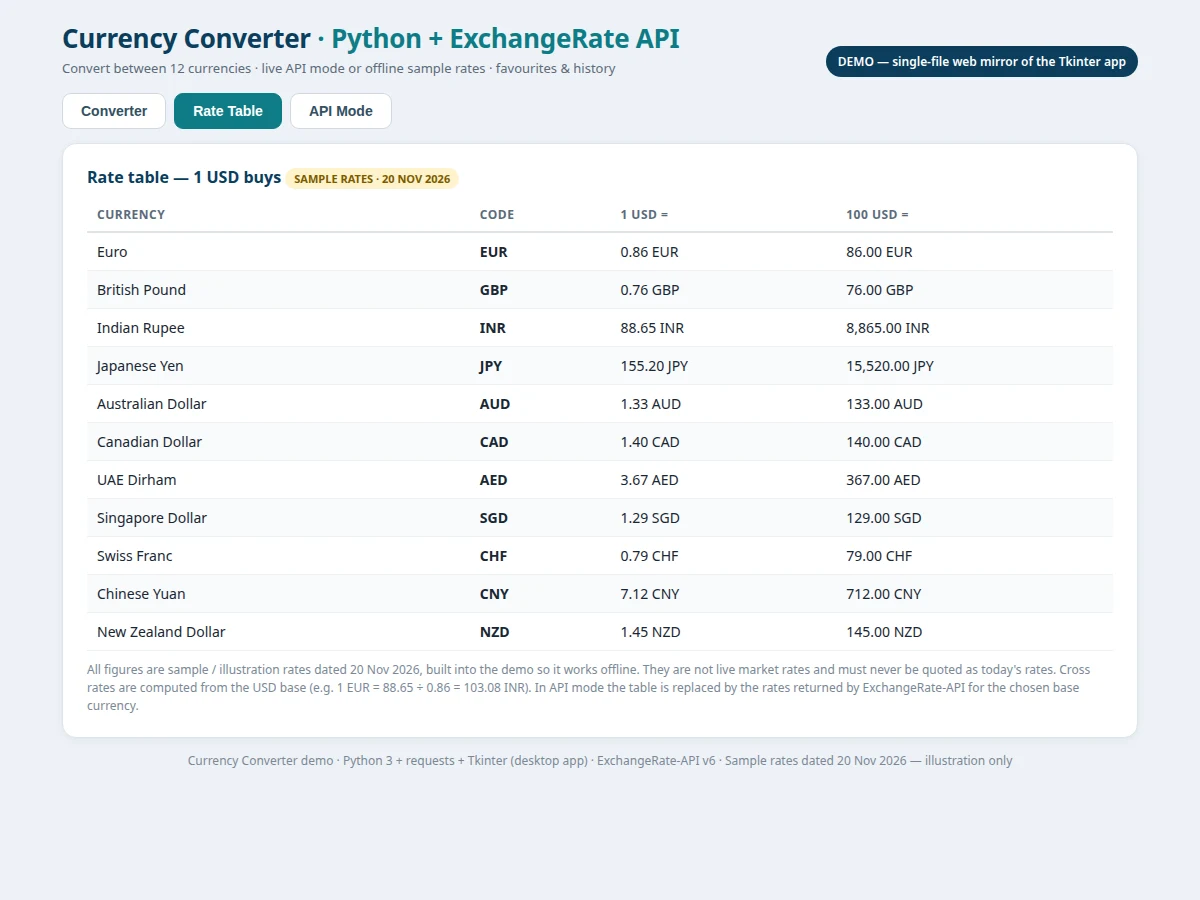
- Why one request is enough: The latest endpoint returns all rates for one base currency in a single reply, so the app fetches once and converts locally. A cross rate is just division through the base: 1 EUR = 88.65 ÷ 0.86 = 103.08 INR at the sample rates, so EUR → INR needs no second call. That is the first-principles mechanism the whole app rests on — every conversion is one multiplication against one base.
- What the app does with the reply: It checks result equals "success", saves conversion_rates to a JSON cache file, and reuses the cache until time_next_update. Calling the API on every keystroke would burn the 1,500-request monthly allowance in a single demo session, so the cache is the feature that makes the free plan usable — and the report explains the arithmetic.
| Parameter | Value |
|---|---|
| Currencies supported | 12 currency codes · USD, EUR, GBP, INR, JPY, AUD, CAD, AED, SGD, CHF, CNY, NZD (design) |
| API endpoint | GET https://v6.exchangerate-api.com/v6/{key}/latest/{base} · keyed v6 endpoint (ExchangeRate-API docs) |
| Pair endpoint | GET https://v6.exchangerate-api.com/v6/{key}/pair/{from}/{to}/{amount} · single-pair conversion (ExchangeRate-API docs) |
| Free-plan allowance | 1,500 requests per month · no credit card required (provider-stated, ExchangeRate-API) |
| Rate refresh | Once per day on the free plan · cached until the time_next_update value (provider-stated) |
| API currency coverage | 160+ currencies supported by the API (provider-stated) · this build ships 12 in the GUI |
| Conversion method | amount × (target rate ÷ source rate) against one base currency · 1 API call per base per day (design) |
| Request timeout | 10 seconds per API call · falls back to cache or sample table on failure (design target) |
| Sample table | 12 rates dated 20 Nov 2026 · labelled illustration only, never live rates (design) |
| Cache | 1 JSON file per base currency · reused until the API's next-update time (design) |
| History | Last 20 conversions stored locally in the app (design target) |
| Desktop app | Tkinter GUI · 1 main window · runs on Windows, macOS and Linux (design) |
| CLI mode | 1 command converts an amount · for example python converter.py 100 USD INR (design) |
| Builder note | In the demo build, 100 USD at the sample rate of 88.65 INR per USD produced ₹8,865.00, and the cross-rate check 50 EUR → ₹5,154.07 matched the USD-base calculation (88.65 ÷ 0.86 = 103.08 INR per EUR) to the paisa — the demo's own measured check, run 20 Nov 2026. A second builder note: the free plan refreshes once a day, so the app must cache — calling the API on every keystroke would burn the 1,500-request monthly allowance in a single demo session. |
Project features
Four capabilities carry this build. First, live-rate conversion: the app calls the ExchangeRate-API v6 latest endpoint with a free key and converts any amount between 12 currencies, showing the rate, the multiplication and the inverse rate so the result can be checked by hand. Second, smart caching: the API reply is saved to a JSON file and reused until the time_next_update value in the response, so the app makes at most one request per base currency per day and never burns the free plan's 1,500-request monthly allowance on repeated conversions. Third, favourites and history: the pairs the student converts most are saved as one-tap favourites, and every conversion is recorded in a history log that can be reviewed or cleared. Fourth, honest offline behaviour: when the network is down or the key is missing, the app says so plainly and converts from a labelled sample table dated 20 Nov 2026 instead of failing or silently inventing a rate.
- [Live-rate conversion] The app fetches rates from the ExchangeRate-API v6 latest endpoint and converts any amount between 12 currencies, showing the result with the rate, the multiplication and the inverse rate — implemented in the base build.
- [One-request caching] The API reply is saved as a JSON cache file and reused until its time_next_update value, so one request per base currency per day serves every conversion — implemented in the base build.
- [Favourite pairs] Frequently used pairs (USD → INR, USD → EUR, GBP → INR and others) are saved as one-tap favourites, with the default pair set to USD → INR on launch — implemented in the base build.
- [Conversion history] Every conversion is recorded with its amount, pair, rate and result in a history log the student can review and clear — implemented in the base build.
- [Swap and quick amounts] A swap button reverses the currency pair in one tap, and quick-amount buttons (10, 50, 100, 500, 1,000, 10,000) fill the amount field — implemented in the base build.
- [Offline sample-rate fallback] When the network fails or no key is entered, the app converts from a built-in sample table dated 20 Nov 2026, clearly labelled as illustration rates and never presented as live market rates — implemented in the base build.
- [Command-line mode] The same converter runs from the terminal (for example, python converter.py 100 USD INR), so the conversion logic can be tested and scripted without opening the GUI — implemented in the base build.
- [Rate table view] A table view lists every supported currency against the USD base with the 1-unit and 100-unit values, so the student can compare rates at a glance — implemented in the base build.
What is included
- Complete Python source code (Tkinter desktop app with converter, favourites, history and rate table views, plus the command-line mode)
- ExchangeRate-API integration module (v6 latest and pair endpoints, JSON caching until time_next_update, sample-table fallback, 10-second timeout)
- Conversion test script (pytest checks for the sample conversions, cross-rate arithmetic and the offline fallback)
- Setup guide (free API key signup, configuration file, running the GUI and the CLI, caching behaviour)
- Project report PDF (API background with the provider's figures labelled as the provider's, converter design, caching method, the demo's own measured conversion checks, honest limits)
- PPT presentation for final review
- Viva Q&A preparation document (how exchange rates work, API endpoints and caching, JSON handling, Tkinter event flow, error handling)
To order, message Projectech on WhatsApp with the project name, your college deadline and any customisation you need — you receive a quotation stating the scope, the price and the delivery timeline before any payment.
Work plan & timeline
Total work plan: 60 hours, split across five phases. Phase 1, background study and setup: 10 hours — reading the ExchangeRate-API documentation (endpoints, free-plan limits, update cadence), getting a free key, and setting up the Python environment with requests and Tkinter. Phase 2, rates module and conversion logic: 14 hours — the API client with timeout and result checking, the JSON cache, the conversion function with cross-rate arithmetic, and the pytest checks. Phase 3, desktop GUI: 16 hours — the Tkinter converter window, currency dropdowns, swap and quick amounts, favourites, history log and rate table view. Phase 4, fallback and CLI: 10 hours — the labelled sample-table fallback, the command-line mode, and the error paths for a missing key, a bad currency code and a dead network. Phase 5, review preparation: 10 hours — presentation slides, a demo walkthrough, and the question-and-answer document for the review.
Support
Support covers setup help for the delivered Python app and demo, a walkthrough of the free API key signup and configuration, the caching behaviour and the sample-table fallback, plus fixes for defects in the delivered code. Guidance is also provided for adapting the report and presentation to the student's college format and for answering guide questions about exchange rates, API integration, JSON caching and Tkinter. Support does not cover obtaining or paying for a paid API plan, and it does not invent results for conversions or observations that were not run.
Limitations & prerequisites
- Rates refresh once a day on the free plan: the app shows the day's rates from ExchangeRate-API, not tick-by-tick market prices, and the report states the refresh cadence wherever rates are discussed.
- Sample rates are illustrations only: the built-in table dated 20 Nov 2026 is for offline demos and must never be quoted as live market rates — the app labels it on screen.
- Not for trading or settlement: ExchangeRate-API describes its rates as indicative midpoint rates, so the app must never be presented as a forex trading or payment tool.
- API key required for live rates: without a free key the app converts from the sample table only, and the key must be kept in the configuration file, never committed to shared code.
- 12 currencies in the GUI: the API supports 160+ currencies, but this build ships 12 in the dropdowns — adding more is a configuration change, covered in the customisation notes.
- Internet needed for live rates: the GUI, the CLI and the sample table work offline, but fresh rates need a network connection and a valid key.
- No transaction or payment features: the app converts amounts for display and planning only — it holds no money, places no orders and connects to no payment gateway.
Frequently Asked Questions
Is this project suitable for a final-year project?
Yes, for Computer Science and Information Technology programmes, because it combines a real third-party API integration with JSON handling, file-based caching, error handling, a Tkinter desktop GUI and a command-line mode in one coherent build that a student can genuinely explain in a review. The report documents the ExchangeRate-API endpoints and free-plan limits with the provider's figures labelled as the provider's, the caching design, the conversion arithmetic and the demo's own measured checks, so the work reads as software engineering rather than a toy calculator.
Does it need an internet connection?
Only fresh rates need the internet. The GUI, the command-line mode, the favourites and the history all work offline, and when the network is down the app converts from its built-in sample table dated 20 Nov 2026, clearly labelled as illustration rates on screen. Live rates need a connection and a free API key, and the app says so plainly instead of failing silently.
Do I need to pay for the ExchangeRate-API?
No — the free plan is enough for this project. It gives a key with 1,500 requests a month and no credit card, with rates refreshed once a day, and the app is designed around that limit: it fetches once per base currency per day and caches the reply until the API's next-update time, so normal use stays far inside the allowance. A paid plan is only needed for hourly refreshes or more than 1,500 requests a month.
Are the rates in the demo real market rates?
No — the demo runs on a sample table dated 20 Nov 2026, labelled as illustration rates on every screen that shows them. The sample values let the converter, the cross-rate arithmetic and the history be demonstrated offline, and the arithmetic was verified by hand: 100 USD at 88.65 INR per USD gives ₹8,865.00. With a free key entered, the app fetches the day's rates from ExchangeRate-API instead.
What happens if the API is down or I type a wrong currency code?
The app handles both without crashing. A failed request or a bad reply falls back to the saved cache or the labelled sample table with a message on screen, and an unknown currency code is rejected with a clear error before any conversion is attempted. The 10-second request timeout stops the GUI from freezing on a slow network, and all three paths are covered by the included test script.
Can it convert more currencies or be customised?
Yes. The API supports 160+ currencies, so adding codes to the GUI is a configuration change, and the report lists realistic customisations: a currency-pair chart from cached daily rates, a travel-budget planner that converts a whole trip list, and an admin panel for managing favourite pairs. Each is an optional addition, quoted separately, and none is claimed as part of the base build.
Components & software requirements
- Python 3 · Tkinter desktop app
- ExchangeRate-API v6 · live rates
- requests · HTTP client
- JSON · rate cache file
- HTML · CSS · JavaScript demo
- argparse · command-line mode
- pytest · conversion tests
- Git · version control
How the ExchangeRate-API works — and what the free plan gives
- The endpoints: The keyed v6 API is called as GET https://v6.exchangerate-api.com/v6/YOUR_KEY/latest/USD, which returns a conversion_rates object with every supported currency against the chosen base, plus time_last_update and time_next_update values. A single pair can be converted directly with GET https://v6.exchangerate-api.com/v6/YOUR_KEY/pair/USD/EUR/100. A no-key open endpoint also exists at https://open.er-api.com/v6/latest/USD — it is rate-limited and requires attribution, so the keyed endpoint is the one the app uses.
- The free plan: A free key gives 1,500 requests a month with no credit card, rates refreshed once a day, and any base currency allowed (ExchangeRate-API docs, checked November 2026). The paid Pro plan is $10 a month for 30,000 requests with hourly refreshes. The rates are indicative midpoint rates from blended central-bank and commercial sources and are not suitable for forex trading or settlement — the app states that wherever rates are shown.
- Why one request is enough: The latest endpoint returns all rates for one base currency in a single reply, so the app fetches once and converts locally. A cross rate is just division through the base: 1 EUR = 88.65 ÷ 0.86 = 103.08 INR at the sample rates, so EUR → INR needs no second call. That is the first-principles mechanism the whole app rests on — every conversion is one multiplication against one base.
- What the app does with the reply: It checks result equals "success", saves conversion_rates to a JSON cache file, and reuses the cache until time_next_update. Calling the API on every keystroke would burn the 1,500-request monthly allowance in a single demo session, so the cache is the feature that makes the free plan usable — and the report explains the arithmetic.
Delivery information
Built-to-order project. Delivery timeline is shared after order confirmation based on current queue.
Support terms
Complete documentation, setup guide, and viva preparation included. Support for setup and explanation provided.
Download free synopsis (PDF)
Enter your name and WhatsApp number — the synopsis PDF downloads immediately. We may send occasional project updates on WhatsApp; no spam.