
More project photos (2)
The problem
A file compression tool using Huffman coding in Python shrinks files by replacing frequent bytes with short binary codes and rare bytes with longer ones, so the same information fits in fewer bytes. This project implements the whole method from scratch: it counts how often each byte value occurs, builds a Huffman tree from those frequencies, assigns a prefix code to every symbol, packs the encoded bits into a binary file with a compact header, and reverses the process to recover the original exactly. The tool ships as a desktop application with a Tkinter graphical interface and a command-line interface, reporting original size, compressed size, compression ratio and time taken for every run. A working browser demo runs the same algorithm in JavaScript, so compression can be tried immediately on any text. On the 2,411-byte sample text in the demo build, the file compresses to 1,387 bytes — 57.5% of its original size — with the round trip verified lossless.
How it works
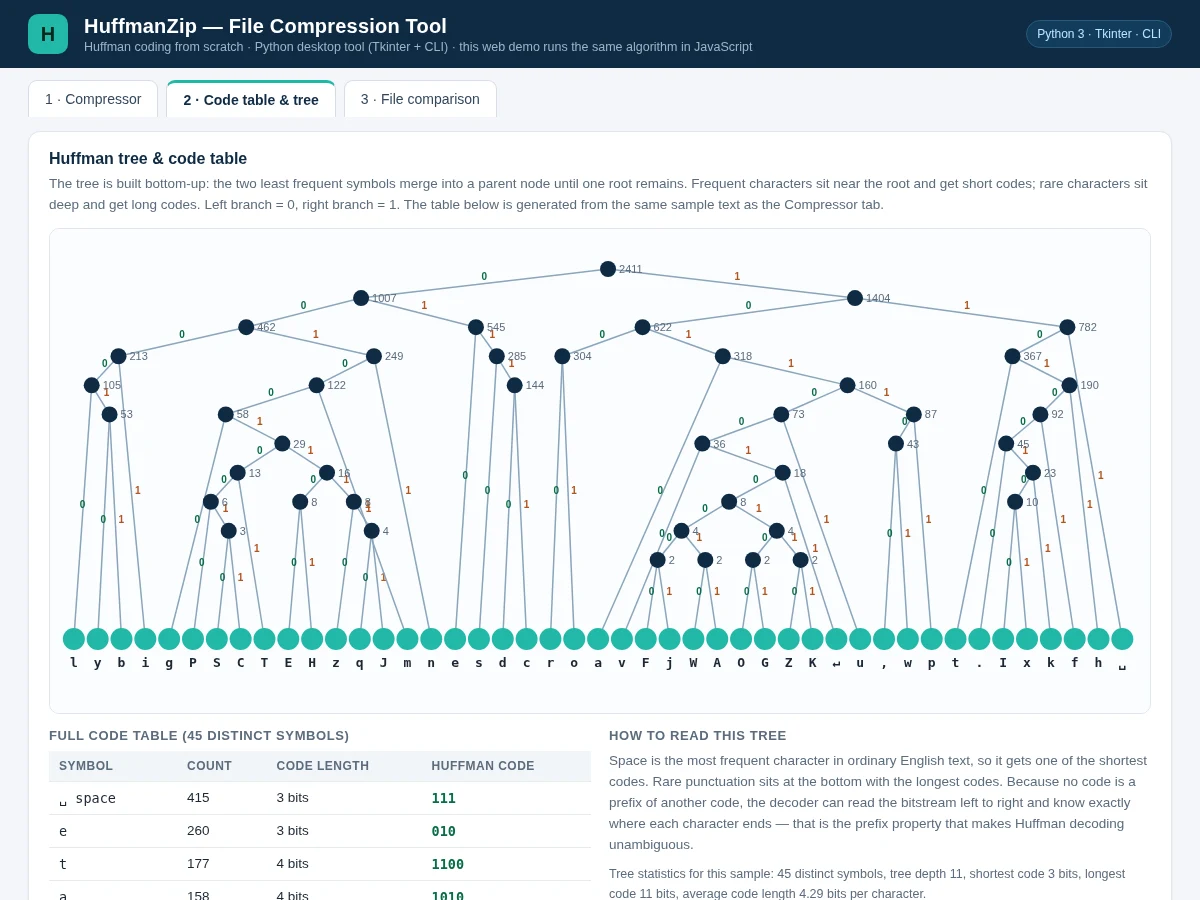
Compression runs end to end in seven stages, from raw bytes to a .huf file and back. The tool reads the input file as bytes and counts how often each of the 256 byte values occurs, producing the frequency table that drives everything else. It then builds the Huffman tree bottom-up, repeatedly merging the two least frequent nodes until a single root remains, and walks from the root to each leaf to assign prefix codes — left for 0, right for 1 — so frequent symbols get short codes and rare symbols get long ones. The input is encoded by replacing each byte with its code, the bits are packed into whole bytes, and a compact header is written first: one symbol-plus-code-length entry per distinct byte, plus the original length. Decompression reads the header, rebuilds the tree, walks the bitstream one bit at a time and emits the original bytes, and a comparison confirms the output matches the input exactly.
- The tool reads the input file as a byte stream and counts the frequency of each byte value to build the frequency table.
- The Huffman tree is built bottom-up: the two least frequent nodes are merged into a parent node, repeatedly, until a single root remains.
- Prefix codes are generated by walking from the root to each leaf — a left step is 0, a right step is 1 — so frequent symbols receive short codes.
- The input is encoded by replacing every byte with its Huffman code, producing a continuous bitstream.
- The bitstream is packed into whole bytes and written to a .huf file, preceded by a compact header holding the code table and the original length.
- To decompress, the header is read, the same Huffman tree is rebuilt, and the bitstream is walked one bit at a time to emit the original bytes.
- The decompressed output is compared byte for byte with the original, and the run report shows original size, compressed size, ratio, space saved and time taken.
Tech stack:
- Python 3
- Tkinter GUI
- Huffman coding algorithm
- HTML · CSS · JavaScript demo
- Binary file I/O
- Command-line interface
- Git
| Parameter | Value |
|---|---|
| Compression method | Huffman coding implemented from scratch (frequency table → tree → prefix codes) |
| Input supported | Any file as a byte stream (.txt, .csv, .log and other formats) in the Python tool; text only in the browser demo |
| Sample result (measured in the demo build) | 2,411-byte sample text → 1,387-byte compressed file |
| Compression ratio (measured in the demo build) | 57.5% of original size on the 2,411-byte sample text |
| Space saved (measured in the demo build) | 42.5% on the 2,411-byte sample text |
| Average code length (measured in the demo build) | 4.29 bits per character on the sample text |
| Distinct symbols (measured in the demo build) | 45 symbols in the sample text |
| Longest code (measured in the demo build) | 11 bits on the sample text |
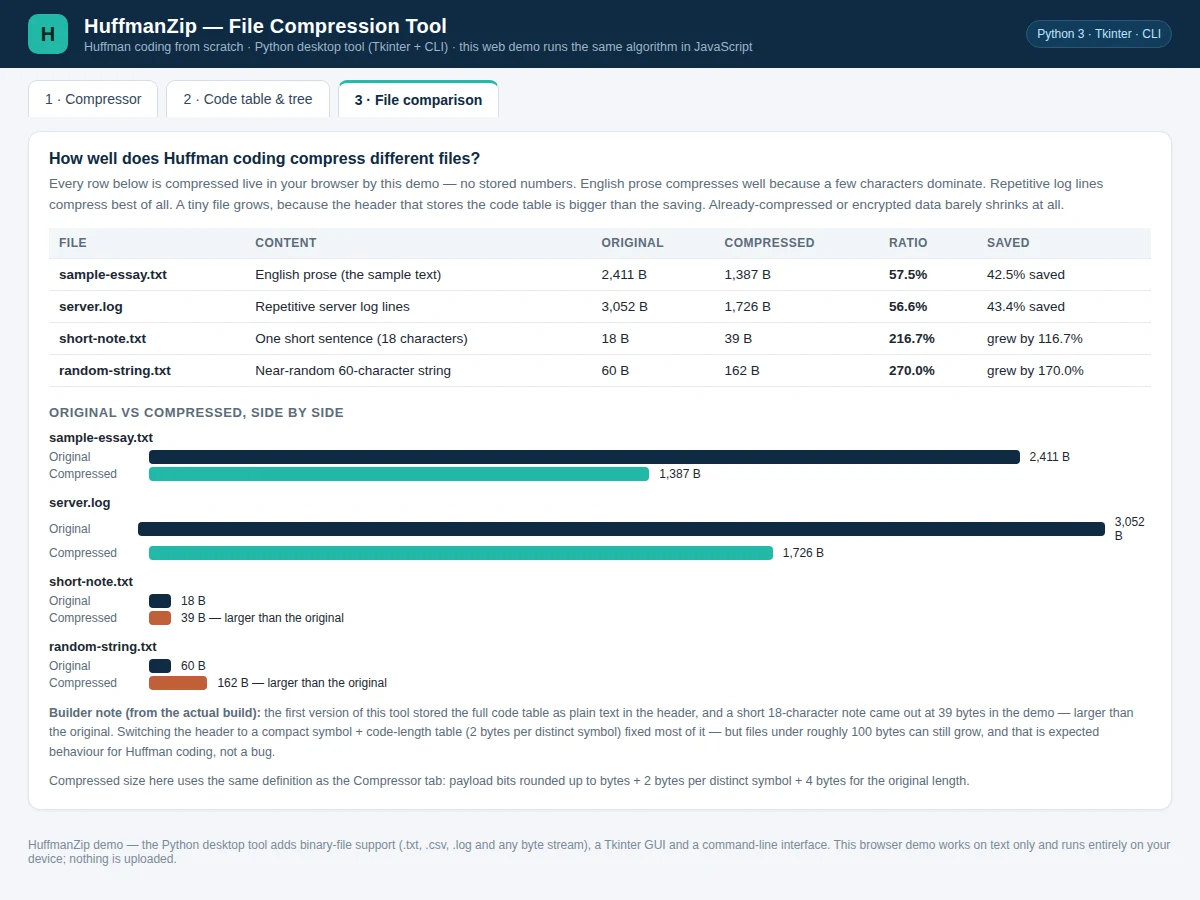
| Repetitive log file (measured in the demo build) | 3,052-byte server log → 1,726 bytes (56.6% of original size) |
| Header size | 2 bytes per distinct symbol + 4 bytes for the original length (design) |
| Small-file behaviour (measured in the demo build) | An 18-byte note compresses to 39 bytes — files under approximately 100 bytes can grow |
| Random data (measured in the demo build) | A 60-character near-random string compresses to 162 bytes (270% of original size) |
| Decompression | Lossless round trip verified in the demo (decompressed output matches the original exactly) |
| Interface | Tkinter desktop GUI + command-line interface |
| Platform | Windows / Linux / macOS with Python 3 (expected) |
| Extra libraries | None — standard library only (design) |
Project features
The tool's core capabilities are a from-scratch Huffman implementation, lossless compression and decompression, a Tkinter desktop interface, and a command-line interface for batch use. The Huffman engine counts byte frequencies, builds the tree bottom-up, generates prefix codes and packs the encoded bitstream into a binary .huf file with a compact header that stores the code table, so any compressed file carries everything the decoder needs. Compression is fully lossless: the decompressor rebuilds the tree from the header, walks the bitstream and reproduces the original byte for byte, and the demo verifies this on every run. The Tkinter GUI keeps the tool usable without the command line — pick a file, compress or decompress, and read the sizes, ratio and time taken — while the CLI supports scripting and batch jobs. Every run ends with a live report of original size, compressed size, compression ratio, space saved and time taken.
- [Huffman coding from scratch] The frequency table, tree construction, prefix-code generation and bit packing are all implemented in plain Python, with no compression library used for the core algorithm — every step is visible and explainable.
- [Lossless compress and decompress] The decompressor rebuilds the Huffman tree from the file header and reproduces the original byte for byte; the demo verifies the round trip on every run and reports an exact match.
- [Tkinter desktop GUI] A graphical interface for picking files, compressing, decompressing and reading the results — original size, compressed size, ratio, space saved and time taken — without touching the command line.
- [Command-line interface] The same engine runs from the terminal, so files can be compressed or decompressed from scripts and batch jobs as well as from the GUI.
- [Real binary file support] The Python tool reads and writes any file as a byte stream — .txt, .csv, .log and other formats — and stores the result as a .huf binary file with a compact header.
- [Live compression report] Every run reports the original size, compressed size, compression ratio, space saved and time taken, so the effect of the algorithm is visible immediately.
- [Downloadable compressed output] The browser demo can download the compressed .huf binary and the decompressed text, so the full round trip can be checked outside the demo.
What is included
- Complete Python source code (Huffman engine, Tkinter GUI, command-line interface)
- Working browser demo running the same Huffman algorithm in JavaScript
- Sample text, log and edge-case files used for the measured compression figures
- Project report PDF (background, Huffman theory, methodology, measured results)
- PPT presentation for final review
- Viva Q&A preparation document (frequency tables, tree construction, prefix property, header design, limitations)
Limitations & prerequisites
- Huffman coding is poor on already-compressed or encrypted files — JPEG images, ZIP archives and encrypted data barely shrink, and a near-random 60-character string grew to 270% of its original size in the demo.
- Small files can grow instead of shrinking: an 18-byte note compressed to 39 bytes in the demo, because the header that stores the code table outweighs the saving.
- The browser demo works on text only; binary-file support (.txt, .csv, .log and any byte stream) lives in the Python desktop tool.
- The tool provides no encryption — .huf files are not password-protected and anyone with the file can decompress it.
- The compression ratio depends entirely on symbol frequencies; data with near-uniform frequencies gains almost nothing.
- This is a single-file, single-user desktop tool — it has no cloud storage, file sharing or multi-user features.
Frequently Asked Questions
Is this project suitable for a final-year project?
Yes — for Computer Science and Information Technology students, because it demonstrates a complete, examinable algorithm rather than a library call: frequency analysis, tree construction, prefix coding, bit-level file I/O and lossless verification are all implemented from scratch and can each be explained and defended in a viva. The working demo, measured compression figures and the tree visualisation give the student concrete material to present.
What compression ratio does it achieve?
It depends entirely on the input: on the 2,411-byte English sample text in the demo build the file compresses to 1,387 bytes, which is 57.5% of the original size with 42.5% saved, while repetitive server log lines do slightly better at 56.6%. No universal ratio is claimed — already-compressed or random data barely shrinks, and very small files can grow because of the header.
Is the compression really lossless?
Yes — Huffman coding is a lossless method by construction: the prefix codes assign every symbol a unique code, the decoder rebuilds the same tree from the header, and the demo decompresses every compressed input and compares it with the original, reporting a verified match. The Python tool performs the same byte-for-byte comparison after decompression.
Can it compress images, videos or other file types?
The Python tool accepts any file as a byte stream, so it can compress images, videos, PDFs and archives, but the result is usually poor because those formats are already compressed or encrypted and their bytes carry almost no redundancy for Huffman coding to exploit. Text, CSV and log files are the formats where it performs best, which the demo's file-comparison tab shows directly.
What do I need to run it?
Python 3 on Windows, Linux or macOS, with Tkinter, which ships with most Python installations, and no additional libraries at all, since the Huffman algorithm, the GUI and the command-line interface are all written using only the Python standard library. The browser demo needs nothing installed and runs entirely on the visitor's device.
Can this project be customised?
Yes — realistic extensions include adaptive Huffman coding that updates frequencies as it reads, batch compression of whole folders, per-file-type presets, a progress display for large files, and optional encryption of the compressed output, each developed on request for the student's own requirements. The base project stays as specified; customisations are quoted separately.
Components & software requirements
- Python 3
- Tkinter GUI
- Huffman coding algorithm
- HTML · CSS · JavaScript demo
- Binary file I/O
- Command-line interface
- Git
Delivery information
Built-to-order project. Delivery timeline is shared after order confirmation based on current queue.
Support terms
Complete documentation, setup guide, and viva preparation included. Support for setup and explanation provided.
Download free synopsis (PDF)
Enter your name and WhatsApp number — the synopsis PDF downloads immediately. We may send occasional project updates on WhatsApp; no spam.