
More project photos (2)
The problem
The Community Tool Library Lending Web App with Reservation Calendar and Late-Return Alerts is a web application for a neighbourhood tool library, where members borrow physical tools such as drills, ladders, pressure washers and garden tools instead of buying tools they use only occasionally. A member searches the catalogue, checks whether a tool is available, reserves it for a chosen date on the calendar, collects it from the library counter, and returns it by the due date. The librarian manages the catalogue, approves or records loans, tracks returns, notes tool condition, and follows up overdue loans through the alert panel. Because every loan, reservation and return is recorded in one place, the library can see which tools are out, which tools are due back, and which members need a reminder, without relying on paper registers or scattered messages. That single record is what turns a friendly sharing shelf into a lending service neighbours can trust and reuse.
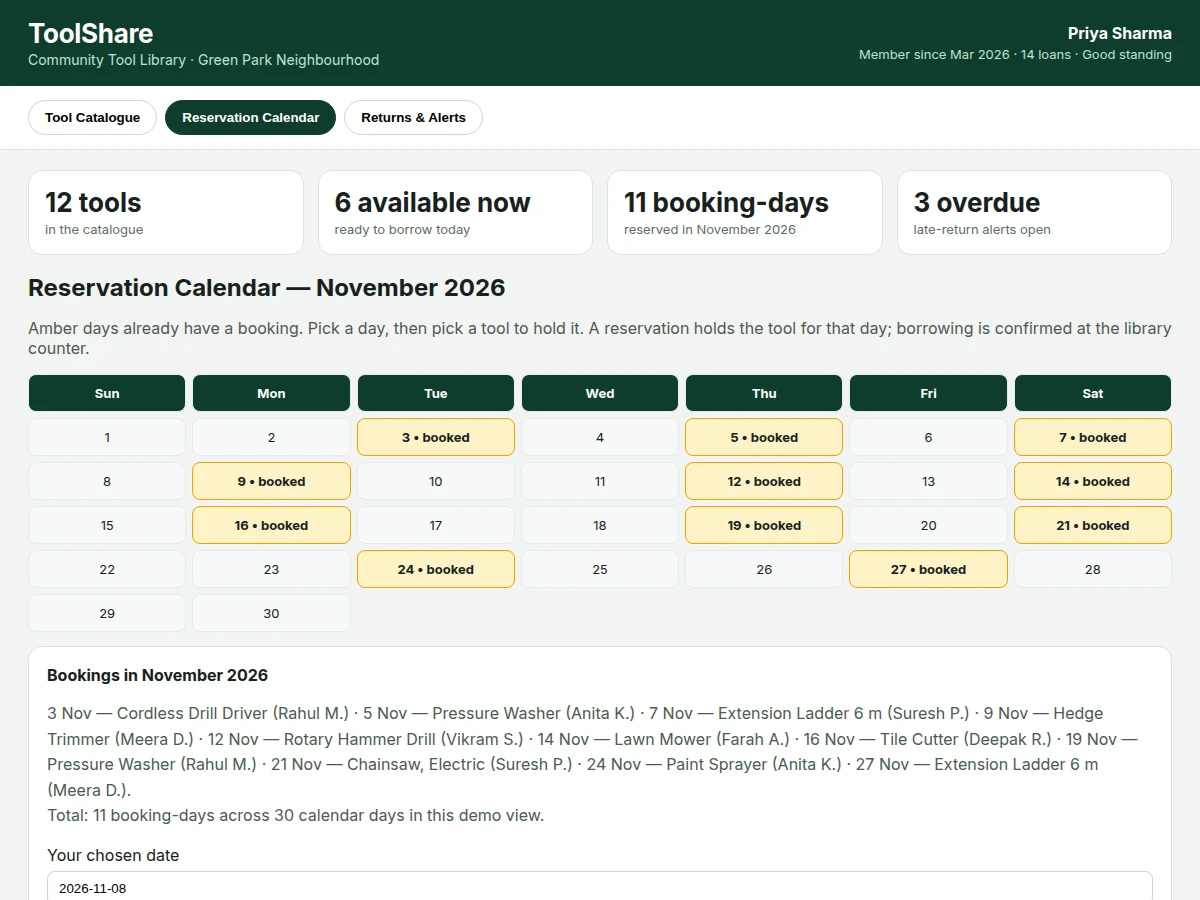
Most households own tools that sit unused for months, while neighbours buy the same drill, ladder or pressure washer for one weekend job. A community tool library solves the waste by lending tools, but lending by notebook or chat group breaks down quickly: two members turn up for the same ladder, nobody knows when a borrowed trimmer is due back, and damaged tools are discovered only at the next loan. The result is arguments, idle tools and lost trust. This web app replaces that informal system with a clear catalogue, a date-based reservation calendar, a recorded borrow-and-return flow, and automatic late-return alerts, so availability is visible before anyone travels to collect a tool. Builder note from the demo build (measured): the demo catalogue renders 12 tools with 6 tools marked available, and the demo November 2026 calendar renders 30 calendar days holding 11 booking-days, which is the exact dataset the screenshots show.
Browses tools and reserves a date for borrowing.
Follow the working sequence
How it works
The Community Tool Library Lending Web App with Reservation Calendar and Late-Return Alerts works end to end in a simple chain: a member browses the catalogue and checks live availability, reserves a chosen tool for a chosen date on the reservation calendar, collects the tool from the library counter where the librarian records the loan, uses the tool during the loan period, and returns it by the due date, after which the librarian records the return and its condition. If the tool is not returned by its due date, the late-return alert panel flags the loan as overdue, shows how many days late it is and what fee applies, and keeps reminding until the tool comes back. That chain — browse, reserve, borrow, return, alert — is the whole service: the catalogue answers what is available, the calendar answers when it is free, the loan record answers who has it, and the alert answers what is late.
- A member opens the catalogue, searches by tool name or category, and reads each tool's availability status, description and refundable deposit before choosing.
- The member picks a date on the reservation calendar; booked days are shown as booked, and the app refuses a second reservation for the same tool on the same date.
- The librarian records the loan at collection, with the member, the tool, the collection date and the due date set by the loan rule.
- During the loan, the member's loan history shows the tool, its due date and any reservation they hold, and the librarian can see every tool currently out.
- At return, the librarian records the return date and the tool's condition, closing the loan and clearing any alert attached to it.
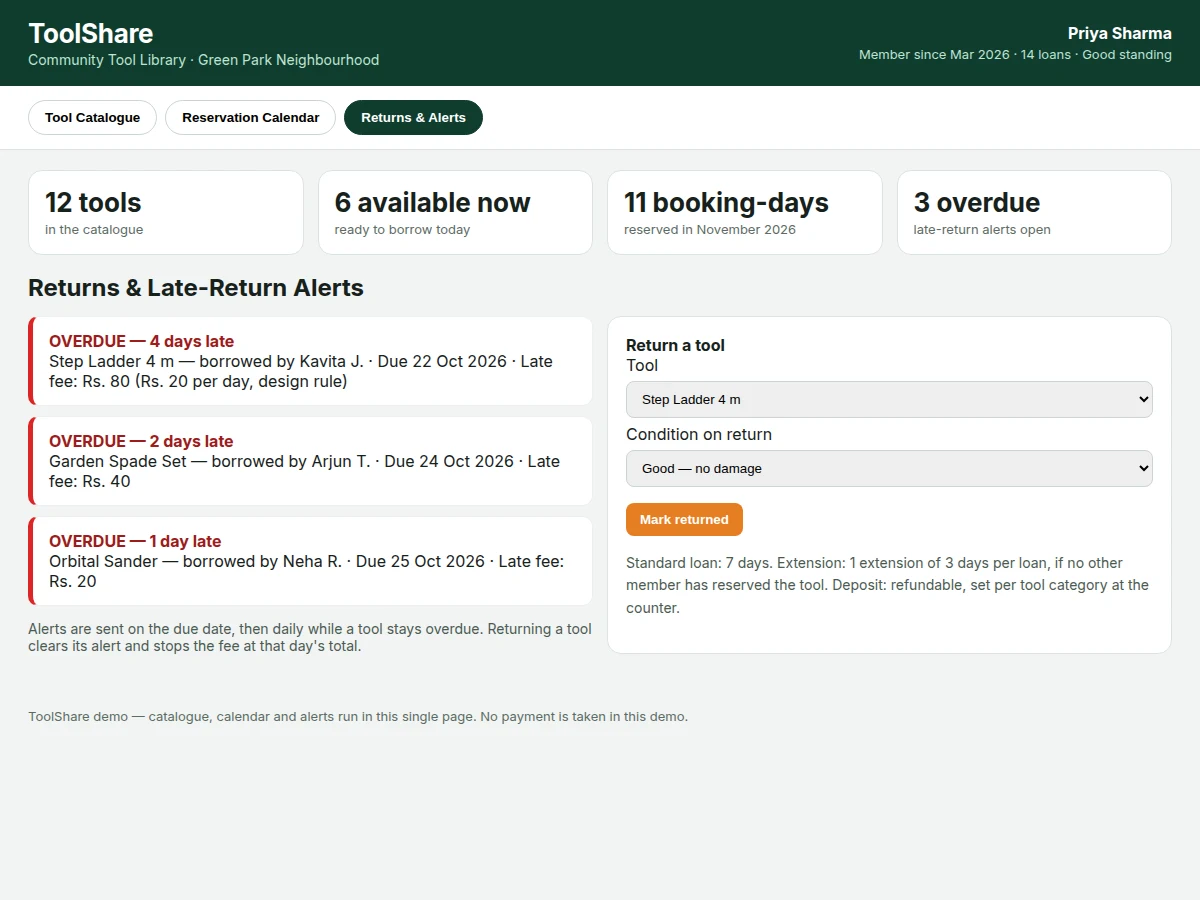
- If a due date passes without a return, the alert panel lists the loan as overdue with days overdue and the fee under the per-day rule, repeating daily until the tool is returned.
- A tool marked as damaged or under maintenance is hidden from new reservations until the librarian returns it to available status.
Tech stack:
- HTML5 · CSS · JavaScript (single-page demo)
- PHP · MySQL (built-to-order web app)
- Reservation calendar logic (date-based booking)
- Role-based access (member and librarian)
- Responsive web layout (desktop and mobile)
- PDF report and PPT (documentation kit)
| Parameter | Value |
|---|---|
| Platform | Web application, desktop and mobile browsers (design target) |
| Catalogue size in demo | 12 tools (measured from demo build) |
| Available tools in demo | 6 tools (measured from demo build) |
| Demo calendar month | November 2026, 30 calendar days (measured from demo build) |
| Demo booking-days | 11 booking-days (measured from demo build) |
| Standard loan period | 7 days (design target) |
| Extension rule | 1 extension of 3 days per loan, if unreserved (design target) |
| Late fee rule | Rs. 20 per day overdue (design target, configurable) |
| Demo overdue alerts | 3 overdue tools (measured from demo build) |
| Roles | 2 roles: member and librarian (design target) |
| Hosting | Standard PHP and MySQL hosting (expected) |
Project features
The Community Tool Library Lending Web App with Reservation Calendar and Late-Return Alerts is built around four capabilities that carry the whole lending service: a searchable tool catalogue that shows live availability for every physical tool, a reservation calendar that holds a tool for a chosen date and prevents two members from booking the same tool on the same day, a borrow-and-return workflow that records who took a tool, when it is due back and what condition it came back in, and a late-return alert panel that lists overdue tools with days overdue and the fee rule in plain view. Around those four, the app adds member loan history, librarian controls for catalogue and maintenance status, and a return-condition note, so the library can keep lending fairly and keep its tools in working order.
- [Searchable tool catalogue with live availability] Members browse tools by name or category and see at a glance whether a tool is available, reserved, on loan, under maintenance or overdue, with its deposit and a short description of what it includes.
- [Reservation calendar with double-booking prevention] A member picks a date on the calendar and reserves a tool for that day; booked days are shown as booked, and the same tool cannot be reserved twice for the same date, so nobody travels to collect a tool that is already promised.
- [Borrow-and-return workflow] The librarian records each loan with the member, the tool, the collection date and the due date, and records the return with the return date and a condition note, closing the loan and clearing any alert for that tool.
- [Late-return alerts with fee display] The alert panel lists overdue tools with the borrower, the due date, the number of days overdue and the late fee under the configured per-day rule, and alerts repeat daily while a tool stays overdue. Implemented in the base app with a configurable per-day fee rule.
- [Member loan history] Each member sees their current loans, past loans, reservations and any overdue items in one view, so they can check what they owe back before booking another tool.
- [Librarian catalogue and maintenance controls] The librarian adds, edits and retires tools, marks a tool as under maintenance so it cannot be reserved, and records damage or repair notes found at return. Implemented in the base app for catalogue and maintenance status.
- [Return-condition notes] At return, the librarian records whether the tool came back in good condition, with minor wear, or damaged, so repair needs are visible before the next loan rather than discovered by the next borrower.
- [Loan rules as settings] The standard loan length, the extension rule and the late-fee rule are stored as settings rather than hard-coded, so a library can adapt them without changing code. Configurable in the base app; a future-scope option is automatic email or SMS reminders, which is not included in the base app and would need a messaging provider.
What is included
- Complete web app source code (catalogue, calendar, loans, returns, alerts, member history)
- Database schema with demo data (12 tools, sample members, sample loans and reservations)
- Working single-file demo app for presentation and testing
- Setup and installation guide for PHP and MySQL hosting
- Project report PDF (background, problem, methodology, working, limitations)
- PPT presentation for final review
- Viva Q&A preparation document (reservation logic, double-booking prevention, alert rules, database design)
Limitations & prerequisites
- The base app records loans at the counter; it does not verify a member's identity automatically, so the librarian must check membership at collection.
- Late alerts are shown inside the app; automatic email or SMS reminders are future scope and need a messaging provider, so they are not included in the base app.
- The app does not track a tool's physical location once it leaves the counter; it relies on the loan record and the return-condition note.
- Tool condition notes are librarian-entered observations, not sensor measurements, so damage found later must be reported by the next borrower.
- The demo data covers 12 tools and 1 calendar month; a real library must enter its own tools, members and loan rules before opening to borrowers.
- The late-fee rule is a configurable design target (Rs. 20 per day overdue); actual fees are set by the library, not by the app.
Timeline
- Week 1 (design target): requirements, database design for tools, members, reservations, loans and alerts, and catalogue screens.
- Week 2 (design target): reservation calendar with double-booking prevention, plus borrow-and-return workflow.
- Week 3 (design target): late-return alerts, member history, librarian controls, and demo data.
- Week 4 (design target): testing, report, PPT and viva Q&A preparation.
Support
- Setup help covers installing the app on standard PHP and MySQL hosting and loading the demo data.
- Guidance covers adapting the loan length, extension rule and late-fee rule to the library's own policy.
- Documentation help covers the report, PPT and viva Q&A supplied with the project.
Frequently Asked Questions
Is this project suitable for a final-year project?
Yes, this project suits final-year students in Web Development and Computer Science because it combines a real database design, date-based reservation logic, role-based access, and a working borrow-and-return workflow in one complete web application. It also gives a clear demonstration story: catalogue, calendar, loan, return and alert, each visible in the demo.
Is this a book library system?
No, this system lends physical tools such as drills, ladders, pressure washers and garden tools, not books. Every feature is built around tool inventory: availability by tool, reservation by date, loan by member, return condition, and maintenance status. A library that lends books would need different fields, such as author and edition, which this project does not include.
How does the reservation calendar stop double-booking?
The calendar stores one reservation per tool per date, and a date that already holds a reservation for that tool is shown as booked. When a member tries to reserve the same tool for the same date, the app refuses the reservation and asks for another date. That single rule, checked before saving any reservation, is what prevents two members from being promised the same tool.
What happens when a tool is returned late?
On the due date, the loan appears in the late-return alert panel if it has not been returned, showing the borrower, the due date, the days overdue and the fee under the per-day rule. The alert repeats daily while the tool stays overdue, and returning the tool closes the loan, stops the fee at that day's total, and clears the alert.
Can the loan period and late fee be changed?
Yes, the standard loan period, the extension rule and the late-fee rule are stored as settings, so a library can change them without editing code. The demo uses a 7-day loan, 1 extension of 3 days, and Rs. 20 per day overdue as design targets. A library should set those values to match its own policy before opening to borrowers.
Can this be customized for a real community library?
Yes, realistic customizations include adding more tool categories, adding member registration with approval, adding a maintenance log, and adding email or SMS reminders through a messaging provider. Customizations that change the core lending logic, such as paid rentals or delivery booking, are possible but need separate design, since the base app is built for free community lending with deposits.
Components & software requirements
- HTML5 · CSS · JavaScript (single-page demo)
- PHP · MySQL (built-to-order web app)
- Reservation calendar logic (date-based booking)
- Role-based access (member and librarian)
- Responsive web layout (desktop and mobile)
- PDF report and PPT (documentation kit)
Delivery information
Built-to-order project. Delivery timeline is shared after order confirmation based on current queue.
Support terms
Complete documentation, setup guide, and viva preparation included. Support for setup and explanation provided.
Download free synopsis (PDF)
Enter your name and WhatsApp number — the synopsis PDF downloads immediately. We may send occasional project updates on WhatsApp; no spam.