
More project photos (2)
The problem
A Plant Nursery Online Store Web App with Care Guides and Delivery Slots is a web store where a nursery lists live plants for sale, shows a care guide for each plant, and lets a buyer book a delivery day and time window before checking out. The buyer browses by plant type and light requirement, opens a plant to read its light and water needs, adds plants to a cart, and reserves a delivery slot instead of leaving delivery timing to chance. The store owner manages the catalogue from an admin view, sets how many deliveries each slot can hold, and marks plants in or out of stock. Because live plants are perishable, the guide and the booked slot are not extras: the guide tells the buyer what the plant needs at home, and the slot makes sure someone is home when it arrives. That combination is what separates this project from a generic online store.
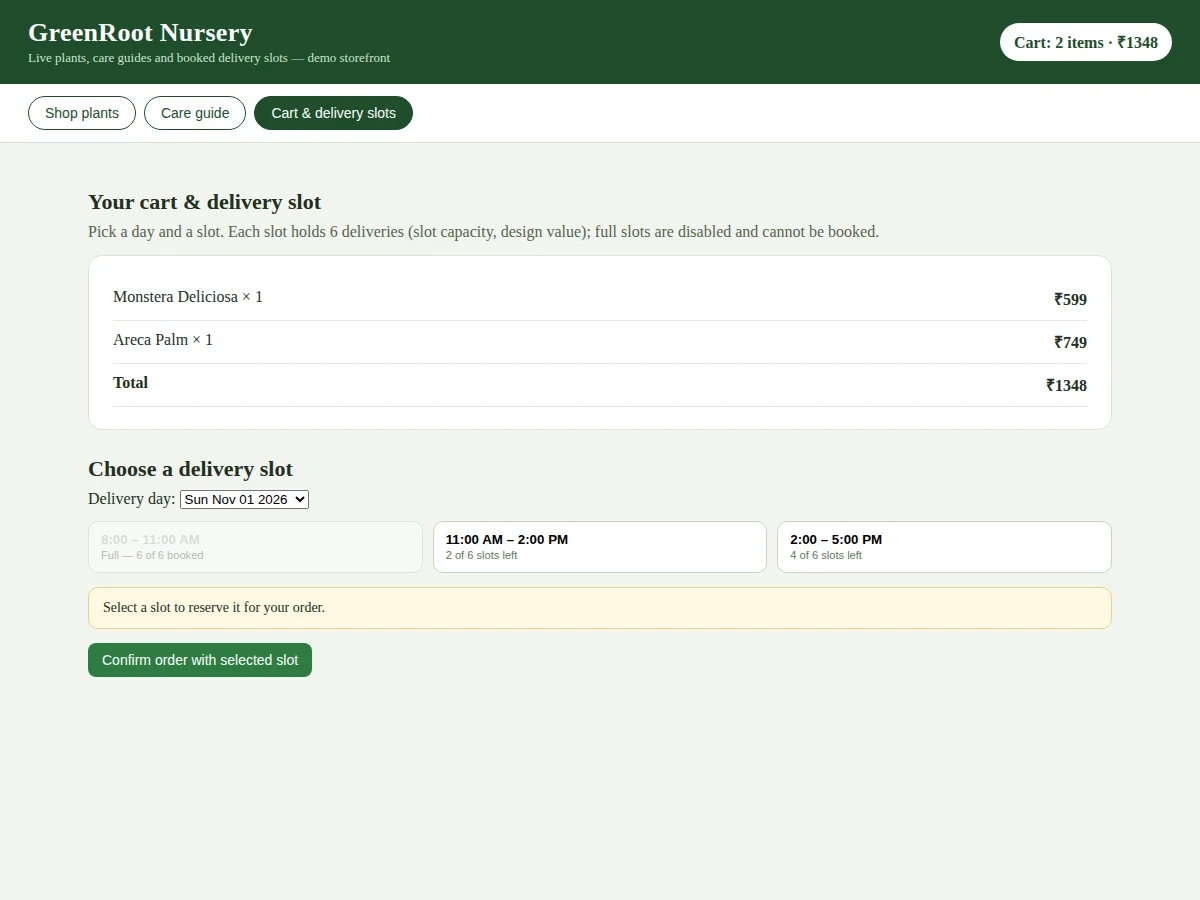
The real problem is that a general online store treats a plant like any other parcel. A buyer orders without knowing whether the plant suits a low-light room, how often to water it, or when it will arrive, and a plant left outside an empty house on a hot afternoon can arrive stressed or damaged. Nurseries that sell through phone messages or social-media posts face the other side of the same problem: orders arrive without a delivery time, stock answers are given from memory, and care advice is repeated plant by plant in chat. This project joins the three jobs a nursery actually does — selling, advising and delivering — into one web app, so the buyer gets the plant, the knowledge to keep it alive, and a confirmed delivery window in a single order. Builder note from the demo build: the first cart badge rendered a total of ₹0 because it read the cart before the catalogue data loaded; moving the badge update to run after the catalogue render fixed it, and the gallery cart view now shows the verified demo total of ₹1,348 for the two preloaded items (one Monstera Deliciosa at a ₹599 demo price plus one Areca Palm at a ₹749 demo price).
Browses plants and picks a delivery day.
Follow the working sequence
How it works
The Plant Nursery Online Store works as one continuous flow from browsing to a booked delivery: the buyer finds a plant, reads its care guide, adds it to the cart, and then reserves a delivery slot whose remaining capacity is checked before the order is confirmed. The catalogue is the starting point, not a side page, because every plant entry already carries the light and watering facts the buyer needs to judge suitability. The cart keeps a running total as plants are added, and the slot picker only offers days and windows that still have places left, with full windows shown as unavailable rather than silently accepted. The admin side runs in parallel: the owner edits plants, prices and stock flags, and sets slot capacities, so the storefront never promises a plant or a delivery window the nursery cannot honour. Confirming the order locks in the items, the total and the slot together.
- The buyer opens the storefront and browses the catalogue, searching by plant name or filtering by indoor or outdoor type and by light requirement.
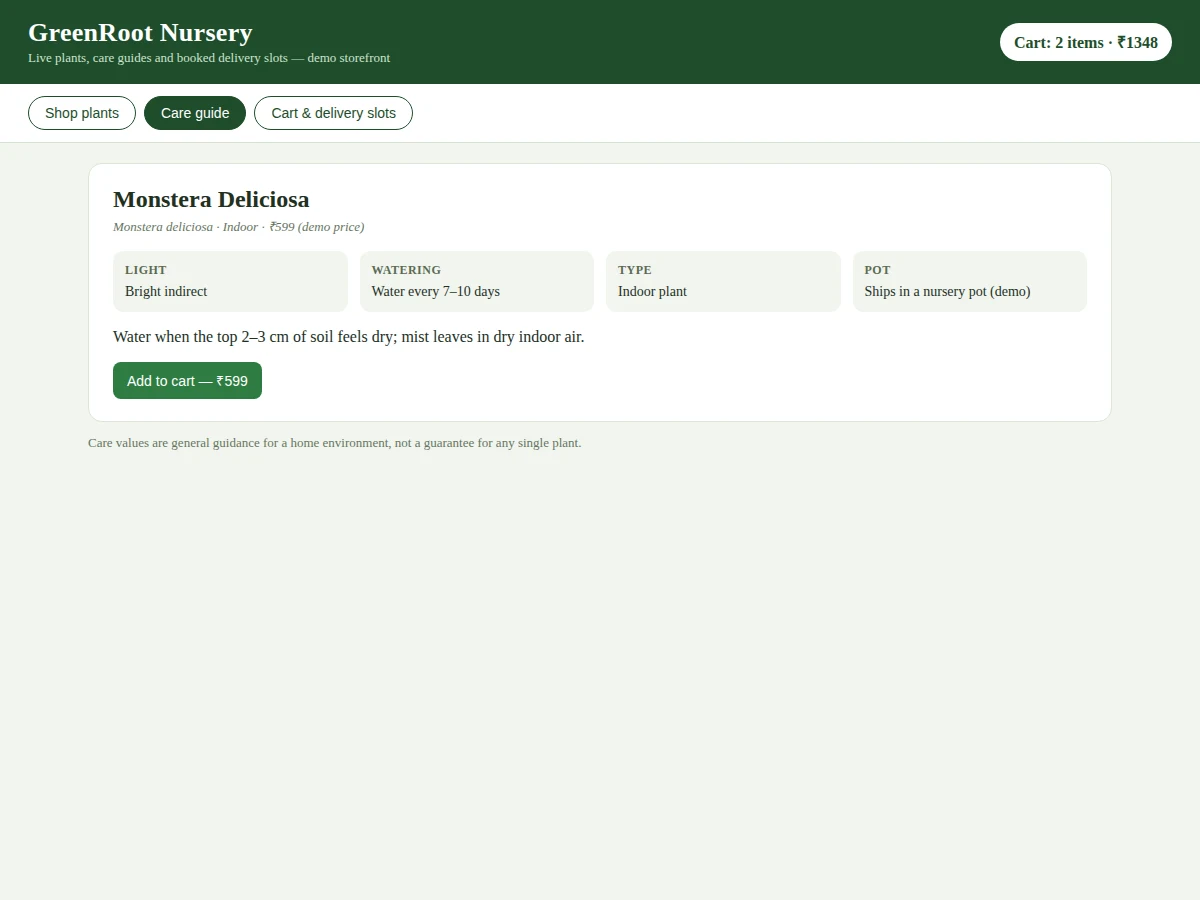
- Opening a plant shows its care guide: botanical name, light requirement, watering frequency, plant type and a short care note for home care.
- The buyer adds plants to the cart; the cart header updates the item count and total immediately with every addition.
- In the cart view the buyer reviews each item, its quantity and the order total before moving to delivery booking.
- The buyer picks a delivery day from the next 7 days and a time window from the 3 windows offered per day.
- The slot picker checks remaining capacity for that window: a slot with all 6 deliveries booked (slot capacity, design value) is shown as full and disabled.
- The buyer confirms the order, and the summary records the items, the total and the booked delivery day and time window together.
This project vs a general grocery store vs a plant-care reminder app
| Aspect | This project | General grocery store | Plant-care reminder app |
|---|---|---|---|
| What it sells | Live nursery plants with pots and care needs | Groceries and household goods | Nothing; it only reminds owners to water plants |
| Care guidance | A care guide for every plant, shown before purchase | No plant care information | Care reminders for plants already owned |
| Delivery | Booked day and time window with a per-slot delivery cap | Delivery windows for groceries, with no plant handling | No delivery at all |
| Stock meaning | A live plant that must be in the nursery and deliverable | Packaged stock on shelves | No stock concept |
| Buyer question answered | Which plant suits my light, and when will it arrive | What groceries do I need this week | When should I water the plant I already own |
| Best fit | A nursery selling live plants to home buyers | Everyday household shopping | Owners keeping existing plants alive |
Tech stack:
- HTML5 · CSS · JavaScript
- Node.js · Express
- MySQL relational database
- REST API design
- Admin dashboard UI
- Delivery-slot booking logic
- Responsive CSS grid layout
| Parameter | Value |
|---|---|
| Demo catalogue plants | 8 plants (count) |
| Delivery days offered | 7 days (count: next 7 days from order date) |
| Time windows per day | 3 windows (count) |
| Total bookable slots | 21 slots (count: 7 days × 3 windows) |
| Deliveries per slot | 6 deliveries (slot capacity, design value) |
| User roles | 2 roles (count: buyer, store admin) |
| Cart behaviour | Live totals on every add (design behaviour) |
| Payment gateway | Not included in the base build (see Limitations) |
| Runs on | Desktop and mobile browsers (design target) |
Project features
The Plant Nursery Online Store centres on four capabilities: a searchable plant catalogue with real plant entries, a care guide attached to every plant, a cart that totals the order live, and delivery-slot booking that caps how many deliveries each time window can hold. Around those four, the app adds filters by plant type and light requirement so a buyer with a shady balcony does not have to wade through sun-loving plants, an admin view for catalogue and stock control, and an order summary that repeats the booked day and slot so the buyer can check it before confirming. Together these give a complete, testable store whose every behaviour can be demonstrated in a review: search for a plant, open its care guide, add it to the cart, and book a slot that refuses to overbook.
- [Searchable plant catalogue] The catalogue lists each plant with its common name, botanical name, indoor or outdoor type, light requirement and a demo price, and the buyer can search by name and filter by type and light level.
- [Per-plant care guides] Every plant carries its own guide covering light, watering frequency, plant type and a short care note, so the buyer learns what the plant needs before buying rather than after it arrives.
- [Cart with live totals] Added plants appear in a cart that updates item counts and the order total immediately, and the cart header always shows the current item count and total so the buyer never loses track of the order.
- [Delivery-slot booking with capacity caps] The buyer picks one of 7 delivery days and one of 3 time windows per day, and each slot holds at most 6 deliveries (slot capacity, design value); a full slot is disabled and cannot be booked, so the nursery is never overcommitted.
- [Admin catalogue and stock control] The store owner adds and edits plants, updates prices and care notes, and marks plants in or out of stock from an admin view, so the public catalogue always reflects what the nursery can actually supply.
- [Slot capacity management] The owner sets how many deliveries each time window accepts, and the booking view shows remaining places per slot, which keeps delivery days plannable instead of first-come chaos.
- [Order summary with booked slot] Before confirming, the buyer sees the items, the total and the chosen delivery day and time window on one summary, so the delivery promise is visible and checkable at the moment of order.
What is included
- Working single-file nursery store demo (catalogue with 8 plants, care guides, cart, delivery-slot picker with capacity logic)
- Complete web app source code (storefront, cart, slot booking, admin catalogue and stock control)
- Project report PDF (background, store and slot-booking design, implementation, testing procedure, limitations, future scope)
- Abstract PDF (10-section structure matching the report)
- Presentation slides for the final review
- Viva Q&A preparation document (web store design, cart state, slot capacity logic, catalogue data modelling)
Limitations & prerequisites
- No payment gateway in the base build: orders are recorded with a booked slot and confirmed by the nursery, and online payment integration is an optional addition, not an included feature.
- Care guidance is general home-care guidance per plant, not a guarantee for any single plant: light, water and temperature in the buyer's home vary, and individual plants may respond differently.
- Delivery is limited to the nursery's own delivery days and windows: the app books slots but does not arrange couriers, route planning or live driver tracking.
- Stock flags are maintained by the store owner: the app does not count physical nursery stock automatically, so a plant marked available depends on the owner keeping the catalogue current.
- The demo catalogue holds 8 plants (count) with demo prices; a production catalogue needs the nursery's real plants, prices and delivery areas entered before launch.
- The slot capacity of 6 deliveries per slot is a design value: a nursery with a larger delivery team would set its own capacities per window.
Frequently Asked Questions
How does delivery-slot booking work?
You pick a delivery day from the next 7 days and one of 3 time windows for that day, and the app checks how many deliveries that window already holds before letting you book. Each window accepts at most 6 deliveries (slot capacity, design value), and a full window is shown as full and disabled so it cannot be overbooked. Confirming the order locks in your items, total and chosen day and window together.
What does each care guide cover?
Each care guide names the plant, gives its botanical name, and states its light requirement, watering frequency, indoor or outdoor type and a short care note for home care. The guide is shown on the plant's own page before purchase, so you can judge whether the plant suits your light and watering routine. Care values are general guidance for a home environment, not a guarantee for any single plant, since conditions at home vary.
Is this project suitable for a final-year project?
Yes, for Web Development, Computer Science and IT programmes: it demonstrates a complete web store, catalogue data modelling, cart state management, a genuinely enforced capacity rule in slot booking, and an admin view. The report documents the store flow, the slot-capacity logic and the testing procedure in enough depth to discuss confidently in a review.
Does the store take online payments?
No, not in the base build: orders are recorded with a booked delivery slot and confirmed by the nursery, so payment is handled outside the app. An online payment gateway can be added as an optional customisation, but it needs merchant credentials and production approval from the gateway provider, which is why it is kept separate from the base project.
Can more plants, categories or delivery areas be added?
Yes: the admin view adds plants with their care guides and prices, and new categories are a catalogue change rather than a rebuild. Delivery areas and slot capacities are configuration values the owner sets per window, so a nursery can start with one delivery area and extend it later. Larger additions such as courier tracking or a mobile app are optional customisations described in the report's future-scope section.
Components & software requirements
- HTML5 · CSS · JavaScript
- Node.js · Express
- MySQL relational database
- REST API design
- Admin dashboard UI
- Delivery-slot booking logic
- Responsive CSS grid layout
Delivery information
Built-to-order project. Delivery timeline is shared after order confirmation based on current queue.
Support terms
Complete documentation, setup guide, and viva preparation included. Support for setup and explanation provided.
Download free synopsis (PDF)
Enter your name and WhatsApp number — the synopsis PDF downloads immediately. We may send occasional project updates on WhatsApp; no spam.