
More project photos (2)
The problem
PlotShare, the Community Garden Plot Booking Web App with Watering Rota and Harvest Log, is a web application that lets a community garden publish a map of its plots, take bookings for a season, run a shared watering rota, and record every harvest pick with its quantity. A gardener opens the plot grid, sees at a glance which plots are available, booked, waitlisted, or under maintenance, and books a free plot or joins the waitlist for a taken one. Once booked, the gardener joins a rota group that waters on fixed days, swaps slots when away, and logs each harvest with crop, quantity, and date, so the garden always knows who holds which plot, whose turn it is to water, and what each plot produced. A delivered garden starts empty, while the demo preview shows a labelled seed garden so every screen can be checked at a glance.
Community gardens usually run on a noticeboard, a group chat, and a spreadsheet that only one person understands. Plots sit empty while a waiting list lives in someone's messages, watering depends on whoever remembers, and nobody can say at season's end what any plot actually grew. The failure is not effort — volunteers work hard — it is shared memory: bookings, watering turns, and harvests are recorded in three different places, or nowhere at all. PlotShare replaces that scattered record with one visible system: the plot grid is the booking record, the rota is the watering record, and the harvest log is the production record, all readable by every gardener in the group.
This is a built-to-order software project: the web app source, the working single-file demo preview, and the complete documentation kit are prepared fresh for you. To order, request a WhatsApp quotation stating your scope (the base app, plus any optional features you want), and you will receive a price and a delivery timeline before any build starts.
| Compared with | PlotShare | Spreadsheet or noticeboard |
|---|---|---|
| Seeing free plots | Live colour-coded grid | A list someone must update by hand |
| Waiting for a plot | Ordered waitlist per plot | Names in chat messages, easily lost |
| Watering turns | Shared rota with swaps and missed-slot alerts | Memory and reminders to one person |
| Season record | Harvest log with quantities per plot | No record, or totals guessed afterwards |
How it works
From a newcomer arriving at the garden to the season's last harvest, the flow has six stages and no stage depends on memory. The organiser sets up the garden's plots on the grid with sizes and states, and a gardener browses the map to find a free plot or a waitlist worth joining. Booking fixes the gardener to a plot for the season and places them in that plot's rota group, which waters on fixed days and swaps slots when someone is away. While the season runs, the rota page shows whose turn is due, missed waterings surface as alerts, and every pick is logged with its quantity. At season's end, the harvest log totals what each plot produced, the organiser closes the season, and plots return to available or maintenance for the next round.
- The organiser sets up the garden's plots on the grid, each with a size and a state: available, booked, waitlisted, or under maintenance.
- A gardener opens the plot grid, clicks a plot to see its holder and booking state, and books a free plot or joins the ordered waitlist for a taken one.
- Booking places the gardener in that plot's rota group, which waters the group's plots twice a week on fixed days.
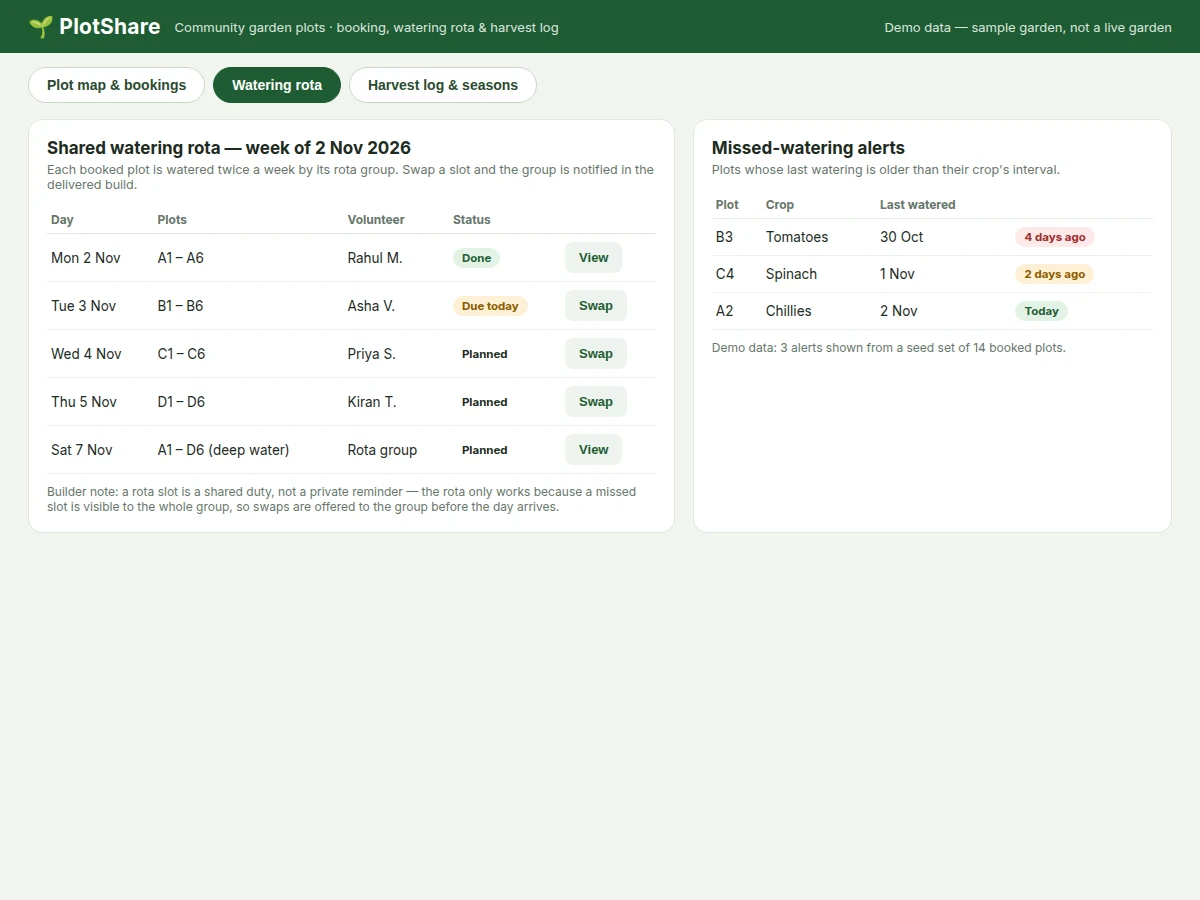
- When a gardener cannot make a slot, they offer it to the group as a swap before the day arrives; the group sees the open slot and covers it.
- If a plot goes unwatered past its crop's interval, it appears on the missed-watering alerts list with the days since its last watering.
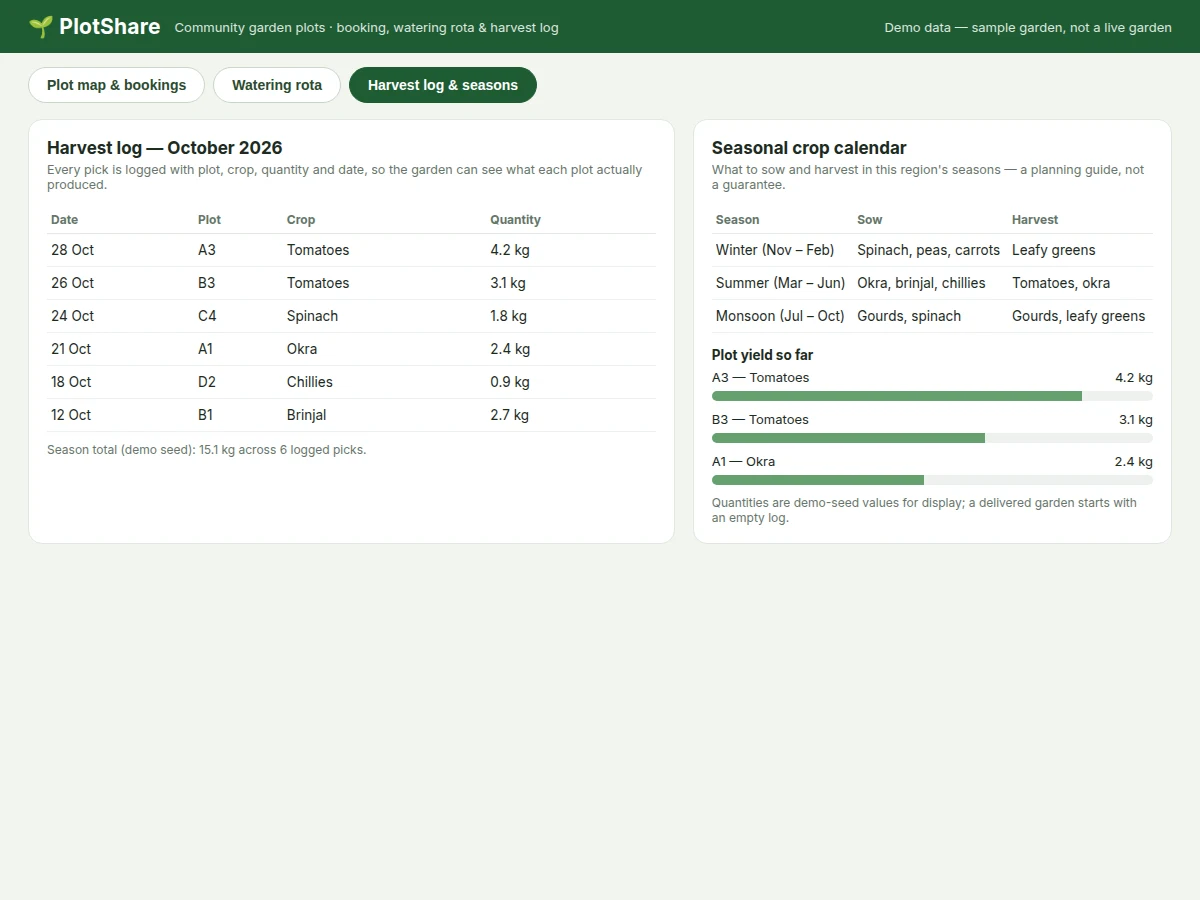
- Each harvest is logged with date, plot, crop, and quantity in kilograms, and the log totals every plot's production for the season.
Tech stack:
- HTML · CSS · JavaScript
- Node.js · Express
- SQLite database
- REST API endpoints
- Responsive CSS grid layout
- Git · VS Code editor
- Single-file HTML demo preview
| Parameter | Value |
|---|---|
| Platform | Web app, runs in a modern desktop or mobile browser (design target) |
| Plots in demo garden | 24 plots in 1 garden (demo seed data) |
| Booked plots (demo seed) | 12 plots booked for the season (demo seed data) |
| Available plots (demo seed) | 6 plots available (demo seed data) |
| Waitlisted plots (demo seed) | 4 plots with a waitlist (demo seed data) |
| Under maintenance (demo seed) | 2 plots under maintenance (demo seed data) |
| Plot size (demo seed) | 3 m × 2 m per standard plot (demo seed data) |
| Watering frequency | 2 sessions per week per rota group (design target) |
| Harvest log (demo seed) | 6 picks totalling 15.1 kg in October 2026 (demo seed data) |
| Largest single pick (demo seed) | 4.2 kg of tomatoes from Plot A3 (demo seed data) |
| Data storage (base build) | SQLite database on the app server (base build) |
| Demo preview | Single-file HTML · CSS · JavaScript working preview (demo only) |
Project features
Four capabilities carry this app. First, the plot-grid map: the garden's plots appear as a colour-coded grid showing available, booked, waitlisted, and maintenance states, so a newcomer can see in seconds where space exists without asking the organiser. Second, season booking with a waitlist: a gardener books a free plot or joins an ordered queue for a taken one, and the queue advances automatically when a plot frees up. Third, the shared watering rota: booked plots are watered on fixed group days, slots can be swapped before the day arrives, and missed waterings surface as alerts. Fourth, the harvest log and seasonal calendar: every pick is recorded with plot, crop, quantity, and date, and a crop calendar shows what to sow and harvest in each season. Together they replace the noticeboard, the group chat, and the single-person spreadsheet with one record every gardener can read.
- [Plot-grid map with availability] The garden's plots appear as a colour-coded grid — available, booked, waitlisted, or under maintenance — and clicking a plot shows its holder and booking state. The demo seed shows 24 plots, with 12 booked, 6 available, 4 waitlisted, and 2 under maintenance.
- [Season booking with waitlist] A gardener books a free plot for the season or joins an ordered waitlist for a taken plot, and the queue advances when a plot frees up. In the demo, Plot A3 carries 2 people waiting, and Plot D3 carries 3.
- [Shared watering rota with swaps] Booked plots are watered twice a week by rota groups on fixed days, and a gardener who cannot make a slot offers it to the group as a swap before the day arrives. The demo rota week runs from 2 Nov 2026 with 5 watering days.
- [Missed-watering alerts] A plot whose last watering is older than its crop's interval appears on an alerts list with the days since watering, so a dry plot is visible to the whole group. The demo seed shows 3 alerts, including Plot B3 tomatoes unwatered for 4 days.
- [Harvest log with quantities] Every pick is logged with date, plot, crop, and quantity in kilograms, and the log totals each plot's season production. The demo seed logs 6 picks totalling 15.1 kg in October 2026, led by 4.2 kg of tomatoes from Plot A3.
- [Seasonal crop calendar] A season guide shows what to sow and harvest in winter, summer, and monsoon months, helping gardeners plan the next planting. The calendar is a planning guide, not a yield promise, and the garden organiser can edit its entries.
- [Builder note — why the rota is shared, not private] A watering slot is a shared duty, not a private reminder: the rota only works because a missed slot is visible to the whole group, so swaps are offered to the group before the day arrives rather than discovered afterwards. That visibility is the project's key mechanism line, and it is why missed-watering alerts go to the group, not to one phone.
- [Admin controls — optional, not in the base build] Garden-admin controls such as plot creation, season dates, and member approval are an optional add-on, clearly separated from the base build. The base build ships with one organiser account and a fixed demo garden layout.
What is included
- Complete web app source code (plot grid, booking and waitlist logic, rota with swaps, harvest log, crop calendar)
- Working single-file demo preview of the app's flows, with the frozen seed garden of 24 plots
- Setup guide for running the app locally and hosting it online
- Project report PDF (background, problem, methodology, architecture, results, limitations)
- PPT presentation for final review
- Viva Q&A preparation document (booking state machine, rota swap design, harvest aggregation, SQLite schema)
Limitations & prerequisites
- The delivered app starts with an empty garden unless a seed import is requested; the demo seed of 24 plots and 15.1 kg of harvests is sample data, not the buyer's garden.
- The base build has one organiser account and a fixed garden layout; multi-garden support and organiser approval workflows are an optional add-on.
- The seasonal crop calendar is a general planning guide; sowing and harvest months vary by local climate and are not a yield promise.
- Watering reminders in the delivered build depend on gardeners checking the rota page; push notifications or SMS reminders are not in the base build.
- Harvest quantities are entered by gardeners and are not verified by weighing hardware; totals are only as accurate as the entries.
- The base build has no payment handling; plot fees or deposits, if a garden charges them, must be collected outside the app or added on request.
- Plot sizes and the twice-weekly watering frequency are demo-seed and design-target values; a real garden sets its own sizes and rota rhythm.
Frequently Asked Questions
How does plot booking work?
A gardener opens the colour-coded plot grid, clicks a plot to see whether it is available, booked, waitlisted, or under maintenance, and then books a free plot for the season or joins the ordered waitlist for a taken one, with the queue advancing automatically when a plot frees up. In the demo garden, Plot A3 has 2 people waiting and Plot D3 has 3, so a gardener can see the queue before joining it.
What happens if someone misses their watering turn?
The missed slot stays visible to the whole rota group rather than to one person, and the plot appears on the missed-watering alerts list with the number of days since its last watering, so another gardener can cover it before the crop suffers. Gardeners are expected to offer a swap to the group before the day arrives, not after, which is why the rota page shows upcoming slots and not just past ones.
How is the harvest log used at the end of a season?
Every pick is recorded with its date, plot, crop, and quantity in kilograms, and the log adds up each plot's production so the garden can compare plots and plan the next season from real totals across the whole season instead of memory. The demo seed shows 6 picks totalling 15.1 kg in October 2026, led by 4.2 kg of tomatoes from Plot A3, but a delivered garden starts with an empty log.
Does the app handle payments for plots?
No, the base build has no payment handling, so a garden that charges plot fees or deposits collects them outside the app, and payment handling can be added only as a separately requested feature, and no payment step is required to book, water, or log a harvest. The booking, rota, and harvest features all work without any payment step, which keeps the base app usable for free community gardens.
Can the crop calendar be changed for my region?
Yes, the seasonal crop calendar is an editable planning guide, so the garden organiser can change which crops are listed for winter, summer, and monsoon months to match local conditions and growing seasons in their own area, rather than keeping the demo garden's default entries. The calendar's sowing and harvest months are general guidance only and never a promise of yield, whatever the region.
Is this project suitable for a final-year project?
Yes, it fits Computer Science, IT, and Web Development programmes, because it combines a real multi-user workflow with database design worth defending, covering booking state machines, rota scheduling with swaps, and harvest aggregation in one working app that students can demonstrate end to end. The report documents each choice with its limits stated plainly.
Components & software requirements
- HTML · CSS · JavaScript
- Node.js · Express
- SQLite database
- REST API endpoints
- Responsive CSS grid layout
- Git · VS Code editor
- Single-file HTML demo preview
Delivery information
Built-to-order project. Delivery timeline is shared after order confirmation based on current queue.
Support terms
Complete documentation, setup guide, and viva preparation included. Support for setup and explanation provided.
Download free synopsis (PDF)
Enter your name and WhatsApp number — the synopsis PDF downloads immediately. We may send occasional project updates on WhatsApp; no spam.