
More project photos (2)
The problem
College notices still live on physical notice boards and scattered WhatsApp groups. A student who misses the board on the wrong day misses the exam-form deadline; a department that needs to reach only its own students broadcasts to everyone; and important announcements drown in chat forwards within hours. The result is missed deadlines, repeated queries to the department office, and no reliable record of what was announced and when. Students also cannot search an old circular or silence departments they do not belong to.
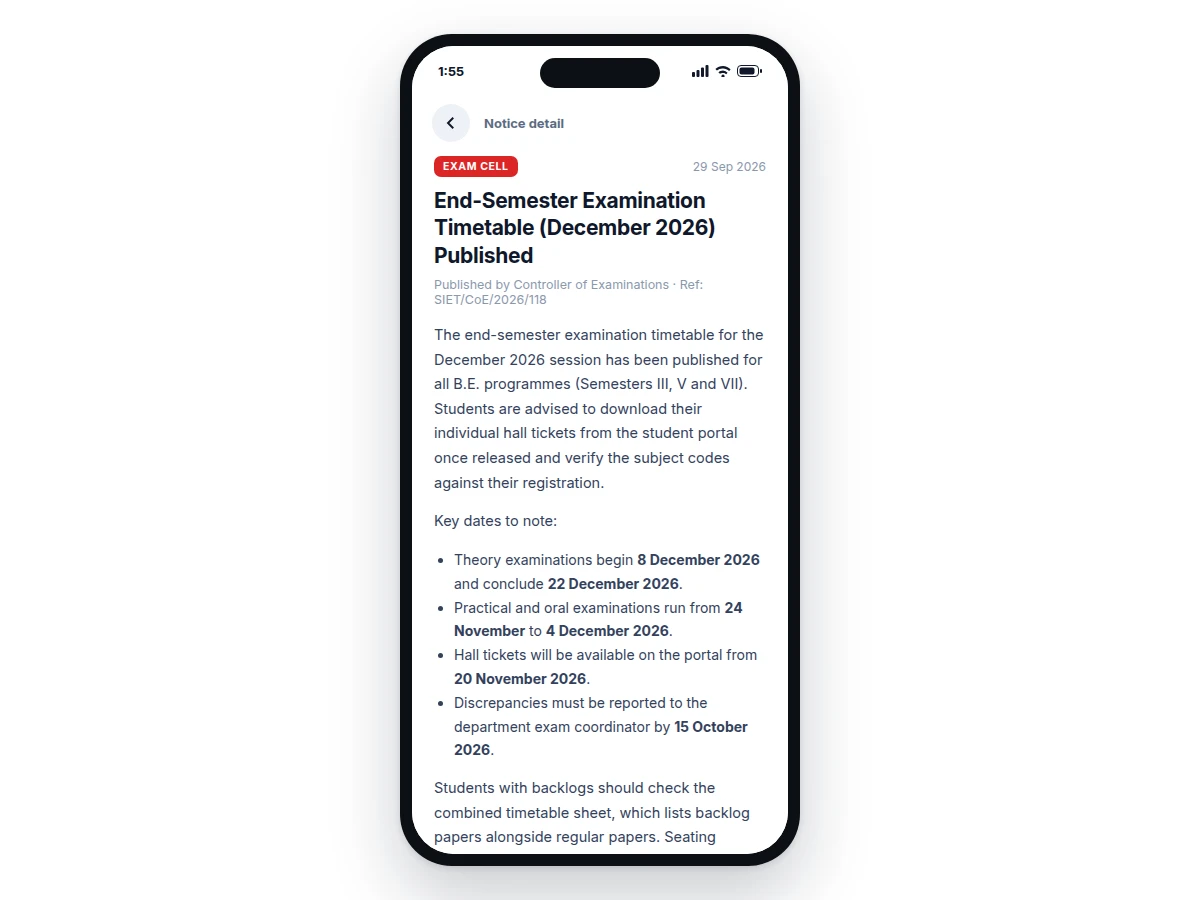
This project builds a native Android app that gives every department its own notice feed and delivers announcements as push notifications. An admin panel lets staff compose notices with attachments, target departments, and pin urgent items; students subscribe to their department, search the archive, save important notices, and control which departments can notify them. Firebase Cloud Messaging handles the push fan-out, and a local database keeps the feed readable offline. The build demonstrates real mobile-app architecture — networking, local persistence, background messaging and Material Design UI — on a problem every college has.
Composes notices in the web panel and targets departments.
Follow the working sequence
How it works
- An admin signs into the web panel and composes a notice — title, body, attachments — then selects target departments and an optional expiry date.
- The backend stores the notice and maps each target department to its FCM topic (for example, the topic "dept_cse").
- Firebase Cloud Messaging fans the notification out to every device subscribed to those topics, typically within seconds on a normal connection.
- On the device, a messaging service receives the payload, builds the Android notification, and inserts the notice into the local Room database.
- The feed screen reads from the local database — department chips filter the timeline, pinned notices stay on top, and the search index covers titles and bodies.
- Tapping a notice opens the detail screen with the full text, attachment downloads, and share and save actions.
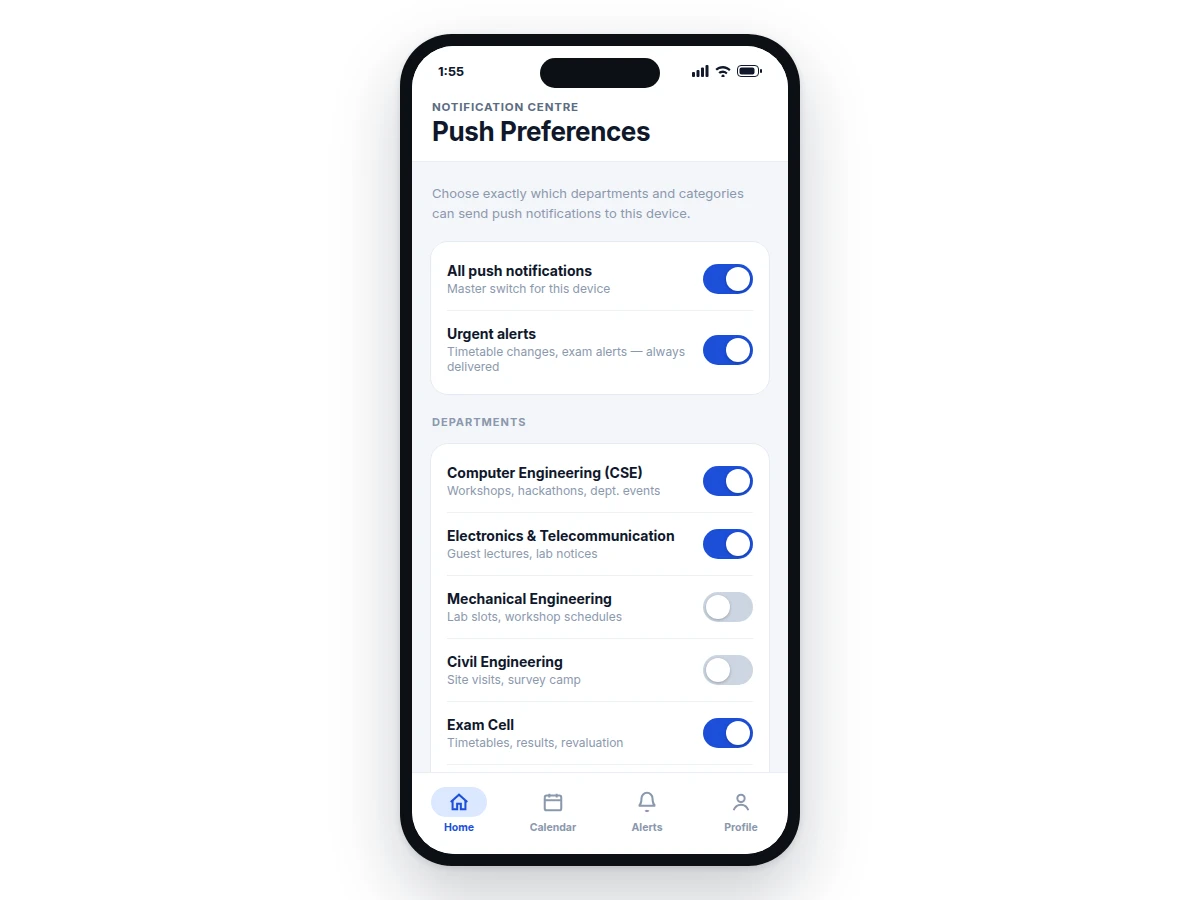
- The settings screen writes the student's department subscriptions back to FCM topics, so unsubscribing stops that department's pushes immediately.
Tech stack:
- Kotlin
- Android Jetpack (ViewModel, Room, Navigation)
- Firebase Cloud Messaging (FCM)
- Firebase Firestore (backend)
- Retrofit (REST client)
- Material Design 3
- Glide (image loading)
- Android Studio
| Parameter | Value |
|---|---|
| App platform | Android 8.0 (API 26) and above |
| Language | Kotlin |
| Push service | Firebase Cloud Messaging, topic-based fan-out |
| Typical push latency | A few seconds on a normal connection (expected, network-dependent) |
| Local storage | Room database; cache holds approximately 200 recent notices (configurable) |
| Installed app size | Approximately 12–18 MB (expected) |
| Backend | Firebase Firestore with topic mapping (REST alternative configurable) |
| Admin panel | Web-based, works in any modern browser |
Project features
- [Department-wise notice feeds] Every department gets its own feed; students follow their department and see a clean chronological timeline of announcements, with pinned urgent notices fixed at the top.
- [Push notifications via FCM] Publishing a notice fans out through Firebase Cloud Messaging topics, so only subscribed departments receive the alert — no spam across the whole college.
- [Admin publishing panel] Staff compose notices with formatted text and file attachments (PDF timetables, circulars), target departments, set expiry dates, and pin critical announcements.
- [Notice search and filters] Full-text search across titles and bodies plus department and date filters, so a student can find an old scholarship circular in seconds.
- [Per-department notification preferences] The settings screen lets each student choose exactly which departments may send push alerts, with quiet hours and a daily-digest option.
- [Saved notices] Students bookmark important notices — exam timetables, fee circulars — into a personal list that stays accessible even after the notice expires from the feed.
- [Offline reading] Published notices are cached in a local Room database, so the feed, detail pages and saved items open without an internet connection.
What is included
- Complete Android app source code (Kotlin, Android Jetpack)
- Admin web panel source with the publishing workflow
- Backend configuration (Firestore rules and FCM topic mapping)
- Setup and build instructions for Android Studio
- Project report PDF (architecture, FCM flow, database design)
- PPT presentation for final review
- Viva Q&A preparation document
Limitations & prerequisites
- Push notifications need an active internet connection and Google Play Services on the device.
- The base build is Android-only; an iOS version is a separate customization.
- Delivery timing depends on the network and the device's battery-optimization settings — the app cannot force instant delivery on aggressive power savers.
- Backend hosting (Firebase plan) costs, if any, are separate from the project.
- The admin panel is web-based; there is no separate mobile admin app in the base build.
- Attachment storage limits follow the Firebase plan's quota, not the app.
Frequently Asked Questions
How do the push notifications work?
The app uses Firebase Cloud Messaging topics — one topic per department. When an admin publishes a notice, the backend sends one message to the department's topic and Firebase fans it out to every subscribed device. Subscribing or unsubscribing a department in the app's settings adds or removes the device from that topic, so students only get alerts from departments they follow.
Does the app work without internet?
Yes, for reading. Published notices are cached in the app's local database, so feeds, notice details and saved items open offline. An internet connection is needed only for receiving new push notifications and for the first download of a notice. The admin panel always needs connectivity to publish.
Which technologies are used?
The app is written in Kotlin with Android Jetpack components — ViewModel for UI state, Room for the local notice database, and Navigation for screen flow. Push delivery uses Firebase Cloud Messaging topics, the backend runs on Firebase Firestore, and the UI follows Material Design 3. Image loading is handled by Glide.
Can it be customized for my college?
Yes. The college name, department list, app colours and logo are all configurable, so the build ships branded for the buyer's institution. Extra modules — event calendar, attendance, fee reminders, or an iOS version — can be developed as customizations based on requirements and timeline.
Is this project suitable for a final-year project?
Yes — for Computer Engineering, IT and software-oriented programs. It demonstrates mobile-app architecture end to end: UI design, Firebase networking, local persistence with Room, background push handling with FCM, and a real admin workflow — strong, defensible viva material on a problem every college understands. Suitable for B.E./B.Tech final-year projects in Computer Engineering, Information Technology and mobile application development.
Components & software requirements
- Kotlin
- Android Jetpack (ViewModel, Room, Navigation)
- Firebase Cloud Messaging (FCM)
- Firebase Firestore (backend)
- Retrofit (REST client)
- Material Design 3
- Glide (image loading)
- Android Studio
Delivery information
Built-to-order project. Delivery timeline is shared after order confirmation based on current queue.
Support terms
Complete documentation, setup guide, and viva preparation included. Support for setup and explanation provided.
Download free synopsis (PDF)
Enter your name and email — the synopsis PDF downloads immediately. We may send occasional project updates; no spam, unsubscribe anytime.