
More project photos (2)

The problem
The College Lab Safety Inspection Android App with Checklist and Reports replaces the paper safety form most college labs still rely on with a guided digital inspection. Paper forms get filled in a hurry, filed in a cupboard, and rarely revisited — hazards noted on page two are forgotten by the following week, and nobody can tell at a glance which lab is overdue for its next check. The lab in-charge has no consolidated view of compliance across labs, and a lost or damaged sheet means the inspection record is gone entirely. This app turns the inspection into a structured walkthrough: the inspector opens the lab, works through a fixed checklist grouped by safety category, photographs each hazard, assigns a severity, and generates a report that the lab in-charge can review and sign off the same day. Every inspection is stored with its date, inspector and score, so repeat problems become visible instead of recurring silently.
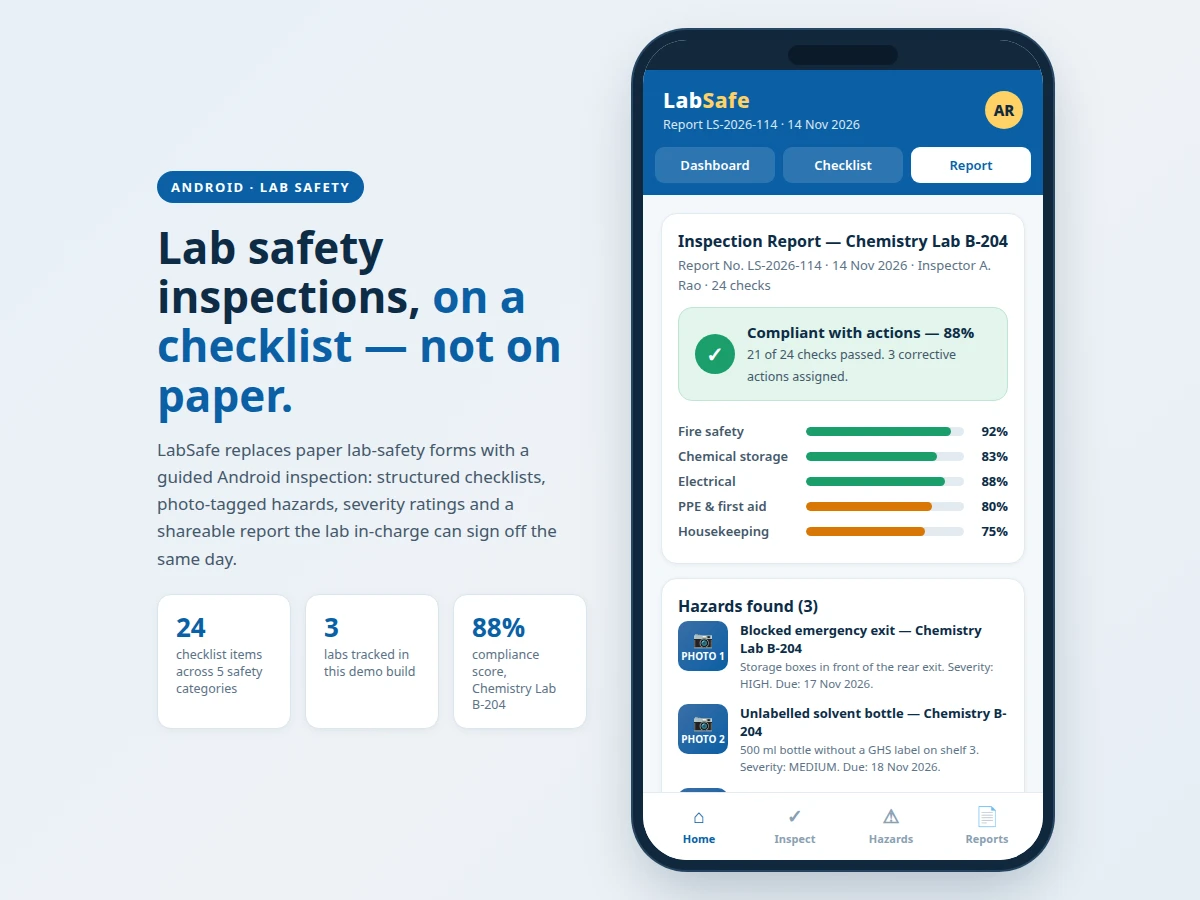
The lab inspector opens the app, picks the lab and starts the scheduled inspection.
Follow the working sequence
How it works
The inspection runs as a single guided walkthrough on the inspector's phone. The inspector opens the app, picks the lab and the scheduled inspection, and works through the checklist category by category, marking each item pass or fail as it is physically verified. A failed item immediately becomes a hazard record: the inspector photographs it, writes a one-line description, picks a severity, and assigns it to someone with a due date. As checks are ticked, the progress bar and the running compliance score update on screen, so the inspector can see how the lab is doing before the walkthrough ends. Finishing the checklist generates the inspection report with category-wise scores and the full hazard list, which the lab in-charge reviews and signs off in the app; the signed report is then shared as a PDF and stored against that lab's history for the next inspection cycle.
- The inspector signs in and selects the lab and the scheduled inspection from the dashboard.
- The app loads the 24-item checklist (design target) for that lab, grouped into 5 safety categories.
- The inspector verifies each item on site and marks it pass or fail, adding a note where needed.
- Each failed item becomes a hazard: a photo is attached, severity is set (High, Medium or Low), and an assignee with a due date is recorded.
- The progress bar and compliance score update live as checks are completed.
- Finishing the checklist generates the inspection report with category scores and the hazard list.
- The lab in-charge reviews the report and signs off in the app; the signed report is shared as a PDF.
- Hazards stay open as corrective actions until marked resolved, and overdue items remain flagged on the dashboard.
Paper checklist vs app inspection
| Aspect | Paper checklist | This Android app |
|---|---|---|
| Record keeping | Sheets filed in a cupboard, easily lost | Every inspection stored with date, inspector and score |
| Hazard evidence | Written description only | Photo attached to each hazard with location and severity |
| Follow-up | Hazards forgotten after filing | Corrective actions tracked with assignee and due date |
| Lab overview | One lab per sheet, no comparison | Dashboard compares all labs by score and overdue actions |
| Sign-off | Physical signature, delayed | In-app sign-off the same day, report shared as PDF |
Tech stack:
- Kotlin · Android Studio
- Room Database (offline storage)
- MVVM architecture
- Material Design 3 components
- CameraX (hazard photo capture)
- iText · PDF report generation
- WorkManager (background sync)
- Git
| Parameter | Value |
|---|---|
| Platform | Android 8.0 (API level 26) and above |
| Checklist size | 24 items (design target) across 5 categories |
| Labs in demo dataset | 3 labs (seeded demo data) |
| Hazards per report | 3 hazards in the seeded demo report |
| Storage | On-device Room database; sync when online |
| Report format | PDF, approximately 2–4 pages per inspection (expected) |
| Photo capture | Device camera via CameraX, stored per hazard |
| Sign-off | In-app inspector and lab in-charge signatures |
| Demo build note | Seeded dataset holds 24 checklist items across 5 categories and 3 labs; tapping a check updates the progress bar and score immediately with no reload |
Project features
The app is built around four capabilities that carry the whole inspection workflow: a category-wise digital checklist that replaces the paper form, photo-tagged hazard capture with severity ratings, per-lab compliance scoring with history, and a shareable inspection report with sign-off. Around those, the app adds offline walkthroughs so inspections continue in basement labs without signal, corrective-action tracking with due dates so nothing found is forgotten, and a dashboard that shows every lab's status at a glance. Each capability exists in the working demo: the checklist screen, the hazard list, the compliance ring and the report screen are all functional in the demo build, driven by a seeded dataset of 3 labs and 24 checklist items, so the flow from first check to signed report can be walked end to end.
- [Category-wise digital checklist] A 24-item checklist (design target) grouped into 5 safety categories — fire safety, chemical storage, electrical safety, PPE and first aid, and housekeeping — with each item carrying a short check note so the inspector knows exactly what to verify.
- [Photo-tagged hazard capture] Every failed check can attach a photo, a location note and a severity rating (High, Medium, Low), so a hazard is evidence, not just a tick in a box.
- [Per-lab compliance scoring] Each inspection produces a percentage score from passed checks, shown per category as well as overall, with the lab's inspection history kept for comparison over time.
- [Shareable inspection report] One tap generates a structured report — report number, date, inspector, category scores, hazard list with due dates — ready to share as PDF or WhatsApp with the lab in-charge.
- [Corrective-action tracking] Hazards become actions with an assignee and a due date, and overdue actions stay visible on the dashboard until they are closed.
- [Offline walkthrough mode] The checklist, photos and notes are stored on the device during the inspection and synced when connectivity returns, so basement and store-room labs are covered.
- [Multi-lab dashboard] All labs are listed with their latest score, last inspection date and open-hazard count, so the in-charge sees which lab needs attention first.
What is included
- Complete Android app source code (Kotlin, Android Studio project)
- Seeded inspection dataset: 3 labs, 24-item checklist, sample hazards and reports
- PDF report templates for inspection reports
- Project report PDF (background, methodology, system design, results)
- PPT presentation for final review
- Viva Q&A preparation document (Android architecture, Room, offline sync, report generation)
- Setup and demo guidance document
Limitations & prerequisites
- The app records inspection findings; it does not detect hazards automatically — every check needs a human inspector on site.
- Photo evidence depends on the phone camera and lighting in the lab; dim store rooms may need the flash.
- Offline mode stores data on one device only; sync needs connectivity and a configured backend or shared export.
- The compliance score reflects the checklist as defined; it is not a certification of lab safety and does not replace a statutory safety audit.
- Report sharing as PDF needs a PDF viewer on the receiving device; WhatsApp sharing needs the WhatsApp app installed.
- Checklist items are fixed per lab type in the base build; adding a new lab type needs a configuration change.
Timeline
- Week 1: app screens, data model, and checklist content for the 5 safety categories.
- Week 2: checklist flow, hazard capture, and offline Room storage.
- Week 3: compliance scoring, PDF report generation, and sign-off flow.
- Week 4: report, abstract, PPT, and app-walkthrough demonstration preparation.
Support
- Build guidance, Android architecture explanation, and demo help are included with the order.
- Customization such as a different checklist, an extra lab type, or a backend sync can be developed on request.
Frequently Asked Questions
What does the app actually do during an inspection?
The app guides the inspector through a fixed 24-item checklist grouped into 5 safety categories — fire safety, chemical storage, electrical safety, PPE and first aid, and housekeeping — marking each item pass or fail on site as it is physically verified. A failed item becomes a hazard record with a photo, a severity rating and an assignee with a due date, and finishing the checklist generates a shareable report with category-wise compliance scores that the lab in-charge signs off in the app.
Does it work without internet in the lab?
Yes. The entire walkthrough works offline: the checklist, photos, notes and hazard records are stored in the on-device Room database while the inspector moves through basement labs and store rooms with no signal, and the finished report syncs or exports once connectivity returns. No step in the inspection needs a connection, so a dead zone never interrupts the walkthrough.
How is the compliance score calculated?
The score is the percentage of checklist items marked pass in that inspection, shown overall and per category, so a lab can be strong on fire safety and weak on housekeeping at the same time. In the seeded demo, Chemistry Lab B-204 scores 88% because 21 of its 24 checks passed. The 3 failed checks are listed as hazards with due dates.
Can the checklist be changed for a different lab?
Yes, within limits. Checklist items are stored as data rather than hard-coded screens, so a chemistry lab and an electronics lab can carry different item sets, and new items can be added through configuration without changing the app code for that lab. Adding an entirely new lab type with its own categories is a small development task, listed under customization.
What will I receive with the project?
The complete Kotlin Android Studio source, the seeded dataset with 3 labs and the 24-item checklist, the PDF report templates, the project report, a PPT for the final review, a viva Q&A document and setup guidance are all included in the delivery. The demo build in the listing shows the dashboard, checklist and report screens working with the seeded data.
Is this project suitable for a final-year project?
Yes, for Computer Science, IT and Electronics & Telecommunication programs. It demonstrates Android development with Kotlin, MVVM architecture, local Room storage, camera integration, offline-first design and PDF report generation, all wrapped around a real campus problem that any college lab faces.
Components & software requirements
- Kotlin · Android Studio
- Room Database (offline storage)
- MVVM architecture
- Material Design 3 components
- CameraX (hazard photo capture)
- iText · PDF report generation
- WorkManager (background sync)
- Git
Delivery information
Built-to-order project. Delivery timeline is shared after order confirmation based on current queue.
Support terms
Complete documentation, setup guide, and viva preparation included. Support for setup and explanation provided.
Download free synopsis (PDF)
Enter your name and WhatsApp number — the synopsis PDF downloads immediately. We may send occasional project updates on WhatsApp; no spam.