
More project photos (2)

The problem
College Lab Equipment Damage Reporting Web App with Photo Proof and Repair Status is a web application that lets students report damaged college lab equipment with a photo, and lets the lab in-charge track each report through repair to closure. A student selects the lab and equipment, picks a damage type and severity, describes the fault, and attaches a photo as proof; the report then moves through three stages — Reported, Under Repair, and Repaired — noting every change.
In most colleges this happens verbally or in a paper register: a broken oscilloscope is mentioned to a technician, the note is lost, and the next batch discovers the same fault again. Without a photo, the in-charge cannot judge urgency before visiting, and without a status trail nobody knows whether a repair was assigned, awaits a part, or was finished. This project replaces that chain with one auditable record per damaged item, keeping damage, evidence, and closure visible to all.
How it works
The damage reporting web app follows one report from the bench where the damage is found to the moment the repaired item returns to service. A student files the report in the lab itself, the lab in-charge verifies the photo and assigns the repair, a technician works through the fault and records notes, and the report closes only after an after-repair photo is checked. At every stage the same record is updated, so the student, the in-charge, and the technician all read the same status instead of chasing separate messages. The steps below trace that journey step by step, from selecting the lab and equipment to the final verified closure, and show exactly where the system's guards — the one-stage-at-a-time rule and the photo-before-closure rule — actually bite at each handover.
- The student opens the report form and selects a lab; the equipment list narrows to that lab's registered items, and the student picks the damaged item.
- The student picks a damage type and severity, writes what happened, attaches a photo of the damage, and enters their name and roll number.
- On submission the system generates a reference ID in DMG-YYYY-NNN form and the report appears on the dashboard with the status Reported.
- The lab in-charge filters the dashboard by lab, status, or severity, opens the report, verifies the photo, and advances it to Under Repair with an assignment note.
- The technician records progress notes on the same report — for example, that a display module has been ordered or a fuse is under test — while the item stays withdrawn from issue.
- Once the repair is done, an after-repair photo is attached to the report so the fix itself is evidenced, not merely claimed.
- The in-charge verifies the after-repair photo, advances the report to Repaired, and the full timeline remains searchable as the item's repair history.
Tech stack:
- HTML5 · CSS
- JavaScript
- PHP
- MySQL
- Apache · XAMPP local hosting
- Responsive web design
| Parameter | Value |
|---|---|
| User roles | 3 roles: student reporter · lab in-charge · technician (design) |
| Status stages | 3 stages: Reported · Under Repair · Repaired (design) |
| Severity levels | 4 levels: Low · Medium · High · Critical (design) |
| Damage types | 6 types: physical damage · malfunction · missing part · calibration drift · display or control fault · other (design) |
| Labs in demo | 5 labs (demo data) |
| Equipment items in demo | 8 items (demo data) |
| Sample reports in demo | 6 reports (demo data) |
| Reference ID format | DMG-YYYY-NNN, for example DMG-2026-008 (demo data) |
| Report submission time | Under 2 minutes per report (design target) |
| Photo formats | JPG · PNG (design target) |
| Database tables | Approximately 4 tables: users · labs and equipment · reports · status history (design) |
| Builder note | The one-stage-at-a-time guard was kept as a strict sequence in the demo after an early version allowed a direct jump to Repaired; the guard, not the button label, is what enforces the workflow |
Project features
The damage reporting web app is built around three capabilities that matter most in a working lab: fast reporting with photographic evidence, a repair workflow that cannot be skipped, and a dashboard that shows the whole lab estate at a glance. Around those core capabilities, the build adds severity triage so urgent faults surface first, lab-wise filtering so an in-charge sees only their own labs, and a repair timeline that records who changed a status and why. Everything listed below is implemented in the working demo: the form submits a real report, the dashboard filters real records, and the detail view advances a report one stage at a time. Optional additions, such as email alerts or a companion mobile app, are kept out of this list and described separately as future scope.
- [Photo-proof damage report] The reporter selects a lab and equipment item, chooses a damage type and severity, describes the fault, and attaches a photo of the damage. The photo travels with the report, so the in-charge judges urgency from evidence instead of a second-hand description.
- [Strict three-stage repair workflow] Every report moves only in the order Reported, then Under Repair, then Repaired. The system refuses a jump from Reported straight to Repaired, and an after-repair photo is required before closure, so a repair cannot be marked done on words alone.
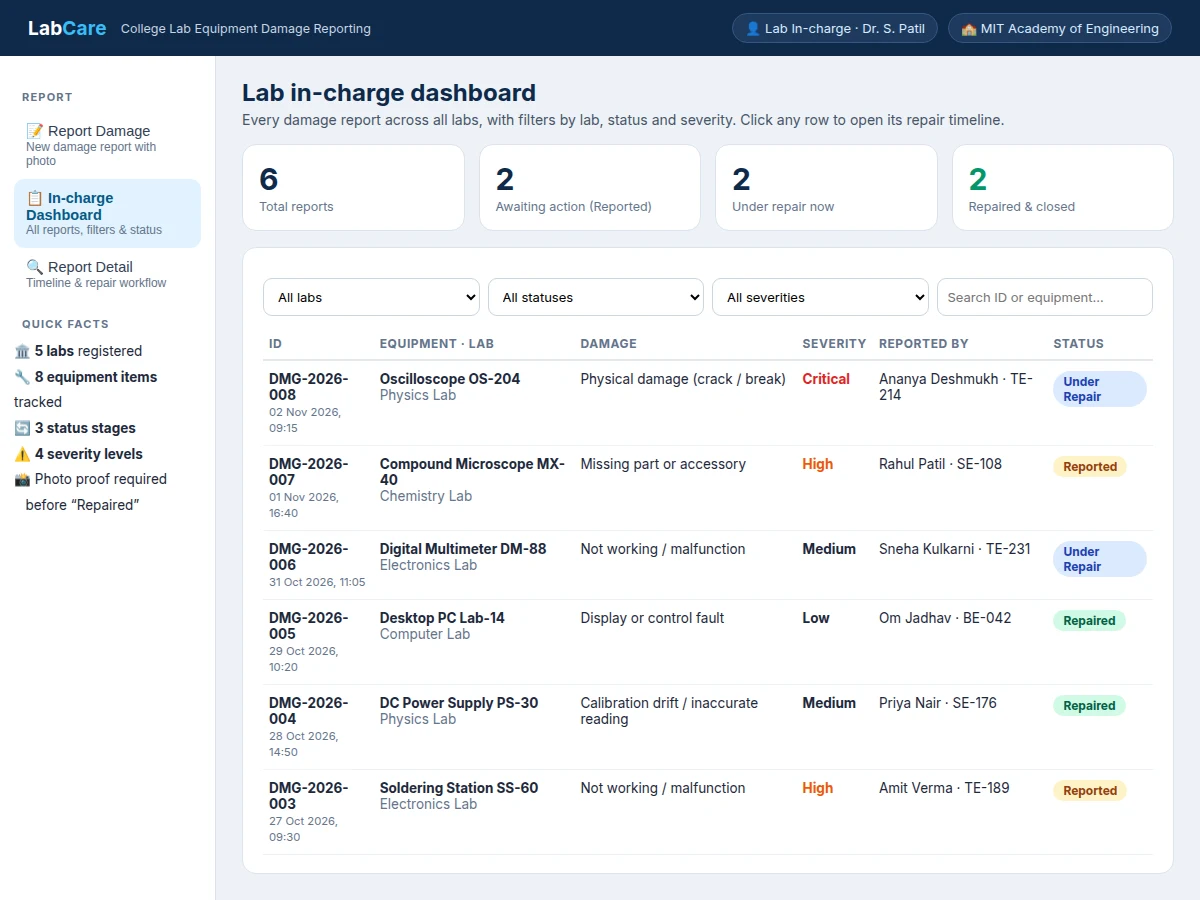
- [Lab in-charge dashboard] All reports across all labs appear in one table with live counts of reports awaiting action, under repair, and closed. The in-charge sees the full lab estate without opening each lab's register separately.
- [Severity triage] Four levels — Low, Medium, High, and Critical — let urgent faults stand out. Critical reports are highlighted and appear first, so a broken safety-critical item is never buried under routine reports.
- [Damage-type taxonomy] Six fixed damage types — physical damage, malfunction, missing part, calibration drift, display or control fault, and other — replace free-text guesswork, so reports can be grouped and compared across labs.
- [Lab and equipment register] Five labs and eight equipment items are registered in the demo, and the equipment list narrows automatically when a lab is chosen. Adding a lab or an item is a register entry, not a code change, in the delivered build.
- [Repair timeline and in-charge notes] Every status change is logged with a note, from verification to part ordering to closure. The timeline stays attached to the report after closure, giving the lab a permanent audit trail for each item.
- [Searchable report history] Each report receives a reference ID in DMG-YYYY-NNN form, and the dashboard searches by ID, equipment, or reporter name. A student can quote one ID and everyone involved opens the same record.
What is included
- Complete web application source code (report form, dashboard, detail view, status workflow)
- MySQL database schema with sample labs, equipment, and reports
- Working single-file demo app with realistic sample data
- Setup instructions for local hosting
- Project report PDF (background, workflow design, database design, testing)
- PPT presentation for final review
- Viva Q&A preparation document (CRUD operations, workflow state machines, file uploads, role-based access)
- Project abstract PDF
Limitations & prerequisites
- The single-file demo holds its records in the browser session; the delivered build uses the MySQL database, so demo records do not persist across sessions.
- Photo quality depends on the reporter's phone or camera; a dark or blurry photo delays triage until a clearer photo is attached.
- Severity is assessed by the reporter and verified by the in-charge; the system does not diagnose faults or assign severity automatically.
- There is no vendor or parts-ordering integration in the base build; parts status is recorded as a free-text note only.
- The base build has one in-charge verification step per report; a multi-level approval chain is not included and would be a customization.
- Public hosting needs a domain and hosting plan, which are separate from the software build unless quoted otherwise.
- This is a damage-reporting and repair-tracking system, not a preventive-maintenance suite: it does not schedule servicing or issue calibration certificates.
Frequently Asked Questions
How does photo proof work in this project?
The reporter attaches a photo of the damage when filing the report, and the photo stays attached to that report through its whole life. The in-charge verifies the damage photo before assigning the repair, and an after-repair photo is required before the status can move to Repaired, so both the fault and the fix are evidenced.
Can a report jump straight from Reported to Repaired?
No. The workflow enforces a strict one-stage-at-a-time sequence: Reported, then Under Repair, then Repaired. The advance button only ever offers the next stage, and the guard exists precisely so a repair cannot be closed without passing through an assigned, in-progress repair stage first.
Is this different from a lab equipment booking or issue-return system?
Yes, completely. A booking system reserves equipment and tracks issue and return; this project does neither. It starts only when something is already damaged, and its entire job is the report, the photo evidence, and the repair lifecycle through to verified closure.
Can more labs and equipment be added later?
Yes. Labs and equipment live in a register, so adding a lab or an item is a data entry, not a code change, in the delivered build. The demo ships with 5 labs and 8 equipment items, and the in-charge can extend that register as the college's labs grow.
Does the system work without internet?
Yes, on local hosting. The delivered build runs on a local server such as XAMPP on the campus network, so reports work inside the college without public internet. Public online access would need a hosted deployment, which is a separate hosting decision.
Is this project suitable for a final-year project?
Yes, for Computer Science, IT, and Web Development programs. It demonstrates database-backed CRUD operations, role-based access, file uploads, a workflow state machine with enforced transitions, and dashboard filtering — a complete, explainable web system with a working demo for the viva.
Components & software requirements
- HTML5 · CSS
- JavaScript
- PHP
- MySQL
- Apache · XAMPP local hosting
- Responsive web design
Delivery information
Built-to-order project. Delivery timeline is shared after order confirmation based on current queue.
Support terms
Complete documentation, setup guide, and viva preparation included. Support for setup and explanation provided.
Download free synopsis (PDF)
Enter your name and WhatsApp number — the synopsis PDF downloads immediately. We may send occasional project updates on WhatsApp; no spam.