
More project photos (2)
The problem
College labs own dozens of instruments — oscilloscopes, multimeters, power supplies, function generators — and every one of them drifts out of calibration on its own schedule. A college lab equipment calibration tracking web app with due-date alerts and service history replaces the spreadsheet or wall chart most labs rely on, with a register where each instrument carries its last calibration date, its interval, and its certificate. The app computes the next due date from those two facts, raises an alert as the date approaches, and blocks overdue instruments from being booked for measurements. When an instrument is calibrated, checked or repaired, the event joins a per-instrument timeline, so the lab always knows what was done, when, and by which accredited provider, with the traceability chain back to national standards intact. That is the difference between a lab that can defend its measurements in a review and one that discovers a lapsed certificate before an exam.
Lab staff enter instruments, calibration dates and service events.
Follow the working sequence
How it works
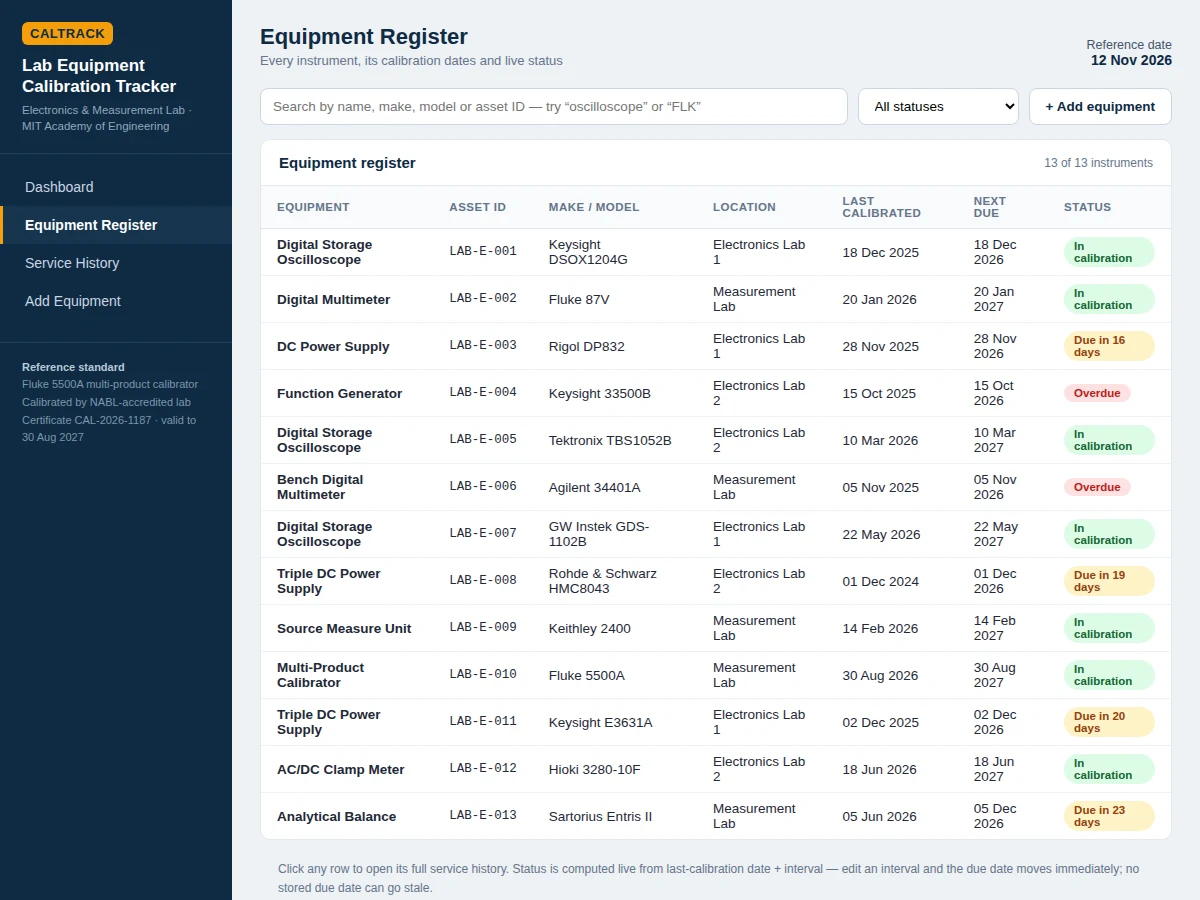
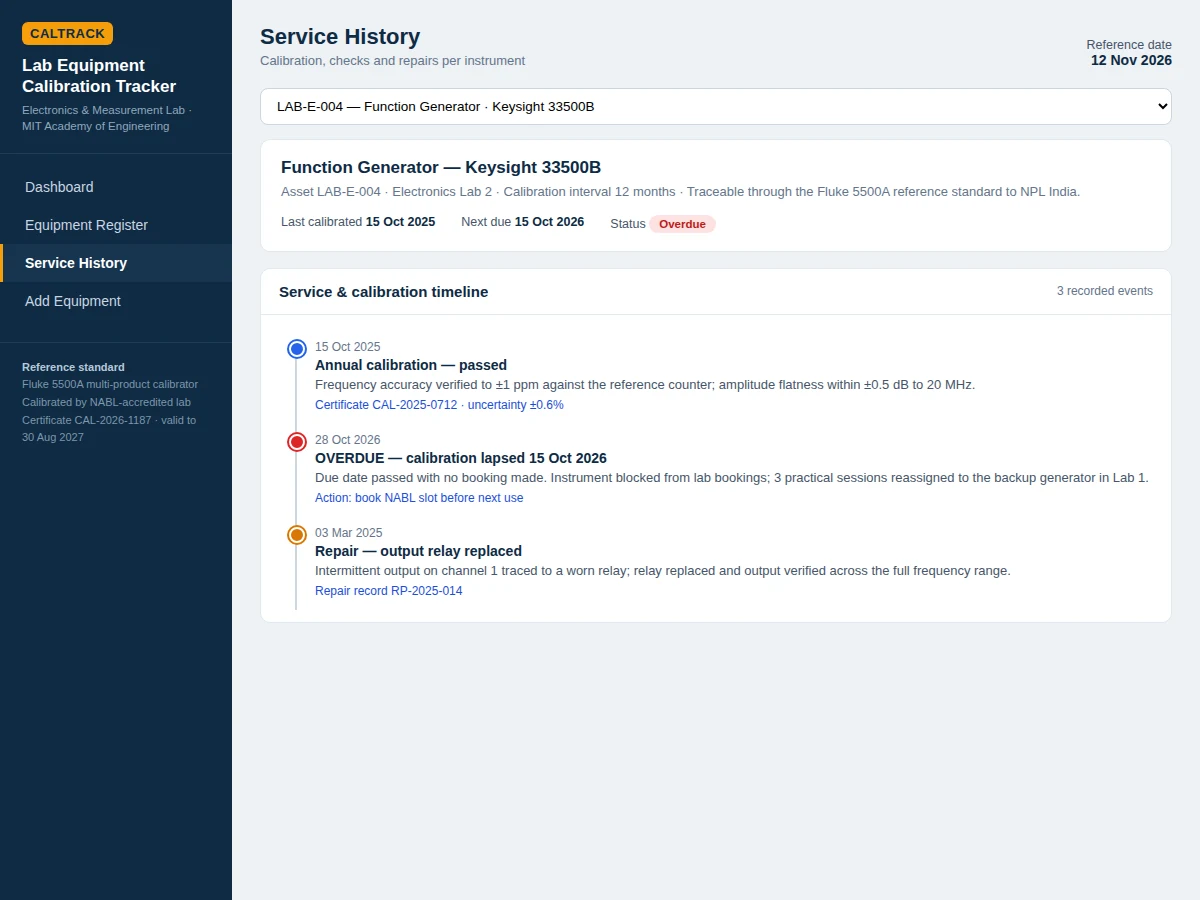
The dashboard shows the whole lab at a glance: instruments registered, overdue, due in the next 30 days, and holding valid certificates. Each instrument's record stores only two date facts — the last calibration date and the interval in months — and the app derives the next due date from them every time the page renders, so the status can never disagree with the record. The engine sorts instruments by days to due date, raises red alerts for lapsed items and amber alerts for items due within 30 days, and blocks overdue items from lab bookings. Opening any instrument shows its service timeline — every calibration, intermediate check and repair with its certificate reference — and the traceability panel shows the chain from the instrument through the lab's Fluke 5500A reference standard to the NABL-accredited calibration lab and on to NPL India. New instruments join through the add-equipment form, and the dashboard recomputes immediately.
- The lab in-charge registers each instrument with its name, make and model, asset ID, location, last calibration date and interval in months.
- On every render, the app adds the interval to the last calibration date to get the next due date, then classifies each instrument as overdue (date passed), due within 30 days, or in calibration.
- The dashboard aggregates the counts and lists alerts earliest-first, showing the exact number of days overdue or remaining for each instrument.
- Overdue instruments are flagged red and blocked from lab bookings; the alert names the action — book an NABL-accredited calibration slot before next use.
- Each calibration, intermediate check or repair is recorded on the instrument's timeline with its date, outcome and certificate reference.
- The traceability panel shows the calibration chain for the lab, and certificates are filed per instrument so an audit can follow any measurement back to national standards.
Tech stack:
- HTML5 · CSS3 · JavaScript (front end)
- Node.js · Express (REST API backend)
- MySQL (equipment and service records)
- JWT authentication (role-based access)
- REST API (JSON endpoints)
- Git (version control)
| Parameter | Value |
|---|---|
| Instruments in demo register | 13 (demo data) |
| Equipment categories | 10 (demo data) |
| Lab rooms | 3 (demo data) |
| Default calibration interval | 12 months (design policy) |
| Analytical balance interval | 6 months (design policy) |
| Power-supply interval | 24 months (design policy) |
| Alert window | 30 days before due date (design policy) |
| Dashboard re-render | Approximately 2 ms across 13 instruments (measured in demo) |
| Demo file size | Approximately 26 KB single HTML file, runs offline |
| User roles | 2 (lab in-charge, faculty — design target) |
| Database tables | 3 core tables: equipment, calibrations, service events (design target) |
Project features
The tracker is built around four capabilities a lab in-charge uses every week. The equipment register holds every instrument with its make, model, asset ID, location, last calibration date and interval, and the due date is derived from those two facts on every render, so an edited interval can never leave a stale due date behind. The alert dashboard ranks what needs attention first — overdue instruments in red, items due within 30 days in amber — and overdue items are blocked from lab bookings until a new certificate is uploaded. The service-history timeline records every calibration, intermediate check and repair per instrument with its certificate reference, so an auditor can follow one asset from purchase to today. A working add-equipment form registers new instruments, and the dashboard recomputes instantly; the demo's full re-render across its 13-instrument register takes approximately 2 ms, measured in the browser.
- [Live equipment register] Every instrument is listed with name, make and model, asset ID, location, last calibration date and interval; the demo ships with 13 realistic instruments across 10 categories and 3 lab rooms.
- [Due-date engine with live status] The next due date is computed from last calibration date plus interval months on every render — never stored — so status (overdue, due within 30 days, in calibration) can never disagree with the record.
- [Alert dashboard] Overdue and soon-due instruments are ranked earliest-first with the exact number of days overdue or remaining, so the lab in-charge sees what to book first.
- [Overdue blocking rule] Overdue instruments are flagged in red and blocked from lab bookings until a new certificate is uploaded, and past results recorded on them are flagged for review.
- [Service-history timeline] Every calibration, intermediate check and repair is recorded per instrument with date, outcome and certificate reference, in a readable timeline an auditor can follow.
- [Add-equipment form] New instruments are registered with name, asset ID, make, location, last calibration date and interval; the due date is computed automatically and the dashboard updates immediately.
- [Traceability panel] The chain from instrument through the lab's reference standard to the NABL-accredited calibration lab and on to NPL India is shown on the dashboard, with the interval policy stated beside it.
What is included
- Complete web app source code (front end + Node.js/Express backend)
- MySQL database schema with seed data (13 demo instruments with calibration dates and service history)
- Single-file working demo of the dashboard, register and service-history views
- Project report PDF (background, calibration concepts, methodology, results)
- Abstract PDF (10-section)
- PPT presentation for final review
- Viva Q&A preparation document (calibration intervals, traceability, ISO/IEC 17025 concepts, due-date logic)
- Setup guide for running the app locally and on a college server
Limitations & prerequisites
- The demo ships with fictional instruments and dates — the built project is loaded with the lab's real register before handover.
- The base build shows alerts on screen; email or SMS reminders are an optional customization, not included by default.
- Certificate PDFs are referenced by number in the demo; file upload and storage of scanned certificates is a customization.
- The app tracks dates and records — it does not perform calibration, which must be done by an NABL-accredited laboratory.
- ISO/IEC 17025 does not prescribe a fixed interval; the demo's 12, 6 and 24-month intervals are design policy, and the lab must justify its own intervals.
- The base build covers one lab; multi-department or multi-campus registers are a customization.
- The demo runs fully in the browser with local data; the full build needs the Node.js/MySQL backend for shared multi-user use.
Frequently Asked Questions
What does the app track for each instrument?
Each instrument carries its name, make and model, asset ID, location, last calibration date and interval in months, plus a computed next due date and a live status. Every calibration, intermediate check and repair is recorded on the instrument's service timeline with its date, outcome and certificate reference, so the full history of one asset is visible in one place.
How are the due dates calculated?
The next due date is the last calibration date plus the interval in months, computed fresh on every render and never stored. Because no stored due date exists, editing an interval moves the due date immediately and the status can never disagree with the record. That single design choice removes the most common failure in spreadsheet trackers, where an edited interval leaves a stale due date behind.
What happens when an instrument goes overdue?
It is flagged red on the dashboard, ranked first in the alerts list with the exact number of days lapsed, and blocked from lab bookings until a new certificate is uploaded. Results recorded on the instrument since its due date are flagged for review, following the ISO/IEC 17025 approach that the effect of an overdue calibration on reported results must be evaluated.
What is metrological traceability, and how does the app show it?
Metrological traceability is an unbroken, documented chain of calibrations linking a measurement back to national standards, with each link stating its uncertainty. The app shows the chain on the dashboard — instrument, Fluke 5500A reference standard, NABL-accredited calibration lab, NPL India, SI units — and every timeline event carries the certificate reference that proves its link.
Can reminders be sent by email or SMS?
Not in the base build — alerts appear on the dashboard when the lab in-charge opens it. Email reminders are an optional customization: the backend can send a weekly digest of instruments due within 30 days and a same-day notice for items that lapse, using the lab in-charge's email address. SMS reminders need a messaging provider account and are quoted separately.
Is this project suitable for a final-year project?
Yes — for Computer Science, IT and Web Development programs. It covers a real lab-management problem with CRUD operations, date arithmetic, dashboard design, role-based access and a working demo, plus a genuine standards topic (ISO/IEC 17025 traceability and interval policy) that gives the report and viva real substance.
Components & software requirements
- HTML5 · CSS3 · JavaScript (front end)
- Node.js · Express (REST API backend)
- MySQL (equipment and service records)
- JWT authentication (role-based access)
- REST API (JSON endpoints)
- Git (version control)
Delivery information
Built-to-order project. Delivery timeline is shared after order confirmation based on current queue.
Support terms
Complete documentation, setup guide, and viva preparation included. Support for setup and explanation provided.
Download free synopsis (PDF)
Enter your name and WhatsApp number — the synopsis PDF downloads immediately. We may send occasional project updates on WhatsApp; no spam.