
More project photos (2)
The problem
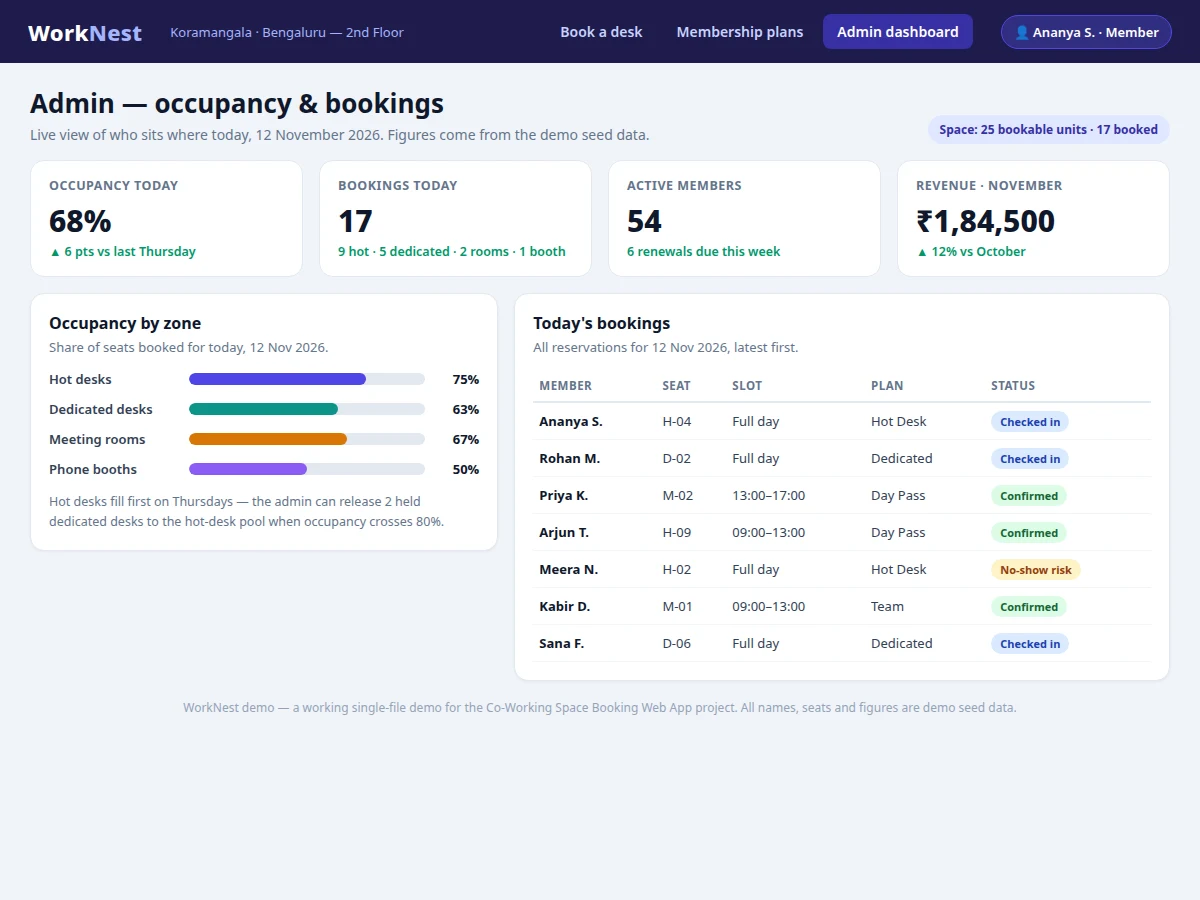
Co-working spaces sell desks by the day or the month, yet most small spaces still take bookings by phone and paper registers. A member asks if a window desk is free tomorrow; by the time the operator replies, it is gone or double-booked. The Co-Working Space Booking Web App with Desk Selection and Membership Plans replaces that back-and-forth with a live floor map: members see which desks and meeting rooms are free for a chosen date and slot, pick a seat, choose a plan, and confirm in four steps. The operator sees the same picture from the other side — an admin dashboard with occupancy by zone, today's bookings and renewals due — so the space stops losing revenue to double bookings. The demo build behind this listing renders 25 bookable units with 17 pre-booked in the seed data, so its dashboard opens at 68% occupancy — a figure from the demo's own data, not a claimed deployment.
Members see 25 desks and rooms with live availability.
Follow the working sequence
How it works
A member opens the app, sees the floor map for the chosen date, and the booking is complete four steps later. First, the frontend requests availability for the selected date, and the backend returns the status of every bookable unit from the bookings table, so booked seats render grey and free seats render green. Clicking a free seat opens the booking panel with that seat's price and amenities; the member picks one of three time slots or a full day, then a plan — a day pass for one visit or a monthly plan covering future visits. Confirming the booking runs a conflict check inside a database transaction, writes the booking and its payment record, and returns a reference such as WN-2026-1147, which lands in the member's booking list and marks the seat booked. The admin sees it instantly on the occupancy dashboard, where it lifts the zone's occupancy bar and joins the day's reservation table.
- The member signs in and picks a date; the frontend requests availability for that date from the REST API.
- The backend queries the bookings table and returns the status of all 25 bookable units, which the floor map renders green for free and grey for booked.
- The member clicks a free seat or room, and the booking panel fills in its price, amenities and free-cancellation terms.
- The member chooses a time slot (09:00–13:00, 13:00–17:00, 17:00–21:00 or full day) and a membership plan.
- Confirming the booking runs a conflict check inside a database transaction, writes the booking and payment record, and returns a booking reference.
- The seat shows as booked on the map, the booking joins the member's list, and the admin dashboard updates its occupancy bars and today's reservation table.
Tech stack:
- React · Vite
- Node.js · Express
- MySQL
- JWT authentication · bcrypt
- SVG floor-map booking interface
- Chart.js occupancy dashboard
- Razorpay test-mode payments
- Git · GitHub
| Parameter | Value |
|---|---|
| Bookable units on demo floor map | 25 (12 hot desks · 8 dedicated desks · 3 meeting rooms · 2 phone booths) |
| Pre-booked units in demo seed data | 17 of 25 — 68% occupancy (measured from the demo build) |
| Booking flow | 4 steps: select seat → date & slot → plan → confirm (counted from the build) |
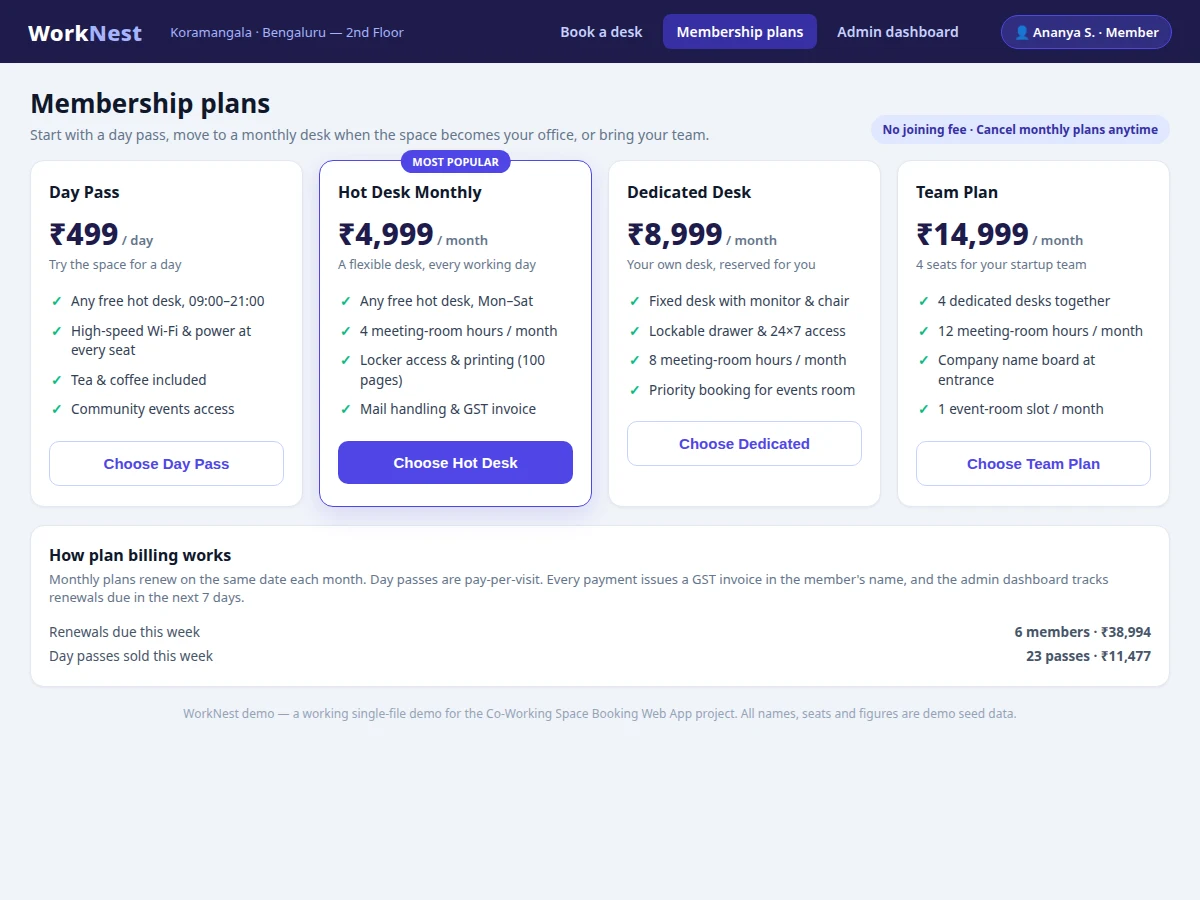
| Membership plans | 4: Day Pass · Hot Desk Monthly · Dedicated Desk · Team Plan |
| Day Pass price | ₹499 per day (listed price) |
| Hot Desk Monthly price | ₹4,999 per month (listed price) |
| Dedicated Desk price | ₹8,999 per month (listed price) |
| Team Plan price | ₹14,999 per month for 4 seats (listed price) |
| Meeting-room rates | ₹499–₹899 per hour by room size (listed price) |
| Time slots per day | 4 (09:00–13:00 · 13:00–17:00 · 17:00–21:00 · Full day) |
| Database tables | 8 (members · desks · plans · bookings · payments · invoices · admins · check-ins) |
| Concurrent members | Approximately 50 (design target) |
Project features
The app is built around four capabilities that a real co-working operator needs every day. First, the interactive floor map turns seat selection into a visual act: 12 hot desks, 8 dedicated desks, 3 meeting rooms and 2 phone booths are drawn as clickable units, each showing its price and live status, so a member chooses a real seat rather than a generic desk. Second, the booking flow covers the three ways a space actually sells — hot-desk day passes, dedicated monthly desks and hourly meeting rooms — with date and time-slot picking and a conflict check that refuses a seat already booked for that slot. Third, membership plans handle the money side: day pass, hot-desk monthly, dedicated monthly and a four-seat team plan, each with its own price and included meeting-room hours, billed with a GST invoice. Fourth, the admin dashboard converts bookings into decisions, showing occupancy by zone and the day's reservation list with check-in status.
- [Interactive floor-map desk selection] The floor map draws 25 bookable units — 12 hot desks, 8 dedicated desks, 3 meeting rooms and 2 phone booths — as clickable seats and rooms, each showing its price and live availability for the chosen date.
- [Hot-desk, dedicated-desk and meeting-room booking] Members book a hot desk for a day, reserve a dedicated desk for a month, or hire a meeting room by the hour, with date and time-slot picking on every booking.
- [Membership plans with billing] Four plans ship ready: Day Pass, Hot Desk Monthly, Dedicated Desk and Team Plan, each with its own price and meeting-room hour allowance, and every payment issues a GST invoice.
- [Live availability and double-booking prevention] Availability is read from the bookings table for the selected date, and confirming a booking runs a conflict check inside a database transaction, so two members cannot take the same seat for the same slot.
- [Admin occupancy dashboard] The operator sees occupancy by zone as live bars, today's bookings with check-in status, active members, renewals due this week and monthly revenue.
- [Member bookings and check-in status] Every confirmed booking appears in the member's own list with its reference number, date and slot, and the admin marks check-ins as members arrive.
- [Date and time-slot picker] Bookings use three daytime slots (09:00–13:00, 13:00–17:00, 17:00–21:00) plus a full-day option, so a space sells mornings, afternoons and full days separately.
What is included
- Complete source code (React frontend + Node.js/Express API)
- MySQL schema with seed data (25 bookable units, 4 plans, sample members and bookings)
- Working floor-map demo with selectable desks and a four-step booking flow
- Admin occupancy dashboard with zone-wise occupancy and a bookings table
- Project report PDF (background, methodology, architecture, outcomes)
- PPT presentation for final review
- Viva Q&A preparation document (REST APIs, JWT authentication, transactions, database design)
Limitations & prerequisites
- Payments run in Razorpay test mode in the delivered build — no real money moves until live keys and production approval are added.
- The demo's occupancy and revenue figures come from seed data; a real deployment starts empty and fills from live bookings.
- A booking is blocked only for the same seat and time slot; the system does not yet prevent one member booking two different seats for the same slot.
- Email and SMS confirmations need the buyer's SMTP/SMS credentials — confirmations are shown in-app by default.
- No native mobile app is included; the web app is responsive and works on mobile browsers.
- Listed prices are designed for the demo space; a real operator sets its own rates in the admin panel.
Frequently Asked Questions
How does the desk selection work?
You pick a date, and the floor map shows every seat and room for that day: green units are free and grey units are booked. Clicking a free hot desk, dedicated desk, meeting room or phone booth selects it, and the booking panel fills in its price, amenities and free-cancellation terms. You then choose a time slot and a plan and confirm — the seat turns grey for everyone else from that moment, because the confirmation runs a conflict check inside a database transaction before writing the booking.
What membership plans are included?
Four plans ship with the project: a ₹499 Day Pass, a ₹4,999-per-month Hot Desk plan, an ₹8,999-per-month Dedicated Desk plan, and a ₹14,999-per-month Team plan covering four seats. Each monthly plan carries its own meeting-room hour allowance — 4, 8 and 12 hours respectively — and every payment issues a GST invoice in the member's name. Plans are chosen during booking and can be changed from the member's account.
Does it include payment integration?
Yes, in test mode. Plan purchases go through Razorpay test keys, so the checkout flow, payment record and invoice generation all work end to end without moving real money, and every test purchase still issues a GST invoice in the member's name. Switching to live payments needs the operator's own Razorpay account and production keys, which is a setup step in the delivered guide rather than a code change.
Can it be hosted online?
Yes — the frontend is a static React build and the API is a Node.js service with a MySQL database, so it deploys to any shared host or VPS that runs Node.js and MySQL, with no special infrastructure beyond a standard Node host. The delivered package includes the database schema, seed data and a setup guide, and the working demo runs entirely in a browser as a single file for the viva.
What will I receive with the project?
You receive the complete source code (React frontend and Node.js/Express API), the MySQL schema with seed data for 25 bookable units and 4 plans, the working floor-map demo, the admin occupancy dashboard, the project report PDF, a PPT for final review, and a viva Q&A document covering REST APIs, JWT authentication, transactions and database design.
Is this project suitable for a final-year project?
Yes — it fits Computer Science, Information Technology and Web Development final-year submissions, and it also works for BCA and MCA projects. It demonstrates database design, REST APIs, authentication, transactions that prevent double booking, and a real admin dashboard, all of which give a viva panel concrete design decisions to ask about.
Components & software requirements
- React · Vite
- Node.js · Express
- MySQL
- JWT authentication · bcrypt
- SVG floor-map booking interface
- Chart.js occupancy dashboard
- Razorpay test-mode payments
- Git · GitHub
Delivery information
Built-to-order project. Delivery timeline is shared after order confirmation based on current queue.
Support terms
Complete documentation, setup guide, and viva preparation included. Support for setup and explanation provided.
Download free synopsis (PDF)
Enter your name and WhatsApp number — the synopsis PDF downloads immediately. We may send occasional project updates on WhatsApp; no spam.