
More project photos (3)

The problem
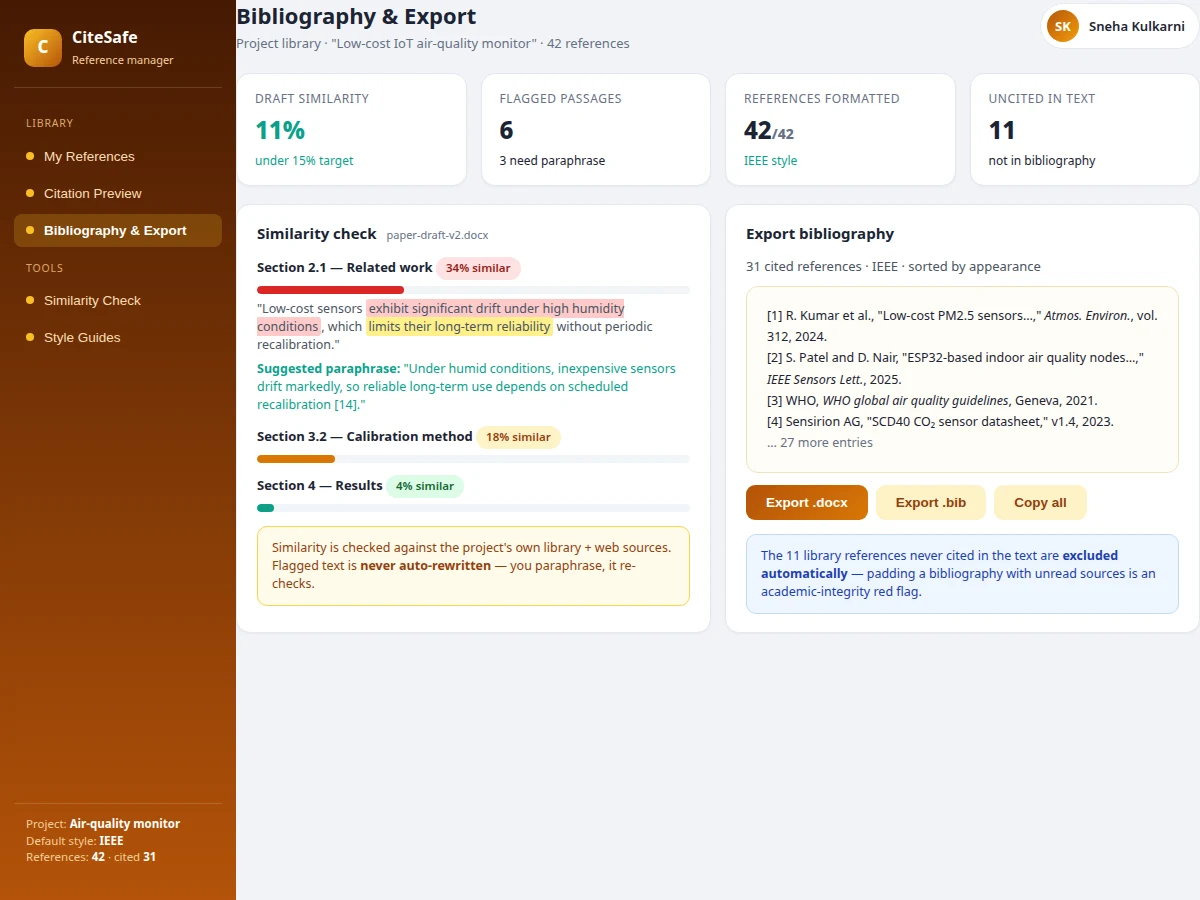
A final-year project report lives or dies on its references. Examiners notice the classic failures instantly: a bibliography padded with sources never cited in the text, DOIs and page ranges missing from entries, in-text citations that do not match the reference list, and paraphrased passages that track the source sentence a little too closely. Students cobble together citations by hand or with generic tools that do not understand academic-integrity rules. This project builds CiteSafe, a reference manager designed around how student research is actually judged. A reference library tracks completeness (missing DOI/pages), flags duplicate suspects for merge review, and records how often each source is cited. Citation preview renders any reference in APA 7th, MLA 9th, IEEE, Chicago and Vancouver side by side, with in-text and narrative forms. A similarity checker scans the draft against the project's own library and web sources, highlights flagged passages with per-section scores, and suggests paraphrases — but never auto-rewrites, so the student owns the writing. Export produces a bibliography containing only sources actually cited in the text.
Builds the library, previews citations and scans the draft for similarity.
Follow the working sequence
How it works
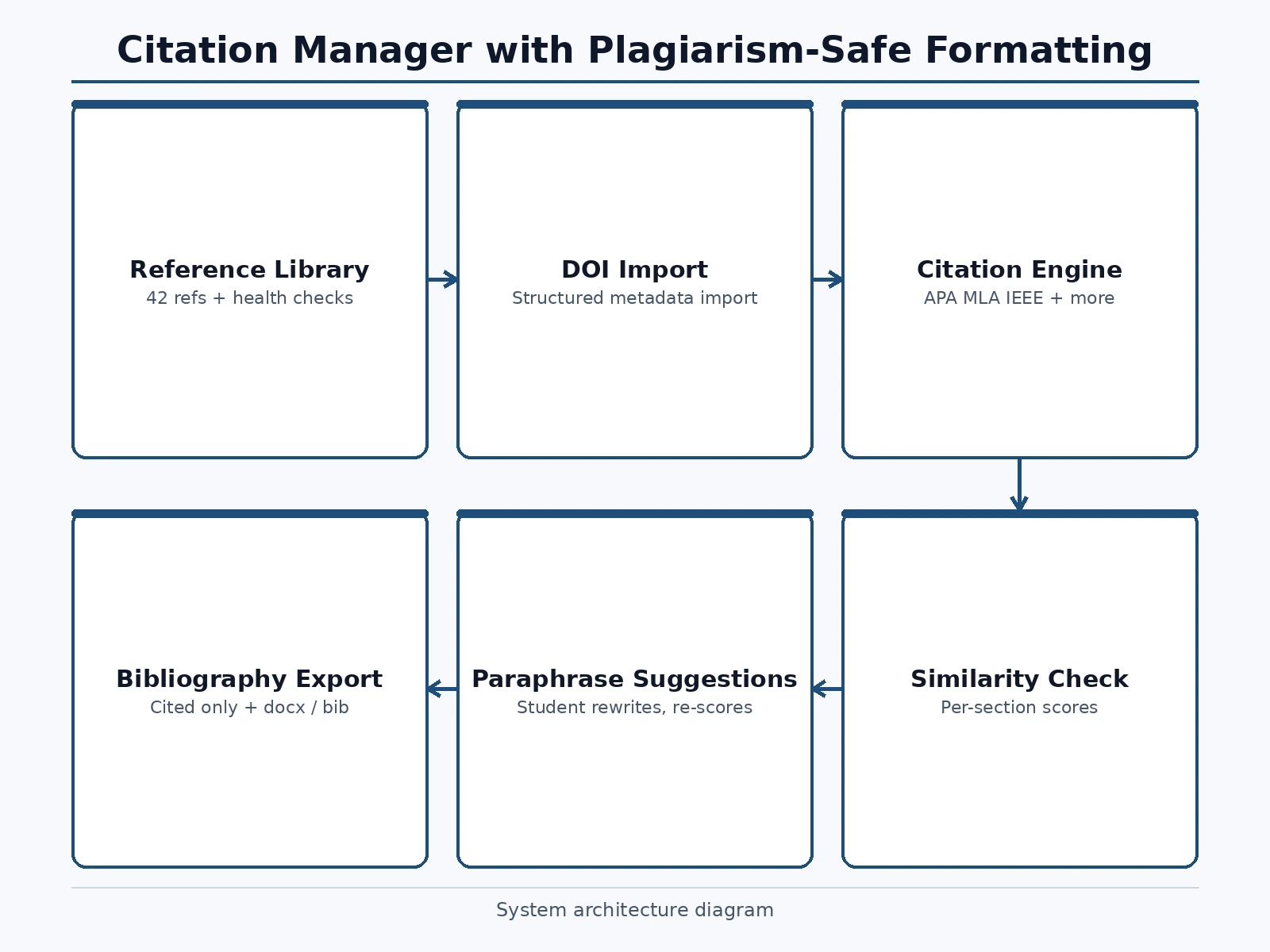
- The student creates a project library and sets the default citation style (IEEE in the demo); references are added manually or imported by DOI.
- Each reference is tracked with type, year, cited count and health status; entries missing DOIs or page ranges are flagged incomplete.
- Duplicate suspects (same source added twice) are queued for merge review so the library stays clean.
- Citation preview renders the selected reference in all five styles plus in-text and narrative citation forms for copy-paste into the draft.
- Switching the project style re-formats the entire library and every in-text citation consistently per the new style guide.
- The similarity checker scans the draft against the library and web sources, scores each section, highlights flagged passages and suggests paraphrases.
- The student rewrites flagged passages themselves; on export, only cited references are included in the .docx/.bib bibliography.
Tech stack:
- HTML5 · CSS3 · vanilla JavaScript (ES6)
- Single-file front-end app (no build step)
- browser localStorage persistence
- Citation-format rule engine (5 styles)
- Text-highlight similarity UI
- Responsive CSS Grid/Flexbox layout
| Parameter | Value |
|---|---|
| App format | Single-file web app, runs offline after download (design) |
| Data storage | Browser localStorage; no server or install required for the demo |
| Seeded dataset | 42 references, 31 cited in the draft, 5 incomplete, 2 duplicate suspects |
| Citation styles | APA 7th, MLA 9th, IEEE, Chicago, Vancouver |
| Similarity demo | Draft similarity 11% overall; per-section scores with flagged passages |
| Export formats | .docx and .bib (demo models the export action) |
| Multi-user | Single-user demo; shared team libraries need a backend (future scope) |
Project features
- [Reference library with health checks] 42 references tracked with cited counts; incomplete entries (missing DOI/pages) and duplicate suspects are flagged for review before export.
- [Multi-style citation preview] Any reference renders in APA 7th, MLA 9th, IEEE, Chicago and Vancouver with one click, including reference-list entries and in-text/narrative forms.
- [Project-wide style switching] Changing the project style re-formats all references and every in-text citation at once, following each style guide's author-order, italics and DOI rules.
- [Similarity check with paraphrase help] The draft is scanned against the project's library and web sources; flagged passages show per-section similarity scores with suggested paraphrases.
- [No auto-rewrite policy] Flagged text is never rewritten by the tool — the student paraphrases and the checker re-scores, keeping authorship honest by design.
- [Clean bibliography export] Export includes only references actually cited in the text; the 11 uncited library entries are excluded automatically, with .docx and .bib formats.
- [DOI import] References can be added manually or imported by DOI, pulling structured metadata instead of hand-typed entries.
What is included
- Complete CiteSafe web app source code (single-file HTML/CSS/JS)
- Seeded demo dataset (reference library with realistic entries across styles)
- Citation-style rule documentation (author order, italics, et-al. and DOI rules per style)
- Project report PDF (background, formatting engine, similarity design, screenshots)
- PPT presentation for final review
- Viva Q&A preparation document
- User manual
- Installation/deployment guide
Limitations & prerequisites
- The demo's similarity check is a teaching-grade comparison against the project's library and modeled web sources — it is not a substitute for institutional plagiarism screening (Turnitin/iThenticate class tools).
- Citation formatting follows the major style guides' core rules, but edge cases (legal sources, datasets, preprints) may need manual review.
- The demo runs single-user with browser storage; shared team libraries and real DOI metadata lookup need backend services (future scope).
- Export actions are modeled in the demo; real .docx/.bib file generation is part of the built-to-order delivery.
- The tool assists honest writing; it cannot detect contract cheating or AI-generated text.
Frequently Asked Questions
How is this different from a generic reference manager?
Generic managers store references; CiteSafe enforces academic-integrity hygiene. It flags incomplete entries before export, queues duplicate suspects for merge, excludes uncited sources from the bibliography automatically, and pairs the library with a similarity checker that suggests paraphrases. The whole design answers what examiners actually penalize.
Why doesn't the tool auto-rewrite flagged passages?
Deliberate design choice: auto-rewriting would let a student launder text without understanding it, which is itself an integrity problem. The tool highlights the passage, shows the similarity score and suggests a paraphrase direction — the student rewrites, and the checker re-scores. Authorship stays with the student.
Which citation styles are supported?
APA 7th, MLA 9th, IEEE, Chicago and Vancouver. Switching the project style re-formats every reference and in-text citation at once, following each guide's rules for author order, italics, et al. usage and DOI presentation — so a department that demands IEEE instead of APA gets a compliant draft in one click.
What does 'uncited in text' exclusion do?
Padding a bibliography with unread sources is an academic-integrity red flag. CiteSafe's export includes only references actually cited in the draft — the 11 library entries never cited are excluded automatically, so the bibliography honestly reflects the work.
Is this project suitable for a final-year project?
Yes — for Computer Science, IT and Web Development programs. It combines a rule-based formatting engine across five citation styles, a text-similarity comparison feature, data-integrity workflows and a domain (academic writing) with real, grade-level consequences. Suitable for B.E./B.Tech final-year projects in Computer Science, IT and Web Development.
Components & software requirements
- HTML5 · CSS3 · vanilla JavaScript (ES6)
- Single-file front-end app (no build step)
- browser localStorage persistence
- Citation-format rule engine (5 styles)
- Text-highlight similarity UI
- Responsive CSS Grid/Flexbox layout
Delivery information
Built-to-order project. Delivery timeline is shared after order confirmation based on current queue.
Support terms
Complete documentation, setup guide, and viva preparation included. Support for setup and explanation provided.
Download free synopsis (PDF)
Enter your name and WhatsApp number — the synopsis PDF downloads immediately. We may send occasional project updates on WhatsApp; no spam.