
More project photos (3)


The problem
Undergraduate research teams — the kind building a low-cost sensor prototype and aiming at a conference paper — run a genuinely complex project: literature survey of dozens of papers, hardware builds, firmware versions, calibration datasets, field trials, and a paper draft cycling through mentor review. In practice this lives across WhatsApp groups, personal drives and email threads; the mentor cannot see progress without asking, document versions collide, and nobody can reconstruct who did what when the paper's author list is debated. This project builds CoLab, a research collaboration workspace for a student team. A project overview tracks tasks, milestones, documents and the countdown to the draft deadline; a kanban task board carries work from to-do through review to done with owners and tags; shared documents are versioned with author names and review states; and the mentor reviews drafts, comments inline, and signs off milestones — with a recent-activity feed keeping the whole team's work visible.
Creates the workspace, assigns responsibility areas and defines milestones.
Follow the working sequence
How it works
- The project lead creates the workspace with the research topic, target venue (e.g. IEEE INDICON) and the paper-draft deadline that drives the countdown.
- Team members and the faculty mentor are added with roles; responsibility areas (hardware, firmware, data pipeline, literature) are assigned explicitly.
- Work is broken into tasks on the kanban board with owners, tags and due dates; tasks move from to-do through in-progress and review to done.
- Milestones (literature survey complete, prototype built, calibration done, field trial, paper draft) are defined with evidence criteria and sign-off dates.
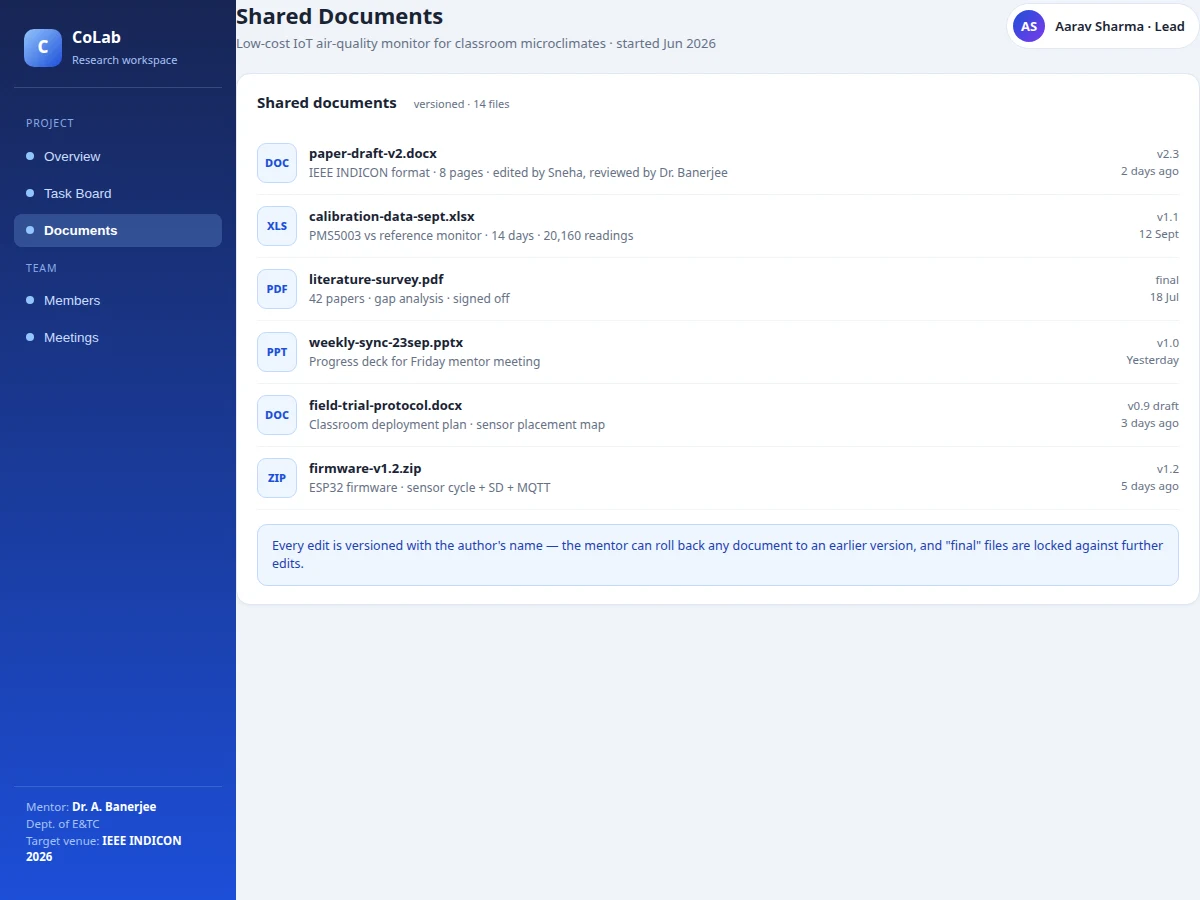
- Documents — drafts, datasets, decks, firmware — are uploaded to shared documents with version numbers, authors and review states; finals lock against edits.
- The mentor reviews drafts, leaves comments and signs off milestones; every action lands in the recent-activity feed with a timestamp.
- The overview dashboard continuously aggregates task completion, milestone progress, documents under review and days remaining to the deadline.
Tech stack:
- HTML5 · CSS3 · vanilla JavaScript (ES6)
- Single-file front-end app (no build step)
- browser localStorage persistence
- Kanban drag-state board UI
- Version-history data model
- Responsive CSS Grid/Flexbox layout
| Parameter | Value |
|---|---|
| App format | Single-file web app, runs offline after download (design) |
| Data storage | Browser localStorage; no server or install required for the demo |
| Seeded dataset | IoT air-quality monitor project: 34 tasks, 5 milestones, 14 documents, 5 members |
| Board columns | To-do, in progress, review, done |
| Document types | DOCX, XLSX, PDF, PPTX, ZIP with versioning |
| Roles | Project lead, data lead, member, mentor (faculty) |
| Multi-user | Single-user demo; real-time collaboration needs a backend (future scope) |
Project features
- [Project overview dashboard] Tasks done, milestones hit, documents under review and days to the draft deadline in one header — the state of the research at a glance.
- [Kanban task board] To-do, in-progress, review and done columns with owner initials, tags (hardware, firmware, data, paper, survey, admin), due dates and progress percentages.
- [Milestone tracking] Milestones carry evidence (42 papers reviewed, prototype built, calibration done) and sign-off dates; the next milestone and its start date stay visible.
- [Versioned shared documents] Paper drafts, datasets, presentations and firmware zips are versioned with author names, edit history and review states; final files lock against further edits.
- [Mentor review loop] The mentor comments on drafts, requests changes and signs off milestones; review comments appear in the activity feed with timestamps.
- [Team directory] Members carry roles (project lead, data lead, member, mentor) and responsibility areas, so ownership of every workstream is explicit.
- [Recent activity feed] Pushes, task moves, comments, uploads and scheduled syncs are logged with relative timestamps — the team's heartbeat without status meetings.
What is included
- Complete CoLab web app source code (single-file HTML/CSS/JS)
- Seeded demo dataset (full research project: tasks, milestones, documents, team)
- Project report PDF (background, workspace design, data model, methodology, screenshots)
- PPT presentation for final review
- Viva Q&A preparation document
- User manual (team and mentor roles)
- Installation/deployment guide
Limitations & prerequisites
- The demo is single-user with browser storage; real-time multi-user collaboration, notifications and file storage need a backend (future scope).
- Document previews are metadata in the demo; real in-browser rendering of DOCX/PDF needs viewer integrations.
- Mentor comments are modeled in-app; real email/push notifications need a messaging service.
- The seeded research project is demo data the buyer replaces with their own team's work.
- The workspace organizes research collaboration; it does not write the paper or run the experiments.
Frequently Asked Questions
Why not just use a generic project-management tool?
Generic tools track tasks; they do not understand research. CoLab's milestones carry research evidence (papers reviewed, calibration datasets, sign-off dates), documents are versioned with review states and mentor lock, and the overview counts down to the paper deadline. The domain model — literature, prototype, calibration, draft, venue — is built in, not bolted on.
How does the mentor fit into the workflow?
The mentor is a first-class role: they review drafts, leave comments, sign off milestones and can roll back any document to an earlier version. Final files lock against further edits, so the submitted version is unambiguous.
What does the activity feed actually capture?
Data pushes, task moves across board columns, review comments, document uploads with versions, and scheduled syncs — each with author and relative timestamp. It replaces the weekly status meeting with a continuously visible record of who did what.
How are documents protected from version chaos?
Every edit creates a named version with the author's name; the mentor can roll back to any earlier version, and files marked final are locked against further edits. The demo models this versioning discipline in the shared-documents view.
Is this project suitable for a final-year project?
Yes — for Computer Science, IT and Web Development programs. It combines kanban state management, document versioning, role-based workflows, dashboard aggregation and a domain model drawn from real student research practice, which makes the viva discussion concrete rather than abstract. Suitable for B.E./B.Tech final-year projects in Computer Science, IT and Web Development.
Components & software requirements
- HTML5 · CSS3 · vanilla JavaScript (ES6)
- Single-file front-end app (no build step)
- browser localStorage persistence
- Kanban drag-state board UI
- Version-history data model
- Responsive CSS Grid/Flexbox layout
Delivery information
Built-to-order project. Delivery timeline is shared after order confirmation based on current queue.
Support terms
Complete documentation, setup guide, and viva preparation included. Support for setup and explanation provided.
Download free synopsis (PDF)
Enter your name and WhatsApp number — the synopsis PDF downloads immediately. We may send occasional project updates on WhatsApp; no spam.