
More project photos (2)
The problem
A college robotics club easily moves over a lakh and a half in a year — membership fees, the college grant, workshop ticket sales, sponsorships — and spends it on components, travel, venues and printing. When the money lives in a spreadsheet on one person's laptop, three problems follow: nobody else can see the real balance, expenses lack supporting bills, and the faculty advisor's quarterly audit becomes a painful reconstruction. Handover to the next treasurer is worse — the knowledge walks away with the person. This project builds ClubBooks, a club finance tracker designed around the treasurer's actual workflow. Income sources and expense heads are tracked year-to-date with a live balance and runway; every expense is submitted with its bill scan and needs treasurer sign-off (large expenses additionally need faculty-advisor co-approval); event budgets carry allocated vs spent bars with overruns flagged red; and the quarterly audit exports every approved expense with its bill in one click.
How it works
- The treasurer sets up the financial year with the opening balance carried forward, income categories and the approval threshold (₹5,000 for co-approval in the demo).
- Income (fees, grants, ticket sales, sponsorships) and expenses are logged with date, description, category and amount; expenses start in pending status.
- Each expense needs its bill scan attached; the treasurer approves from the pending-approvals queue, and large expenses route to the faculty advisor for co-approval.
- The dashboard aggregates income YTD, expenses YTD, current balance and runway, with income-source and expense-split breakdowns.
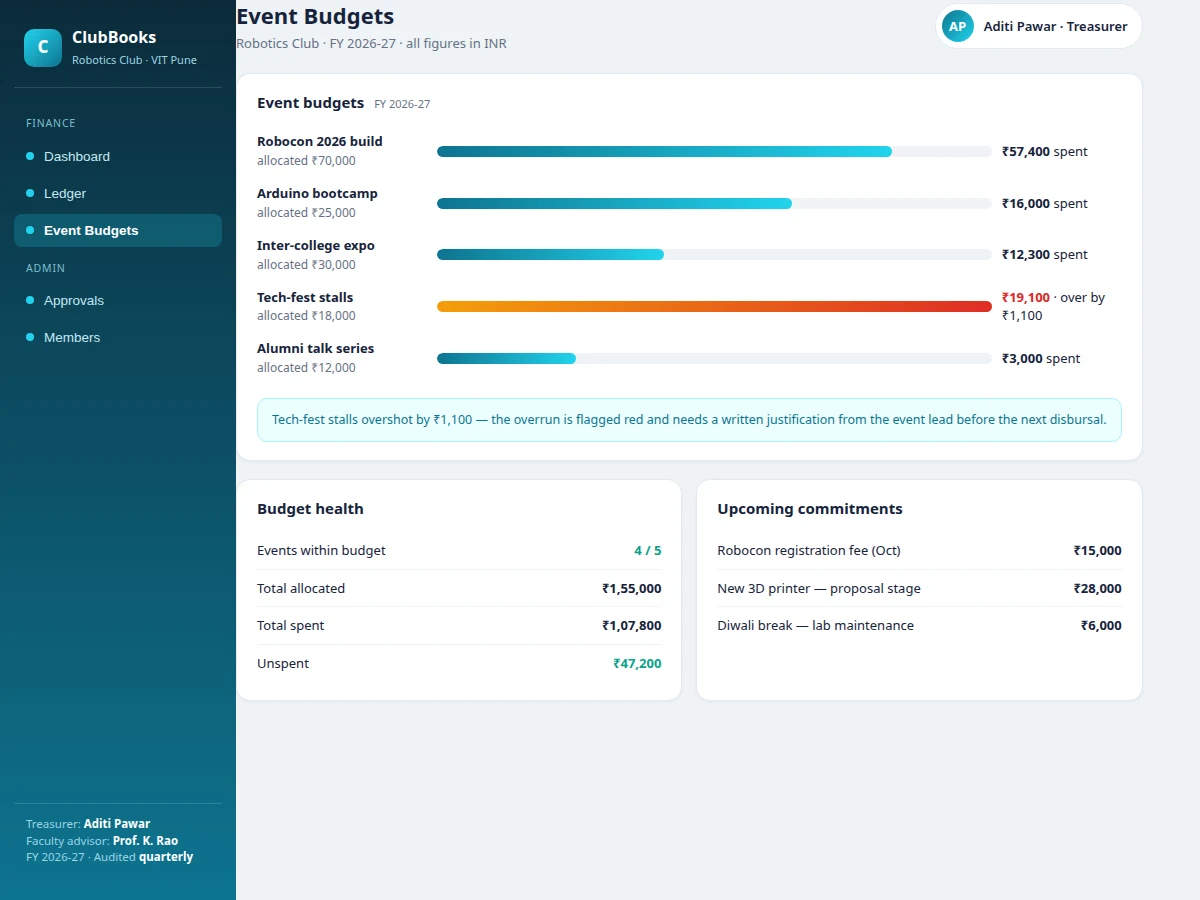
- Event budgets track allocated vs spent with progress bars; an overrun flags red and blocks the next disbursal until a written justification is recorded.
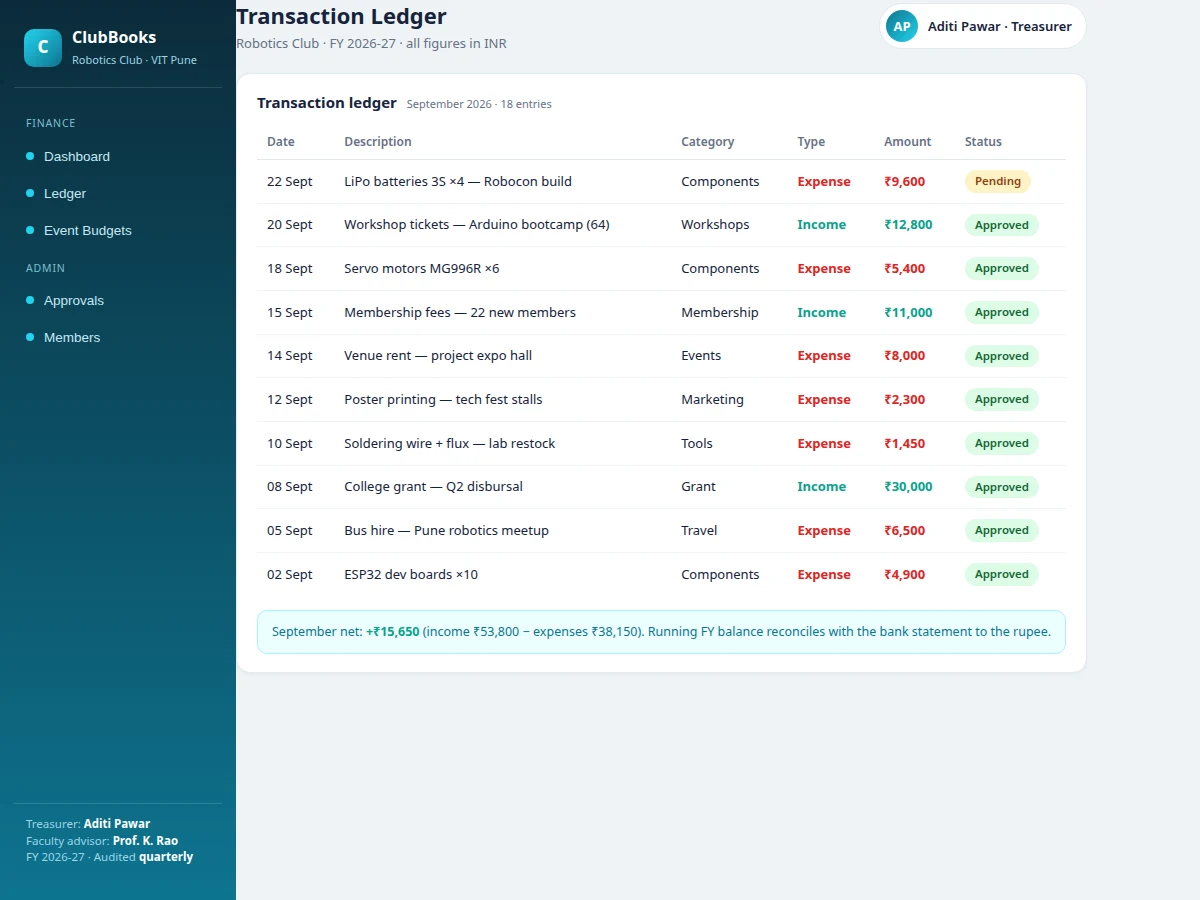
- The transaction ledger keeps the dated record with a monthly net summary; upcoming commitments are tracked separately so future outflows are visible.
- At quarter end, the audit export bundles every approved expense with its bill scan into one packet for the faculty advisor.
Tech stack:
- HTML5 · CSS3 · vanilla JavaScript (ES6)
- Single-file front-end app (no build step)
- browser localStorage persistence
- Bar/donut chart components (canvas)
- Approval workflow state machine
- Responsive CSS Grid/Flexbox layout
| Parameter | Value |
|---|---|
| App format | Single-file web app, runs offline after download (design) |
| Data storage | Browser localStorage; no server or install required for the demo |
| Seeded dataset | FY 2026-27 robotics club: ~₹1.86L income, ~₹1.42L expenses across 61 bills |
| Approval rule | Expenses above ₹5,000 need faculty-advisor co-approval (configurable) |
| Categories | Membership, grant, workshops, sponsorship; components, events, travel, marketing, tools |
| Currency | INR with Indian digit grouping |
| Multi-user | Single-user demo; treasurer/advisor roles shown as views; shared backend is an extension |
Project features
- [Finance dashboard] Opening balance, income YTD, expenses YTD and current balance with runway, plus income sources and expense-split panels — the club's money at a glance.
- [Approval-gated expenses] Every expense is submitted with its bill attached and sits in pending until the treasurer approves; expenses above ₹5,000 additionally need faculty-advisor co-approval.
- [Bill-attachment discipline] The approve action is disabled until the bill scan is attached, so no expense enters the books without supporting documentation.
- [Transaction ledger] A dated, categorized ledger of every income and expense with status (pending/approved), and a monthly net summary that reconciles with the running balance.
- [Event budgets with overrun flags] Each event gets an allocated budget with spent bars; overruns turn red and require a written justification before the next disbursal.
- [Budget health + commitments] Events-within-budget counts, total allocated vs spent, and upcoming commitments (registration fees, proposals) so the treasurer sees future load.
- [One-click audit export] The quarterly audit exports all approved expenses with their bill scans in one click — the faculty advisor gets a complete packet, not a spreadsheet hunt.
What is included
- Complete ClubBooks web app source code (single-file HTML/CSS/JS)
- Seeded demo dataset (full financial year of a robotics club)
- Project report PDF (background, approval workflow, data model, audit design, screenshots)
- PPT presentation for final review
- Viva Q&A preparation document
- User manual for the treasurer and faculty advisor
- Installation/deployment guide
Limitations & prerequisites
- The demo is single-user with browser storage; a real club needs a shared backend so the whole committee sees one ledger (future scope).
- Bill scans are attachment flags in the demo, not real file storage — document upload needs a backend.
- This is an internal tracking tool, not certified accounting software; it does not replace statutory bookkeeping or tax compliance.
- Financial figures are seeded demo data the buyer replaces with their club's real numbers.
- Approval thresholds and co-approval rules are demo configuration; the club sets its own policy.
Frequently Asked Questions
Why can't the treasurer just use a spreadsheet?
A spreadsheet records numbers; it does not enforce process. ClubBooks blocks approval until the bill is attached, routes large expenses to the faculty advisor automatically, flags event-budget overruns in red, and exports the audit packet in one click. The handover problem also disappears — the next treasurer inherits the system, not someone else's spreadsheet habits.
How does the audit export work?
Every approved expense links its bill scan, so the quarterly export bundles the full set — dated, categorized, approved — into one packet for the faculty advisor. The demo models this as a one-click action; a production build would generate the PDF/ZIP bundle server-side.
What happens when an event overshoots its budget?
The event's spent bar turns red with the overrun amount, and the next disbursal is blocked until the event lead records a written justification. The rule is encoded in the app, so budget discipline does not depend on the treasurer's memory.
Who approves what?
Members submit expenses with their bills attached; the treasurer approves routine ones from the pending-approvals queue, and expenses above the threshold (₹5,000 in the demo) additionally need faculty-advisor co-approval before they are marked paid. The queue always shows exactly what is waiting on whom, so nothing stalls silently.
Is this project suitable for a final-year project?
Yes — for Computer Science, IT and Web Development programs. It demonstrates workflow design with approval gates, financial data modeling, dashboard aggregation, audit-trail thinking and a real organizational pain point with measurable value, plus a clean demo the student can walk an examiner through. Suitable for B.E./B.Tech final-year projects in Computer Science, IT and Web Development.
Components & software requirements
- HTML5 · CSS3 · vanilla JavaScript (ES6)
- Single-file front-end app (no build step)
- browser localStorage persistence
- Bar/donut chart components (canvas)
- Approval workflow state machine
- Responsive CSS Grid/Flexbox layout
Delivery information
Built-to-order project. Delivery timeline is shared after order confirmation based on current queue.
Support terms
Complete documentation, setup guide, and viva preparation included. Support for setup and explanation provided.