
More project photos (3)


The problem
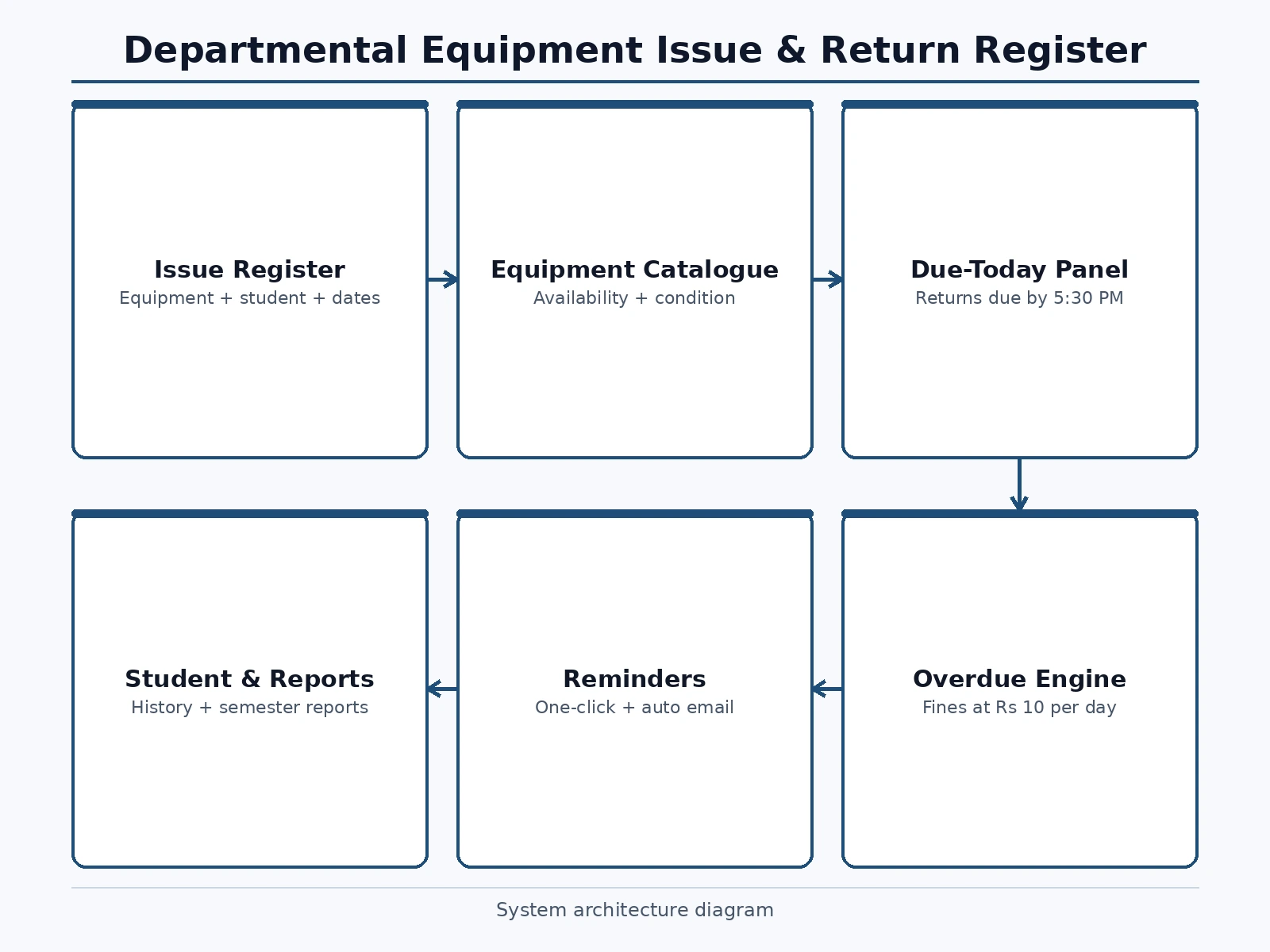
Every engineering department lab runs a lending counter: students borrow test instruments and kits for practicals and mini-projects, and return them days later. The traditional system is a paper register at the lab assistant's desk — entries are scribbled, due dates are remembered loosely, and overdue equipment surfaces only when someone else needs it and it is not on the shelf. Fines, where they exist, are computed by hand and rarely collected. The result is lost equipment, silent hoarding, and friction between students and lab staff. This project builds LabLedger, a digital issue-and-return register for a department lab. It replaces the paper book with a live register: each issue gets an entry number, equipment, student, issue date, due date and status. Overdue items accrue fines at a configured daily rate, the lab in-charge sees overdue and due-today panels with one-click reminders, and an equipment catalogue keeps live availability and condition per item so students know what is actually on the shelf before they ask.
Creates issue and return entries and chases the due-today panel.
Follow the working sequence
How it works
- The lab in-charge sets up the semester register: equipment catalogue with quantities, categories, condition, fine per day and maximum issue period.
- When a student borrows equipment, the in-charge creates an entry with the item, student details, issue date and computed due date; the item's available count drops.
- On return, the entry is closed with the return date; the available count rises and any fine is settled or recorded.
- Each day the overdue engine scans open entries past their due date, flags them, accrues fines at the configured rate, and queues reminders to the student and in-charge.
- The due-today panel lists everything returnable by closing time so the counter can chase returns proactively.
- Items flagged under repair are excluded from issue until cleared by the lab assistant, keeping broken stock out of circulation.
- Overdues beyond the escalation threshold auto-escalate to the HOD with the student's fine ledger attached.
Tech stack:
- HTML5 · CSS3 · vanilla JavaScript (ES6)
- Single-file front-end app (no build step)
- browser localStorage persistence
- Status-badge + progress-bar UI components
- Responsive CSS Grid/Flexbox layout
- Date-arithmetic fine engine
| Parameter | Value |
|---|---|
| App format | Single-file web app, runs offline after download (design) |
| Data storage | Browser localStorage; no server or install required for the demo |
| Seeded dataset | Approximately 186 items across 12 categories; ~40 register entries in the demo |
| Fine rule | ₹10/day per item (configurable); maximum issue period 7 days (configurable) |
| Escalation rule | Auto-escalation to HOD beyond 14 days overdue (configurable) |
| Multi-user | Single-user demo; multi-user backend listed as a configurable extension |
Project features
- [Live issue register] Every issue is logged with a sequential entry number, equipment, student name with class and roll number, issue date, due date and status — latest entries first.
- [Overdue engine with fines] Items past their due date are flagged automatically and fines accrue at a configured daily rate (₹10/day in the demo), with a running fine-pending total.
- [Due-today panel] The lab in-charge sees exactly what must come back by closing time (5:30 PM in the demo), so end-of-day collection is a checklist, not a hunt.
- [Equipment catalogue] All equipment grouped in categories with available/total counts and condition badges (Good/Fair), plus an under-repair flag that excludes broken items from issue.
- [One-click reminders] Each overdue row carries a send-reminder action, and the demo models daily auto-emails to the student and the lab in-charge until return.
- [HOD escalation rule] Overdues beyond 14 days auto-escalate to the HOD with the student's fine ledger attached — a policy rule encoded in the app, not enforced by memory.
- [Student and reports views] Student records aggregate each borrower's history, and reports summarize issues, overdues and fines for the semester register.
What is included
- Complete LabLedger web app source code (single-file HTML/CSS/JS)
- Seeded demo dataset (equipment catalogue, register entries, students)
- Project report PDF (background, data model, fine/escalation rules, methodology, screenshots)
- PPT presentation for final review
- Viva Q&A preparation document
- User manual for the lab in-charge
- Installation/deployment guide
Limitations & prerequisites
- The demo is single-user with browser storage; a real department deployment with multiple counters needs a shared backend (future scope).
- Reminders are modeled as in-app actions and queued auto-emails in the demo — actual email/SMS sending needs a configured mail/SMS service.
- Fine amounts and policies are demo configuration; the buying department sets its own rules.
- The app does not physically track equipment — it records what the counter staff enter; honesty of the register depends on counter discipline.
- Barcode/RFID scanning is not included in the demo build; it is listed as an extension.
Frequently Asked Questions
Why not just keep the paper register?
A paper register records; it does not enforce. LabLedger computes due dates, flags overdues automatically, accrues fines without hand calculation, and shows the in-charge exactly what is due today and what is overdue with reminders queued. The catalogue also tells students what is actually available, which a paper book at the counter cannot do.
How are fines calculated?
Each overdue day on an open entry adds the configured daily rate (₹10/day per item in the demo). The fine-pending total and per-student fine ledgers accumulate from the same rule, and the rate and maximum issue period are configuration, so the department sets its own policy.
What happens to equipment under repair?
It is flagged in the catalogue and excluded from issue until the lab assistant clears it. The demo models this with an under-repair banner naming the affected items, so broken stock never gets lent out by mistake.
Can students see the catalogue themselves?
Yes — the catalogue view is the read side of the same data: availability counts and condition badges update from live register entries. Issue and return actions stay with the lab in-charge role, so the register keeps a single accountable writer.
Is this project suitable for a final-year project?
Yes — for Computer Science, IT and Web Development programs. It covers data modeling (equipment, entries, students, fines), date-driven business rules, role-based views, and a real administrative workflow with measurable impact on a department lab. Suitable for B.E./B.Tech final-year projects in Computer Science, IT and Web Development.
Components & software requirements
- HTML5 · CSS3 · vanilla JavaScript (ES6)
- Single-file front-end app (no build step)
- browser localStorage persistence
- Status-badge + progress-bar UI components
- Responsive CSS Grid/Flexbox layout
- Date-arithmetic fine engine
Delivery information
Built-to-order project. Delivery timeline is shared after order confirmation based on current queue.
Support terms
Complete documentation, setup guide, and viva preparation included. Support for setup and explanation provided.
Download free synopsis (PDF)
Enter your name and WhatsApp number — the synopsis PDF downloads immediately. We may send occasional project updates on WhatsApp; no spam.