
More project photos (2)
The problem
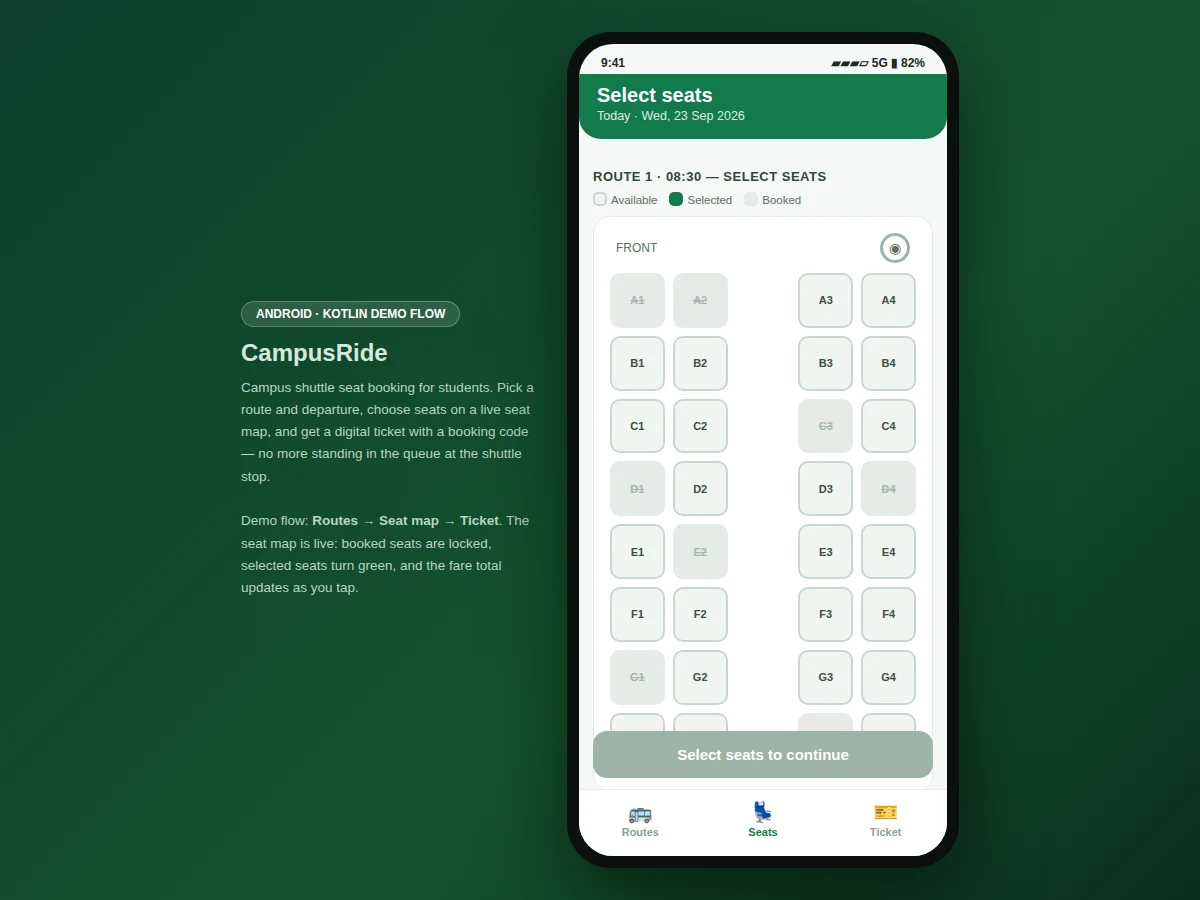
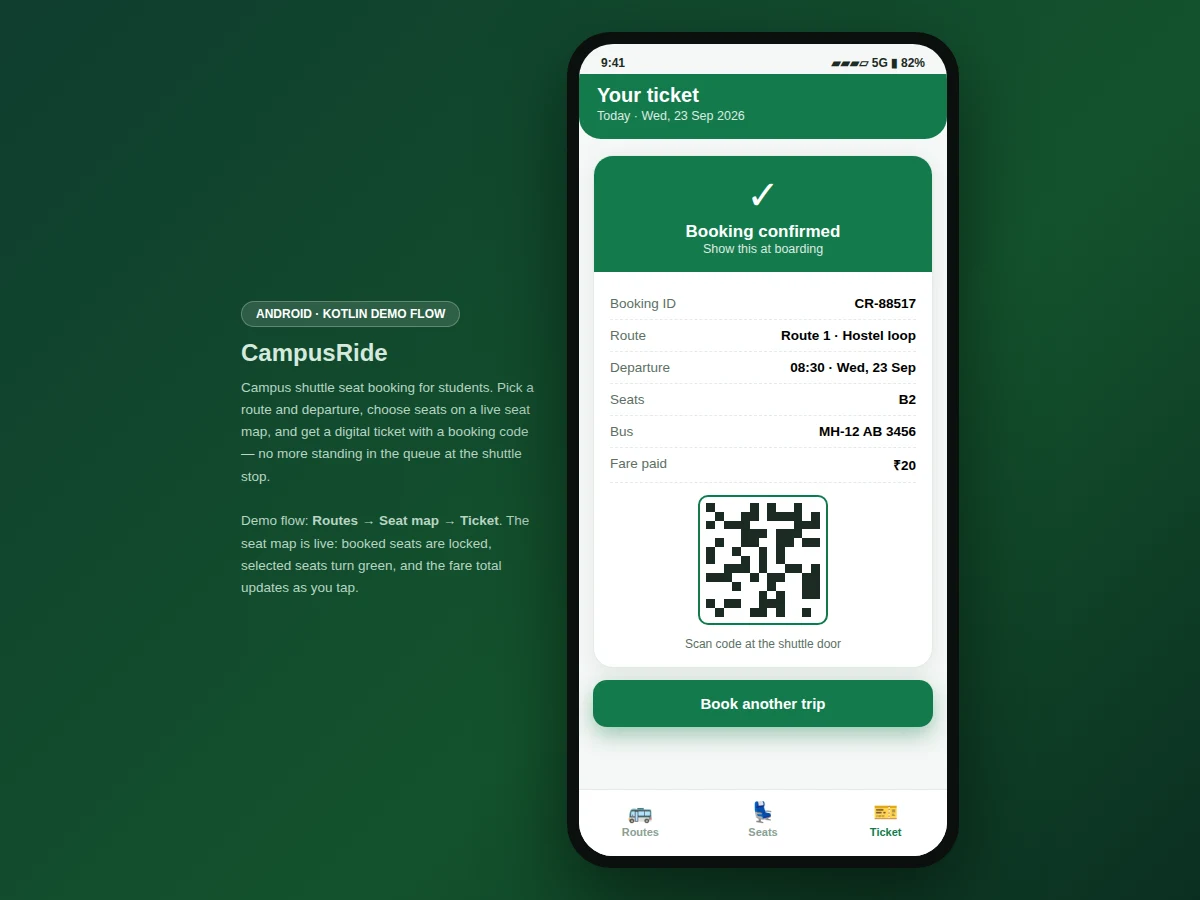
On most campuses the shuttle is first-come-first-served: students queue at the stop not knowing whether the bus will have a seat, and drivers have no advance count of who is boarding. The result is crowding at peak hours, students left standing, and no record of trips. This project replaces the queue with a booking flow. The app lists the day's shuttle routes — hostel loop, city-gate express, girls-hostel link — each with departures, vehicle number and a live seat-availability badge. Tapping a route opens a seat map of the bus: booked seats are locked, free seats are tappable, and the fare total updates as seats are selected. Confirming a booking generates a digital ticket with a booking ID and a QR-style scan code, plus an "upcoming trip" card on the home screen. Boarding becomes a scan instead of a scramble, and the shuttle operator gets a predictable passenger count per departure.
How it works
- The student opens the app and sees today's shuttle routes with departure times and seat-availability badges.
- Tapping a route opens the seat map: booked seats are locked, free seats can be tapped to select, and the fare total updates per seat.
- The student confirms the selection; the app generates a booking ID and a QR-style scan code.
- The digital ticket is saved and the "upcoming trip" card appears on the home screen with seat and booking details.
- At boarding, the student shows the ticket; the scan code is verified against the booking ID.
- Seat availability on the route list updates as bookings are made.
Tech stack:
- Kotlin, Android SDK (delivered app)
- Material-style mobile UI components
- Interactive web prototype of the app flow (HTML/CSS/JS) for demonstration
- Booking state model with seat-locking logic
| Parameter | Value |
|---|---|
| Platform | Android app in Kotlin (design target) |
| Demo screens | 3 (routes, seat map, ticket) |
| Routes in demo | 3 (hostel loop, city-gate express, girls-hostel link) |
| Seats per bus | 32 (rows A–H, 4 seats each) |
| Fare per seat | ₹20 in the demo (configurable) |
| Booking ID format | CR-##### (e.g. CR-88517) |
| Ticket code | QR-style scan pattern generated per booking |
| Demo views | Interactive web prototype of the Android flow |
| Data persistence | In-memory session store in the demo; local database in the delivered app (design target) |
| Device support | Android phones (demo prototype runs in any modern browser) |
Project features
- [Route list with live availability] Three campus routes with departures, vehicle numbers and seat-availability badges — "Seats available", "Filling fast" — computed from the booking state.
- [Interactive seat map] A 32-seat bus layout (rows A–H, 4 seats each) where booked seats are locked, selected seats highlight, and tapping toggles selection with an instant fare total (₹20 per seat in the demo).
- [Digital ticket with scan code] Every confirmed booking issues a ticket with booking ID, route, departure, seats, bus number, fare paid and a QR-style code for boarding verification.
- [Upcoming trip card] The home screen pins the student's next booked trip with seat and booking code, one tap away when the shuttle arrives.
- [Bottom navigation] Routes, Seats and Ticket tabs mirror a standard Android navigation pattern.
- [Full booking flow in the demo] Routes → seat map → ticket works end to end in the interactive prototype, including the sold-out and filling-fast states.
What is included
- Complete Android app source code (Kotlin) implementing the routes, seat map and ticket flow
- Interactive web prototype of the app flow (the demo shown in the screenshots)
- Full source code with comments explaining the booking state model
- Project report PDF (background, methodology, architecture, screens, testing notes)
- PPT presentation for final review
- Viva Q&A preparation document (booking logic, seat locking, ticket generation)
Limitations & prerequisites
- The demo prototype keeps bookings in memory for the session; the delivered app uses a local database for persistence.
- The QR-style code in the demo is a generated pattern for illustration; the delivered build can integrate a real QR library.
- Live multi-device seat syncing needs a backend server and is documented as future scope.
- The demo uses fixed sample routes and schedules; the delivered app loads them from an editable configuration.
- Payment collection is out of scope — the demo assumes a flat ₹20 fare.
Frequently Asked Questions
What does the app actually do?
It lets students browse campus shuttle routes, pick seats on a live seat map, and get a digital ticket with a booking ID and scan code — replacing the first-come queue at the shuttle stop.
How does the seat map work?
A 32-seat bus layout: already-booked seats are locked and cannot be tapped, free seats toggle on tap, and the fare total (₹20 per seat) updates instantly.
Is the demo a real Android app?
The screenshots show an interactive web prototype of the Android flow. The delivered project is the full Android app in Kotlin; the prototype demonstrates every screen and interaction.
Can the routes and fares be changed?
Yes — routes, departures, seat layout and the per-seat fare are configuration data in the delivered build, not hard-coded UI.
What does the report include?
A background on campus transport problems, the app's architecture and booking-state model, screen walkthroughs, and testing notes.
Is this project suitable for a final-year project?
Yes — for Computer Science, IT and Android-focused programs. It demonstrates mobile UI design, state management, and a real campus-facing problem. Suitable for B.E./B.Tech final-year projects in Computer Science, IT and Android development.
Components & software requirements
- Kotlin, Android SDK (delivered app)
- Material-style mobile UI components
- Interactive web prototype of the app flow (HTML/CSS/JS) for demonstration
- Booking state model with seat-locking logic
Delivery information
Built-to-order project. Delivery timeline is shared after order confirmation based on current queue.
Support terms
Complete documentation, setup guide, and viva preparation included. Support for setup and explanation provided.