
More project photos (2)

The problem
Many campuses keep a fleet of shared cycles, but renting one still depends on a register at a counter, a staff member being present, and a paper note of who took which cycle and when. Students cannot see whether cycles are available before walking to a station, nobody has a reliable record of return times, and charging by the hour becomes guesswork when start and return times were never recorded properly. That friction quietly kills the service: cycles sit unused at one station while students queue at another, and late returns go unnoticed. The Campus Bicycle Rental Android App with Hourly Billing replaces that counter register with a phone flow a student already understands. A station list shows how many cycles are free at each station, a rent action starts a live timer, a return action closes the rental, and the app produces an hourly bill with a ride history and a wallet balance. An admin station view keeps the fleet visible in one place, so staff can see where cycles are piling up and where they are running out.
This is a built-to-order software project: the Android app source, the demo data, the billing logic, and the complete viva kit (report, PPT, Q&A) are prepared fresh for you.
The Problem
The Campus Bicycle Rental Android App with Hourly Billing answers a plain campus logistics problem: how does a student find a free cycle without walking station to station, and how does the campus charge fairly for the time that cycle was actually out? Today the answer is usually a counter register and a staff member's memory, so availability is invisible until arrival, return times go unrecorded, and hourly charges are argued over rather than read off a bill. The rental app built here removes that guesswork by making each step visible: the station list shows free cycles, the rent action stamps a start time, the live timer shows the running cost during the ride, and the return action stamps an end time and bills the elapsed started hours. Late returns follow a stated rule, and the wallet and ride history give student and campus a record that can be checked afterwards.
A campus fleet only works if students trust that a cycle shown as available will actually be there and that the bill will match the ride they took. The app earns that trust by keeping the rental in one clear state at a time — available, rented, or returned — so a cycle cannot be rented twice, a finished ride cannot be billed again, and the station counts always reflect the rides that are genuinely in progress. For a student demonstration, that state discipline is the most instructive part of the build: it is easy to draw a station list, and much harder to keep availability, timer, billing, and history consistent when a ride is started, returned, and then followed by another ride.
Opens the app to find a free cycle at a campus station.
Follow the working sequence
How it works
The Campus Bicycle Rental Android App with Hourly Billing works through one end-to-end chain: find, rent, ride, return, and bill, with the wallet and history updated only when a ride genuinely closes. A student opens the station list, picks a station with cycles available, and rents a cycle, which stamps the start time, reduces that station's available count by one, and starts the live timer. While riding, the timer and running cost stay visible, so the student always knows how many started hours have accrued. At the end of the ride the student chooses a return station, returns the cycle, and the app stamps the end time, restores the available count there, computes the bill from started hours plus any late fee, deducts it from the wallet, and writes the ride into the history. The admin station view reflects each change immediately, because it reads the same availability counts the student list reads.
- The student opens the app and views the station list, which shows each campus station with its currently available cycle count.
- The student picks a station with at least one cycle available and taps Rent, which stamps the start time and reduces that station's available count by one cycle.
- The app starts the live rental timer and shows the chosen cycle's identifier, the pickup station, and the running cost at the stated demo rate.
- Optionally, the student shows the QR unlock code from inside the rent flow to release the cycle at a dock that supports scanning.
- During the ride, the timer keeps counting and the running cost updates as each new started hour begins, so the bill is never a surprise at return.
- The student chooses a return station, which may differ from the pickup station, and taps Return, which stamps the end time and restores the available count at the return station.
- The app computes the bill from the number of started hours at the stated rate, adds the flat late fee only when the return passes the stated return hour, and deducts the total from the wallet.
- The completed ride, with its route, duration, billed hours, and total, is written to the ride history, and the admin station view shows the updated availability.
Tech stack:
- Android · Kotlin
- Android Studio
- Material Design components
- Local app database · Room
- QR code display · ZXing-compatible
- Timer and billing logic · Kotlin coroutines
- REST API-ready data layer
- Figma-style phone UI prototype
| Parameter | Value |
|---|---|
| Platform | Android app for phones (design target) · minimum Android 8.0 or later (design target) |
| Stations in demo | 8 stations (demo data) · 34 cycles available across all stations at demo start (demo data) |
| Station list | Station name · location note · available cycle count · example cycle identifier (implemented feature) |
| Rent flow | Start-time stamp · station count reduced by 1 cycle · live timer started (implemented feature) |
| Rental timer | Elapsed time in hours · minutes · seconds (implemented feature) · running cost updated per started hour (implemented feature) |
| Billing rule | Each started hour billed in full (design rule) · 65 minutes bills as 2 hours (worked example) |
| Demo rate | ₹20 per hour (demo rate only · example, not a campus tariff) |
| Late-return rule | ₹30 flat demo fee (demo rate only) when return passes 10:00 pm (stated return hour · demo rule) |
| Wallet | Demo balance starting at ₹200 (demo data) · deducted on return (implemented feature) |
| Ride history | Route · duration in minutes · billed hours · total in rupees (implemented feature) |
| Admin view | All stations with available counts in one list (implemented feature) |
| QR unlock | In-app QR code display for the rented cycle (implemented feature) · physical dock hardware not included (scope limit) |
| Payment | No real payment gateway in the base app (scope limit) · wallet is a balance ledger in the demo (implemented feature) |
| Data | Local demo station and cycle data (demo data) · server backend is an optional extension, not included in the base app (scope limit) |
Project features
The Campus Bicycle Rental Android App with Hourly Billing is built around four capabilities a student can demonstrate end to end: a live station list with available cycle counts, a rent and return flow tied to a live rental timer, hourly billing with a rate card and a late-return rule, and a wallet with a ride history, all watched over by an admin station view. Around those core capabilities, the app provides a QR unlock option inside the rent flow, a low-availability warning when a station is nearly empty, and a return-station choice so a cycle need not come back to the station it left from. Every feature below is part of the base app unless it is marked optional, and real payment processing is deliberately not in the base build: the wallet in the demo is a balance ledger with clearly labelled demo rates, so nothing is claimed about money movement that the app does not perform.
- [Live station list] The app shows campus stations with the number of cycles currently available at each one, so a student can choose a station with cycles free before setting out instead of discovering an empty dock on arrival. Implemented in the base app.
- [Rent and return flow] Renting a cycle stamps a start time and starts the live timer, and returning it at a chosen station stamps an end time and closes the rental, so every ride has a definite beginning and end. Implemented in the base app.
- [Live rental timer with running cost] While a ride is in progress, the timer shows elapsed time and the running hourly cost at the demo rate, so the student sees the bill growing during the ride rather than being surprised by it at return. Implemented in the base app.
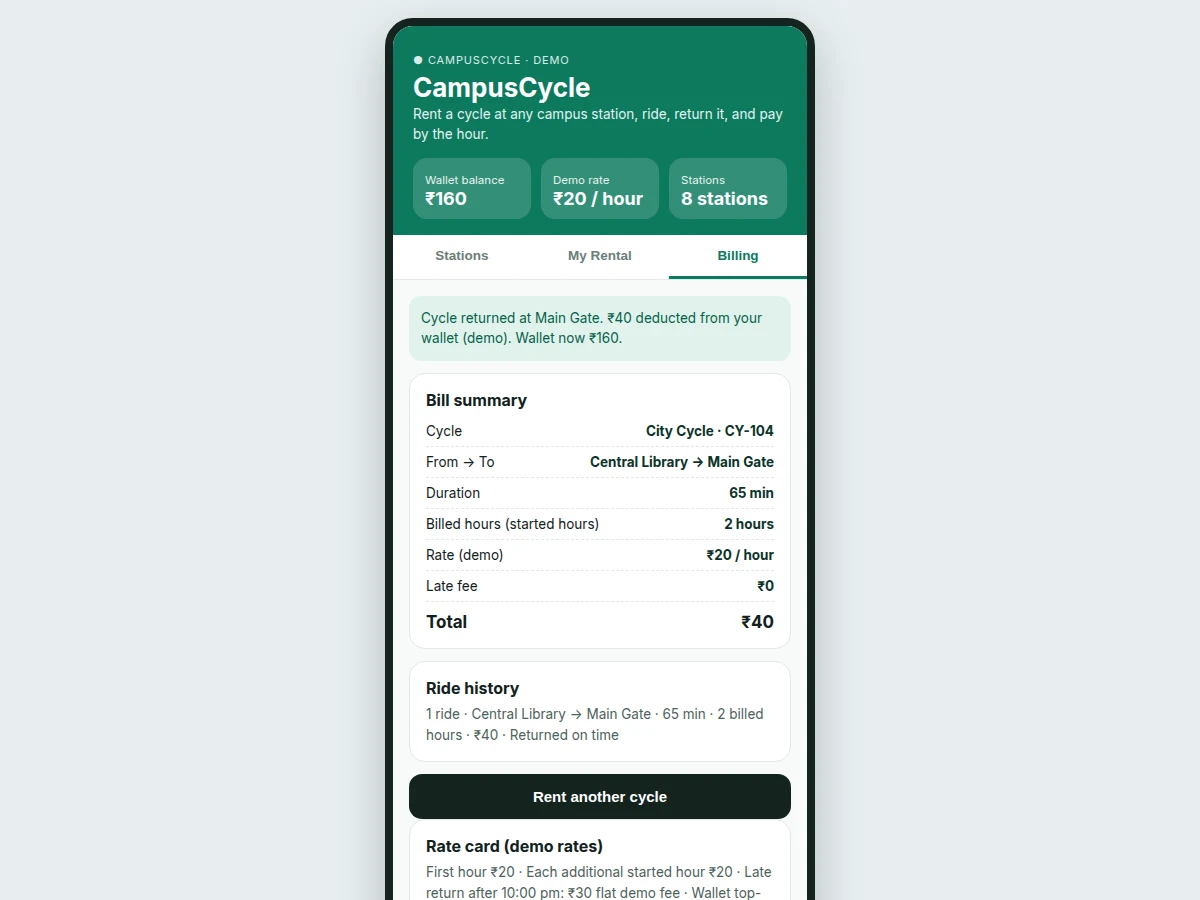
- [Hourly billing with rate card] The bill is computed from started hours at a stated rate, with the rate card shown in the app, so a ride of 65 minutes bills as 2 started hours and the arithmetic on the bill can be checked by hand. Implemented in the base app.
- [Late-return handling] A stated late-return rule applies a flat demo fee when a cycle comes back after the stated return hour, and the fee appears as its own line on the bill instead of being folded silently into the hourly charge. Implemented in the base app.
- [Wallet and ride history] A wallet balance falls when a bill is settled, and the ride history keeps each completed ride with its route, duration, billed hours, and total, giving the student a record to check against the bill. Implemented in the base app.
- [Admin station view] An admin view lists every station with its available count, so campus staff can spot stations running low and stations accumulating cycles without opening individual rental records. Implemented in the base app.
- [QR unlock inside the rent flow] After renting, the app can show a QR unlock code for the chosen cycle, as one feature inside the rent flow, for docks that release a cycle on scan. Implemented in the base app; physical dock hardware is not included and is an optional extension.
What is included
- Complete Android app source code with the station list, rent and return flow, live timer, hourly billing, wallet, ride history, and admin station view
- Working phone demo of the full find, rent, ride, return, and bill flow on realistic campus station data
- Billing logic documentation, including the started-hour rule and the worked 65-minute example
- Setup instructions for Android Studio, including how to run the demo on an emulator or a phone
- Project report PDF (background, rental workflow, state machine, billing design, limitations)
- PPT presentation for final review
- Viva Q&A preparation document (station availability, state machine, started-hour billing, late-return handling, wallet ledger, admin view)
- Builder note: the billing rule was settled during the demo build, not assumed afterwards — the timer accrues cost per started hour, not per minute, so a ride crossing into a new hour jumps to the next full hour's charge, and the return handler clears the timer and moves the rental from Active to Returned, which is why the same ride cannot be billed a second time; the rent, return, and bill states share one rental record, so the station counts, the timer, and the history can never disagree about whether a cycle is out or back
Limitations & prerequisites
- The demo rates are examples only: ₹20 per hour and the ₹30 late fee are demo figures for the student demonstration and are not a real campus tariff, and a real deployment must set its own rates.
- No real payment is processed in the base app: the wallet is a balance ledger, so UPI or card payment would need a payment gateway integration as a separate, quoted extension.
- Availability in the demo comes from local demo data, not from live dock sensors: a real deployment would need station hardware or staff updates to keep counts true.
- The QR unlock in the base app displays a code only: it does not release a physical lock, and dock hardware with a scanner would be needed for a working dock.
- One phone account holds one active rental in the demo flow: group or multi-cycle rentals are not supported in the base app.
- Late-return handling uses a single stated return hour: it does not model grace periods, per-station closing times, or damage and loss charges, which a real campus policy would need.
- The app is an academic prototype, not a campus operations system: it has no staff roster, maintenance scheduling, or fleet servicing workflow.
Frequently Asked Questions
Is this project suitable for a final-year project?
Yes, for Computer Science and Information Technology students, because it demonstrates Android app development, list and detail screens, a rent-to-return state machine, timer-driven billing logic, wallet and history data handling, and an admin view in one complete workflow that can be demonstrated live on a phone. The report can walk through the started-hour billing rule with a worked example and explain why the rental state machine keeps availability, timer, and history consistent across a full ride.
How does hourly billing work in this app?
Hourly billing works by counting started hours, not minutes, so each hour a ride touches is billed in full at the stated rate, and the bill shows the billed hours, the rate, any late fee, and the total, with every line item visible for checking. A ride of 65 minutes therefore bills as 2 started hours, which at the ₹20 demo rate is ₹40, and the running cost shown during the ride already reflects that rule so the final bill matches what the student watched accrue. The rate card is shown in the app, and the demo rates are examples only, not a real campus tariff.
Does the student have to return the cycle to the same station?
No, the student chooses a return station at return time, and the app restores the available count at the return station rather than the pickup station, so one-way rides between stations are supported by design, and the completed ride keeps that return station in its history record for staff to review. The bill records the full route from pickup station to return station, so the ride history shows where each cycle actually ended up. A campus deploying the system would still need a rebalancing routine for stations that accumulate too many cycles.
Is QR unlock the main feature of this app?
No, QR unlock is one feature inside the rent flow, because the core of this app is the rental marketplace with billing: station availability, the rent and return flow, the live timer, hourly billing, late-return handling, wallet, history, and the admin station view. The QR code simply gives a rented cycle an unlock step at docks that support scanning, and the app works as a rental and billing demonstration with or without dock hardware. Physical dock hardware is not included in the base build.
Can this app be customised for my campus?
Yes, within realistic scope, because the station names, cycle counts, rate card, return hour, and late fee are all demo data and configuration values that can be changed to match a real campus layout and policy, including station additions, removals, and renames during the build. Larger changes, such as a server backend with live station updates, real payment processing, or dock hardware integration, are quoted separately as extensions and are not claimed as part of the base app. College-specific station lists and branding can be adapted during the build.
What does the admin station view show?
The admin station view shows every campus station in one list with its currently available cycle count, so staff can see at a glance which stations are running low and which are accumulating cycles, and the list refreshes from the same counts behind the student station list after every rental and return. It reads the same availability counts as the student station list, so a rental or return updates both views together and neither view can drift from the other. The base view covers availability only; staff rosters, maintenance scheduling, and fleet servicing are not included.
Components & software requirements
- Android · Kotlin
- Android Studio
- Material Design components
- Local app database · Room
- QR code display · ZXing-compatible
- Timer and billing logic · Kotlin coroutines
- REST API-ready data layer
- Figma-style phone UI prototype
Delivery information
Built-to-order project. Delivery timeline is shared after order confirmation based on current queue.
Support terms
Complete documentation, setup guide, and viva preparation included. Support for setup and explanation provided.
Download free synopsis (PDF)
Enter your name and WhatsApp number — the synopsis PDF downloads immediately. We may send occasional project updates on WhatsApp; no spam.