
More project photos (3)

The problem
A Bluetooth Scrolling LED Matrix Display with Mobile Message Control is a phone-controlled notice board that shows text messages as scrolling red letters on a wide LED panel. The panel is built from four 8x8 LED matrix modules chained side by side into a single 32-column by 8-row display, driven by an ESP32 controller that receives each message over a Bluetooth serial link from a mobile phone. Fixed notice boards, printed posters and wired displays all share the same weakness: changing the message means reprinting, rewriting or walking up to the board with a cable. This display answers that problem by letting anyone standing nearby send a new message from a phone, so classrooms, workshops, labs, small shops and event counters can update what the board says without touching it. Messages scroll smoothly across the panel from one end to the other, and the sender can adjust how fast the text moves and how bright the LEDs glow.
How it works
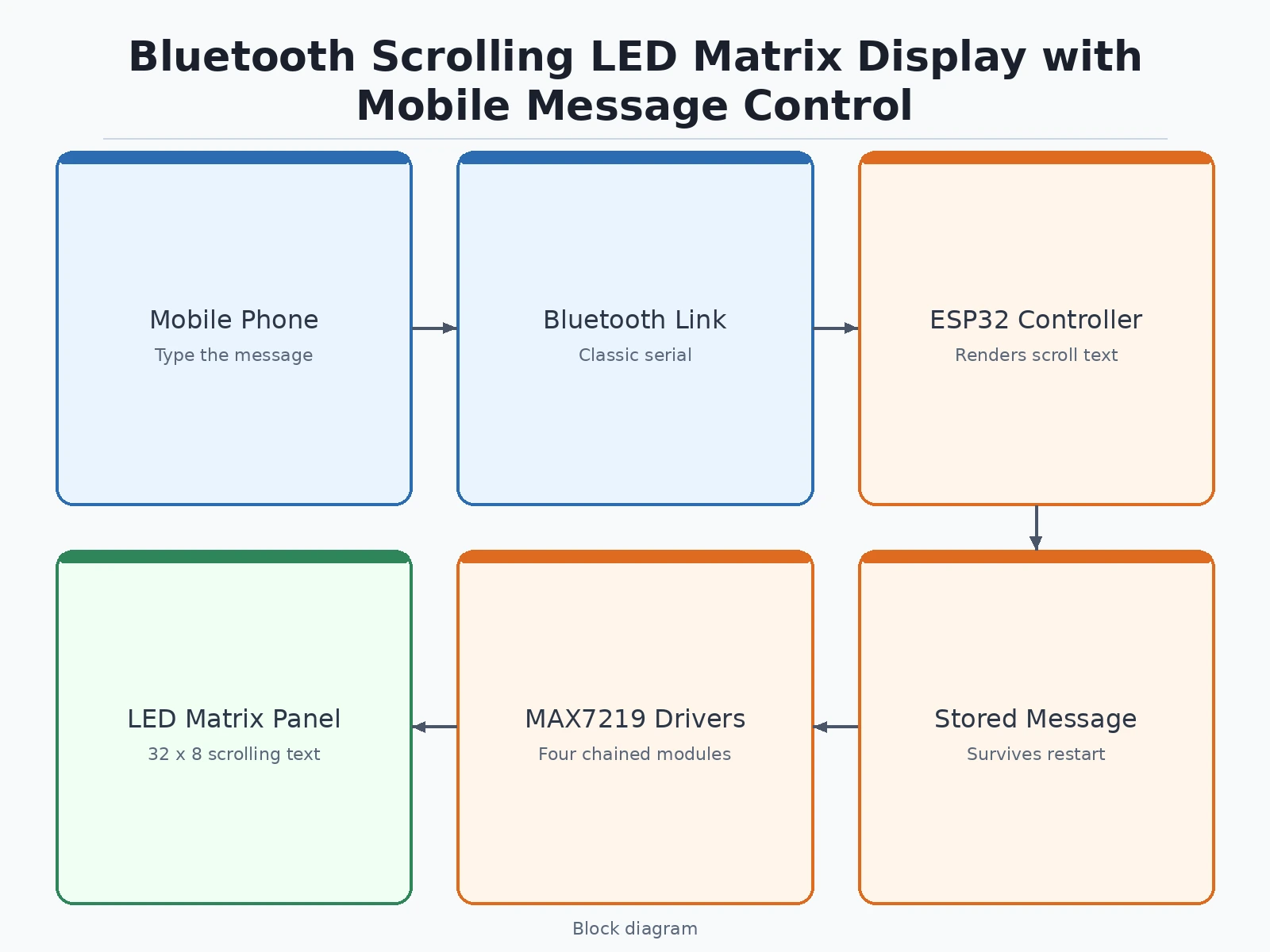
Sending a message to the board is one continuous chain from phone to LEDs. The phone pairs with the ESP32 over Bluetooth Classic serial, the same kind of wireless serial link a cable would provide, and the typed message travels over that link as plain text. The ESP32 firmware receives the text, stores it, and converts each character into dot patterns for the LED panel, queuing a new message so it starts cleanly once the current scroll finishes or immediately when the screen is idle. The firmware then shifts the dot patterns column by column through the four chained MAX7219 driver chips, each chip lighting its own 8x8 module in turn, so the text appears to glide from one end of the panel to the other. Scroll speed sets how quickly columns advance, brightness sets how strongly the LEDs are driven, and the stored copy of the message means a power cut only pauses the board until power returns.
- The phone pairs with the ESP32 over Bluetooth Classic serial, using a generic Bluetooth terminal app on the phone.
- The sender types a message on the phone and sends it over the Bluetooth serial link as plain text.
- The ESP32 firmware receives the text and places it in the message queue, so it never overwrites text mid-scroll.
- The firmware saves the latest message in non-volatile storage, so it survives a power restart.
- Each character is converted into dot patterns, and the firmware shifts the patterns column by column through the chained MAX7219 drivers.
- Each MAX7219 chip drives its own 8x8 module, and together the four modules show the text gliding across the full 32-column panel.
- Scroll speed and brightness commands sent from the phone adjust the column advance rate and the LED drive level while the message keeps scrolling.
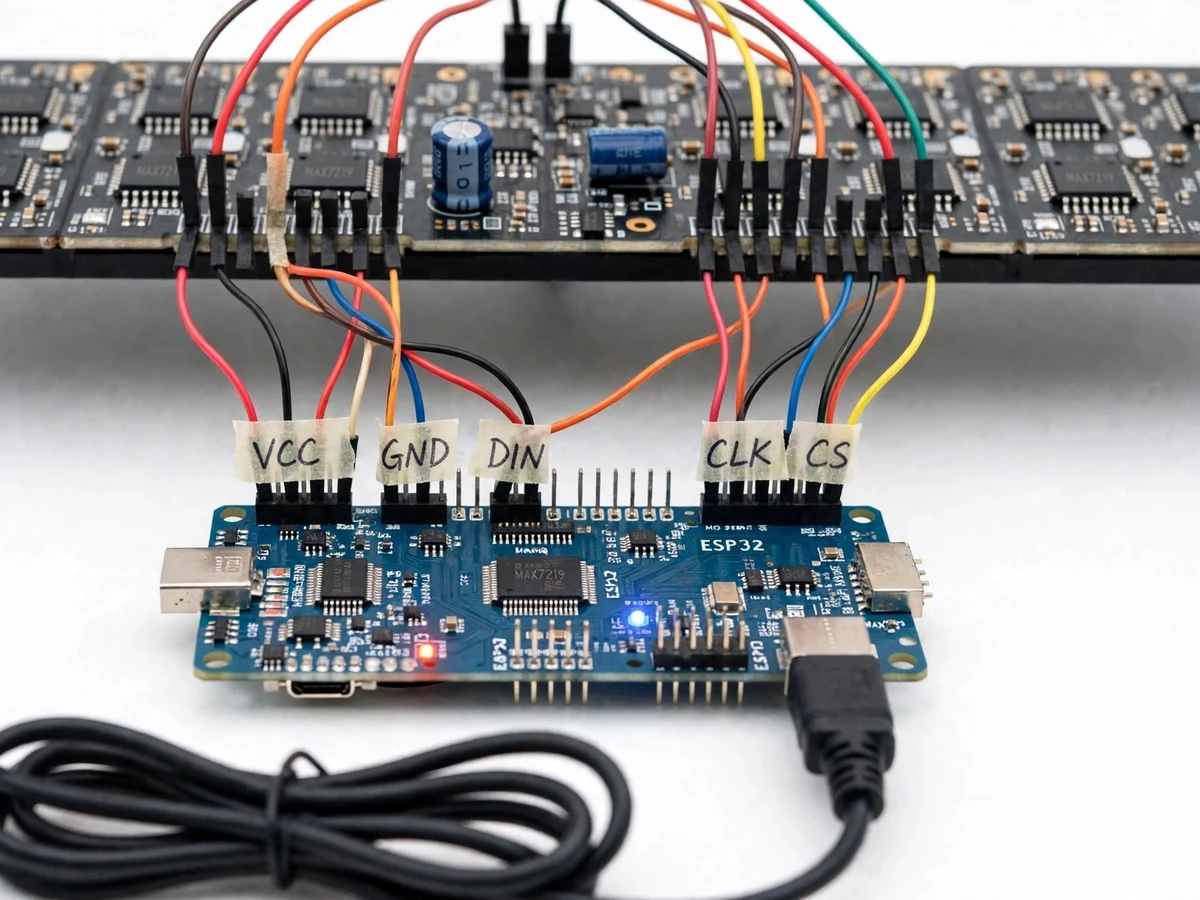
Builder note: when all four modules light up together, the shared 5 V rail can dip briefly because each module switches many LEDs at the same instant, so a decoupling capacitor fitted close to each module's power pins keeps the rail steady and stops the far modules from flickering. The MAX7219 chips also multiplex: each chip lights only one row of its matrix at a time and scans through all 8 rows fast enough that the eye sees a steady image, which is why the display needs only three control lines from the ESP32 for all four modules.
Tech stack:
- ESP32 development board with built-in Bluetooth
- Four MAX7219-driven 8x8 LED matrix modules
- Bluetooth Classic serial link from a mobile phone
- 5 V regulated power supply for the display chain
- Arduino IDE firmware with a scrolling text renderer
- Non-volatile message storage on the ESP32
- Jumper wiring with chained DIN to DOUT module links
- Display stand with mounting brackets
| Parameter | Value |
|---|---|
| Controller | ESP32 development board with built-in Bluetooth |
| Display modules | 4 MAX7219-driven 8x8 LED matrix modules (Design configuration) |
| Panel size | 32 columns × 8 rows from 4 chained modules (Design configuration) |
| Total LEDs | 256 LEDs in a 32-column × 8-row panel (Design configuration) |
| Driver interface | SPI-compatible serial link using DIN · CLK · CS lines (Datasheet) |
| Module supply voltage | 5 V supply within a 4.0 V to 5.5 V range (Datasheet) |
| Brightness levels | 16 levels (Datasheet) |
| Message input | Bluetooth Classic serial (SPP) from a mobile phone |
| Stored messages | Last message retained across restarts in non-volatile storage (Design) |
| Power supply | 5 V regulated adapter sized for all LEDs lit (Design target) |
| Scroll and brightness control | Adjustable in steps from the phone (Design) |
| Display colour | Red LEDs in a single colour (Design configuration) |
Project features
The display's most useful capabilities are phone-based message control, a queued message flow, adjustable scroll speed and brightness, and message storage that survives a restart, all running on a chained four-module panel. Phone-based control defines the project: a message typed on a phone travels over Bluetooth to the ESP32, which turns the text into scrolling dot patterns without any cable or computer in between. The message queue is the second capability: a newly sent message replaces the one on screen in an orderly way instead of garbling the display mid-scroll, so the board always shows one complete message at a time. Adjustable scroll speed and brightness form the third capability: slow scrolling suits long notices, fast scrolling suits short announcements, and brightness can be turned down indoors or up in a bright room. Stored-message recovery is the fourth capability: the last message is kept in non-volatile storage, so the board resumes showing it after power returns.
Base build (implemented):
- [Phone-sent scrolling messages] A message typed on a phone is sent over Bluetooth to the ESP32, which renders it as text scrolling across the 32-column by 8-row panel.
- [Bluetooth message queue] Incoming messages are queued and shown one complete message at a time, so a new message never corrupts the text already scrolling on screen.
- [Adjustable scroll speed] The sender changes how fast text moves across the panel, with slow settings for long notices and faster settings for short announcements.
- [Adjustable brightness] Display brightness is set from the phone in steps, so the panel can be dimmed indoors or brightened in a well-lit room.
- [Stored message recovery] The last message is saved in non-volatile storage on the ESP32, so the display resumes showing it automatically after a power restart.
- [Chained four-module panel] Four MAX7219-driven 8x8 modules are chained into one wide display, with each module passing display data on to the next over a short serial link.
- [Single-cable 5 V operation] The display chain runs from one regulated 5 V supply, so the prototype needs no separate supply for each module.
What is included
- Complete Bluetooth scrolling LED matrix prototype: ESP32 board, four chained MAX7219 modules, display stand and 5 V power supply
- Firmware source code with message queue, scroll-speed control, brightness control and stored-message recovery
- Circuit and wiring documentation showing the chained module connections and power wiring
- Project report PDF with working explanation, component details and test notes
- PPT presentation for final review
- Demonstration notes and setup guide for pairing the phone and sending the first message
Limitations & prerequisites
- Bluetooth range is short: the link is expected to work up to approximately 10 m in open space (Design target), and walls or distance can break the connection mid-message.
- The phone must support Bluetooth Classic serial (SPP); phones without Classic SPP support cannot send messages, so an Android phone with Classic SPP support is needed for message sending.
- The panel shows red text only, in a single colour, with no colour graphics or images; only text characters supported by the firmware font can be displayed.
- Only 8 rows tall, so a long message cannot be read all at once; it must scroll across the panel, and readers need time to follow it to the end.
- When all 256 LEDs are lit, the display draws its highest current, so a weak USB port alone may dim or flicker the panel; the supplied 5 V adapter should be used.
- Only the last message is stored, not a history of messages; each new message replaces the stored one.
- The prototype is not weatherproof and is not built for outdoor use; bright daylight also reduces how clearly the red LEDs can be read.
Frequently Asked Questions
How do I send a message to the display?
You pair your phone with the ESP32 over Bluetooth, open a generic Bluetooth terminal app, and type the message and send it as plain text over the Bluetooth serial link. The ESP32 receives the text, queues it, and renders it as scrolling letters on the panel, with no cable and no computer needed in between. Scroll-speed and brightness commands are sent the same way.
Does the display need internet or Wi-Fi?
No, it needs neither internet nor Wi-Fi, because messages travel directly from the phone to the ESP32 over a short-range Bluetooth link. That means the board works in rooms without network coverage, but it also means the sender must stay within Bluetooth range of the display while sending. The display cannot be updated remotely over the internet in this base build.
What happens to the message if the power goes off?
The last message is kept in the ESP32's non-volatile storage, so it reappears and starts scrolling again automatically once power returns. No phone is needed to restore it after a restart, and the board resumes exactly the message that was showing before the power cut. Sending a new message replaces the stored one with the newer text.
Can scroll speed and brightness be changed?
Yes, both can be changed from the phone while a message is scrolling, by sending short text commands over the same Bluetooth link used for messages. Slower scrolling suits long notices that readers need time to follow, faster scrolling suits short announcements, and brightness can be turned down indoors or up in a bright room. The chosen settings apply immediately to the message on screen.
Is this project suitable for a final-year project?
Yes, for Electronics and Telecommunication final-year work, because it combines embedded firmware, serial communication, display driver interfacing and power considerations in one working prototype. It demonstrates Bluetooth serial links, chained SPI-driven modules, multiplexed LED driving and non-volatile storage, with clear scope for honest testing of range, readability and message recovery after a restart.
Components & software requirements
- ESP32 development board with built-in Bluetooth
- Four MAX7219-driven 8x8 LED matrix modules
- Bluetooth Classic serial link from a mobile phone
- 5 V regulated power supply for the display chain
- Arduino IDE firmware with a scrolling text renderer
- Non-volatile message storage on the ESP32
- Jumper wiring with chained DIN to DOUT module links
- Display stand with mounting brackets
Delivery information
Built-to-order project. Delivery timeline is shared after order confirmation based on current queue.
Support terms
Complete documentation, setup guide, and viva preparation included. Support for setup and explanation provided.
Download free synopsis (PDF)
Enter your name and WhatsApp number — the synopsis PDF downloads immediately. We may send occasional project updates on WhatsApp; no spam.