
More project photos (2)
The problem
A bird watching log Android app is a mobile application that records bird sightings in the field: the watcher picks a species from a checklist, adds the date, time and location note, attaches a photo, and keeps every entry searchable on the device. Unlike a paper notebook, where entries pile up in visit order and a species seen months ago is hard to find again, the app ties every sighting to a named species and a checklist tick, so the log can be searched by species or by location and summarised in simple counts. It is built offline-first, so logging, searching, and viewing statistics work on the device with no account and no internet connection.
| Feature | Bird watching log app | Paper notebook | Generic notes app | Birding social app |
|---|---|---|---|---|
| Sighting record | Species, date, time, location note, photo slot and field note in one entry | Freehand lines in visit order, with no fixed fields | Free text with no species structure | Sighting post built for sharing, not personal logging |
| Species checklist | Tickable checklist with a progress count | A list to tick by hand, with progress counted manually | No checklist concept | Life list tied to a public profile |
| Finding a past sighting | Search by species or filter by location | Page-by-page re-reading | Text search only, with no species or location fields | Feed search, built around other people's posts |
| Offline use | Yes, fully on-device in the base build | Yes, but unsearchable | Usually yes | Needs an account and a connection for most features |
| Statistics | Sightings per species, totals and checklist progress | Manual tallying | None | Community totals, not a personal season summary |
This is a built-to-order software project: the Android application, the working demo, and the complete documentation are prepared fresh for you, with the starter checklist and entry fields matched to your college's requirements.
The Problem
A bird watching log Android app is a mobile application that helps a birdwatcher keep a reliable personal record of every bird seen in the field. The watcher opens the app during or after an outing, picks the species from a checklist, and saves the date, time, location note, photo, and a short field note as one entry that can be found again later. Paper notebooks create the core problem: entries pile up in visit order, a species seen months ago is hard to find, and there is no quick way to count how often each species has been seen. Loose phone photos make the problem worse, because a photo alone carries no species name or location note. A dedicated log solves this by tying every sighting to a named species and a checklist tick, so the watcher can search by species or location, watch the checklist fill up over a season, and review simple counts without re-reading every page.
Watcher out in the field with the app open.
Follow the working sequence
How it works
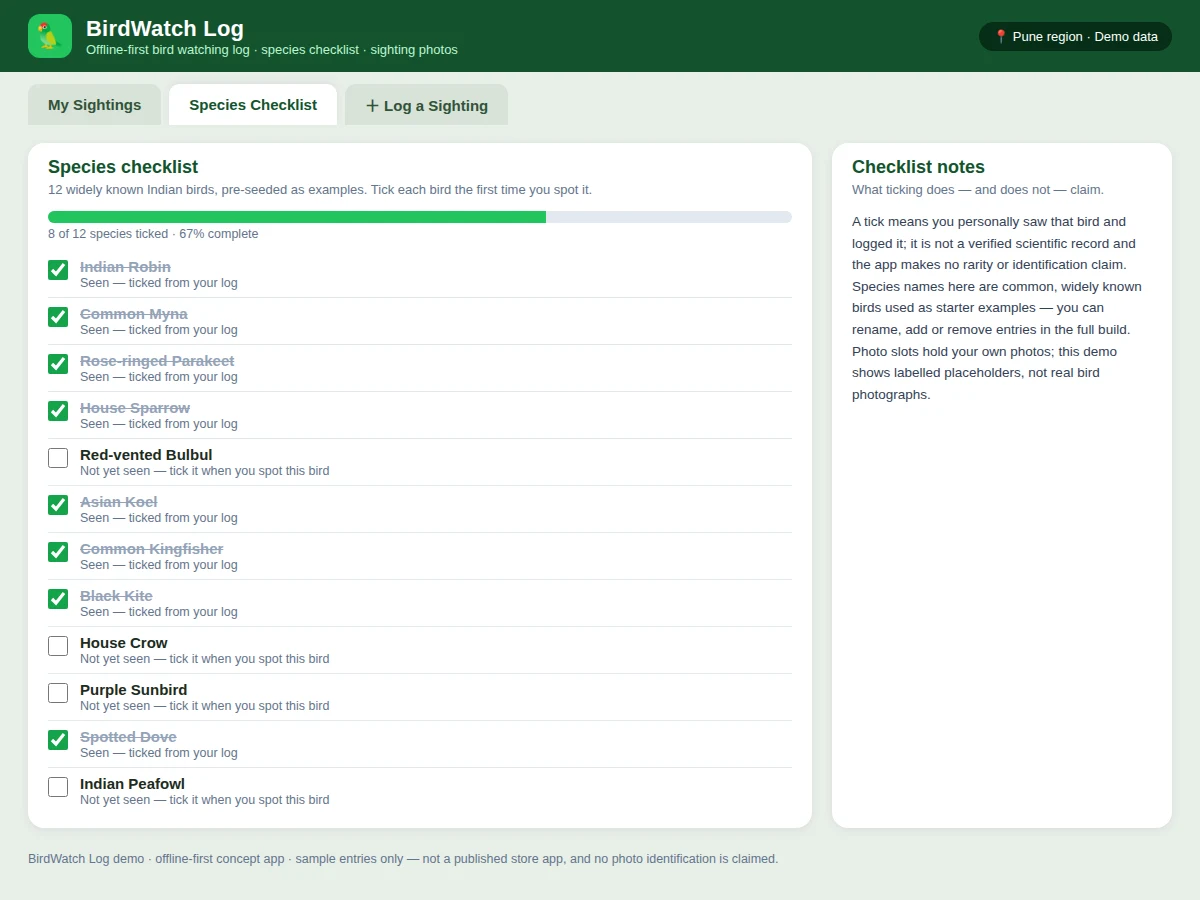
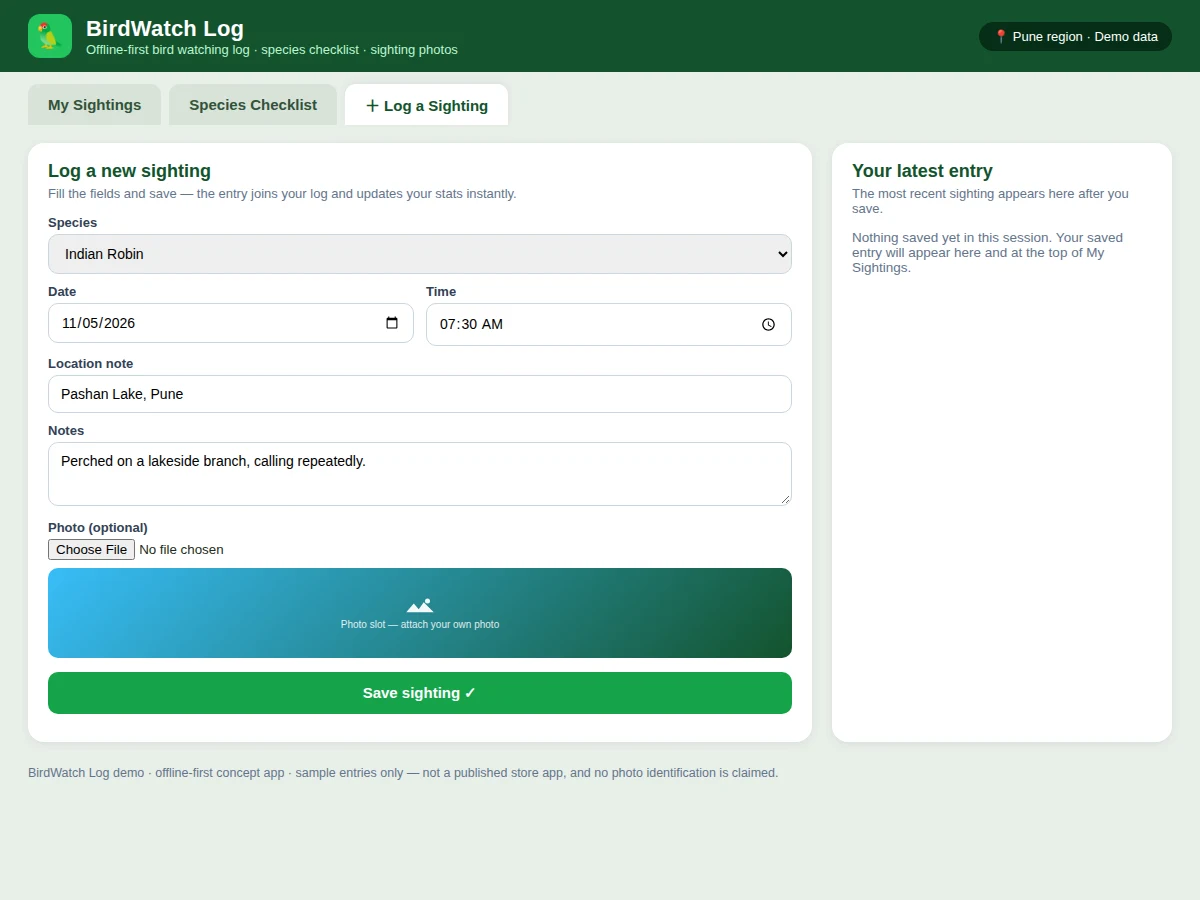
The bird watching log works as a single on-device loop that runs from the moment a bird is seen to the moment the season summary is reviewed. The watcher starts from the species checklist, where each bird is either unticked or marked as seen, and opens the sighting form when a bird is spotted. The form records the species, the date and time of the sighting, a short location note, an optional photo from the device, and a free-text note about behaviour or flock size. Saving the entry writes one record into the local on-device database and ticks the species on the checklist at the same time, so the log and the checklist never disagree. The sightings list then shows the newest entry first, search and location filters narrow that list on demand, and the statistics panel recounts totals and per-species counts from the same stored records, so every view in the app reflects one shared log.
- The watcher opens the species checklist and sees which of the starter birds are already ticked and which are still unseen.
- When a bird is spotted, the watcher opens the sighting form and picks the species from the checklist.
- The watcher confirms the date and time of the sighting and types a short location note, such as the name of a lake or garden.
- The watcher adds an optional photo from the device photo picker and a free-text note about behaviour, flock size, or weather.
- Saving the entry writes one record into the on-device database and ticks the species on the checklist at the same time.
- The sightings list updates with the newest entry first, and the statistics panel recounts totals and per-species counts from the stored records.
- At any later point, the watcher searches by species name or filters by location to find a past sighting without re-reading the whole log.
Tech stack:
- Kotlin · Android app development
- Android Studio · official Android IDE
- Jetpack Compose · Android UI toolkit
- Room · on-device local database
- Camera API · on-device photo capture
- Material Design · Android design system
- HTML · CSS · JavaScript · demo build only
| Parameter | Value |
|---|---|
| Platform | Android phones and tablets (design target) |
| Minimum Android version | Android 8.0 · API level 26 (design target, Android platform fact) |
| Pre-seeded species in demo | 12 species (demo count) |
| Pre-seeded sightings in demo | 8 sightings (demo count) |
| Checklist progress in demo | 8 of 12 species ticked (demo count) |
| Sighting record fields | 6 fields: species, date, time, location note, photo slot, free-text note |
| Storage in full build | On-device Room database, no account required |
| Storage in demo | Local browser storage on the viewer's device |
| Photo handling | Device photo picker with on-device storage; no cloud upload in the base build |
| Internet requirement | None for logging, searching, or viewing statistics (offline-first design) |
| Search scope | All saved sightings on the device (demo: 8 sample sightings) |
| Statistics shown | Sightings per species, total sightings, species seen, checklist progress |
Project features
The bird watching log is built around four capabilities that work together: a tickable species checklist, a complete sighting entry, fast search and filtering, and simple statistics that summarise the log at a glance. The checklist holds widely known Indian birds as starter examples and tracks progress as each species is ticked on first sighting. The sighting entry captures species, date, time, a location note, an optional photo, and a free-text note in a single record, so nothing about an outing depends on memory. Search and location filters then make that record useful, because any past sighting can be found by species name or by the place it was seen. Statistics close the loop by counting sightings per species, total sightings, and species seen, giving the watcher a season summary without manual tallying. Around those four, offline-first local storage keeps the whole log on the device.
- [Tickable species checklist] The checklist ships with 12 widely known Indian birds as starter examples, such as the Indian Robin, Common Myna, and Common Kingfisher, and each bird is ticked on first sighting with a running progress count.
- [Complete sighting entries] Each sighting stores species, date, time, a location note, an optional photo, and a free-text note as one record, so behaviour, flock size, and weather observations stay attached to the sighting they describe.
- [Photo attach from the device] The watcher attaches a photo from the device photo picker to any sighting, and the photo is stored on the device with its entry; the demo shows labelled photo slots, not real bird photographs.
- [Search by species] A search box filters the sighting list by species name as the watcher types, so a past sighting of one bird can be found without scrolling through the whole log.
- [Filter by location] A location filter narrows the list to sightings saved at one place, such as a lake or a campus garden, making it easy to compare what was seen at different outings.
- [Simple sighting statistics] The app counts total sightings, species seen, checklist progress, and sightings per species, and redraws those counts from the same stored records every time an entry is added.
- [Offline-first local storage] Every entry lives in an on-device database with no account and no upload, so logging, searching, and statistics work with no internet connection and the log stays private to the device.
Implemented in the demo, delivered in the full build, and future scope, kept separate: the HTML demo already implements the tickable checklist with 12 pre-seeded species, 8 pre-seeded sightings, search, location filtering, per-species statistics, and the sighting entry form with a photo slot. The delivered Android build adds the native Kotlin application, the Room on-device database, and device photo-picker capture. Photo identification from pictures, GPS tracking, migration data, cloud sync, and social sharing are future scope only, and are not part of the base project.
What is included
- Complete Android application source code with the checklist, sighting entry, search, filter, and statistics features above
- Single-file HTML demo of the log with 12 pre-seeded species and 8 pre-seeded sightings
- Setup instructions for running the application and using the demo
- Project report PDF covering background, design, implementation, and limitations
- PPT presentation for the final review
- Viva Q&A preparation document covering Android storage, checklist design, photo handling, and offline-first design
To request a quotation, message Projectech on WhatsApp with the project name, the scope you want (the base log app, or the base app plus cloud backup), and your delivery date; Projectech replies with a quotation covering scope, price, and delivery timeline.
Limitations & prerequisites
- The demo shows labelled photo slots rather than real bird photographs, and the delivered build stores the watcher's own photos; it does not identify a bird from a photo, and that feature belongs to future scope.
- The app records a typed location note rather than tracked coordinates, so it does not map routes, measure distances, or follow migration, and GPS tracking is future scope only.
- Species names in the starter checklist are widely known examples, not a verified regional field guide, so a college or club checklist should replace them where a local list matters.
- A tick means the watcher personally logged the bird; it is not a verified scientific record, and the app makes no rarity or identification claim.
- Entries live on one device in the base build, so there is no sharing, syncing, or multi-device access without the future-scope cloud work.
- This is an academic project build, not a published store app and not a citizen-science platform, and it does not submit records to any external database.
Frequently Asked Questions
Is this project suitable for a final-year project?
Yes, for Computer Science and IT programmes, because it combines a real Android application with local database storage, a checklist data model, photo handling, and statistics that a reviewer can open and test directly on a device without needing any server or external service. The work demonstrates mobile UI design, on-device persistence, list filtering, and state that stays consistent between two views, and the report can explain each decision from the working demo rather than from slides alone. A reviewer can also trace one sighting from the entry form through its stored record to its effect on the checklist and the statistics.
Does the app identify birds from photos?
No, the app does not identify birds from photos, because photo identification would need a trained recognition model and a verified image collection that the base project does not include, and the build deliberately avoids claiming a capability it cannot demonstrate honestly. Photos here are simply attached to a sighting the watcher identified, so the record keeps the watcher's own observation with its date, location note, and field note. Automatic identification from a picture is future scope only, and the documentation states that split plainly so the feature is never oversold.
Does the app work without an internet connection?
Yes, the application is offline-first, because every sighting is stored in an on-device database and no entry is uploaded to any server for logging, searching, filtering, or viewing statistics, so the full log remains usable with no internet connection at all. An internet connection is only needed once, to download the application itself and any library files it ships with, after which daily use is fully local. That also keeps personal outing records on the watcher's own device, which matters for a log that may include home locations.
Can the species checklist be customised?
Yes, the starter checklist of widely known Indian birds can be replaced with a college, club, or regional list, and entries can be renamed, added, or removed to match the outings the watcher actually plans, so the delivered build reflects the watcher's own birding grounds rather than a fixed sample list. Customisation changes the delivered build, not the demo, so the quotation states the exact scope before work starts. One example customisation is a season tag on each sighting, so statistics can be compared across different birding seasons.
What will I receive with the project?
You receive the complete Android application source code, the single-file HTML demo, setup instructions, the project report, the review presentation, and the viva Q&A document, covering everything needed to present the checklist, sighting entry, and statistics at review, with no additional purchase required for the base scope. The quotation on WhatsApp confirms the exact scope, price, and delivery timeline before work starts, so there is no ambiguity about what is included. Delivery also includes a short walkthrough of the demo, so the checklist, sighting entry, and statistics can be shown confidently at review time.
Components & software requirements
- Kotlin · Android app development
- Android Studio · official Android IDE
- Jetpack Compose · Android UI toolkit
- Room · on-device local database
- Camera API · on-device photo capture
- Material Design · Android design system
- HTML · CSS · JavaScript · demo build only
Delivery information
Built-to-order project. Delivery timeline is shared after order confirmation based on current queue.
Support terms
Complete documentation, setup guide, and viva preparation included. Support for setup and explanation provided.
Download free synopsis (PDF)
Enter your name and WhatsApp number — the synopsis PDF downloads immediately. We may send occasional project updates on WhatsApp; no spam.