
More project photos (2)
The problem
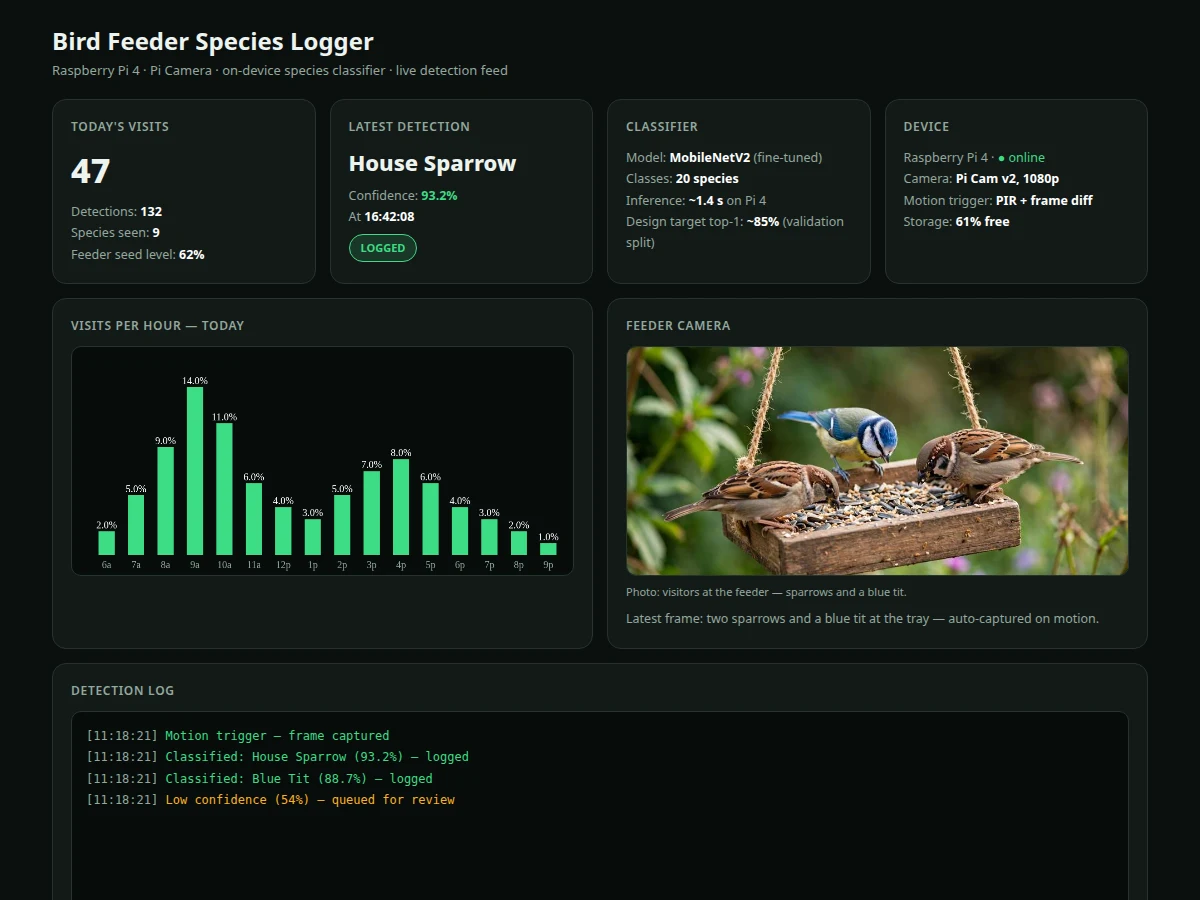
Backyard birdwatching generates wonderful data that nobody records: which species visit, when, and how often. Commercial smart feeders exist but they are closed, expensive, and useless as student projects. This build does it the open way: a wooden feeder fitted with a Raspberry Pi 4 and Pi Camera module, watching the seed tray. A PIR sensor plus frame-differencing wakes the capture pipeline only when something moves; the captured frame is cropped to the bird and passed through a MobileNetV2 convolutional network fine-tuned on a 20-species labeled bird dataset, and the top prediction with its confidence is written to a local SQLite log with the photo. The dashboard — the software half of this hybrid project — renders the detection feed, today's visit counts, an hourly activity chart, a species breakdown and a review queue for low-confidence frames. The honest-ML discipline matters here: the notebook trains on a documented dataset split, evaluates top-1 accuracy on a held-out validation set, and the report discusses the real failure modes — squirrels, motion blur, harsh shadows and species outside the training set, which are flagged for review rather than mislabeled.
How it works
- The PIR sensor and frame-differencing detect motion at the tray and trigger a 1080p capture from the Pi Camera.
- The frame is cropped around the motion region and resized to the classifier's 224x224 input.
- The fine-tuned MobileNetV2 model runs on-device and returns the top species prediction with a confidence score.
- Predictions above the confidence threshold are logged with timestamp and photo; below-threshold frames go to the review queue.
- The dashboard reads the SQLite log and renders the detection feed, hourly chart and species breakdown.
- At week end, the log exports to CSV; the buyer can review flagged frames and correct labels.
- The training notebook lets the buyer fine-tune on additional species and re-run the validation evaluation.
Tech stack:
- Raspberry Pi 4 (4 GB) + Pi Camera Module v2
- PIR motion sensor, wooden feeder with camera bracket
- Python, TensorFlow Lite (MobileNetV2 fine-tuned, 20 species)
- SQLite detection log
- Single-file HTML/CSS/JS dashboard (feed, charts, review queue)
- Training notebook (dataset prep, fine-tuning, evaluation)
| Parameter | Value |
|---|---|
| Controller | Raspberry Pi 4 (4 GB) |
| Camera | Pi Camera Module v2, 1080p capture |
| Trigger | PIR + frame-differencing motion detection |
| Model | MobileNetV2 fine-tuned on 20-species labeled bird dataset |
| Inference | ~1.4 s per frame on Pi 4 (design target, on-device) |
| Accuracy | Design target top-1 ~85% on validation split — measured by the buyer's own evaluation run, never pre-claimed |
| Output | Species, confidence, timestamp, photo per detection; weekly CSV export |
| Storage | Local SQLite + JPEGs; review queue for low-confidence frames |
| Dashboard | Detection feed, hourly chart, species breakdown, review queue |
Project features
- [Motion-triggered capture] PIR sensor plus frame-differencing wakes the camera only on movement, saving storage and compute.
- [On-device species classifier] MobileNetV2 fine-tuned on a 20-species labeled bird dataset; inference runs on the Pi 4 in about 1.4 s per frame — no cloud needed.
- [Detection feed dashboard] Latest detections with species, confidence, timestamp and photo; today's visit count and hourly activity chart.
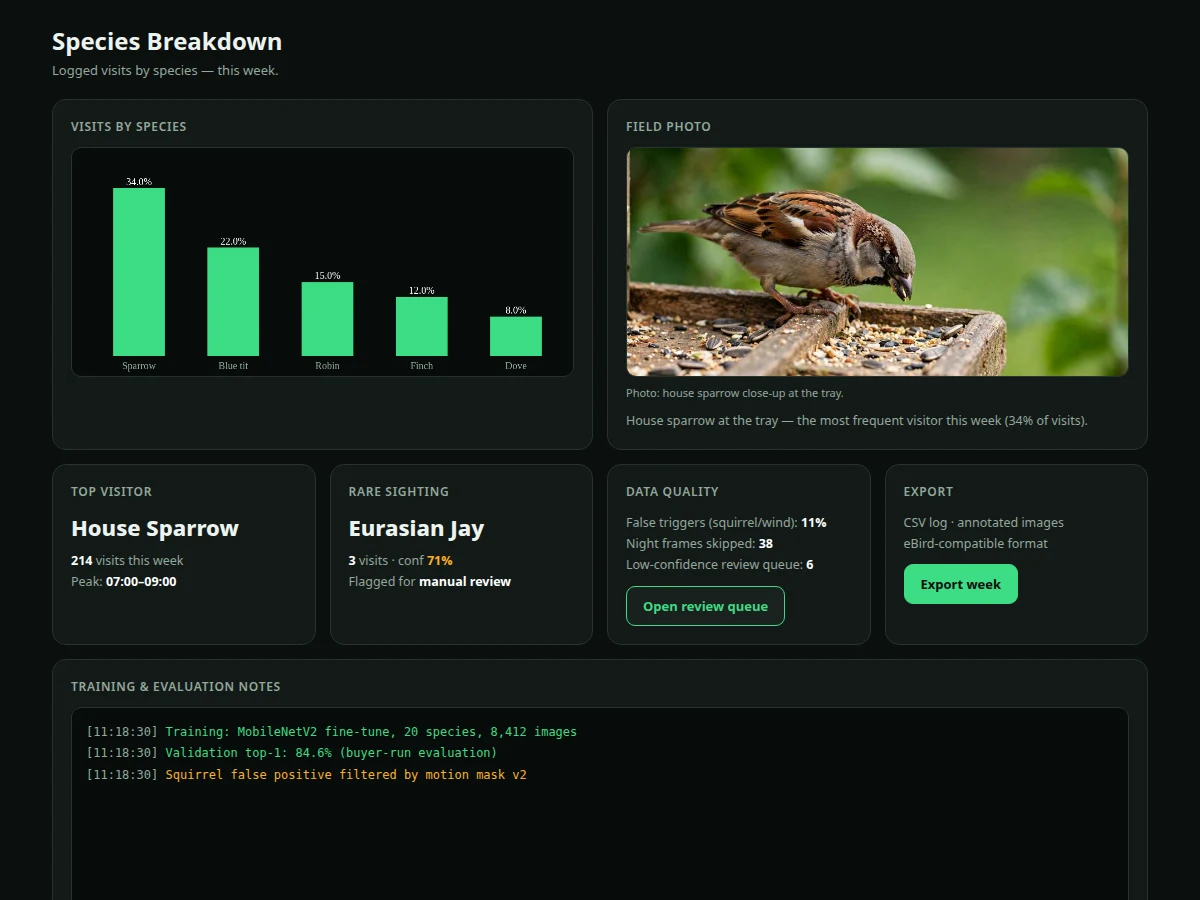
- [Species breakdown analytics] Visits per species over the week, top visitor, rare-sighting highlights and peak-hour analysis.
- [Manual review queue] Frames below the confidence threshold are flagged for human review instead of being silently mislabeled.
- [eBird-compatible export] Weekly logs exportable as CSV with species, counts and timestamps for citizen-science use.
- [Retraining notebook] Documented fine-tuning pipeline so the buyer can add local species and re-evaluate — accuracy is measured, not pre-claimed.
What is included
- Bird feeder hardware with Pi Camera bracket, PIR sensor and Raspberry Pi 4 assembly
- Complete capture + classification software (motion trigger, inference, logging)
- Fine-tuned MobileNetV2 model (TFLite) + training notebook (dataset prep, fine-tuning, evaluation)
- Detection dashboard web app (feed, charts, species breakdown, review queue, export)
- Wiring and mounting guide (feeder placement, camera angle, weather protection notes)
- Project report PDF (background, dataset analysis, methodology, buyer-run evaluation, error analysis)
- PPT presentation for final review
- Viva Q&A preparation document (CNNs, transfer learning, TFLite, evaluation metrics, dataset bias)
- Setup guide (OS image, dependencies, first capture test)
Limitations & prerequisites
- Classification accuracy is a design target (~85% top-1), not a guarantee — the notebook measures it on the buyer's validation split and the report documents the real number, including confusions between similar species.
- Night and low-light frames are unreliable (no IR illumination in the base build); the pipeline skips dark frames and logs the skip.
- Squirrels, falling leaves and wind-shaken branches trigger captures — about one in ten triggers is a false positive, filtered by a motion mask the guide documents.
- Species outside the 20-class training set cannot be recognized; they land in the review queue, which is the honest behavior, not a failure.
- Rain and feeder placement affect results; the mounting guide covers siting, and weatherproofing the Pi is the buyer's responsibility.
- Continuous inference shortens SD-card life; the trigger-gated design exists precisely to limit writes.
Frequently Asked Questions
Which model is used?
MobileNetV2, fine-tuned on a 20-species labeled bird-image subset and exported to TensorFlow Lite for on-device inference on the Pi 4 (~1.4 s per frame).
How accurate is species identification?
The design target is ~85% top-1 on the validation split, but the number is measured by the training notebook during the build — the report documents the buyer's own evaluation, confusion patterns included.
What happens with birds it was not trained on?
They are not guessed: low-confidence frames go to a manual review queue, and the report lists out-of-distribution handling as an explicit design decision.
Does it work at night?
Not reliably — the base build has no IR illumination, so dark frames are skipped and logged. A NoIR camera + IR LEDs is a documented extension.
What about squirrels stealing seeds?
They trigger the motion sensor like anything else; roughly 10% of captures are non-bird, and a motion-mask filter plus the review queue handle them.
Is this project suitable for a final-year project?
Yes — for Computer Science, AI/ML and Electronics programs. It demonstrates embedded vision, transfer learning, TFLite deployment, dataset discipline and honest error analysis, all strong viva material. Suitable for B.E./B.Tech final-year projects in Computer Science, AI/ML and Electronics.
Components & software requirements
- Raspberry Pi 4 (4 GB) + Pi Camera Module v2
- PIR motion sensor, wooden feeder with camera bracket
- Python, TensorFlow Lite (MobileNetV2 fine-tuned, 20 species)
- SQLite detection log
- Single-file HTML/CSS/JS dashboard (feed, charts, review queue)
- Training notebook (dataset prep, fine-tuning, evaluation)
Delivery information
Built-to-order project. Delivery timeline is shared after order confirmation based on current queue.
Support terms
Complete documentation, setup guide, and viva preparation included. Support for setup and explanation provided.