
More project photos (3)
The problem
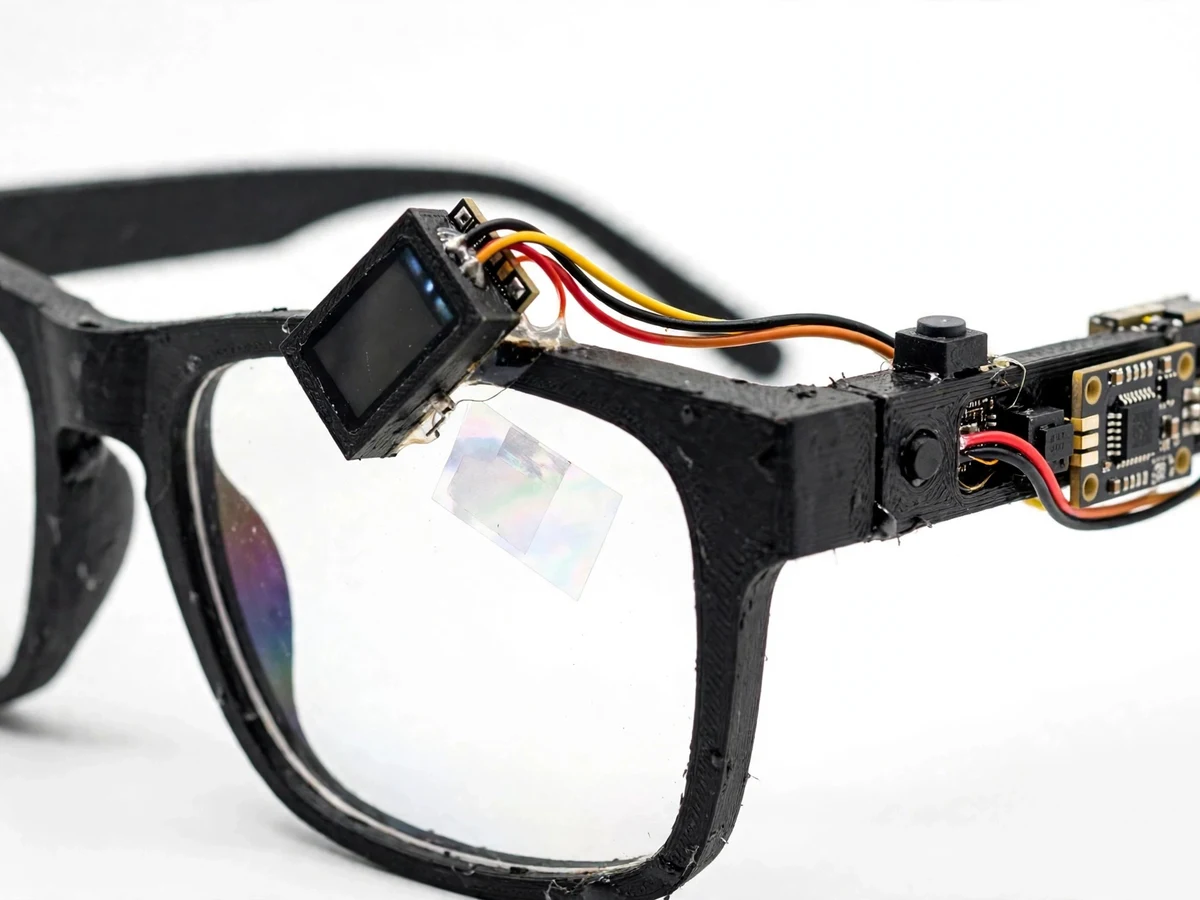
Optical see-through AR glasses float digital information in front of one eye without blocking the real world: the wearer reads a clock, a notification or a compass heading while still seeing the room and the people around them. XREAL Aura-Inspired Optical See-Through AR Glasses answers that idea at student scale, with a small OLED above one lens reflecting off a 45-degree beam-splitter film, an ESP32 tracking head orientation with an MPU6050 sensor, and a phone app forwarding notifications and voice replies over Bluetooth Low Energy. The idea made headlines on 28 October 2026, when XREAL launched Aura as the first wired XR glasses powered by Android XR, with Sony Micro-OLED displays and a reported weight under 95 grams. This student build translates that headline honestly to bench scale: one eye instead of two, head orientation instead of positional tracking, a manual tint slider instead of electronic dimming, and voice handling on the phone.
Motion sensor measures head acceleration and rotation on three axes.
Follow the working sequence
How it works
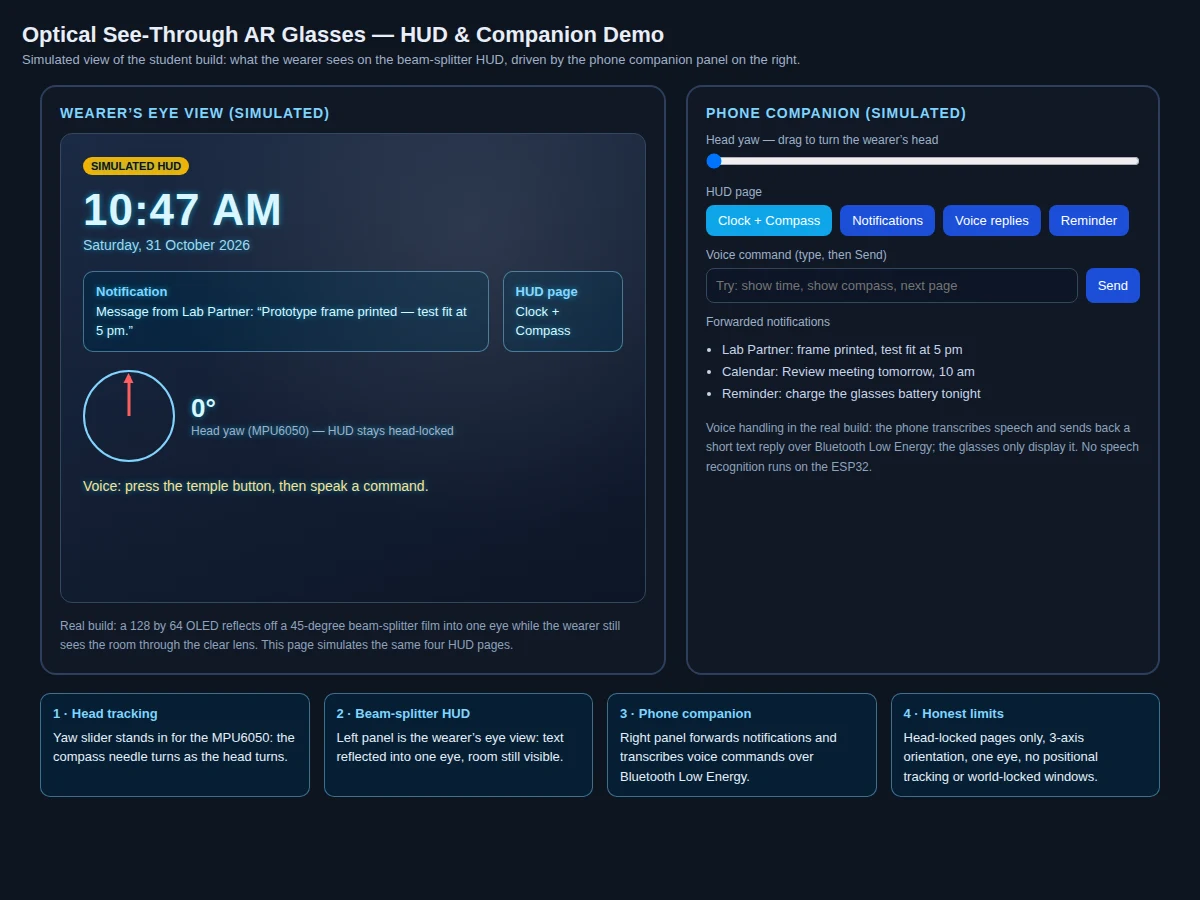
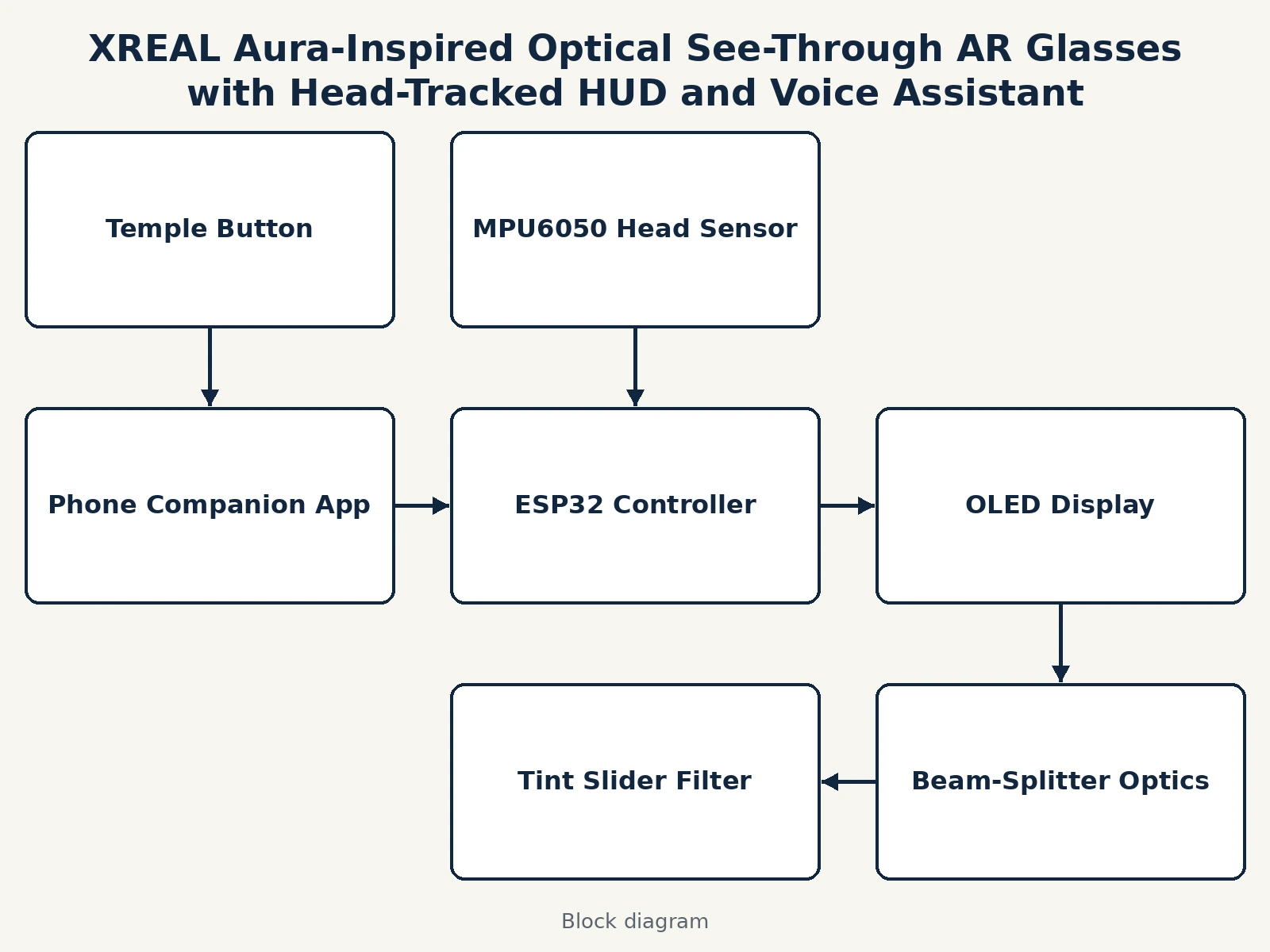
The end-to-end mechanism runs from a turn of the wearer's head to text floating in front of one eye, with the phone doing the work the glasses cannot. The MPU6050 sensor measures acceleration and rotation on three axes each, and the ESP32 converts those readings into head orientation — yaw, pitch and roll. The ESP32 draws the current HUD page on the small OLED display, and the beam-splitter film in front of the lens reflects that display into the eye while transmitting the light of the room, so the wearer sees both at once. Meanwhile the phone companion app watches for notifications and, when the temple button is pressed, transcribes a spoken command and sends a short text reply back over Bluetooth Low Energy for the ESP32 to display. Every page is head-locked, moving with the wearer, which is all a 3-axis orientation sensor can honestly support.
- The builder prints the glasses frame, fits clear acrylic lenses, and mounts the small OLED display above the right lens angled toward a 45-degree beam-splitter film fixed in front of that lens.
- The builder wires the MPU6050 sensor, the temple push button and a protected single-cell battery to the ESP32 board housed in the temple arm, keeping the wiring short so the frame stays wearable.
- The builder pairs the phone companion app over Bluetooth Low Energy and grants it notification access, then checks that a test notification from the phone appears on the HUD.
- The builder calibrates the headset by holding the head level and pressing the temple button to zero the yaw, and repeats this zeroing whenever the compass heading has drifted.
- For the head-tracking demonstration, the builder turns slowly left and right while the examiner watches the compass needle and heading in degrees follow the head on the HUD.
- For the voice demonstration, the builder presses the temple button, speaks a command such as "show time", and the phone's transcription returns a short text reply that appears on the HUD page.
- The builder slides the tint filter across the lens to show manual dimming, then notes the yaw drift observed after two minutes of wear and the re-zeroing step that corrects it, so the report states the limitation with its own measured observation.
Tech stack:
- ESP32 development board · dual-core controller and BLE link
- MPU6050 motion sensor · 3-axis accelerometer and gyroscope head tracking
- SSD1306 OLED display · 128 by 64 beam-splitter HUD
- Beam-splitter lens · clear lens with 45-degree reflective film
- 3D-printed glasses frame · PLA frame with temple electronics housing
- Phone companion app · notification forwarding and voice commands
- Bluetooth Low Energy · glasses to phone link
- HUD pages · clock compass notifications and voice replies
| Parameter | Value |
|---|---|
| Build type | Monocular hybrid hardware and software build · glasses plus companion app |
| Controller | ESP32 · dual-core Xtensa LX6 up to 240 MHz (Datasheet value) |
| Motion sensor | MPU6050 · 3-axis accelerometer with ±2g to ±16g range · 3-axis gyroscope with ±250 to ±2000 degrees per second range · I2C (Datasheet value) |
| Display | SSD1306 OLED · 128 by 64 pixels · I2C (Datasheet value) |
| Optics | Beam-splitter film at 45 degrees · reflection into one eye · clear lens transmits room light (design target) |
| Tracking | 3-axis orientation only · yaw pitch roll · no positional tracking · no room mapping (design target) |
| HUD pages | 4 pages · clock plus compass · notifications · voice replies · reminder (count) |
| Link | Bluetooth Low Energy · glasses to phone · notification and short text replies only |
| Power | Protected single-cell Li-ion pack · bench demonstration sessions of 30 to 60 minutes (Expected value) |
| Dimming | Manual sliding tint filter · student analogue of electronic dimming (design target) |
| Trend reference | XREAL Aura launch 28 October 2026 · Android Developer Summit · under 95 grams · 70-degree field of view · Sony Micro-OLED 1200p at 120 Hz · reported figures only · never claimed for this build |
| Builder note | On the prototype, yaw drifts over minutes because there is no magnetometer to anchor absolute heading, so the build re-zeroes heading with a temple-button press between demonstrations; the OLED is readable indoors but washes out in direct sunlight, so demonstrations are run indoors and the report states both limits plainly |
Project features
These AR glasses combine four capabilities that make a complete see-through wearable prototype rather than a display strapped to a frame. First, the beam-splitter optics put text in front of one eye while the clear lens keeps the room visible, which is the hardest part to demonstrate convincingly. Second, head tracking turns the HUD from a static screen into something that responds to the wearer: the compass heading follows head yaw, so turning the head visibly turns the needle. Third, the phone companion app gives the glasses something worth showing, forwarding real notifications and short voice replies over Bluetooth Low Energy instead of canned demo text. Fourth, the manual tint slider reproduces Aura's dimming idea in a form a student can build, trading electronic dimming for a filter the wearer slides by hand. Together these capabilities let a student demonstrate optics, motion sensing, wireless links and voice interaction in one wearable viva demonstration.
- [Optical see-through HUD on one eye] A 128 by 64 OLED display mounted above the right lens reflects off a 45-degree beam-splitter film into the eye, so HUD text appears over the wearer's view while the clear lens keeps the room visible — implemented in the base build.
- [Head-tracked compass and clock] The MPU6050 sensor measures head orientation and the ESP32 redraws the compass heading as the wearer turns, with the clock always visible beside it, so the HUD visibly responds to head movement — implemented in the base build.
- [Phone notifications on the lens] The companion app forwards phone notifications over Bluetooth Low Energy and the glasses show the sender and a short message line, so a message arriving on the phone appears in the wearer's view within seconds — implemented in the base build.
- [Voice commands through the phone] Pressing the temple button starts listening on the phone, the phone transcribes the command and sends back a short text reply that appears on the HUD, for commands such as showing the time, the compass or the next page — implemented in the base build.
- [Manual tint slider for dimming] A sliding tint filter clipped over the lens darkens the wearer's view by hand, standing in for the electronic dimming of the commercial glasses with a mechanism a student can build and explain — implemented in the base build.
- [Four HUD pages on a temple button] Short presses of the temple button cycle four pages — clock plus compass, notifications, voice replies and reminder — so a viva demonstration walks through every capability without touching the phone — implemented in the base build.
- [Companion app with live yaw readout] The companion app shows live head yaw in degrees, the connected status and the forwarded notification feed, giving the examiner a second screen that proves the glasses and phone are actually linked — implemented in the base build.
- [World-locked windows and hand tracking] Future scope only, not implemented: windows pinned to fixed points in the room and gesture control, listed as an extension rather than a claimed feature, since the base build tracks head orientation only and shows head-locked pages.
What is included
- Complete fabricated AR glasses rig (3D-printed frame, clear lenses, beam-splitter film, OLED display module, MPU6050 sensor board, ESP32 temple board, temple button, sliding tint filter, protected battery pack)
- Glasses firmware and phone companion app (4 HUD pages, head-tracked compass, notification forwarding, voice-command replies over Bluetooth Low Energy, live yaw readout)
- Calibration and measurement guide (yaw zeroing procedure, drift observation sheet, indoor demonstration setup, Bluetooth pairing checklist)
- Project report PDF (see-through optics background, head-tracking method, wireless link design, calibration procedure, results template)
- PPT presentation for final review
- Viva Q&A preparation document (optical see-through concept, beam-splitter optics, MPU6050 orientation sensing, yaw drift, Bluetooth Low Energy limits, trend-glasses differences)
Limitations & prerequisites
- Monocular only: the display serves one eye, not both, so there is no stereoscopic depth and no binocular field of view like the commercial glasses.
- Head-locked pages only: the HUD moves with the head and nothing is pinned to a point in the room, because a 3-axis orientation sensor cannot track position.
- Yaw drifts: without a magnetometer, absolute heading drifts over minutes of wear and must be re-zeroed with the temple button between demonstrations.
- Indoor readability: the small OLED is readable indoors but washes out in direct sunlight, so outdoor demonstrations are not part of the base build.
- Phone required: notifications and voice transcription depend on the paired phone, and no speech recognition runs on the ESP32 itself.
- No hand tracking or room mapping: gesture control, world-locked windows and spatial mapping are future scope, not included features.
- This is an academic prototype, not a certified wearable: brightness should be kept comfortable, regular breaks should be taken during wear, it must not be worn while driving or cycling, and lithium battery handling needs supervision, correct polarity, and a protected holder.
Frequently Asked Questions
Is this project suitable for a final-year project?
Yes, for Electronics, IoT and Computer Engineering programs, because it combines optics, motion sensing, embedded firmware, wireless communication and a companion app in one wearable students can actually wear and demonstrate. It gives a clear viva thread: how see-through optics work, how head orientation is measured, why yaw drifts, and what a phone link can and cannot do.
How is this different from XREAL Aura?
Aura is a commercial binocular product launched on 28 October 2026 with Sony Micro-OLED displays, a 70-degree field of view, a split-compute puck and a reported weight under 95 grams, while this build is a monocular student prototype with one small OLED, a beam-splitter film and head orientation only. Aura's scale, display quality and commercial results are reported references only and are never claimed for this student build.
How does the wearer see both the room and the display?
The wearer sees both because a beam-splitter film reflects part of the OLED light into the eye while transmitting most of the room light through the clear lens. The display sits above the lens angled at 45 degrees, so its image bounces off the film into the eye and the room remains visible behind the text, which is the defining property of optical see-through.
Why does the compass heading drift, and how is it fixed?
The heading drifts because yaw comes from integrating gyroscope rotation over time, and small measurement errors accumulate into a growing error since no magnetometer anchors the heading to magnetic north. The build fixes this in practice by re-zeroing: the wearer holds the head level and presses the temple button, which resets the reference heading before each demonstration.
Does the project need internet access?
No, the glasses-to-phone link runs over Bluetooth Low Energy on its own, and notifications and HUD pages work without any internet connection. Voice transcription itself happens on the phone and follows whatever speech service that phone uses, so the glasses link needs no internet even though a particular phone may use its own service for transcription.
Can the glasses show windows pinned to the room like Aura?
No, the base build cannot pin windows to fixed points in the room, because pinning requires positional tracking and room mapping that a 3-axis orientation sensor does not provide. Every page in this build is head-locked and moves with the wearer, and world-locked windows are listed as future scope rather than an included feature.
Components & software requirements
- ESP32 development board · dual-core controller and BLE link
- MPU6050 motion sensor · 3-axis accelerometer and gyroscope head tracking
- SSD1306 OLED display · 128 by 64 beam-splitter HUD
- Beam-splitter lens · clear lens with 45-degree reflective film
- 3D-printed glasses frame · PLA frame with temple electronics housing
- Phone companion app · notification forwarding and voice commands
- Bluetooth Low Energy · glasses to phone link
- HUD pages · clock compass notifications and voice replies
Delivery information
Built-to-order project. Delivery timeline is shared after order confirmation based on current queue.
Support terms
Complete documentation, setup guide, and viva preparation included. Support for setup and explanation provided.
Download free synopsis (PDF)
Enter your name and WhatsApp number — the synopsis PDF downloads immediately. We may send occasional project updates on WhatsApp; no spam.