
More project photos (3)
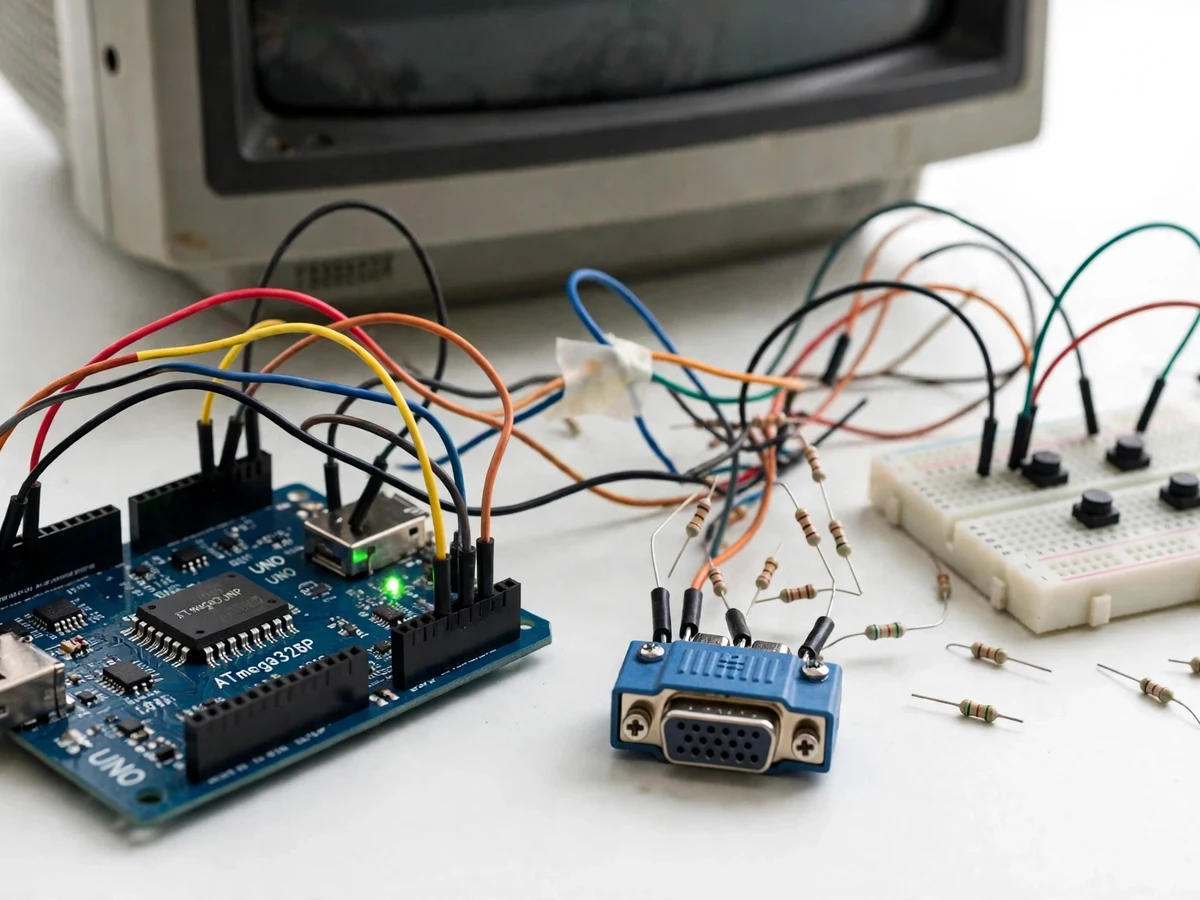
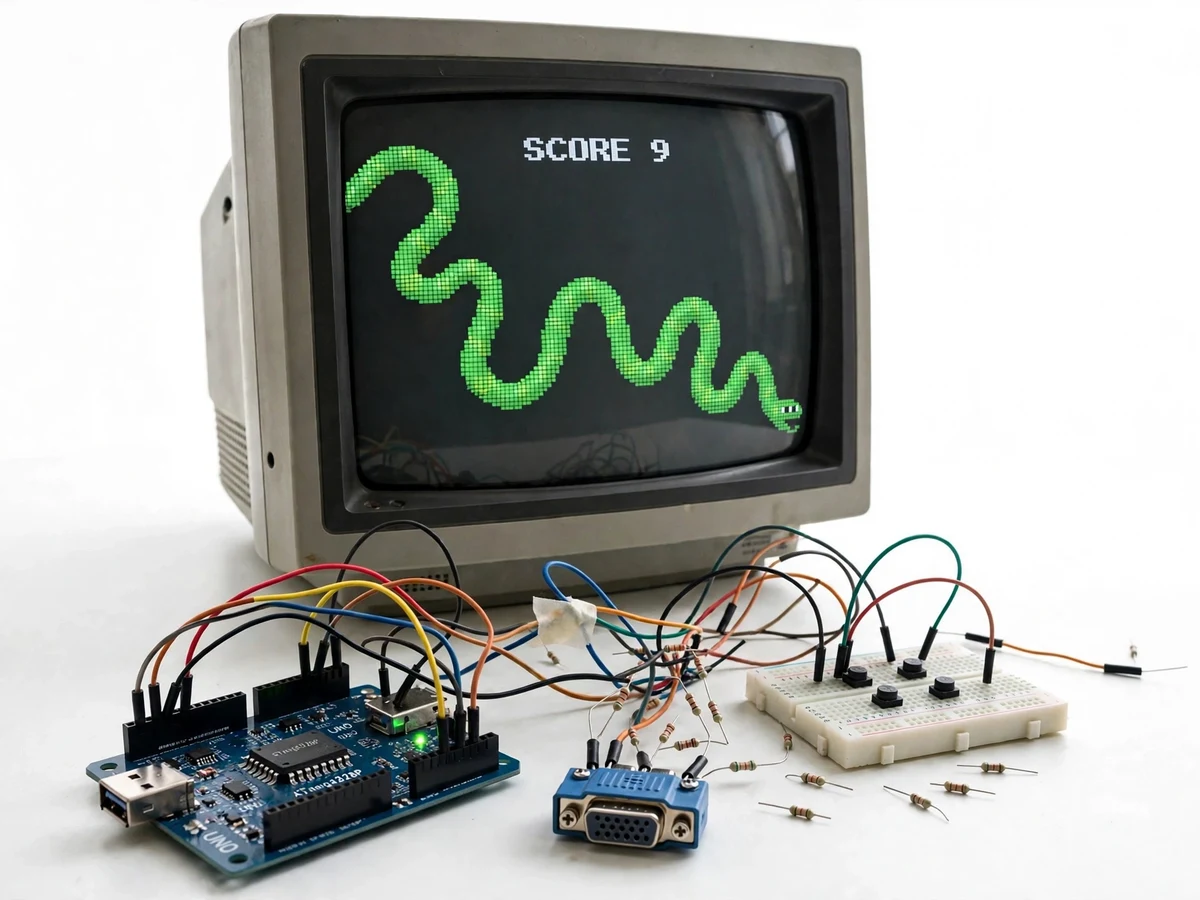
Watch it work
The problem
The classic Snake game is one of the simplest games to describe and one of the hardest to display on a microcontroller: the game logic is a few dozen lines of code, but drawing it needs a display, and most student builds reach for an LCD or an OLED panel. This project takes a different route. An Arduino Uno runs the Snake game and draws it directly onto an ordinary VGA monitor, using the open-source VGAx library by Smaffer, with no special shield and no support IC — just a handful of resistors, a DSUB15 VGA connector and four push buttons for control. The result is a full-screen game on a real monitor, driven by a single 8-bit microcontroller, which makes it an unusually clear demonstration of what an Arduino can do when its pins are used to generate a video signal in software. The demo shows the snake moving on the monitor, the score climbing from 0 to 9 across rounds, the snake visibly longer at higher scores, the game getting faster as the score rises, and a Game Over screen at the end of a round.
| Feature | Snake on a small LCD | This Arduino VGA Snake game |
|---|---|---|
| Display | Small LCD or OLED panel | Full VGA monitor, readable across a room |
| Video hardware | Display module or graphics shield | Resistors and a DSUB15 connector only, no shield |
| Signal generation | Display module handles it | VGA signal generated in software by the VGAx library |
| Controls | Often a joystick or keypad | Four push buttons, one per direction |
| Score | Shown on the same small panel | Shown on the monitor with the game |
| Speed | Usually fixed | Increases as the score rises |
| Demonstration | One person close to the bench | Whole room can watch the monitor |
Builder note: the VGAx library handles the timing-critical part of the build — the horizontal and vertical sync pulses and the colour signals — so the student firmware only has to run the game itself: the snake movement, the food, the score and the game-over logic. The most useful detail in the demo is the speed change: the game shows on screen that the speed increases, and the snake visibly moves faster at a score of 9 than at a score of 0, which is what makes the build demonstrable in a review room without explaining the timing code first.
How it works
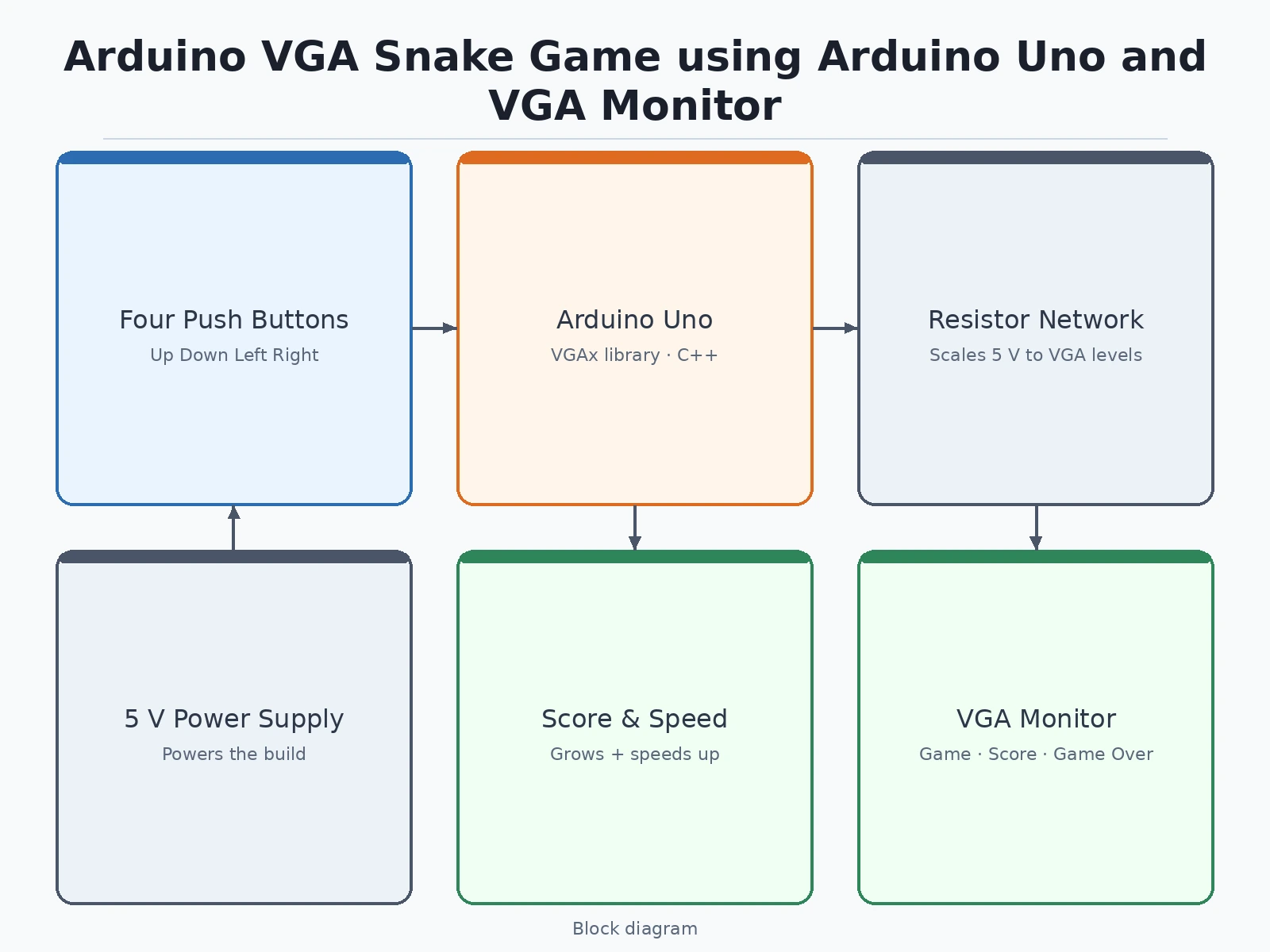
The Arduino Uno runs the VGAx library, which produces the VGA sync and colour signals with precise timing, and the resistor network scales the 5 V logic levels down to the levels a VGA monitor expects. The game code runs alongside the signal generation: each step, the snake head moves one cell in the direction last pressed on the four buttons, and the frame is redrawn on the monitor. When the head reaches the food, the snake grows by one segment, the score increases by one and the step rate rises, so the game gets faster as the score climbs. A collision with the screen edge or with the snake's own body ends the round on a Game Over screen, and a button press starts a new round.
- At power-up the Uno initialises the VGAx library, which starts generating the VGA signal through the resistor network to the DSUB15 connector.
- The game draws the playfield, the snake and the first food item on the VGA monitor, with the score shown at the top of the screen.
- The four push buttons are read each step, and the last direction pressed sets the direction the snake head moves next.
- Each step the snake head moves one cell, and the frame is redrawn so the movement is visible on the monitor.
- When the head reaches the food, the snake grows by one segment, the score increases by one, and a new food item appears.
- The step rate rises as the score climbs, so the snake moves faster at a score of 9 than at a score of 0, as the demo shows on screen.
- A collision with a wall or with the snake's own body ends the round on a Game Over screen, and a button press starts a new round.
Tech stack:
- Arduino Uno · ATmega328P
- VGAx library · Smaffer
- VGA monitor · 4:3 display
- DSUB15 connector · resistor network
- Four push buttons · direction control
- 5 V power supply
- Arduino IDE · C++ firmware
- Jumper wiring · base board
| Parameter | Value |
|---|---|
| Controller | Arduino Uno · ATmega328P |
| Video library | VGAx library · Smaffer |
| Display | VGA monitor · 4:3 |
| Video output | DSUB15 connector · resistor network · no shield · no support IC |
| Controls | Four push buttons · up · down · left · right |
| Score | Shown on screen · demo shows 0 to 9 across rounds |
| Game speed | Increases as the score rises · shown on screen |
| Game over | Wall collision or self collision · Game Over screen |
| Sound | None in the base build · no buzzer |
| Main supply | 5 V DC |
| Builder note | The demo shows the score climbing 0 to 9, the snake growing longer, the speed increasing and the Game Over screen; two-player mode, levels and a saved high score are not part of this build |
Project features
This Snake game is built around four capabilities: software VGA output from an Arduino Uno, four-button direction control, a score that drives both growth and speed, and a clear game-over state. The software VGA output is the heart of the build — the VGAx library generates the sync and colour signals with precise timing, and a resistor network scales the 5 V logic levels down to the levels a VGA monitor expects, so no shield or support IC is needed. The four push buttons are the second capability: up, down, left and right, each wired to a digital pin, so the snake steers with simple debounced button reads. The third capability is the score-driven game: each food eaten adds a segment to the snake and a point to the score, and the step rate rises with the score, so the game gets faster the better the player does. The fourth is the Game Over screen: a collision with a wall or with the snake's own body ends the round, and a button press starts a new one.
- [Software VGA output] The VGAx library generates the VGA signal on the Arduino Uno, with only resistors and a DSUB15 connector as video hardware, so the game appears on a full monitor with no shield and no support IC.
- [Four-button direction control] Four push buttons give up, down, left and right control, so the snake steers with simple digital reads and no joystick is needed.
- [Score, growth and speed] Each food eaten adds one segment to the snake and one point to the score, and the step rate rises as the score climbs, so the game visibly speeds up from score 0 to score 9.
- [Game Over screen] A collision with a wall or with the snake itself ends the round on a Game Over screen, and a button press starts a new round.
- [No shield, no support IC] The whole video path is the Arduino, a resistor network and a DSUB15 connector, so the build stays cheap, easy to wire and easy to explain from the circuit up.
- [Compact Uno build] The entire game runs on one Arduino Uno, so the build is small, cheap and easy to carry into a demonstration room with a monitor.
What is included
- Working Arduino VGA Snake game prototype on a base board
- Complete firmware source code with comments (Arduino IDE, VGAx library)
- Circuit and wiring documentation (resistor network, DSUB15 wiring, four-button control)
- Component list with part names
- Project report PDF (background, working, specifications, limitations)
- Project abstract PDF
- PPT presentation for final review
- Viva Q&A preparation document (VGA timing, VGAx library, ATmega328P, game logic)
- Demonstration guidance for showing the score climb, the speed increase and the Game Over screen
Limitations & prerequisites
- This is a tabletop demonstration model, not a certified product, and it needs a VGA monitor with a 4:3 display to show the game as designed.
- The base build is single-player only, with no two-player mode and no levels.
- There is no sound in the base build, no buzzer and no speaker.
- The score is not saved when the power is removed, so there is no persistent high-score table.
- The game ends on a wall or self collision, and the only controls are the four push buttons — there is no joystick and no LCD in the base build.
- The display resolution and frame timing depend on the VGAx library and the monitor, so a monitor that does not accept the library's VGA timing will not show the game.
Timeline
- Week 1: circuit design, component sourcing, and resistor network and DSUB15 wiring.
- Week 2: board assembly, VGAx library setup, and Snake game firmware development.
- Week 3: direction-control testing, score and speed tuning, and Game Over testing.
- Week 4: report, abstract, PPT, and game demonstration preparation.
Support
- Build guidance, circuit explanation, and firmware help are included with the order.
- Customization such as a buzzer for eating and game-over sounds, a saved high-score table, or a two-player mode can be developed on request.
Frequently Asked Questions
How does an Arduino drive a VGA monitor without a shield?
The VGAx library by Smaffer generates the VGA signal in software: it produces the horizontal and vertical sync pulses and the colour signals with precise timing from the ATmega328P pins, and a resistor network scales the 5 V logic levels down to the levels a VGA monitor expects. The only video hardware is the resistors and a DSUB15 connector — there is no shield and no support IC.
How is the snake controlled?
Four push buttons give up, down, left and right control, each wired to a digital pin on the Arduino Uno. The game reads the buttons each step and moves the snake head one cell in the last direction pressed. There is no joystick in the base build.
What happens when the snake eats?
The snake grows by one segment, the score increases by one, and a new food item appears. The demo shows the score climbing from 0 to 9 across rounds, with the snake visibly longer at higher scores.
Does the game get harder as you play?
Yes — the step rate rises as the score climbs, so the snake moves faster at a score of 9 than at a score of 0, and the game shows on screen that the speed increases. A collision with a wall or with the snake's own body ends the round on a Game Over screen.
Can the score be saved, and is there sound?
No to both in the base build: there is no sound, no buzzer and no speaker, and the score is not saved when the power is removed, so there is no persistent high-score table. A buzzer and a saved high score using the microcontroller EEPROM can be added as customization.
Who is this project suitable for?
B.E. and B.Tech students in Electronics, E&TC and Electrical programs, because it combines software video-signal generation, timing-critical firmware, simple game logic and button interfacing in one demonstrable prototype that can be shown on a monitor in a review room and explained from the circuit up.
Components & software requirements
- Arduino Uno · ATmega328P
- VGAx library · Smaffer
- VGA monitor · 4:3 display
- DSUB15 connector · resistor network
- Four push buttons · direction control
- 5 V power supply
- Arduino IDE · C++ firmware
- Jumper wiring · base board
Delivery information
Built-to-order project. Delivery timeline is shared after order confirmation based on current queue.
Support terms
Complete documentation, setup guide, and viva preparation included. Support for setup and explanation provided.
Download free synopsis (PDF)
Enter your name and WhatsApp number — the synopsis PDF downloads immediately. We may send occasional project updates on WhatsApp; no spam.