
More project photos (3)
The problem
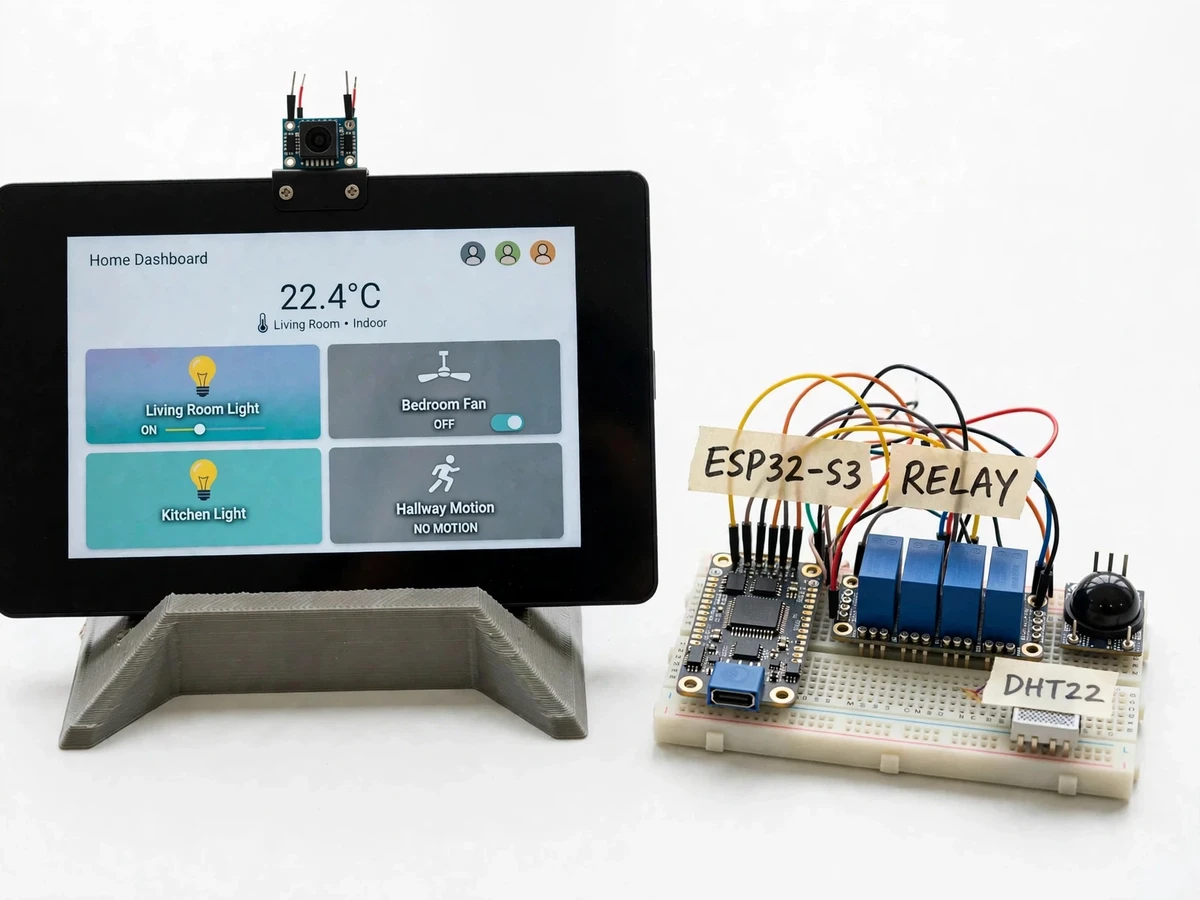
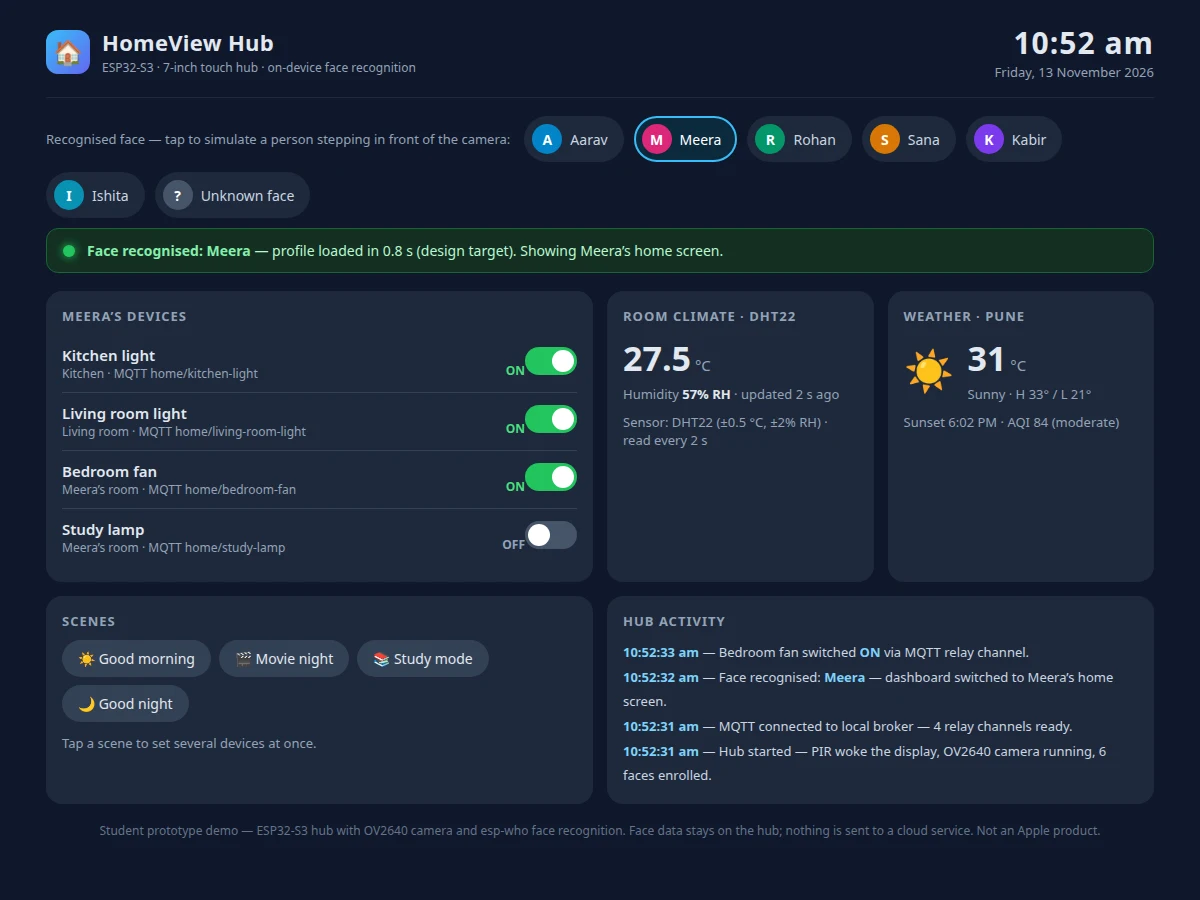
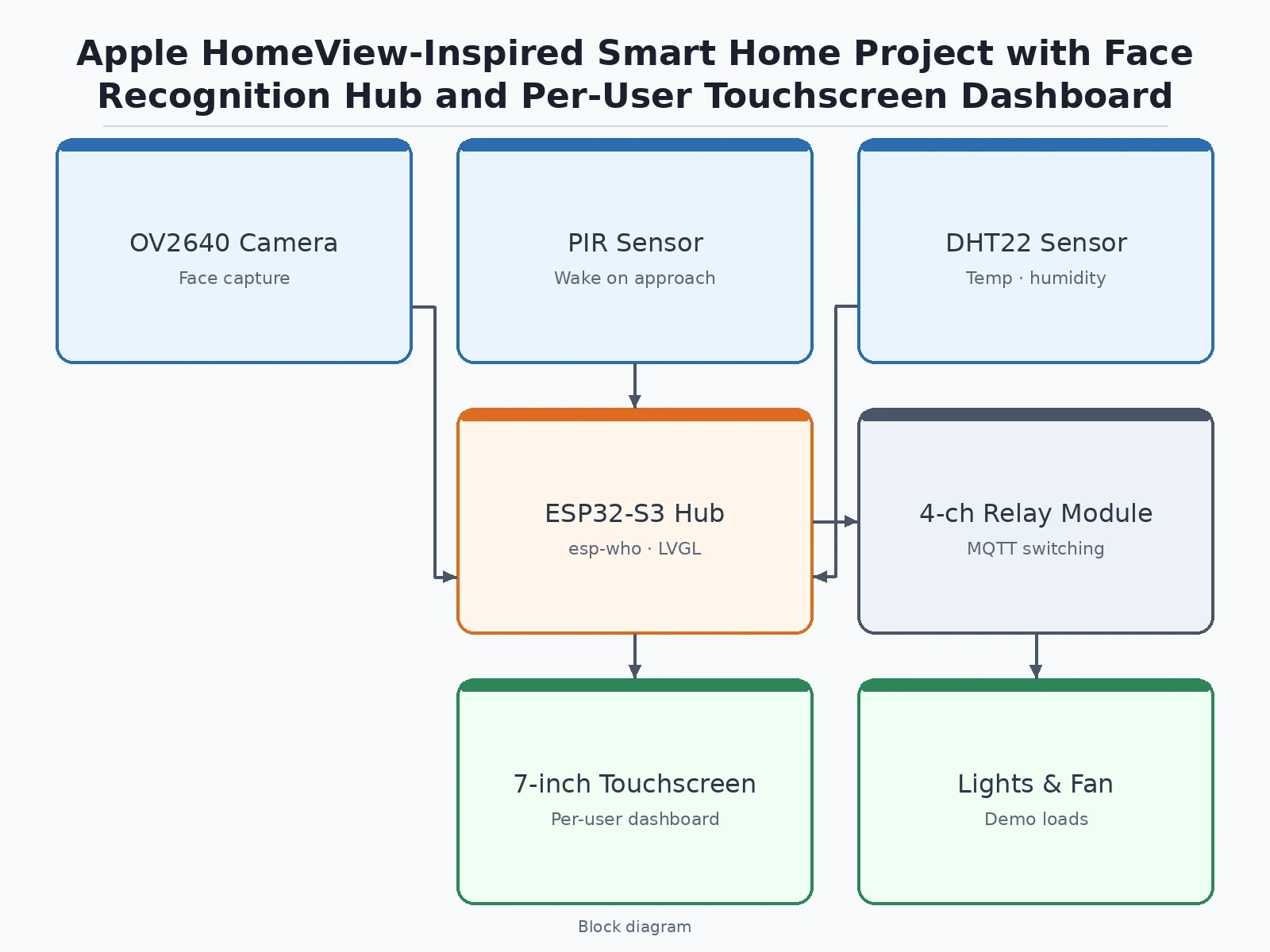
A shared screen on the wall cannot know whose hand is touching it unless someone tells it. Apple's HomeView, launched on 13 November 2026, answers that with a 7-inch touchscreen hub that recognises up to 6 household members by face and gives each one a personalised Home Screen, with a voice assistant built in. This project builds the student version of that idea: a wall- or table-mounted hub built on a Waveshare ESP32-S3 7-inch capacitive-touch display board, an OV2640 camera and Espressif's esp-who face-recognition framework, all running on the device with no cloud account. When the camera recognises one of up to 6 enrolled faces, the hub switches to that person's dashboard — their room's lights and fan, their calendar and weather tiles — and an unknown face gets the shared household screen. A 4-channel relay module switches demo loads over MQTT, a DHT22 sensor feeds the climate tile, and a PIR sensor wakes the screen as someone approaches.
| This student build | Apple HomeView (reported figures) | MQTT Smart Home Control Android App with Room-wise Device Dashboard | |
|---|---|---|---|
| Hub hardware | Waveshare ESP32-S3 7-inch touch display board · wall or tabletop stand · 3D-printed mount | 7-inch Liquid Retina touchscreen hub · tabletop and wall-mounted versions (reported) | No hub hardware · phone app only · ESP32 relay endpoints per room |
| Face recognition | OV2640 camera plus esp-who on-device recognition · up to 6 enrolled faces · switches profiles only | Face recognition for up to 6 household members · each gets a personalised Home Screen (reported) | No camera · no face recognition · one shared app login |
| Per-user screens | Each enrolled person gets their own dashboard: their room devices, calendar and weather tiles | Personalised Home Screen per household member (reported) | Room-wise dashboard · same view for every user · no per-person screens |
| Device control | 4-channel relay module · MQTT over local Wi-Fi · lights and fan demo loads | Controls smart home devices through the hub screen and voice (reported) | 24 devices across 4 rooms · MQTT QoS 1 · retained status feedback |
| Voice | INMP441 microphone · fixed local command set · no cloud assistant | Siri AI voice assistant (reported) | No voice control in the base build |
| Climate sensing | DHT22 temperature and humidity tile on the hub screen | Not stated in the launch reports | No climate sensor in the base build · power estimate only |
| Wake | PIR sensor wakes the display on approach · screen dims when idle | Not stated in the launch reports | Phone screen · no wake sensor |
| Price | Built-to-order · quotation | $299 · on sale from 13 November 2026 in India, US, UK, Australia, Canada, New Zealand, Singapore and South Africa (reported) | Built-to-order · quotation |
| Privacy | Face data stored in flash on the hub · no images leave the device · no cloud account | Face recognition on the device (reported) | Local broker · no cloud account · no camera data at all |
A person walks up to the hub on its stand or wall mount.
Follow the working sequence
How it works
The hub sits dimmed on its stand until the PIR sensor notices someone approaching, then the display wakes and the OV2640 camera starts capturing frames. Each frame is downscaled to QVGA (320 × 240) and handed to Espressif's esp-who framework, which detects any face in the frame and compares it against the up to 6 enrolled faces stored in the hub's flash memory. A match loads that person's dashboard on the 7-inch touchscreen — their room's device tiles, their calendar and weather tiles — while no match shows the shared household screen. Tapping a tile publishes an MQTT message to the local broker, the relay board switches the matching load, and the dashboard updates only after the device confirms. The DHT22 sensor refreshes the climate tile every 2 seconds, and the same dashboard is served over Wi-Fi so a phone can control the hub from another room.
- The builder assembles the hub: the Waveshare ESP32-S3-Touch-LCD-7 board in a 3D-printed tabletop stand or wall mount, the OV2640 camera module on top of the display, the 4-channel relay board, the DHT22 sensor, the PIR sensor and the INMP441 microphone wired to the board.
- The builder enrols up to 6 household members: each person stands about 0.5–1 m from the camera in good light while the hub captures several frames per face and stores the face features in flash memory — no image is uploaded anywhere.
- The builder flashes the firmware: the esp-who recognition pipeline, the LVGL touchscreen dashboard, the MQTT client and the local voice-command set, then checks the display, touch input and each sensor on the bench.
- The builder connects the relay outputs to the demo loads — LED bulbs and a table fan — and sets up the local Mosquitto broker, with one MQTT topic per device.
- The builder tests recognition per person: each enrolled member steps in front of the camera and the hub must load their own dashboard, while an unenrolled person must get the shared household screen.
- The builder tests control end to end: tapping a tile switches the matching relay and load, the PIR wakes the dimmed display on approach, the DHT22 tile updates, and the web mirror on a phone controls the same devices.
- The builder records the results honestly: which faces recognised reliably and at what distance and lighting, which confused the hub, and where the fixed voice-command set misheard, reported in the project report with the test table.
Tech stack:
- ESP32-S3 · Waveshare 7-inch touch display board
- OV2640 camera module · esp-who face recognition
- LVGL · touchscreen dashboard UI
- MQTT · Mosquitto local broker
- 4-channel relay module · demo load switching
- DHT22 · temperature and humidity sensing
- INMP441 MEMS microphone · offline voice commands
- HTML · CSS · JavaScript web dashboard mirror
Face enrolment & data note
- Enrolment: Each household member is enrolled on the hub itself: they stand about 0.5–1 m from the OV2640 camera in good, even light while the hub captures several frames per face (design target). Enrolment takes a few minutes per person and is repeated if recognition is unreliable for that person.
- Storage: Face features are stored in the hub's flash memory only. No face image or feature leaves the device, no cloud account is created, and an enrolled face can be deleted from the on-screen settings at any time.
- Honest limits: Recognition works at close range in good light and is a profile switch, not a security check. It must never be presented as a lock, an attendance record or a certified biometric system, and the report states the enrolment, lighting and range limits plainly.
| Parameter | Value |
|---|---|
| Build type | Hybrid hub plus web dashboard mirror (design target) |
| Hub board | Waveshare ESP32-S3-Touch-LCD-7 · ESP32-S3-WROOM-1-N16R8 module · 16 MB flash · 8 MB PSRAM (Datasheet value) |
| Controller | ESP32-S3 · dual-core Xtensa LX7 up to 240 MHz · 512 KB SRAM · 384 KB ROM · Wi-Fi 802.11 b/g/n · Bluetooth 5 LE (Datasheet value) |
| Display | 7-inch IPS capacitive touch · 800 × 480 pixels · 65K colours · 5-point touch · GT911 controller over I2C (Datasheet value) |
| Camera | OV2640 · 2 MP · UXGA 1600 × 1200 · up to 15 fps at UXGA · up to 30 fps at SVGA (Datasheet value) |
| Face recognition | esp-who on-device detection and recognition · up to 6 enrolled faces · recognition frame downscaled to QVGA 320 × 240 (design target) |
| Device switching | 4-channel relay module · 10 A at 250 V AC per channel (Datasheet value) · demo loads: LED bulbs and a table fan |
| Climate sensor | DHT22 · −40 to 80 °C at ±0.5 °C · 0 to 100% RH at ±2% RH typical · read once every 2 s (Datasheet value) |
| Motion wake | HC-SR501 PIR sensor · detection range up to approximately 7 m (Datasheet value) |
| Voice | INMP441 MEMS microphone · I2S 24-bit · SNR 61 dBA · fixed local command set (Datasheet value) |
| Link | Wi-Fi MQTT to local Mosquitto broker · port 1883 · web dashboard mirror over local Wi-Fi (design target) |
| Power | 5 V DC 2 A USB-C supply (design target) |
| Trend reference | Apple HomeView reported figures only: 7-inch Liquid Retina touchscreen · face recognition for up to 6 household members · personalised Home Screen per person · Siri AI voice assistant · tabletop and wall-mounted versions · $299 · on sale from 13 November 2026 in India, US, UK, Australia, Canada, New Zealand, Singapore and South Africa (reported) · shares no parts or software with this build |
| Builder note | The 800 × 480 display framebuffer lives in the module's 8 MB PSRAM, not in the ESP32-S3's 512 KB internal SRAM — the internal SRAM cannot hold a full-colour 800 × 480 frame, so a board without PSRAM cannot drive this panel at all. The face-recognition frame is downscaled to QVGA (320 × 240) before esp-who runs, because the full UXGA frame and the display framebuffer cannot sit in memory together. The PIR sensor wakes the display from its dimmed state, so the screen is dark until someone approaches — dimming the backlight is the single biggest power saving in the build. |
Project features
This hub earns its place on a review table because four ideas work together in one build. First, face-switched per-user screens: the camera recognises one of up to 6 enrolled faces and the dashboard changes to that person's tiles, so the hub feels personal without a login screen. Second, on-device recognition: esp-who runs entirely on the ESP32-S3, so face data never leaves the hub and no cloud account is needed. Third, real device control: a 4-channel relay module switches lights and a fan over MQTT, so a tap on the screen moves a real load a reviewer can see. Fourth, honest scope: the recognition switches profiles and never locks anything, the voice commands are a fixed local set rather than a cloud assistant, and the report states those limits plainly.
- [Face-switched per-user dashboards] When the camera recognises an enrolled face, the hub loads that person's screen — their room's devices, calendar and weather tiles — and an unknown face gets the shared household screen — implemented in the base build.
- [On-device face recognition with esp-who] Espressif's esp-who framework detects and recognises faces on the ESP32-S3 itself, with up to 6 faces enrolled in flash memory and no image sent to any server — implemented in the base build.
- [7-inch capacitive-touch hub display] The Waveshare ESP32-S3-Touch-LCD-7 board drives a 7-inch 800 × 480 IPS touchscreen with 5-point capacitive touch, mounted on a 3D-printed tabletop stand or wall mount — implemented in the base build.
- [MQTT relay switching of real loads] A 4-channel relay module switches demo loads — LED bulbs and a table fan — over MQTT topics on the local Wi-Fi network, so the hub controls hardware a reviewer can watch — implemented in the base build.
- [PIR wake-on-approach] A PIR sensor wakes the display from its dimmed state when someone walks up to the hub, so the screen is dark and quiet until it is needed — implemented in the base build.
- [DHT22 climate tile] The DHT22 sensor feeds a live temperature and humidity tile on every home screen, read once every 2 seconds as its datasheet requires — implemented in the base build.
- [Offline voice commands] An INMP441 microphone takes a fixed local command set — lights on, lights off, fan on, fan off — recognised on the hub with no cloud assistant involved — implemented in the base build.
- [Web dashboard mirror] The same per-user dashboard is served over Wi-Fi, so a phone on the same network can control the hub remotely without installing anything — implemented in the base build.
What is included
- Complete hub (Waveshare ESP32-S3 7-inch touch display board, OV2640 camera module, 4-channel relay board, DHT22 sensor, PIR sensor, INMP441 microphone, 3D-printed tabletop stand and wall mount, demo loads)
- Firmware (esp-who face detection and recognition, per-user LVGL dashboard, MQTT client, PIR wake, DHT22 reading, fixed local voice-command set, web dashboard mirror)
- Face-enrolment guide (lighting, distance, per-person enrolment steps, deleting an enrolled face)
- Setup guide (broker setup, MQTT topic list, wiring diagram, Wi-Fi and web-mirror steps)
- Project report PDF (HomeView background with reported figures labelled as reported, hub design, face-recognition design, test results, honest measurement limits)
- PPT presentation for final review
- Viva Q&A preparation document (how on-device face recognition works, why the hub switches profiles instead of locking, MQTT relay control, touchscreen and PSRAM limits)
Limitations & prerequisites
- Not Apple HomeView: this build shares no parts, software or performance with Apple's product — it is a student hub inspired by the launch, and must never be presented as the Apple device.
- Recognition is a profile switch, not security: it changes which dashboard is shown and must never be used to lock a door, guard valuables or record attendance, and a printed photo or a similar-looking person can confuse it.
- Needs good light and close range: recognition works at about 0.5–1 m in even light; dim rooms, backlight from a window behind the person, hats and sunglasses all reduce reliability, and each new person needs their own enrolment pass.
- No cloud assistant: voice commands are a fixed local set (lights on, lights off, fan on, fan off) and the hub cannot answer questions, play music or control cloud devices the way a commercial assistant does.
- Local network only: the hub and the web mirror work on the local Wi-Fi network; control from outside the home needs a cloud broker or VPN, which is an optional extension, not part of the base build.
- Relay outputs switch 230 V AC loads, so mains wiring must be done by a qualified electrician; the student demo uses low-power loads and the relay board must be enclosed before any mains load is connected.
- Academic prototype only: the hub is a student build, not a certified smart-home or biometric product, and no security or safety claim is made for it.
Frequently Asked Questions
Is this project suitable for a final-year project?
Yes, for IoT, Electronics and Embedded Systems programmes, because it combines on-device face recognition, a touchscreen dashboard, MQTT relay control and a web mirror into one testable build, with a clear review thread around how a shared hub can tell household members apart without a cloud account. The report documents the build, the enrolment procedure, the recognition tests and the honest limits, so the project reads as engineering work rather than a copy of a headline.
Is this the Apple HomeView?
No, this is a student hub inspired by Apple's HomeView, launched on 13 November 2026, not the Apple product: it uses a Waveshare ESP32-S3 7-inch touch display board, an OV2640 camera and Espressif's esp-who framework, while HomeView is Apple's own 7-inch Liquid Retina hub with face recognition for up to 6 household members at a reported $299. This build shares no parts, software or performance with Apple's device.
How does face recognition work on an ESP32-S3?
The OV2640 camera captures frames that are downscaled to QVGA (320 × 240) and handed to Espressif's esp-who framework, which detects faces and compares them against the up to 6 enrolled faces stored in the hub's flash memory. Everything runs on the device: no face image is uploaded, no cloud account is needed, and enrolment is a short guided pass per person in good light at about 0.5–1 m from the camera.
Can face recognition lock my house?
No, and it must never be presented that way. Recognition here only switches which dashboard is shown — a profile switch, not a security check. It works at close range in good light, a printed photo or a similar-looking person can confuse it, and the relay outputs switch demo loads only. A real lock needs certified hardware and anti-spoofing the student hub does not have.
Does it work without internet?
Yes, the hub works entirely on the local Wi-Fi network: face recognition runs on the ESP32-S3, device commands travel over MQTT to a local Mosquitto broker, and the voice commands are a fixed local set recognised on the hub. No cloud account, internet connection or subscription is needed for any base feature, and the web dashboard mirror is served from the hub itself.
What will I receive with the project?
You receive the complete hub with the 7-inch touch display board, OV2640 camera, relay board, DHT22, PIR and microphone, the firmware with face recognition, per-user dashboard, MQTT control and web mirror, the enrolment and setup guides, the project report, the presentation and the viva Q&A document. A Wi-Fi router and a phone or laptop on the same network are needed for the web mirror, both covered in the setup guide.
Components & software requirements
- ESP32-S3 · Waveshare 7-inch touch display board
- OV2640 camera module · esp-who face recognition
- LVGL · touchscreen dashboard UI
- MQTT · Mosquitto local broker
- 4-channel relay module · demo load switching
- DHT22 · temperature and humidity sensing
- INMP441 MEMS microphone · offline voice commands
- HTML · CSS · JavaScript web dashboard mirror
Face enrolment & data note
- Enrolment: Each household member is enrolled on the hub itself: they stand about 0.5–1 m from the OV2640 camera in good, even light while the hub captures several frames per face (design target). Enrolment takes a few minutes per person and is repeated if recognition is unreliable for that person.
- Storage: Face features are stored in the hub's flash memory only. No face image or feature leaves the device, no cloud account is created, and an enrolled face can be deleted from the on-screen settings at any time.
- Honest limits: Recognition works at close range in good light and is a profile switch, not a security check. It must never be presented as a lock, an attendance record or a certified biometric system, and the report states the enrolment, lighting and range limits plainly.
Delivery information
Built-to-order project. Delivery timeline is shared after order confirmation based on current queue.
Support terms
Complete documentation, setup guide, and viva preparation included. Support for setup and explanation provided.
Download free synopsis (PDF)
Enter your name and WhatsApp number — the synopsis PDF downloads immediately. We may send occasional project updates on WhatsApp; no spam.