
More project photos (2)
The problem
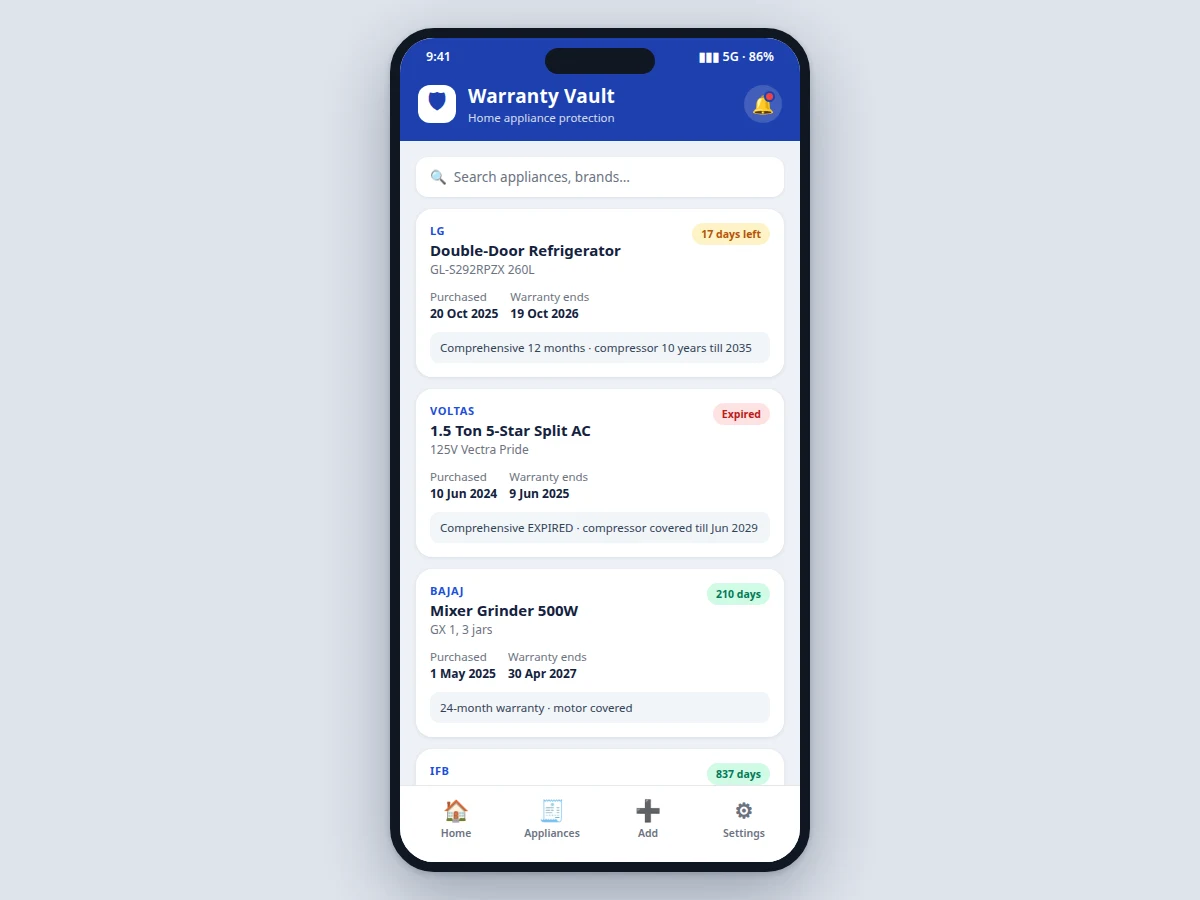
Home-appliance warranties live in crumpled invoices at the back of a drawer: the buyer rarely knows when the refrigerator's one-year comprehensive cover ends, when the AC's compressor-only phase begins, or when the RO purifier's filter service is due. By the time a defect appears, the warranty has quietly lapsed and a repair that should have been free becomes an out-of-pocket bill of several thousand rupees. This project solves the problem the way a phone solves it best — with a vault app that records each appliance's brand, model, purchase date, warranty duration and invoice, then does the date arithmetic automatically. A dashboard surfaces what needs attention first: expired cover, warranties ending within 30 days, and service reminders for appliances whose warranties depend on regular servicing (RO, AC, washing machine). Everything works offline-first with Room, so the data is available even without a connection, and WorkManager schedules the expiry and service alerts reliably without keeping the app open.
Homeowner tracking appliance warranties and service dates.
Follow the working sequence
How it works
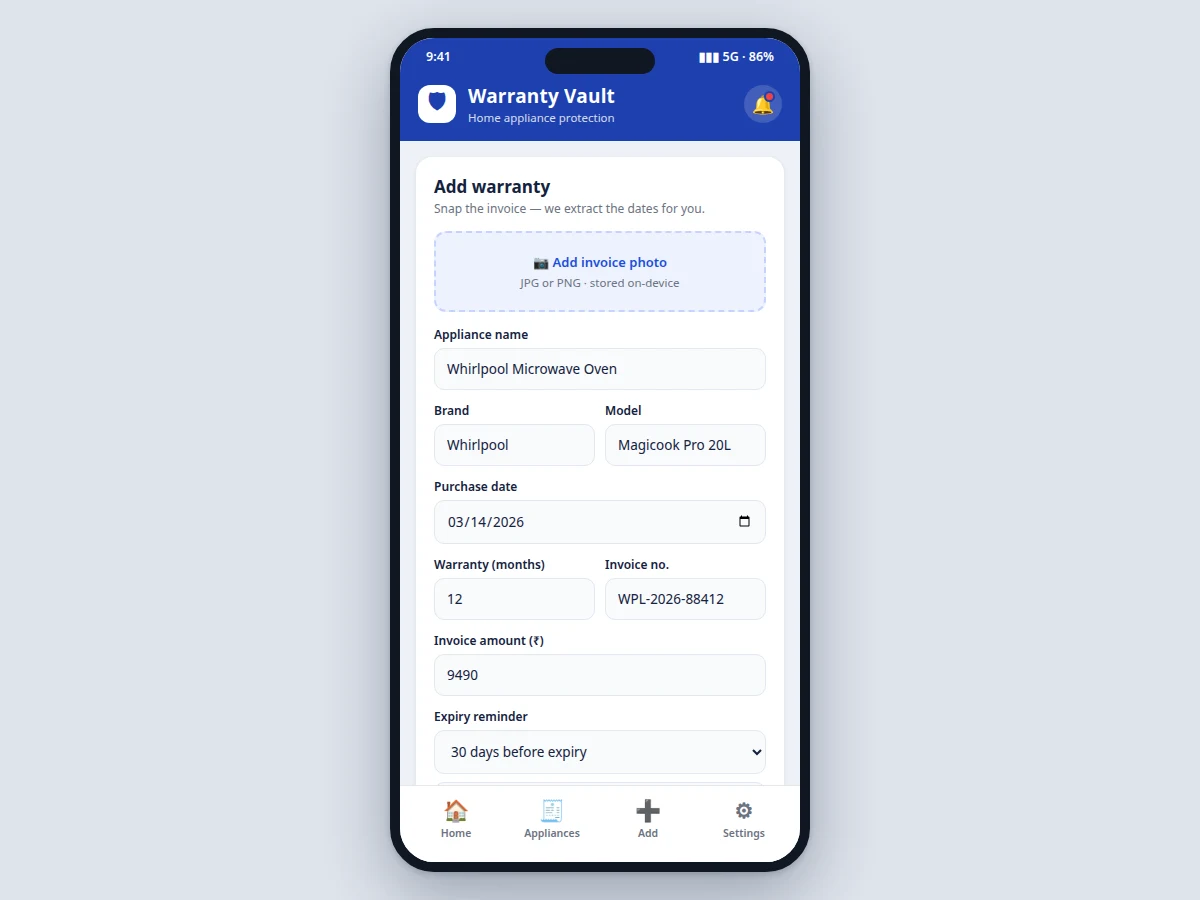
- The user adds an appliance through the form — brand, model, purchase date and warranty duration in months, optionally with an invoice photo and amount.
- The app computes the warranty end date (purchase date + warranty months) and stores the record in the Room database.
- On every launch, the dashboard reads all records, computes days remaining against the device clock, and sorts alerts: expired first, then expiring within 30 days, then upcoming service dates.
- Indian warranty realities are modelled honestly: separate comprehensive-cover end dates and longer compressor/motor terms (e.g. 12 months comprehensive + 10-year compressor on a refrigerator) are stored as distinct fields.
- WorkManager registers one-time workers for expiry alerts (at the chosen lead time: 15, 30 or 60 days) and periodic workers for recurring service reminders.
- When an alert fires, a notification opens the app directly on the affected appliance's detail, where the user can mark the service as done or renew the reminder.
- A broadcast receiver re-registers all pending workers after a device reboot so no alert is silently lost.
Tech stack:
- Kotlin (Android native)
- Jetpack Room (offline persistence)
- WorkManager (scheduled alerts)
- Material 3 components (UI)
- Glide (invoice photo thumbnails)
- Android 12+ target SDK
- Git (version control)
| Parameter | Value |
|---|---|
| Platform | Android 8.0 (API 26) minimum, targets Android 14 (API 34) |
| Language | Kotlin, 100% (no Java legacy code) |
| Local database | Room, single database, approximately 2–4 tables (appliances, services, reminders) |
| Alerts | WorkManager one-time + periodic workers; re-registered on BOOT_COMPLETED |
| Reminder lead times | 15, 30 or 60 days before expiry (user configurable) |
| Storage | On-device only (design target); invoice photos capped at approximately 2 MB each after compression |
| Build | Single Gradle module, debug + release APK (expected) |
| Demo data | 7 sample appliances with realistic Indian brands and warranty terms (design target) |
Project features
- [Warranty dashboard with expiry alerts] Every appliance sorted by days remaining, with red/amber/green status chips for expired, expiring-soon and active cover — the screen a viva examiner asks to see first.
- [Add-warranty form with invoice capture] Records appliance name, brand, model, purchase date, warranty months, invoice number and amount, with a photo slot for the invoice and configurable reminder timing (15/30/60 days before expiry).
- [Service reminders for service-dependent warranties] Repeating reminders (e.g. RO filter every 6 months, AC deep service every 6 months, washer drum descale quarterly) because skipping a service can void coverage.
- [Appliance vault with search] Cards showing brand, model, purchase date, warranty end date and days remaining, searchable by appliance or brand, covering the realistic split Indian buyers face (comprehensive cover plus longer compressor/motor terms).
- [Offline-first local storage] All data persists in a Room database on the device — no account, no server dependency, the vault opens with full data in airplane mode.
- [Reliable scheduled notifications] WorkManager schedules expiry alerts and service reminders that fire even after a device reboot, using exact alarms only where the OS permits.
- [Expiry timeline and statistics] Counts of total appliances, expired cover and warranties due soon, so the user sees household warranty health at a glance.
What is included
- Complete Android source code (Kotlin, single Gradle module, clean architecture)
- Debug APK ready to install and demo on a phone
- Room database schema with the warranty and service-reminder tables
- WorkManager notification scheduling implementation with reboot handling
- Project report PDF (problem, requirements, system design, database schema, testing notes)
- PPT presentation for final review
- Viva Q&A preparation document (Room vs SQLite, WorkManager vs AlarmManager, offline-first design, permission model)
Limitations & prerequisites
- Invoice "date extraction" is manual entry plus a photo slot — the app does not OCR the invoice; automatic OCR is listed as future scope, not claimed as implemented.
- Expiry computation assumes the purchase date the user enters is correct; a wrong date produces a wrong alert, and the app does not validate against the actual invoice.
- Notifications depend on the OS granting the app exact-alarm or battery-exemption permissions; on some devices aggressive battery savers can delay periodic reminders, which the FAQ documents honestly.
- Data lives on one device only — there is no cloud sync or multi-device backup; moving to a new phone needs the app's export (JSON backup) feature in the report's future scope.
- The demo ships with 7 realistic sample appliances (design target); a real user's vault starts empty and grows through the add form.
Frequently Asked Questions
Why is this a genuine problem worth a final-year project?
Appliance warranties in Indian households are tracked on paper invoices that get lost, and the money cost is concrete: a compressor repair just after a lapsed comprehensive cover can run ₹3,000–₹8,000. The app turns that paperwork into date arithmetic with scheduled alerts — a small, real, measurable utility, which is exactly what an Android final-year project should demonstrate.
Why Room and WorkManager instead of simpler options?
Room gives type-safe SQLite access with compile-time query checking, so schema mistakes fail at build time instead of crashing at runtime — a strong viva talking point. WorkManager handles the OS battery constraints and reboot persistence that raw AlarmManager code gets wrong on modern Android; the report compares both approaches.
How do the service reminders work?
Some warranties stay valid only if the appliance is serviced on schedule (RO filters every 6 months, AC service twice a year). Each appliance stores a service interval; WorkManager runs a periodic worker that posts a reminder when the next service date falls within the window, and the user can mark it done to reset the cycle.
Does the app need the internet?
No. It is offline-first by design: all records live in the on-device Room database and alerts are scheduled locally. The only permission the core flow needs is notifications; camera permission is requested only when the user taps the invoice-photo slot.
Can it read my invoice automatically?
Not in the shipped build — you photograph the invoice for reference and enter the dates yourself. OCR-based date extraction is explicitly listed as future scope in the report so the viva stays honest about what is implemented versus what is aspirational.
Is this project suitable for a final-year project?
Yes — for Computer Science and IT programs. It is a complete native Android app demonstrating database design, background scheduling, notification UX and offline-first architecture, with a demo an examiner can operate live on a phone rather than watch in slides. Suitable for B.E./B.Tech final-year projects in Computer Science and IT.
Components & software requirements
- Kotlin (Android native)
- Jetpack Room (offline persistence)
- WorkManager (scheduled alerts)
- Material 3 components (UI)
- Glide (invoice photo thumbnails)
- Android 12+ target SDK
- Git (version control)
Delivery information
Built-to-order project. Delivery timeline is shared after order confirmation based on current queue.
Support terms
Complete documentation, setup guide, and viva preparation included. Support for setup and explanation provided.
Download free synopsis (PDF)
Enter your name and email — the synopsis PDF downloads immediately. We may send occasional project updates; no spam, unsubscribe anytime.