
More project photos (2)
The problem
Renting a car still means opening several websites or calling rental desks one by one, comparing per-day rates from memory and retyping pickup addresses into every form. The quotes a renter collects are hard to compare — different cars, different inclusions, different deposits — and once the call ends there is no booking record on the phone to refer back to. This project builds a native Android car rental app, DriveRent, that puts the whole flow on the phone: a photo fleet to browse, a side-by-side per-day price comparison, GPS pickup pinning, date-based booking with a live fare breakdown, and a My Bookings history with push reminders. Fleet data syncs from Firebase Firestore, unfinished bookings are saved as offline drafts in Room, and Firebase Cloud Messaging reminds the renter before pickup and return. The build is deliberately mobile-first — it is not a desktop website squeezed onto a phone screen.
Builder note from the demo build: the working demo ships as one 197 KB HTML file with 4 embedded fleet photographs, and its fare engine was checked against a 3-day TrailMax SUV rental — ₹3,499 × 3 days = ₹10,497, plus 18% GST of ₹1,889, giving ₹12,386 payable with a ₹5,000 refundable deposit. Those are the demo's own figures, produced by its fare code, not market prices.
| This Android app (DriveRent) | Desktop web rental system | Calling rental desks | |
|---|---|---|---|
| Where the booking happens | On the phone, in a native Android app | In a desktop browser | Over a phone call |
| Pickup location | One-tap GPS pin, or a saved point | Typed address | Described verbally |
| Price comparison | Side-by-side per-day table for up to 3 cars | Per-car pages, compared by the visitor | One quote per call |
| Offline use | Unfinished booking saved as a Room draft | Needs a connection | No record kept |
| Reminders | FCM push before pickup and return | Email, or none | Manual, if at all |
| Booking history | In-app My Bookings list | Account page on the website | None |
The Android Car Rental App with Fleet Booking and Price Comparison exists because renting a car on a phone is still awkward: a renter opens one website per operator, retypes the same pickup address and dates into each one, and compares per-day rates from memory. The Android Car Rental App answers that by keeping the whole job inside one native app: the fleet is browsed with photos, three cars are compared side by side on price, seats, fuel and boot space, the pickup point is pinned by GPS instead of typed, and booking, fare and reminders all live on the phone. The comparison is where renters decide — a car that looks cheap per day can cost more once deposits, GST and extra days are added, and a phone call leaves no record to check. Neither a desktop web system nor a phone call gives a renter on the move a comparable, keepable booking in under two minutes.
Browses cars and books from the phone.
Follow the working sequence
How it works
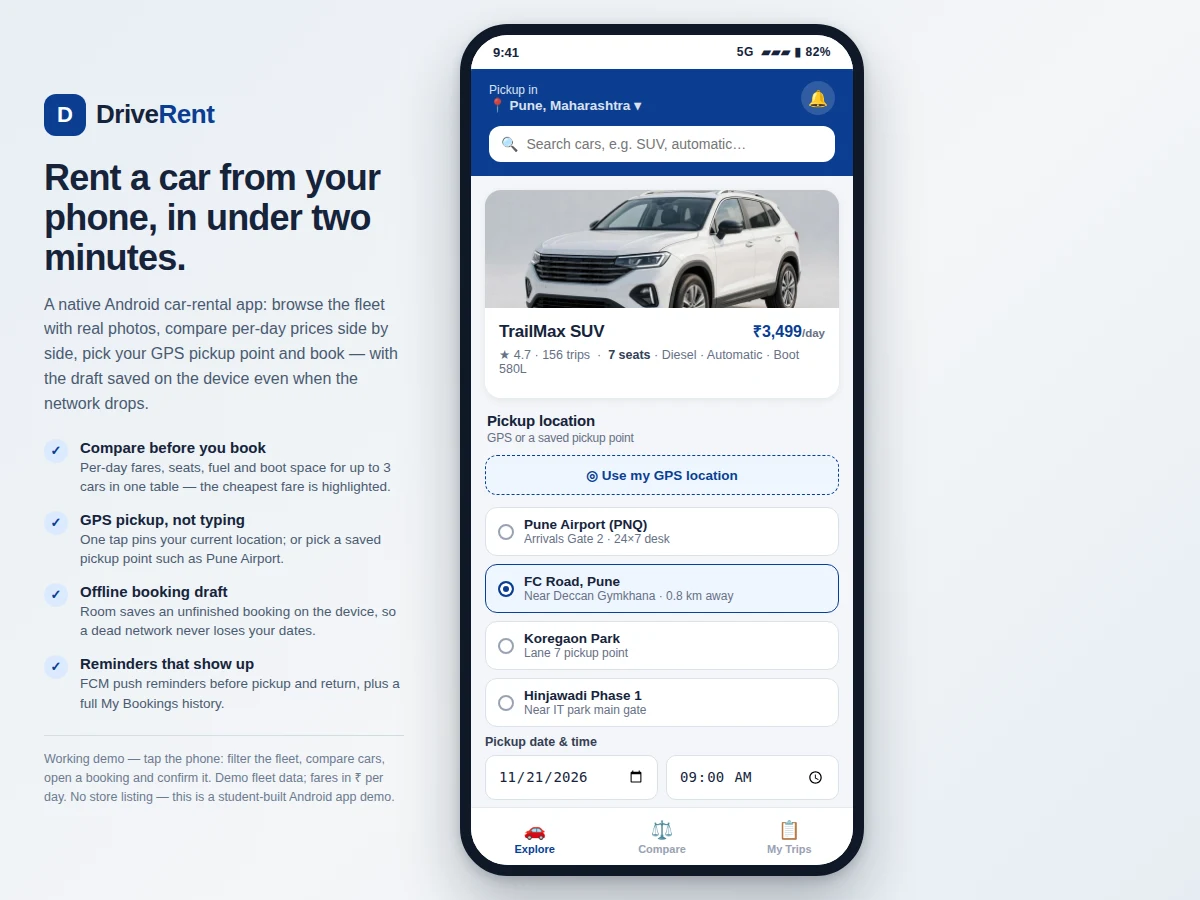
Using the app runs end to end in one chain: the renter signs in with Firebase Auth, the fleet loads from Firestore into a Room cache, and the browse screen shows each car with photo, fare and key facts. The renter filters by category or searches by fuel or gearbox, taps Compare on up to three cars, and the comparison table lines up per-day price, seats, fuel, gearbox, boot space and rating with the lowest fare highlighted. Tapping Book now opens the booking screen: the pickup point is set by GPS or chosen from saved points, pickup and return dates and times are picked, and the fare engine recomputes the total live — daily rate times days, plus 18% GST, with the ₹5,000 refundable deposit shown separately. Confirming writes the booking to Firestore and Room, generates a booking ID, and schedules FCM reminders; the booking then appears in My Bookings with its status, ready for pickup.
- Sign in with Firebase Auth; the fleet syncs from Firestore into the Room cache so recently viewed cars stay available offline.
- Browse the fleet with photos, per-day fares, seats, fuel, gearbox, boot space and trip ratings; filter by category or search by fuel or gearbox.
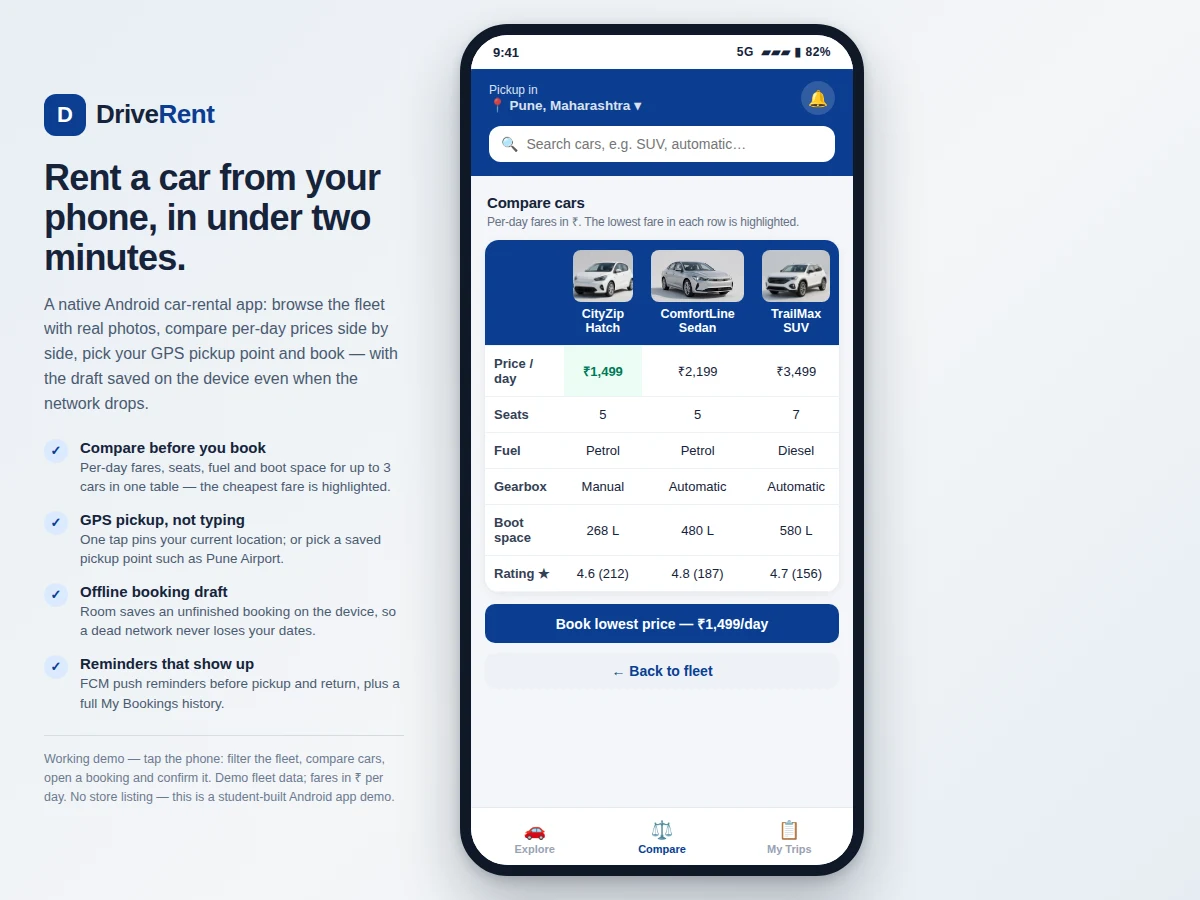
- Tap Compare on up to 3 cars; the comparison table lines up per-day price, seats, fuel, gearbox, boot space and rating, highlighting the lowest fare.
- Tap Book now on the chosen car; set the pickup point with one GPS tap or pick a saved point such as Pune Airport.
- Pick pickup and return dates and times; the fare engine recomputes live — daily rate times days, plus 18% GST, with the ₹5,000 refundable deposit shown separately.
- Confirm the booking; it is written to Firestore and Room, a booking ID is generated, and FCM reminders are scheduled for pickup and return.
- Open My Bookings to see confirmed and completed trips with dates, pickup point and total paid; an unfinished booking stays saved as an offline draft in Room.
Tech stack:
- Kotlin · Jetpack Compose UI
- Android Studio
- Firebase Firestore · Firebase Auth
- Room local database
- Firebase Cloud Messaging
- Google Maps SDK · Fused Location Provider
- Retrofit · REST APIs
- Git
| Parameter | Value |
|---|---|
| Platform | Native Android app · Kotlin · Jetpack Compose UI |
| Minimum Android version | Android 8.0 (API level 26, design target) |
| Target Android version | Android 14 (API level 34, design target) |
| Screens in the app | 5 screens (browse · compare · booking · confirmation · My Bookings) |
| Demo fleet | 4 cars (demo fleet: hatchback · sedan · SUV · premium sedan) |
| Comparison limit | 3 cars at a time (design limit) |
| Per-day fares in demo | ₹1,499 – ₹4,999 per day (demo fleet values, illustrative) |
| GST in fare engine | 18% (demo rate applied by the fare engine) |
| Refundable deposit in demo | ₹5,000 (demo value) |
| Minimum rental | 1 day |
| Fare example (demo, verified in the demo build) | 3-day TrailMax SUV: ₹3,499 × 3 days = ₹10,497 + 18% GST ₹1,889 = ₹12,386 payable |
| Local storage | Room database (on-device drafts and cache) |
| Cloud sync | Firebase Firestore · Firebase Auth |
| Location | Google Maps SDK · Fused Location Provider · GPS accuracy ±8 m (demo reading) |
| Push reminders | Firebase Cloud Messaging (FCM) |
| Demo file | 1 single-file HTML demo · 197 KB · 4 embedded fleet photos (measured) |
Project features
The app's working core is seven capabilities that all run inside the phone. Fleet browsing shows each car with a photograph, per-day fare, seats, fuel, gearbox, boot space and trip rating, with search and category filters so a renter finds a hatchback, sedan, SUV or premium car without scrolling the whole fleet. Price comparison puts up to three selected cars in one table and highlights the lowest per-day fare, so the decision is made on numbers rather than memory. GPS pickup pins the renter's current location or a saved point such as Pune Airport, and the booking flow turns the chosen dates into a live fare breakdown — daily rate times days, GST, refundable deposit and the amount payable now. Unfinished bookings are saved as offline drafts in Room, and Firebase Cloud Messaging sends pickup and return reminders while My Bookings keeps the full history. Sign-in and sync run on Firebase Auth and Firestore.
- [Fleet browsing with photos and filters] Four demo fleet cars — hatchback, sedan, 7-seater SUV and premium sedan — each shown with a photograph, per-day fare, seats, fuel, gearbox, boot space and trip rating, with search and category filters.
- [Side-by-side price comparison] Up to 3 cars are compared in one table on per-day price, seats, fuel, gearbox, boot space and rating, with the lowest per-day fare highlighted so the cheapest option is visible at a glance.
- [GPS pickup location] One tap pins the renter's current location through the Fused Location Provider, or the renter picks a saved pickup point such as Pune Airport, FC Road or Hinjawadi.
- [Date-based booking with live fare breakdown] Pickup and return dates and times are picked in the app, and the fare engine recomputes live: daily rate times days, plus 18% GST, with the ₹5,000 refundable deposit shown separately from the amount payable now.
- [Offline booking draft] An unfinished booking is saved in the Room database on the device, so a lost connection never loses the renter's dates; the draft syncs to Firestore when the connection returns.
- [Push reminders and My Bookings] Firebase Cloud Messaging schedules reminders before pickup and return, and every confirmed and completed trip stays listed in My Bookings with dates, pickup point and total paid.
- [Firebase sign-in and sync] Firebase Auth handles sign-in, and Firestore keeps the fleet and bookings in sync across sessions, with Room caching recently viewed cars on the device.
What is included
- Complete Android Studio source code in Kotlin (Jetpack Compose UI, Room offline storage, Firebase Auth and Firestore sync, Google Maps SDK pickup, FCM reminders)
- Demo APK build with the 4-car demo fleet seeded
- Working single-file demo of the app (browse, compare, booking, confirmation and My Bookings screens)
- Project report PDF (background, problem, methodology, architecture, limitations)
- PPT presentation for final review
- Viva Q&A preparation document (Kotlin, Room, Firebase, Maps SDK, FCM, fare engine, offline sync)
- Specific next step: message on WhatsApp for a quotation stating scope (native Android car rental app with fleet booking and price comparison), and the delivery timeline for this built-to-order project
Work plan & timeline
Total work plan: 100 hours, split across five phases. Phase 1, fleet browsing UI: 25 hours — Jetpack Compose screens, car cards with photos, search and category filters, Room cache setup. Phase 2, comparison and booking flow: 25 hours — the 3-car comparison table, GPS pickup picker, date pickers and the live fare engine. Phase 3, Firebase sync and sign-in: 20 hours — Firestore fleet and bookings collections, Firebase Auth, offline draft sync. Phase 4, location and reminders: 20 hours — Google Maps SDK with the Fused Location Provider, FCM reminder scheduling, My Bookings history. Phase 5, report and viva preparation: 10 hours — report, presentation and viva Q&A document.
Support
Support covers setup help for the delivered Android Studio project, a walkthrough of the app and the demo, and fixes for defects in the delivered code. Guidance is also provided for adapting the report and presentation to the student's college format and for answering guide questions about Kotlin, Room, Firebase, the Maps SDK, FCM and the fare engine. Support does not cover publishing the app to the Play Store, which needs the student's own developer account, and it does not invent results for builds that were not run.
Limitations & prerequisites
- The demo fleet holds 4 cars with illustrative per-day fares; a live fleet comes from the operator's Firestore collection and is not bundled with the app.
- GPS accuracy depends on the device and signal; indoor pickup pins fall back to typed or saved locations.
- No payment gateway is included in the base build — the demo shows pay-at-pickup pricing; UPI or card payment can be added as a customization.
- Push reminders need an FCM token and a network connection; a device that stays offline receives its reminders only after reconnecting.
- No fleet-owner admin panel is included in the base app — admin functions such as adding cars or managing deposits belong to a separate operator tool and can be developed on request.
- Availability shown in the demo is demo data; live availability needs the operator's backend and is not claimed from the demo.
- The 18% GST figure is the demo fare-engine rate used for the worked fare example, not tax advice, and the ₹5,000 deposit is a demo value.
Frequently Asked Questions
Is this project suitable for a final-year project?
Yes — for Computer Science, IT and Android application development programmes. It demonstrates Kotlin and Jetpack Compose UI, Room offline storage, Firebase Auth and Firestore sync, Google Maps location, FCM push reminders and a complete booking flow with a live fare engine, which together give a guide a real mobile system to examine rather than a set of static screens. The work plan totals 100 hours across fleet UI, comparison and booking, Firebase sync, location and reminders, and report preparation.
How is this different from a web car-rental system?
A web car-rental system is built for a desktop browser and an operator's desk: it manages a fleet, staff checks and deposits from an admin panel. This project is the renter's native Android app instead — GPS pickup, offline drafts, push reminders and a phone-first booking flow — and it deliberately does not include the web system's fleet admin panel, staff inspection forms or deposit handling. The two solve different sides of the same business.
What technology is used?
Kotlin with Jetpack Compose for the UI, Room for on-device storage, Firebase Firestore and Firebase Auth for fleet data and sign-in, Firebase Cloud Messaging for reminders, and the Google Maps SDK with the Fused Location Provider for GPS pickup. Android Studio is the development environment and Git tracks the source. No machine-learning model is used, so no dataset or accuracy claim applies.
Does the app work without internet?
Partly: browsing the live fleet, syncing bookings and receiving push reminders need a connection, but an unfinished booking is saved as an offline draft in Room and recently viewed cars stay in the on-device cache, so a dead network never loses the renter's dates. The draft syncs to Firestore when the connection returns.
How does the price comparison work?
The renter taps Compare on up to three cars and the app lines them up in one table — per-day price, seats, fuel, gearbox, boot space and trip rating — with the lowest per-day fare highlighted in green. The fare engine then prices the chosen car by days, adds 18% GST and shows the ₹5,000 refundable deposit separately. The demo's worked example is a 3-day TrailMax SUV rental at ₹12,386 payable.
What will I receive, and how do I get a quotation?
You receive the complete Android Studio source in Kotlin, a demo APK build, the seeded demo fleet, the project report, the presentation and a viva Q&A document. Message on WhatsApp for a quotation stating the scope — native Android car rental app with fleet booking and price comparison — and the delivery timeline for this built-to-order project.
Components & software requirements
- Kotlin · Jetpack Compose UI
- Android Studio
- Firebase Firestore · Firebase Auth
- Room local database
- Firebase Cloud Messaging
- Google Maps SDK · Fused Location Provider
- Retrofit · REST APIs
- Git
Delivery information
Built-to-order project. Delivery timeline is shared after order confirmation based on current queue.
Support terms
Complete documentation, setup guide, and viva preparation included. Support for setup and explanation provided.
Download free synopsis (PDF)
Enter your name and WhatsApp number — the synopsis PDF downloads immediately. We may send occasional project updates on WhatsApp; no spam.