
More project photos (2)
The problem
An Android assignment planner is an offline mobile app that keeps every subject assignment, its deadline, its priority and its submission status in one place on the student's phone. What is an Android assignment planner? It is an app where the student adds an assignment under its subject, sets the due date, and receives a reminder before that date, then marks the work submitted once it is handed in, so overdue work, work due today and upcoming work are visible at a glance instead of being scattered across notebooks, chat messages and memory. A missed deadline usually comes from a forgotten date rather than from unfinished work, so the planner attacks the forgetting itself: the deadline is stored once, the reminder is scheduled at the same moment, and the progress count for each subject shows plainly how much is done and how much is still open.
| Tool | What it does | What the student sees | Where the data lives |
|---|---|---|---|
| This assignment planner | Stores assignments by subject with due dates, priorities, reminders and submission status | Overdue, due-today and upcoming lists plus a submission count per subject | On the phone only, in a local database |
| Generic to-do app | Stores flat tasks with optional dates | One mixed list with no subject structure | On the provider's servers, behind an account |
| Spreadsheet tracker | Records assignments in rows the student maintains by hand | A table that must be sorted and filtered manually | In a file the student must open and update |
| Paper diary | Records deadlines in handwriting | Whatever was written on the current page | On paper, with no reminder at all |
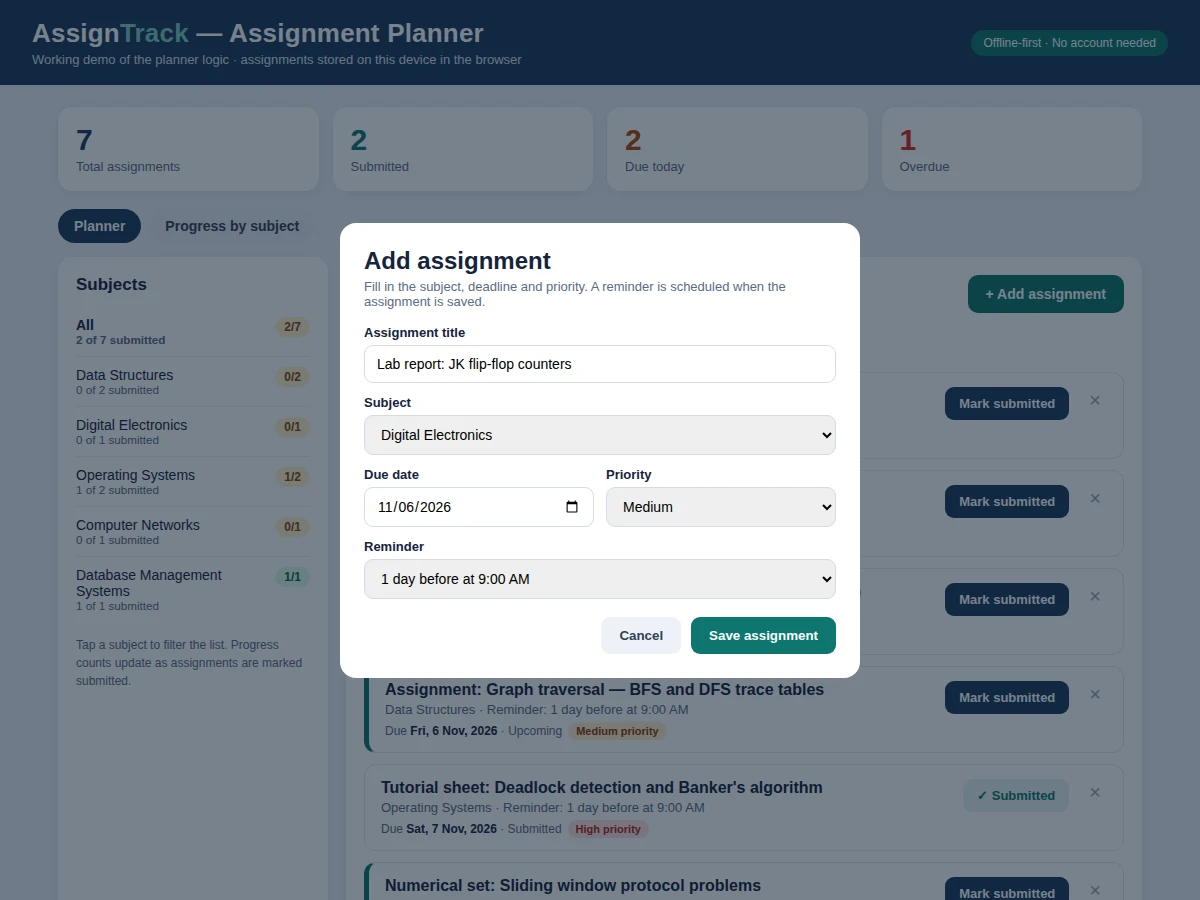
Assignment added under a subject.
Follow the working sequence
How it works
The planner turns a deadline into a completed submission through five stages: the student adds an assignment under its subject with a due date and a priority, the app stores that assignment in a local Room database on the device, a WorkManager reminder is scheduled for the chosen lead time, the list view computes overdue, due-today and upcoming status from the stored due date each time the app opens, and the student marks the assignment submitted when the work is handed in, which updates the subject progress count. Nothing leaves the phone at any stage, so the whole flow works in a classroom, on a bus, or anywhere without a data connection. Because status is computed from the due date at each app open, an assignment quietly moves from upcoming to due today to overdue without the student editing anything.
- The student opens the app and adds an assignment, choosing its subject, title, due date and priority level.
- The app saves the assignment in the local Room database on the device, with its submission status set to open.
- WorkManager schedules a reminder for the chosen lead time, such as 1 day before the deadline at 9:00 AM.
- The planner list shows the assignment under its computed status: upcoming, due today, overdue, or submitted, based on the stored due date.
- The student filters the list by status or by subject to find the work that needs attention first.
- When the work is handed in, the student marks the assignment submitted in one tap, and the subject progress count updates at once.
- After a device reboot, a boot receiver reschedules any reminders that are still pending, so a restart does not silently cancel a reminder.
Builder note from the actual build design: reminders are scheduled with WorkManager at creation time and rescheduled after a device reboot by a boot receiver, and overdue status is computed from the stored due date at each app open rather than stored as a flag, so an assignment can never be stuck showing the wrong status because a stored flag went stale. Status is a calculation from the date, not a label written once and forgotten.
Tech stack:
- Kotlin with Android Studio
- Room local database
- WorkManager reminders
- Material 3 UI components
- Jetpack Navigation
- RecyclerView list display
- Android notification channels
- Gradle build tooling
| Parameter | Value |
|---|---|
| Platform | Android phone (design target: Android 10 or later) |
| Programming language | Kotlin |
| Local database | Room database stored on the device |
| Reminder scheduling | WorkManager with a boot receiver for rescheduling |
| App screens | 4 screens (planner list, add and edit, subject progress, settings) |
| Subjects per install | Up to 20 subjects (design target) |
| Default reminder lead time | 1 day before the deadline at 9:00 AM (configurable) |
| Priority levels | 3 levels (high, medium and low) |
| Device storage needed | Approximately 50 MB of free space (expected) |
| Network requirement | None for the base build (fully offline) |
| Notification delivery | Through Android notification channels, subject to device notification settings |
| Build deliverable | Android source code plus an installable APK for testing |
Project features
An Android assignment planner earns its place on a student's phone through four capabilities working together: subject-wise assignment entry with a due date and priority for every item, reminders scheduled at the moment an assignment is created, a single list that separates overdue work from work due today and upcoming work, and a per-subject progress count that turns submission status into a visible record. The app needs no account and no internet connection, so adding an assignment takes seconds and checking the day's deadlines takes even less. Each subject keeps its own count of submitted and open items, which means a student can see at a glance whether one subject is falling behind while the others are on track, rather than guessing from a mixed list. That subject view also makes revision planning simpler, since the subjects with the most open work are obvious before any study session begins.
- [Subject-wise assignment entry] Every assignment is added under a subject with a title, a due date and a priority level, so work for Data Structures never mixes with work for Operating Systems in the same list.
- [Reminders scheduled at creation] A reminder is scheduled with WorkManager as soon as an assignment is saved, using the student's chosen lead time, so no separate alarm or calendar entry is needed.
- [Overdue, today and upcoming filters] The planner list can be filtered to overdue items, items due today, upcoming items, or submitted items, so the student opens the app and immediately sees what needs attention first.
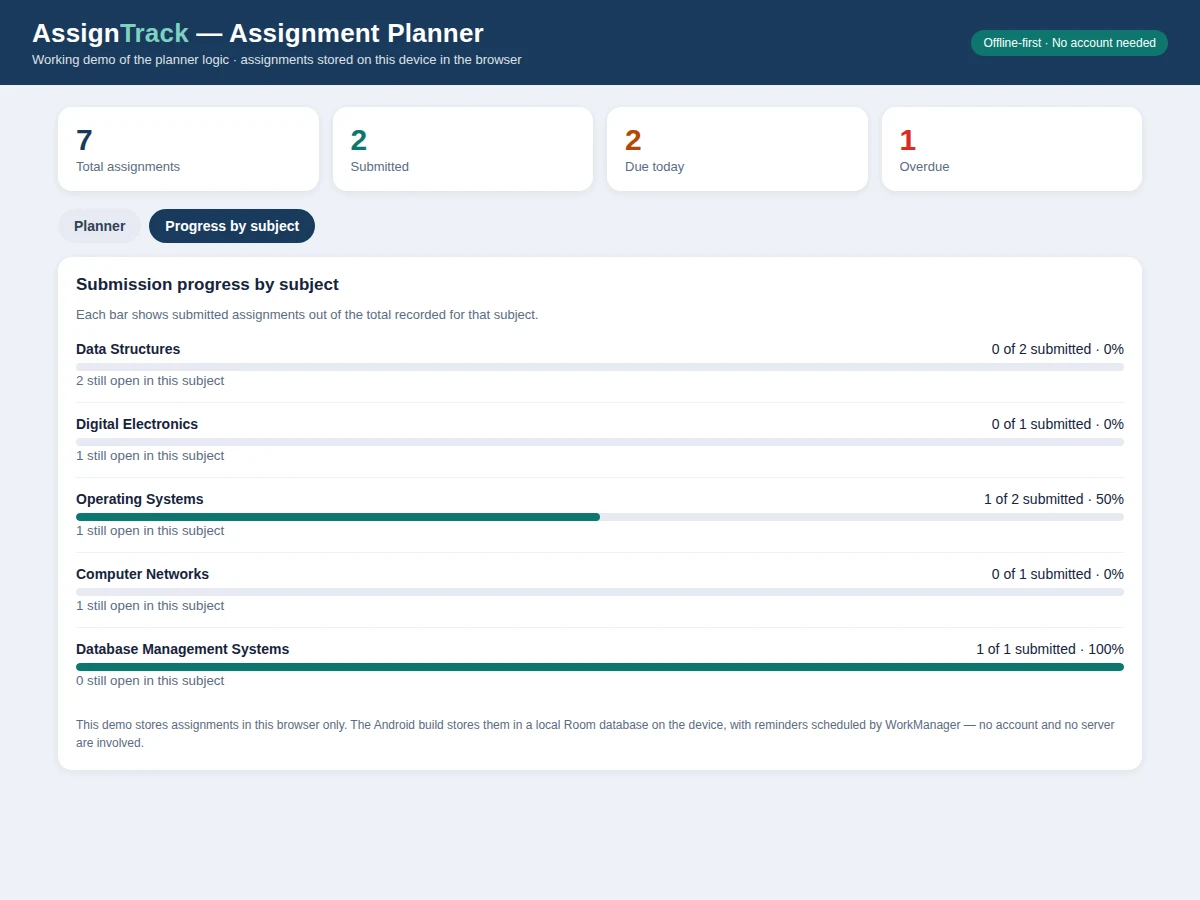
- [Per-subject submission progress] Each subject shows how many of its assignments are submitted out of its total, giving a plain count of what is done and what is still open for that subject.
- [Mark submitted in one tap] An assignment is marked submitted from the list itself, which updates the subject count at once, so the progress view always reflects the latest status.
- [Priority levels for ordering] High, medium and low priority levels let the student order the day's work, with overdue and high-priority items standing out in the list.
- [Fully offline local storage] All assignments live in a Room database on the device, so the planner works without an account, without a server, and without a mobile data connection.
Implemented in the base build: subject-wise entry, reminders at creation, the four list filters, per-subject progress counts, one-tap submission marking, priority levels, and offline Room storage. Optional on request: custom reminder times per subject, a weekly summary view, or a dark theme. Future scope only, not in the base build: any teacher or college portal connection, and any sync between two devices.
What is included
- Android app source code in Kotlin with Room local database and WorkManager reminders
- Working HTML demo of the planner logic for preview (the demo runs in a browser and is not the Android build itself)
- Subject list and reminder preferences configured as agreed before the build
- User guide covering adding assignments, filters, submission marking and progress views
- Project report PDF (background, problem statement, methodology, system working, outcomes)
- PPT presentation for final review
- Viva Q&A preparation document covering Kotlin, Room, WorkManager, Material 3 and offline storage
To get a quotation, send the subject list and reminder preferences on WhatsApp, and Projectech will reply with a quotation stating the price and the delivery timeline for your build.
Limitations & prerequisites
- The base build runs on a single device: assignments stored on one phone do not appear on another phone, since there is no server and no sync.
- Reminders depend on device notification settings: if notifications are blocked for the app, or battery optimisation stops background work, a reminder may arrive late or not at all.
- The planner does not connect to any teacher or college system in the base build, so deadlines must be entered by the student by hand.
- Submission status is marked by the student: the app records that the student marked an item submitted, and it cannot verify that the work was actually handed in.
- Reminder times are limited to the options in the base build (1 day before, on the due date, or 2 days before); per-subject custom times are an optional addition, not part of the base build.
- The app is designed for one student's own assignments; it has no shared lists, no group features, and no multi-user support.
Frequently Asked Questions
Does this app need the internet or an account?
No, the app works fully offline with no account and no server, because every assignment is stored in a Room database on the phone itself. A data connection is never required to add an assignment, check deadlines, or mark work submitted, and nothing is uploaded anywhere. The only requirement is the phone itself, with notifications allowed so reminders can be delivered.
How do the reminders work?
A reminder is scheduled with WorkManager at the exact moment an assignment is saved, using the lead time the student chose, such as 1 day before the deadline at 9:00 AM. If the phone restarts before the reminder fires, a boot receiver reschedules the pending reminder, so a reboot does not silently cancel it. Reminder delivery still depends on the device notification settings, which the user guide explains.
How is progress shown for each subject?
Progress is shown as a submitted count out of the total assignments recorded for that subject, for example 1 of 2 submitted, together with a progress bar for the subject. The count updates the moment an assignment is marked submitted, so the progress view always matches the planner list. Subjects with no assignments show an empty count rather than a misleading percentage.
Can the app handle many subjects and assignments?
Yes, the base build supports up to 20 subjects, and each subject can hold as many assignments as the student adds, with no fixed cap in the base build. The planner list can be filtered by subject or by status, so a long list stays usable even near exam time. If a student genuinely needs more than 20 subjects, that limit can be raised as an optional change before the build.
What is the difference between this planner and a generic to-do app?
This planner is organised by subject first, with deadlines, priorities, reminders and submission counts built around coursework, while a generic to-do app keeps one flat list of tasks with no subject structure. A to-do app can record a deadline, but it does not show per-subject submission progress or separate overdue coursework from everyday chores. The planner also works fully offline, with no account, unlike most to-do apps that require sign-in and sync.
Is this project suitable for a final-year project?
Yes, for Computer Science, IT and Android App Development programmes, because it combines Android UI design, local database storage, background reminder scheduling and a complete working app in one build. A student can demonstrate adding an assignment, receiving a reminder, filtering by status, and watching subject progress update live. The report and viva document cover Kotlin, Room and WorkManager in the depth a review panel expects.
Components & software requirements
- Kotlin with Android Studio
- Room local database
- WorkManager reminders
- Material 3 UI components
- Jetpack Navigation
- RecyclerView list display
- Android notification channels
- Gradle build tooling
Delivery information
Built-to-order project. Delivery timeline is shared after order confirmation based on current queue.
Support terms
Complete documentation, setup guide, and viva preparation included. Support for setup and explanation provided.
Download free synopsis (PDF)
Enter your name and WhatsApp number — the synopsis PDF downloads immediately. We may send occasional project updates on WhatsApp; no spam.