
More project photos (2)
The problem
Most people's phones hold banking apps, private chats and personal photos behind a single device lock — once someone gets past the lock screen, or borrows the phone unlocked, everything is open. App-lock utilities solve this by demanding a second PIN per app, but the common free ones stop at the gate: they record nothing about who tried to get in. This project adds the missing evidence layer. Sentinel App Lock protects selected apps with a PIN or pattern and treats repeated wrong attempts as a break-in: the front camera silently captures the intruder, the attempt is logged with a timestamp and the wrong credentials tried, and the owner gets an email with the selfie attached. Building it teaches the real Android security model — accessibility-service interception, background Camera2 capture without a preview surface, and encrypted on-device storage — all of which make strong, honest viva material.
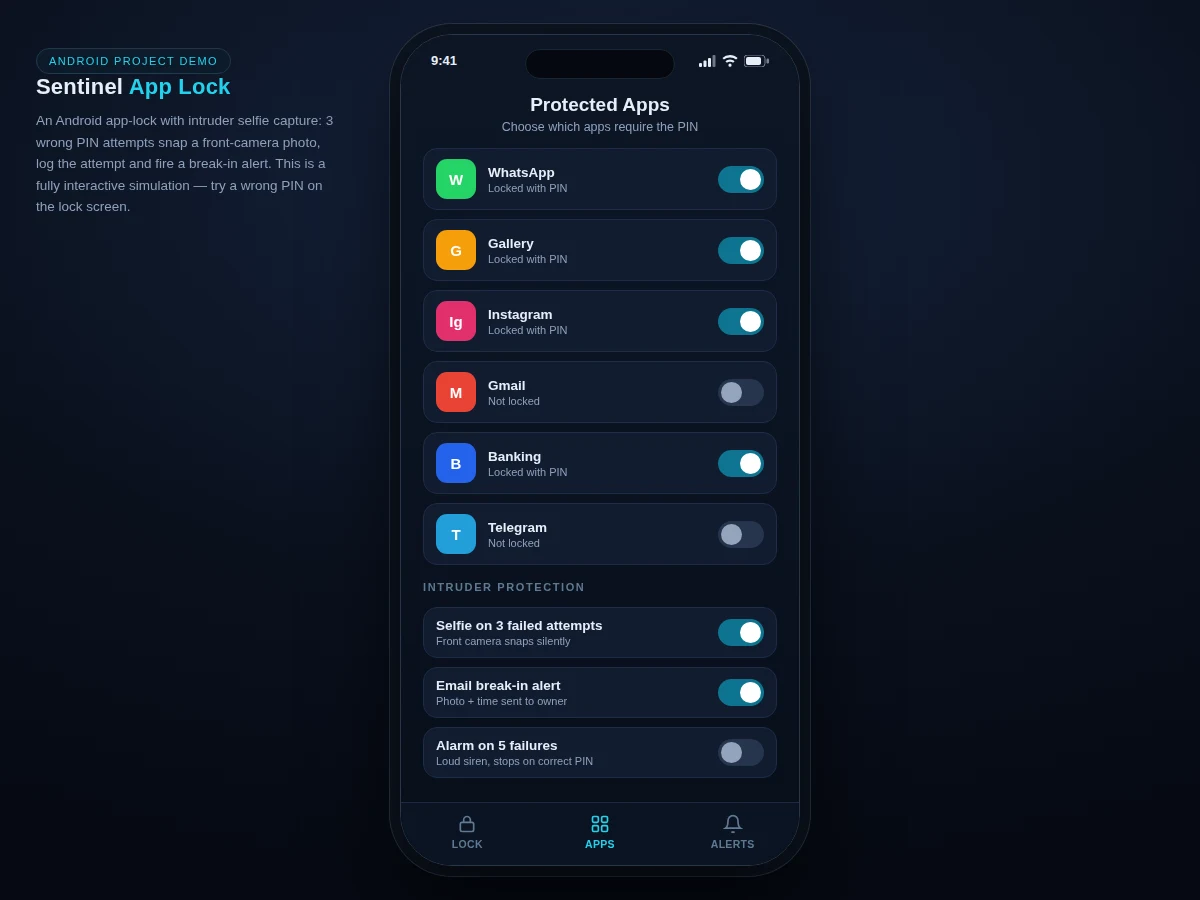
Enables the lock, picks protected apps and sets the PIN and recovery email.
Follow the working sequence
How it works
- On first run, the app guides the owner through enabling the Accessibility Service and granting camera and device-admin permissions, then sets a 4-digit PIN and a recovery email address.
- The owner selects which installed apps to protect; per-app lock flags are stored in an encrypted local Room database.
- When a locked app is launched, the AccessibilityService detects the foreground package change and overlays the Sentinel PIN gate before the app's own UI renders.
- Entering the correct PIN dismisses the gate and hands control to the app; a screen-off event re-arms the lock so the app cannot be reopened from recents.
- Each wrong PIN increments a per-session failure counter; at 3 consecutive failures the front camera captures a silent photo via Camera2 with no preview surface.
- The attempt is written to the on-device log (timestamp, package name, wrong PINs tried, photo path) and an email with the selfie is sent to the owner through the configured SMTP account.
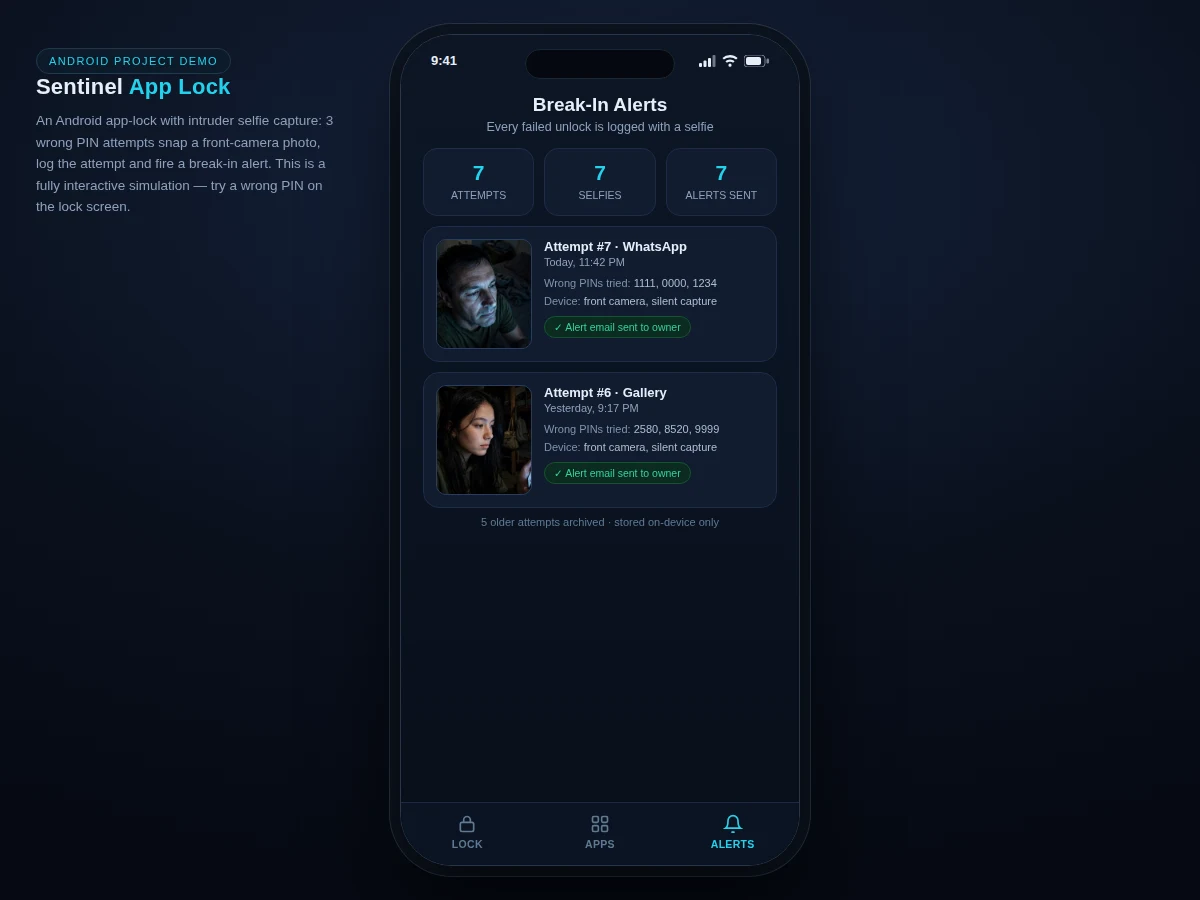
- The owner reviews captures in the Break-In Alerts tab, and can clear the log or adjust the failure threshold in settings.
Tech stack:
- Kotlin, Android SDK (minSdk 26, targetSdk 34)
- AccessibilityService API (launch interception)
- Camera2 API (silent front-camera capture)
- Jetpack Room + SQLCipher (encrypted local storage)
- JavaMail over SMTP (break-in alert emails)
- Material 3 UI components
| Parameter | Value |
|---|---|
| PIN length | 4 digits by default, configurable 4–8 in settings |
| Intruder capture threshold | 3 consecutive failures (configurable, design target) |
| Capture method | Front camera via Camera2, no preview surface (expected) |
| Alert photo size | Approximately 640 × 480 px JPEG per capture (design target) |
| Storage per capture | Approximately 60–120 KB (expected) |
| Alert delivery | Within approximately 60 s of capture on an active data connection (expected); queued offline |
| Min / target SDK | API 26 (Android 8.0) / API 34 (per Android SDK documentation) |
| Log retention | On-device only, cleared by owner; no cloud upload by default |
Project features
- [Per-app PIN/pattern lock] The owner chooses which installed apps require unlock; launching a locked app shows the Sentinel gate instead of the app. The PIN is stored as a salted SHA-256 hash, and a pattern is offered as an alternative.
- [Intruder selfie capture] After 3 consecutive wrong attempts, the front camera takes a silent photo via Camera2 with no preview surface and no shutter sound, saved to the app's private directory.
- [Break-in alert email] Each capture fires an email to the owner's registered address with the selfie attached, plus the timestamp, the targeted app and the wrong credentials tried.
- [Attempt log dashboard] Every failed unlock is recorded — time, targeted app, wrong PINs tried, selfie thumbnail — in an on-device log the owner can review, export or clear.
- [Accessibility-service interception] Locked apps are intercepted at launch through an AccessibilityService, so the PIN gate appears before the app's own UI and cannot be dismissed with the back button.
- [Anti-tamper basics] The app requests device-admin privileges to resist casual uninstall, and re-locks protected apps after screen-off so they cannot be reopened from recents without the PIN.
- [Alarm on repeated failures (optional)] A loud siren after 5 consecutive failures, off by default and configurable in settings — included as an optional module.
- Future scope: fingerprint unlock via BiometricPrompt, encrypted cloud backup of the attempt log, and a remote alert-viewing web dashboard are documented as future extensions, not part of this build.
What is included
- Complete Android Studio project source in Kotlin
- Sentinel PIN gate UI, protected-apps manager and break-in alerts dashboard
- Intruder capture and SMTP alert module with setup guide
- Debug demo APK for on-device demonstration
- Project report PDF (background, Android security model, methodology, testing)
- PPT presentation for final review
- Viva Q&A preparation document (accessibility services, Camera2, secure credential storage)
Limitations & prerequisites
- The owner must manually enable the Accessibility Service and grant camera and device-admin permissions; Android does not let any app enable these itself.
- Silent capture depends on a working front camera and Camera2 support; some heavily customized ROMs restrict background camera access.
- Email alerts need an active data connection and a configured SMTP/app-password account; alerts queue locally while offline.
- A determined attacker with the device passcode or a factory reset can bypass any app lock — this is a deterrent and evidence tool, not device encryption.
- The PIN is stored as a salted hash, so there is no "forgot PIN" recovery except the owner reset flow via the registered email.
- The accessibility listener adds approximately 1–3% extra battery drain per day (expected; varies by device and usage).
Frequently Asked Questions
How does the app know when a locked app is opened?
Through an AccessibilityService that observes foreground package changes. When a protected package comes to the foreground, the service overlays the Sentinel PIN gate before the app's own UI renders, and the back button is blocked while the gate is showing.
Does the intruder know their photo was taken?
No. The capture uses Camera2 with no preview surface and no shutter sound, and the photo is saved to the app's private directory — invisible in the gallery. The attempt counter and alert banner are only visible after the fact, to the owner.
What happens if there is no internet during a break-in?
The selfie and log entry are saved on-device immediately, and the alert email is queued. It sends automatically once a data connection returns, so no evidence is lost.
Can the intruder just uninstall the app to bypass it?
Not casually: the app requests device-admin privileges, which blocks normal uninstall until admin is revoked from system settings. A factory reset would still remove it, which is stated honestly as a limitation.
Is this project suitable for a final-year project?
Yes — for Computer Engineering, IT and mobile-application programs. It demonstrates Android internals (accessibility services, Camera2, encrypted storage), a real security workflow and a working demo the student can show live in the viva.
Components & software requirements
- Kotlin, Android SDK (minSdk 26, targetSdk 34)
- AccessibilityService API (launch interception)
- Camera2 API (silent front-camera capture)
- Jetpack Room + SQLCipher (encrypted local storage)
- JavaMail over SMTP (break-in alert emails)
- Material 3 UI components
Delivery information
Built-to-order project. Delivery timeline is shared after order confirmation based on current queue.
Support terms
Complete documentation, setup guide, and viva preparation included. Support for setup and explanation provided.
Download free synopsis (PDF)
Enter your name and WhatsApp number — the synopsis PDF downloads immediately. We may send occasional project updates on WhatsApp; no spam.