
More project photos (3)
The problem
Final-year engineering students often choose careers with almost no access to people who have already made those choices. Alumni are willing to help, but colleges usually keep them in a spreadsheet, a WhatsApp group or an annual meet, so a student who needs guidance on placements, higher studies or a career switch has no reliable way to find the right alumnus, check whether they are available, or book a focused conversation. The result is that mentorship happens by luck: well-connected students get advice, while others rely on rumours and seniors' anecdotes. This project closes that gap with a single portal where verified alumni publish their domain, company, skills and availability, students search and rank them by match score, and both sides manage sessions, goals and feedback in one place. A coordinator verifies every alumnus before they appear in search, so students trust the people they contact, and the college can see which departments and topics need more mentors.
Creates a profile with branch, career interests, target companies and skills.
Follow the working sequence
How it works
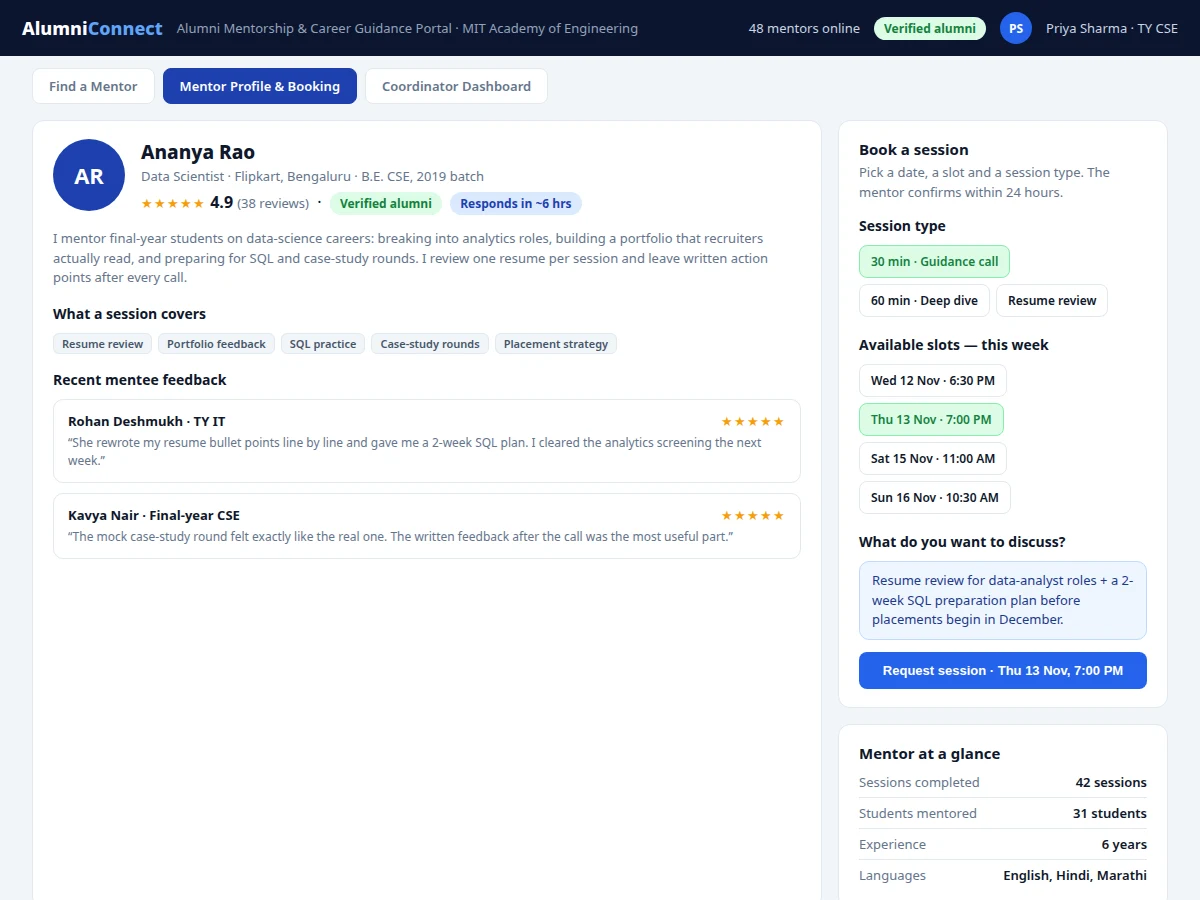
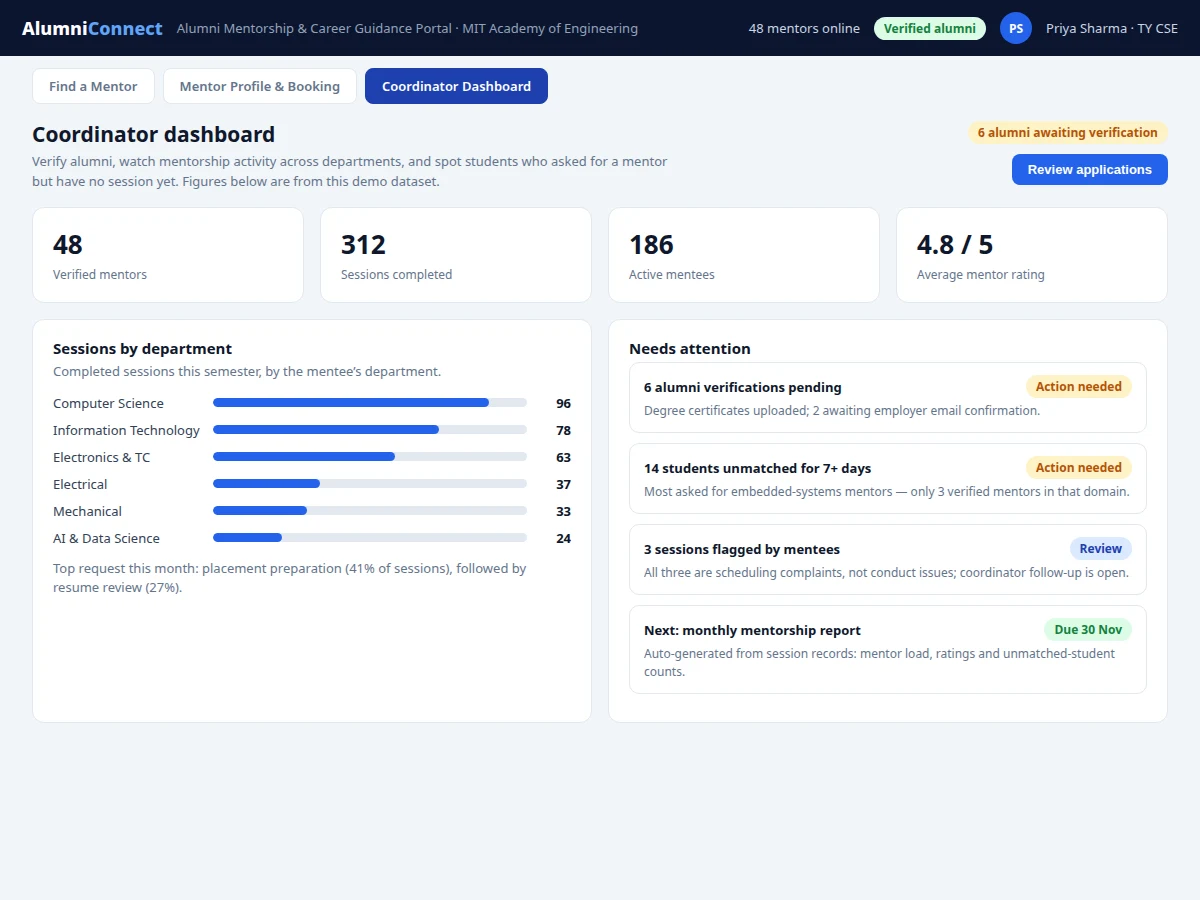
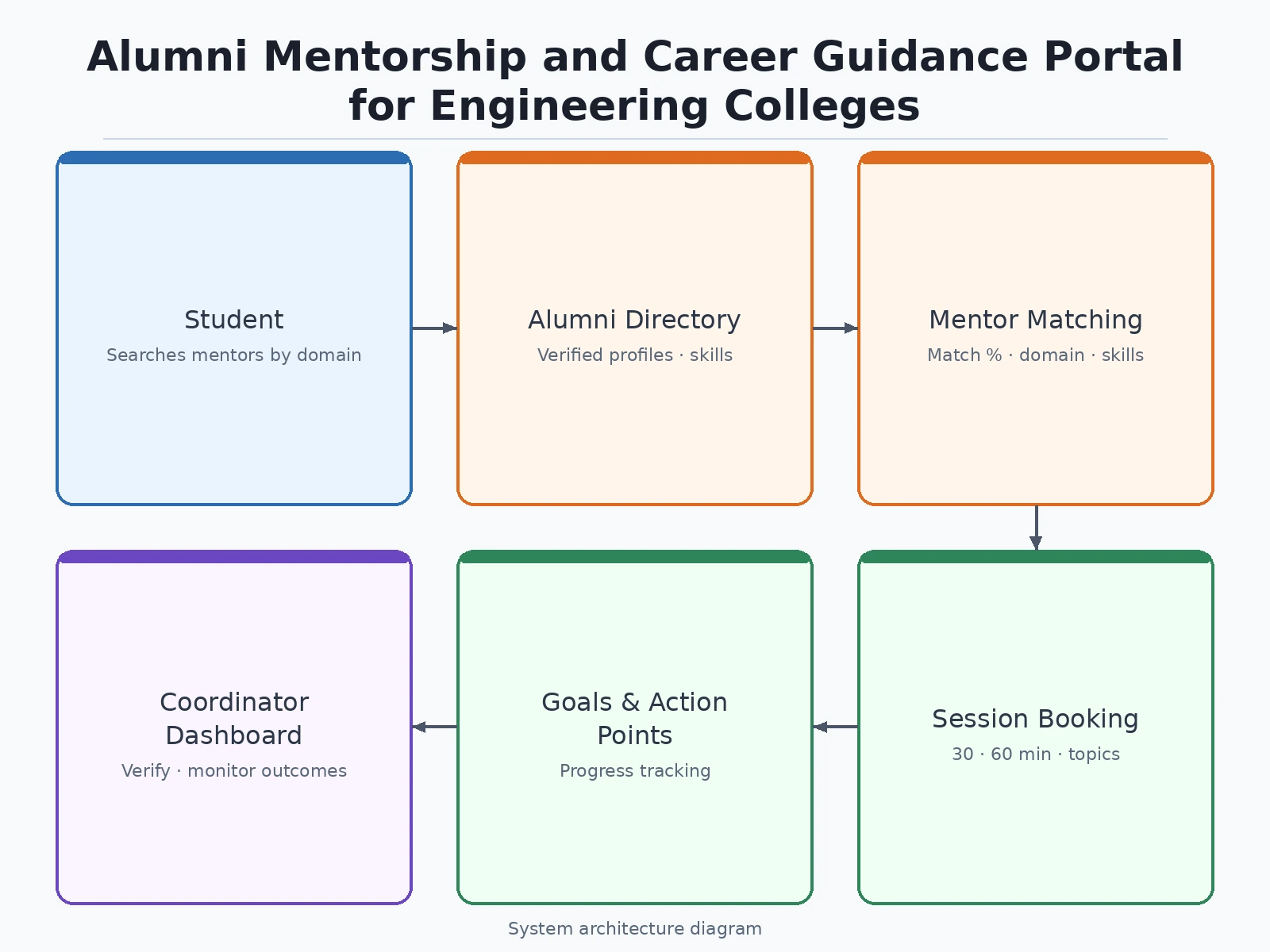
From a student's first search to a completed mentorship session, the portal follows one continuous flow: profile, match, book, meet, record and review. A student completes a profile with branch, career interests, target companies and skills, and the portal scores every verified alumnus against it using domain overlap, shared skills and availability, showing the best matches first with a visible percentage. The student opens a mentor profile, reads past mentee feedback, picks a 30-minute or 60-minute slot and writes what they want to discuss; the mentor confirms within 24 hours and the video link is shared on confirmation. After the call, the mentor records written action points and the student rates the session, which updates the mentor's rating and the student's goal progress. Coordinators watch the same flow from above: they verify new alumni, monitor sessions by department and step in when a student has waited more than 7 days.
- A student creates a profile with branch, career interests, target companies and skills, and the portal computes a completeness score from the filled fields.
- The matching engine scores every verified alumnus on domain overlap, shared skills and availability this week, and lists the best matches first with a visible percentage.
- The student opens a mentor profile, reads ratings and past mentee feedback, then requests a 30-minute or 60-minute slot with a written discussion topic.
- The mentor confirms or declines within 24 hours; on confirmation the student receives the video-call link and an email reminder.
- After the session, the mentor records written action points, the student rates the session, and goal progress updates on the student dashboard.
- The coordinator reviews new alumni applications, watches sessions by department, and follows up with students unmatched for more than 7 days.
Tech stack:
- React 18 (frontend)
- Node.js · Express (backend API)
- MySQL (database)
- JWT authentication
- REST API
- Tailwind CSS
- Nodemailer (email reminders)
- Chart.js (coordinator analytics)
| Parameter | Value |
|---|---|
| User roles | 3 roles: Student, Alumni Mentor, Coordinator |
| Demo dataset | 48 mentor profiles and 312 session records (demo dataset) |
| Matching factors | 3 factors: domain overlap, shared skills, availability |
| Session lengths | 30 minutes or 60 minutes |
| Mentor confirmation | Within 24 hours (design target) |
| Profile completeness | 0–100% score (computed from filled fields) |
| Resume upload | Up to 10 MB per file (design target) |
| Session history | All past sessions retained per student (design target) |
| Platform | Responsive web app for desktop and mobile (design target) |
| Authentication | Email and password login with JWT sessions |
Project features
The portal is built around three capabilities that matter most to a final-year student: finding the right mentor, booking a useful session, and keeping the guidance going after the call ends. Verified alumni profiles carry domain, company, graduation batch, skills and a response-time indicator, so a student judges fit before sending a request instead of messaging blindly. Mentor matching ranks alumni by domain overlap, shared skills and availability this week, and every match shows its percentage, so the ranking is transparent rather than a black box. Session booking offers 30-minute guidance calls and 60-minute deep dives with written discussion topics, and each completed session leaves written action points and a rating, so advice accumulates into a record the student can revisit. Behind these, a coordinator dashboard verifies alumni, tracks sessions by department and flags students who have waited more than 7 days for a match.
- [Verified alumni directory] Alumni profiles show domain, company, graduation batch, skills, experience and a verified badge; only coordinator-verified alumni appear in student search.
- [Transparent mentor matching] Each mentor gets a visible match percentage computed from domain overlap, shared skills and availability this week, so students can see exactly why a mentor ranks first.
- [Session booking with discussion topics] Students pick 30-minute or 60-minute slots, write what they want to discuss, and receive the video link once the mentor confirms within 24 hours.
- [Goals and written action points] Students set career goals with progress tracking, and mentors record written action points after every session so advice is not lost when the call ends.
- [Career guidance resources] Structured support for resume review, mock interviews, SQL practice and placement strategy, tied to the mentor's own domain and experience.
- [Session feedback and ratings] Students rate each session and leave written feedback, which builds each mentor's public rating and helps future students choose.
- [Coordinator dashboard and verification] Coordinators verify alumni applications, monitor sessions by department, and see unmatched students and flagged sessions that need follow-up.
What is included
- Complete source code (React frontend, Node.js and Express backend)
- MySQL database schema with seed data (48 mentor profiles, 312 session records)
- Working single-file demo of the student, mentor and coordinator views
- Setup and deployment instructions
- Project report PDF (background, methodology, architecture, results)
- PPT presentation for final review
- Viva Q&A preparation document
- User manual covering all 3 roles
Limitations & prerequisites
- The shipped profiles and session records are demo seed data; a real deployment needs the college to verify its own alumni.
- Mentor matching uses transparent rule-based scoring, not a machine-learning model, so no matching accuracy is claimed.
- The portal shares a video-meeting link for sessions; it does not include built-in video conferencing.
- Email reminders need valid SMTP credentials configured by the college before deployment.
- Mentor ratings start from the demo feedback and only become meaningful after real sessions accumulate.
- Built for a single college as shipped; multi-college support is future scope, not included.
Frequently Asked Questions
Is this project suitable for a final-year project?
Yes. It suits Computer Science, IT and Information Technology final-year projects because it demonstrates full-stack web development, role-based authentication, a transparent matching algorithm, session workflows and an analytics dashboard in one complete system. The three roles, the matching logic and the coordinator reports each give the student concrete viva material.
How does mentor matching work?
Matching is a transparent rule-based score, not a black box. Each verified alumnus is scored on three factors: overlap between the student's career interests and the mentor's domain, shared skills, and availability this week. The resulting percentage is shown next to every mentor, so students can see exactly why one mentor ranks above another.
Is the database included?
Yes. The project ships with a complete MySQL schema for users, mentor profiles, sessions, goals, action points and feedback, plus seed data with 48 mentor profiles and 312 session records so every screen works immediately after setup. The schema and sample queries are documented in the report.
Can it be hosted online?
Yes. The frontend builds to static files and the backend is a standard Node.js and Express app with a MySQL database, so it runs on any VPS or platform that supports Node.js and MySQL. Setup steps for local running and online hosting are both included.
Does it include video calling?
No. The portal does not build its own video conferencing; instead, the mentor shares a meeting link when confirming a session, and the student joins from the session page. This keeps the project focused on mentorship workflows rather than real-time media, which is a separate engineering problem.
Can more roles or modules be added?
Yes. The role system is designed for extension, so a placement-cell role, an events module for alumni talks, or a resource library can be added without changing the core session flow. Common requests such as department-wise reports and bulk alumni import are listed as customizations.
Components & software requirements
- React 18 (frontend)
- Node.js · Express (backend API)
- MySQL (database)
- JWT authentication
- REST API
- Tailwind CSS
- Nodemailer (email reminders)
- Chart.js (coordinator analytics)
Delivery information
Built-to-order project. Delivery timeline is shared after order confirmation based on current queue.
Support terms
Complete documentation, setup guide, and viva preparation included. Support for setup and explanation provided.
Download free synopsis (PDF)
Enter your name and WhatsApp number — the synopsis PDF downloads immediately. We may send occasional project updates on WhatsApp; no spam.