
More project photos (2)
The problem
An AI-proctored online exam platform watches a student through the webcam during an online test and flags behaviour that suggests cheating, so a college can run exams remotely without an invigilator in every room. This project builds that platform as a web application: the student's face is recognised at login, eye gaze is tracked, and every suspicious event is logged with a timestamp for review. Colleges moved many exams online and found that an unmonitored browser tab invites copied answers, while a human invigilator for every student is slow and costly. One invigilator cannot watch dozens of video feeds at once, so quiet cheating such as glancing at a phone below the screen goes unnoticed. This project answers that gap with browser-based face and eye tracking on the student's own laptop, a live trust score, and a violation log that turns raw video into reviewable evidence. Every flag is a suggestion for review, not an automatic punishment.
| Approach | Who watches | What it catches | Cost and effort |
|---|---|---|---|
| AI proctoring (this project) | Browser-based face and eye tracking | Gaze away, second face, tab switch, audio events | 1 invigilator reviews flagged sessions |
| Human invigilation | 1 invigilator per room or feed | Visible cheating only | High staffing cost per exam |
| Unproctored online exam | Nobody | Nothing is checked | Lowest cost, no cheating deterrent |
getUserMedia captures the exam video in the browser over HTTPS.
How it works
The AI-proctored online exam platform runs the whole exam inside one browser session, from identity check to final report. The student logs in and the webcam opens with explicit permission; MediaPipe Face Mesh locates 468 landmarks on the face, plus 10 iris landmarks, and the system compares the face with the photo stored at registration. During the exam the browser samples video frames, estimates where the eyes are looking from the iris position, and watches for a second face, a missing face, tab switches and unusual audio. Each event is scored, written to a violation log with its timestamp, and reflected in a live trust score on the invigilator dashboard. When the exam ends, the answers, the trust score and the full flag list are combined into a report that the invigilator reviews before accepting the result.
- The student registers with a photo and logs in; the exam page asks for explicit webcam and microphone permission through the browser's getUserMedia prompt, which only works on a secure (HTTPS) page.
- MediaPipe Face Mesh locates 468 3D face landmarks per frame, plus 10 iris landmarks, and the face is matched against the registration photo before the exam timer starts.
- The student answers questions in the exam interface while the browser samples webcam frames and estimates gaze from the iris centre relative to the eye corners.
- The system watches for a missing face, a second face in frame, sustained gaze away from the screen, tab switches and unusual audio, and each event is scored by severity.
- Every event is written to the violation log with its timestamp and evidence, and the candidate's trust score is updated on the invigilator dashboard in real time.
- The invigilator can message a candidate, review any flag with its evidence, and clear it with a note when it turns out to be harmless.
- When the exam ends, answers, the trust score and the full flag list are combined into a per-student report for final review.
Tech stack:
- HTML5 · CSS3 · JavaScript (exam and dashboard frontend)
- Node.js · Express.js (exam and proctoring API)
- MongoDB · Mongoose (exams, candidates and violation logs)
- MediaPipe Face Mesh (468 face landmarks + 10 iris landmarks)
- WebRTC getUserMedia API (webcam and microphone access)
- Socket.IO (live trust scores and flag updates)
- JWT authentication (student and invigilator sessions)
- Chart.js (trust-score and flag charts in reports)
| Parameter | Value |
|---|---|
| Face landmarks | 468 3D landmarks per frame (MediaPipe Face Mesh, verified in official docs) |
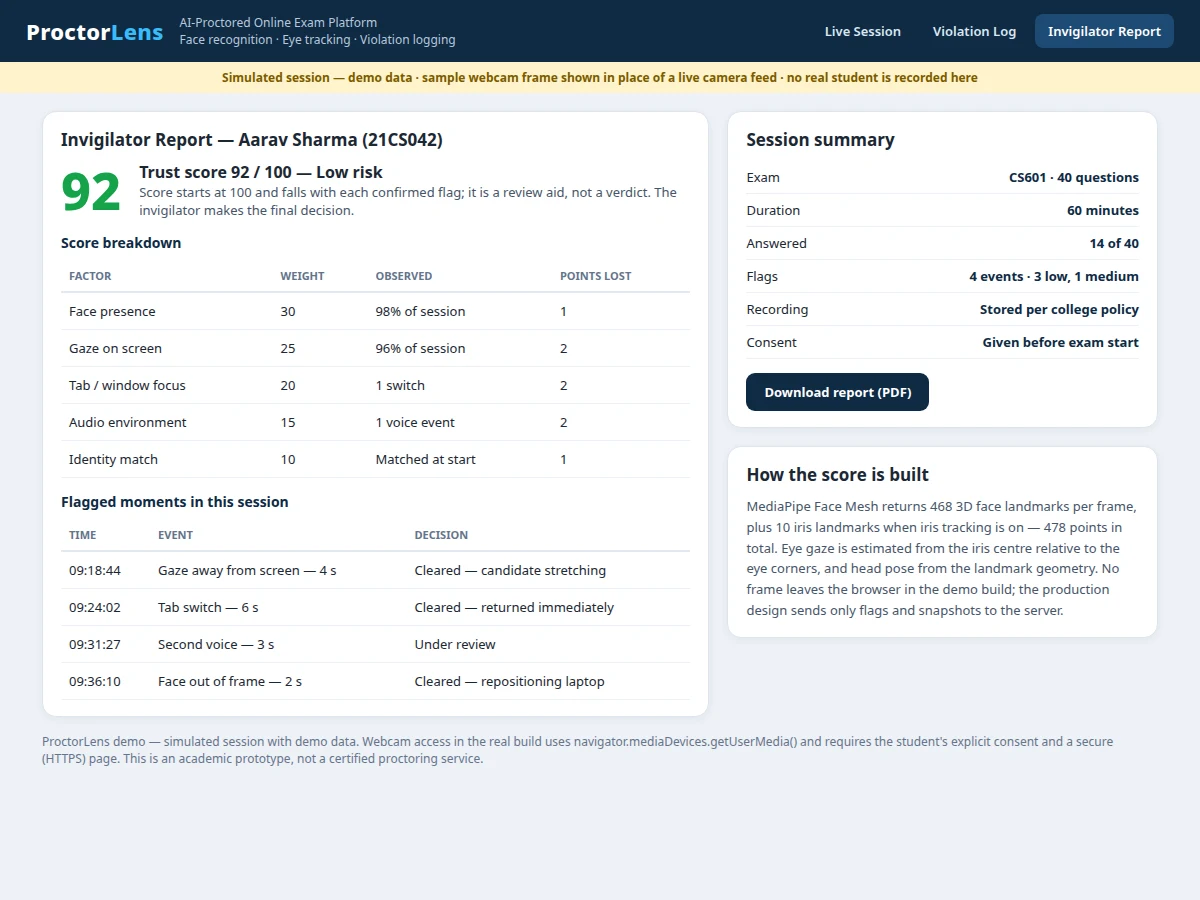
| Iris landmarks | 10 landmarks when iris tracking is on — 478 points in total |
| Exam duration | 60 minutes (design target, configurable per exam) |
| Questions per exam | 40 questions (design target) |
| Webcam resolution | 1280 × 720 pixels (design target) |
| Frame rate | 30 fps (design target) |
| Gaze-away limit | 5 seconds before a flag (configurable) |
| Trust score range | 0–100 points, starting at 100 |
| Roles | 2 roles: student and invigilator |
| Camera access | WebRTC getUserMedia, secure context (HTTPS) only |
| Data storage | Violation logs and snapshots stored per college policy |
| Deployment | Runs on a Node.js server with MongoDB |
Project features
The platform's four most important capabilities are live face verification, eye-gaze tracking, automatic violation logging, and the invigilator dashboard. Face verification matches the student at the start of the exam and re-checks presence through the session, so another person cannot sit the paper in their place. Eye-gaze tracking estimates where the student is looking from the iris landmarks and flags sustained glances away from the screen, such as reading from a phone held below it. Violation logging records every event with a timestamp, severity and the evidence captured at that moment, so nothing depends on anyone's memory. The invigilator dashboard pulls it together into a live trust score, a question palette and a per-student report, giving one invigilator a clear, live view of a whole exam hall at once, without watching every feed by hand.
- [Face verification at login] The student's face is matched against the photo stored at registration before the exam starts, and presence is re-checked through the session so another person cannot take over mid-exam.
- [Eye-gaze tracking] Iris landmarks are compared with the eye-corner landmarks each frame, so a sustained glance away from the screen is flagged without any extra sensor or infrared camera.
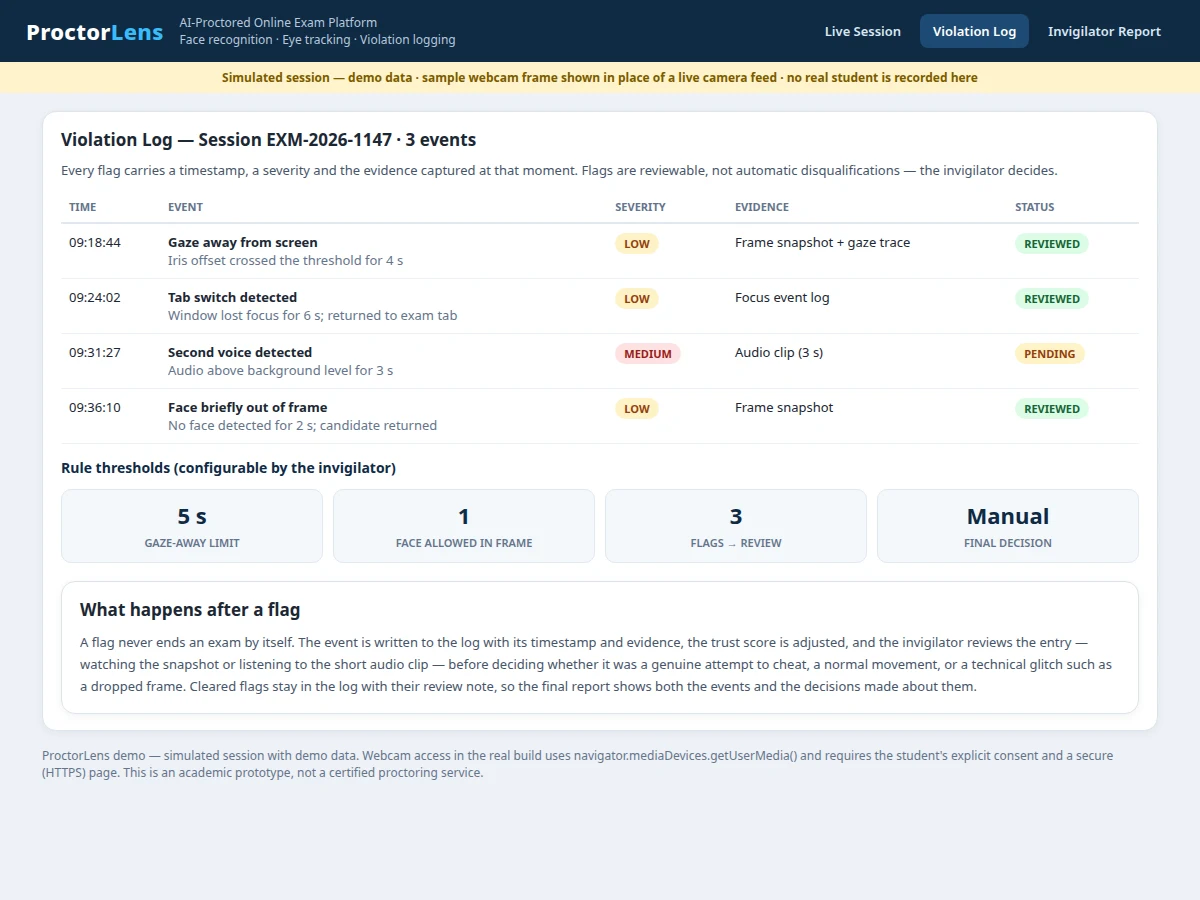
- [Violation logging] Every event is stored with its timestamp, severity and the evidence captured at that moment, such as a frame snapshot or a short audio clip, ready for review.
- [Live trust score] Each candidate carries a score from 0 to 100 that falls with every confirmed flag, letting the invigilator spot the riskiest sessions at a glance.
- [Invigilator dashboard] One screen shows all live candidates, their trust scores, the latest flags and the question palette, so a single invigilator can follow a whole exam hall.
- [Tab-switch and focus detection] Losing browser focus or switching tabs is recorded as a low-severity event with its duration, and repeated switches raise the flag level.
- [Per-student exam report] At the end of the exam the system produces a report with the trust-score breakdown, the full flag list and the invigilator's decisions on each flag.
- [Configurable proctoring rules] Gaze-away limits, the number of faces allowed and the flag thresholds are settings the invigilator can change per exam, rather than fixed values in code.
What is included
- Complete exam platform source code (student exam, proctoring engine, invigilator dashboard)
- Working demo with a simulated proctoring session, violation log and invigilator report
- Database setup with sample exam, questions and candidate accounts
- Project report PDF (background, face-mesh method, gaze estimation, methodology, results)
- PPT presentation for final review
- Viva Q&A preparation document (face landmarks, gaze estimation, WebRTC permissions, privacy)
Limitations & prerequisites
- This is an academic prototype, not a certified proctoring service, and its flags are review aids, not proof of cheating.
- Eye-gaze estimation is approximate: poor lighting, glasses glare or a low-resolution webcam can weaken landmark accuracy.
- Webcam access needs the student's explicit consent and a secure (HTTPS) page; a denied permission means the exam cannot be proctored.
- Face matching compares against one registration photo, so a major appearance change can lower the match and needs a manual check.
- Audio detection flags loud or second voices only; it cannot identify who is speaking.
- Recordings and snapshots are stored per college policy — retention, access and deletion rules must be set by the college, not by this project.
- A determined student can still cheat outside the camera's view; no webcam system can see the whole room.
Frequently Asked Questions
Is this project suitable for a final-year project?
Yes — for Computer Science, IT and Web Development students, because it demonstrates web development, browser-based computer vision with MediaPipe Face Mesh, real-time dashboards, and the privacy and consent questions that make a strong viva discussion, and the report and demo give the student concrete material to explain in the review, from landmark counts to the scoring rules.
How does eye tracking work without extra hardware?
It uses the laptop's ordinary webcam. MediaPipe Face Mesh returns 468 face landmarks plus 10 iris landmarks, and gaze is estimated by comparing the iris centre with the inner and outer eye-corner landmarks — when the iris drifts toward one corner, the system reads that as a sideways glance. Because the landmarks come from the ordinary webcam frame, no infrared sensor, second camera or special hardware is needed.
Does the system record the student's webcam video?
Only snapshots and short evidence clips around flagged events are stored, not a continuous recording, and only with the student's explicit consent given before the exam. Retention and access follow the college's policy, and the demo build stores no real student video at all. Students can also show the consent screen and the storage settings during the demonstration to explain how privacy is handled.
Can it detect another person or a phone in the room?
It detects a second face appearing in the webcam frame and flags sustained gaze away from the screen, which is how phone use below the screen usually shows up. It cannot see anything outside the camera's view, so that limit is stated honestly in the report. The invigilator therefore treats a gaze flag as a prompt to review the snapshot, not as proof on its own.
Does it work without internet?
No — the exam, the live dashboard and the violation log need an internet connection to the server. The face-landmark processing itself runs in the browser, but answers, flags and scores are sent to the server, so an offline exam is not supported. A dropped connection pauses the exam timer and flags the gap, rather than silently letting the student continue unmonitored.
Can the violation rules be changed for a college?
Yes. The gaze-away limit, the number of faces allowed, the flag thresholds and the trust-score weights are settings the invigilator changes per exam, so a strict final exam and a relaxed practice test can use different rules without changing the code, and the report records which settings were used for that exam so the rules behind every flag are visible to anyone reviewing the result.
Components & software requirements
- HTML5 · CSS3 · JavaScript (exam and dashboard frontend)
- Node.js · Express.js (exam and proctoring API)
- MongoDB · Mongoose (exams, candidates and violation logs)
- MediaPipe Face Mesh (468 face landmarks + 10 iris landmarks)
- WebRTC getUserMedia API (webcam and microphone access)
- Socket.IO (live trust scores and flag updates)
- JWT authentication (student and invigilator sessions)
- Chart.js (trust-score and flag charts in reports)
Delivery information
Built-to-order project. Delivery timeline is shared after order confirmation based on current queue.
Support terms
Complete documentation, setup guide, and viva preparation included. Support for setup and explanation provided.
Download free synopsis (PDF)
Enter your name and WhatsApp number — the synopsis PDF downloads immediately. We may send occasional project updates on WhatsApp; no spam.