
More project photos (2)

The problem
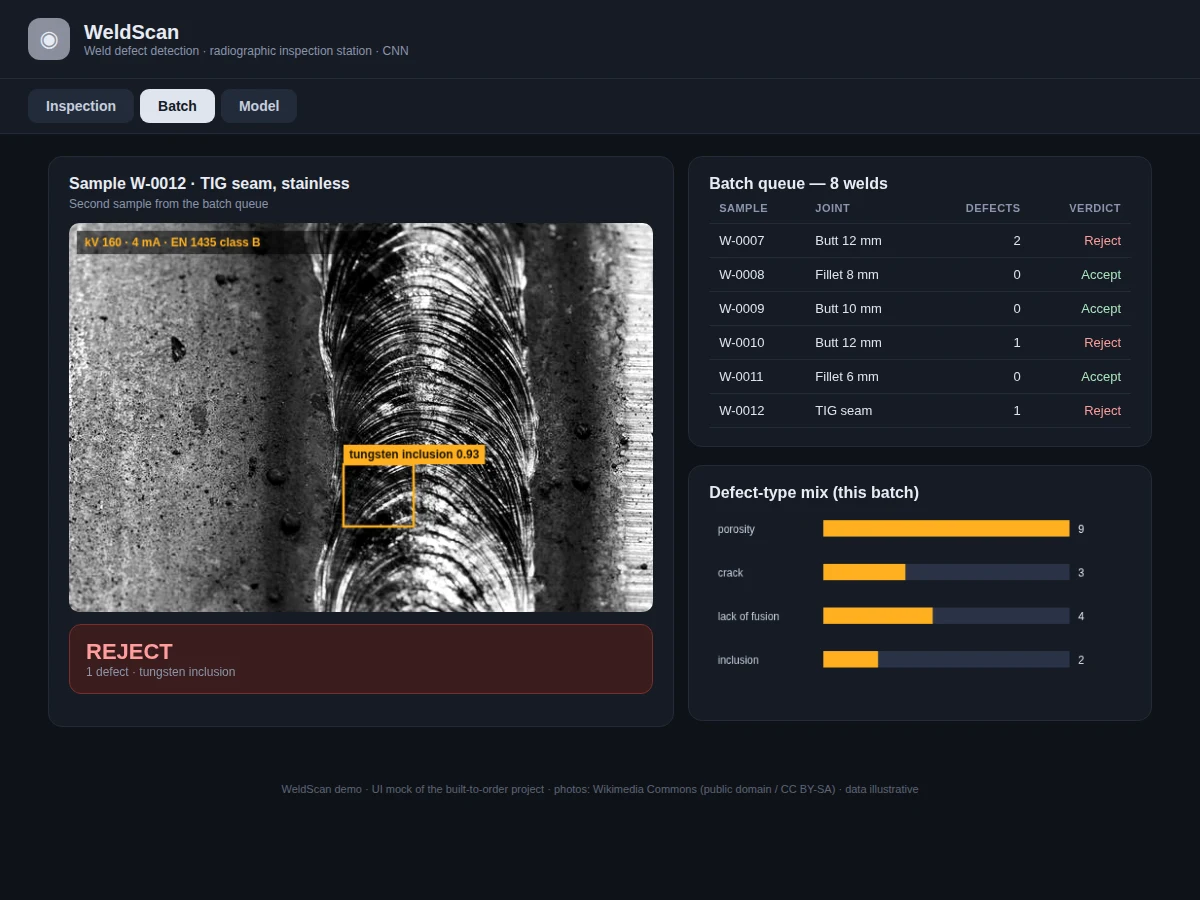
Welded joints in pressure vessels, pipelines and structures are inspected with X-ray radiography — a trained interpreter studies each film for dark rounded indications (porosity), sharp lines (cracks) or elongated misses (lack of fusion). It is slow, skilled work, and fatigue causes misses. Computer vision can pre-screen: a detection CNN learns the visual signatures of each defect type and flags candidates with boxes a human then confirms. This project builds that pre-screener on the GDXray database's weld series (88 weld radiographs in three series, with defect annotations) using Faster R-CNN — a region-proposal network finds candidate indications and a classifier names them. The inspection viewer renders boxes with class and confidence over each radiograph, aggregates batch verdicts, and reports per-class average precision.
How it works
- The GDXray weld series (88 radiographs across 3 series with defect annotations) is parsed into COCO-style training records.
- Images are contrast-normalized (CLAHE) and augmented with rotations, flips and contrast jitter that preserve radiographic appearance.
- Anchors are tuned toward small, elongated boxes matching porosity clusters and lack-of-fusion indications.
- A Faster R-CNN (ResNet-50 FPN backbone) is trained with the RPN and classifier heads jointly, using focal-style sampling for the rare crack class.
- At inspection time, each radiograph is passed through the detector; boxes above the confidence threshold are kept after non-maximum suppression.
- Detections aggregate per weld into an accept/reject verdict following a documented workmanship rule set.
- The held-out split is scored with mAP@0.5, per-class AP and recall, and the viewer renders every detection for visual verification.
Tech stack:
- Python 3, PyTorch (Faster R-CNN, ResNet-50 FPN)
- torchvision detection models
- GDXray weld series (88 radiographs, 3 series)
- OpenCV, CLAHE contrast normalization
- NumPy, Matplotlib
- HTML/CSS/JavaScript inspection viewer (canvas)
- Git
Dataset & model details
- Dataset: GDXray (GRIMA X-ray database, U. de Chile) — weld series: 88 weld radiographs in 3 series (W0001: 20 complete weld samples) with defect annotations.
- Task: Defect detection + classification; input = weld radiograph, output = bounding boxes with defect class (porosity, crack, lack of fusion, inclusion) and confidence.
- Model: Faster R-CNN with ResNet-50 FPN backbone; RPN anchors tuned for small elongated indications; joint RPN + classifier training.
- Metrics: mAP@0.5 ≥ 0.82 and defect recall ≥ 0.90 (design targets); per-class AP reported. No accuracy is claimed as measured until the training run is executed for the order.
| Parameter | Value |
|---|---|
| Input | Weld radiograph (grayscale) |
| Dataset | 88 radiographs, 3 series (GDXray welds) |
| Defect classes | 4 (porosity, crack, lack of fusion, inclusion) |
| Model | Faster R-CNN, ResNet-50 FPN (design target) |
| mAP@0.5 | ≥ 0.82 (design target, not a measured claim) |
| Defect recall | ≥ 0.90 (design target, not a measured claim) |
| Inference | Approximately 41 ms per image on GPU (expected) |
| Inspection viewer | Single-file web app, runs offline after download |
Project features
- [Faster R-CNN detector] Region-proposal network plus classifier localizes four defect types — porosity, crack, lack of fusion, inclusion — with confidence scores.
- [Radiograph inspection viewer] Web app rendering each X-ray with defect boxes, class labels, confidence and the accept/reject verdict.
- [GDXray training pipeline] Annotation parsing, anchor tuning for small elongated defects, augmentation (contrast, rotation) suited to radiographs.
- [Batch queue reporting] Per-weld defect tables, defect-type mix charts and accept/reject tallies across an inspection batch.
- [Per-class evaluation] Average precision per defect type plus recall at the operating point, with the crack class honestly reported as the hardest.
- [Confidence thresholding] Tunable operating point balancing missed defects against false calls, with the trade-off curve in the report.
- [Indication sizing] Approximate defect length estimated from box dimensions against the image scale marker for the report.
What is included
- GDXray parsing, augmentation and training pipeline
- Trained Faster R-CNN weld defect detector
- Radiograph inspection viewer (boxes, verdicts)
- Batch queue report generator
- Per-class AP evaluation and threshold analysis
- Project report PDF (background, detection theory, NDT context, results)
- PPT presentation for final review
- Viva Q&A preparation document (R-CNN family, anchors, mAP, radiographic testing)
Limitations & prerequisites
- 88 radiographs is a small dataset — heavy augmentation and transfer learning carry the training, and the report states this limit plainly.
- 0.82 mAP is a design target for the training run, stated honestly — the report documents the actual achieved figure after training.
- The system pre-screens; final accept/reject on real welds remains a certified human inspector's decision — this is an assistive tool, not a certifying authority.
- Cracks are the hardest class (thin, rare) and will show the lowest AP — reported honestly per class.
- Only the four trained defect types are detected; unusual indications outside them are out of scope.
Frequently Asked Questions
Which dataset is used and why?
GDXray's weld series (GRIMA, Universidad de Chile) — 88 weld radiographs in three series with defect annotations. It is one of the very few public X-ray weld datasets, used across the NDT computer-vision literature.
Why Faster R-CNN?
Weld defects need precise boxes (an inspector must find the indication), and two-stage detectors still lead on small-object localization accuracy. The report compares against a YOLO-class single-stage model for the viva.
Can this replace a human inspector?
No — and the report says so explicitly. It triages: clean welds pass quickly, suspect ones get boxes for the inspector to confirm. Certification stays human.
How are small defects found?
RPN anchors are tuned small and elongated to match porosity clusters and fusion-line indications, and the FPN pyramid preserves fine detail — the anchor design is documented in the report.
What about cracks?
The rarest and thinnest class — the report gives its AP separately and honestly, with focal-style sampling used to help the model learn it.
Is this project suitable for a final-year project?
Yes — for Mechanical, Electronics and AI/ML programs. It applies object detection to a safety-critical NDT problem with unusual intellectual honesty about limits. Suitable for B.E./B.Tech final-year projects in Mechanical, Electronics and AI & Machine Learning.
Components & software requirements
- Python 3, PyTorch (Faster R-CNN, ResNet-50 FPN)
- torchvision detection models
- GDXray weld series (88 radiographs, 3 series)
- OpenCV, CLAHE contrast normalization
- NumPy, Matplotlib
- HTML/CSS/JavaScript inspection viewer (canvas)
- Git
Dataset & model details
- Dataset: GDXray (GRIMA X-ray database, U. de Chile) — weld series: 88 weld radiographs in 3 series (W0001: 20 complete weld samples) with defect annotations.
- Task: Defect detection + classification; input = weld radiograph, output = bounding boxes with defect class (porosity, crack, lack of fusion, inclusion) and confidence.
- Model: Faster R-CNN with ResNet-50 FPN backbone; RPN anchors tuned for small elongated indications; joint RPN + classifier training.
- Metrics: mAP@0.5 ≥ 0.82 and defect recall ≥ 0.90 (design targets); per-class AP reported. No accuracy is claimed as measured until the training run is executed for the order.
Delivery information
Built-to-order project. Delivery timeline is shared after order confirmation based on current queue.
Support terms
Complete documentation, setup guide, and viva preparation included. Support for setup and explanation provided.