
More project photos (2)
The problem
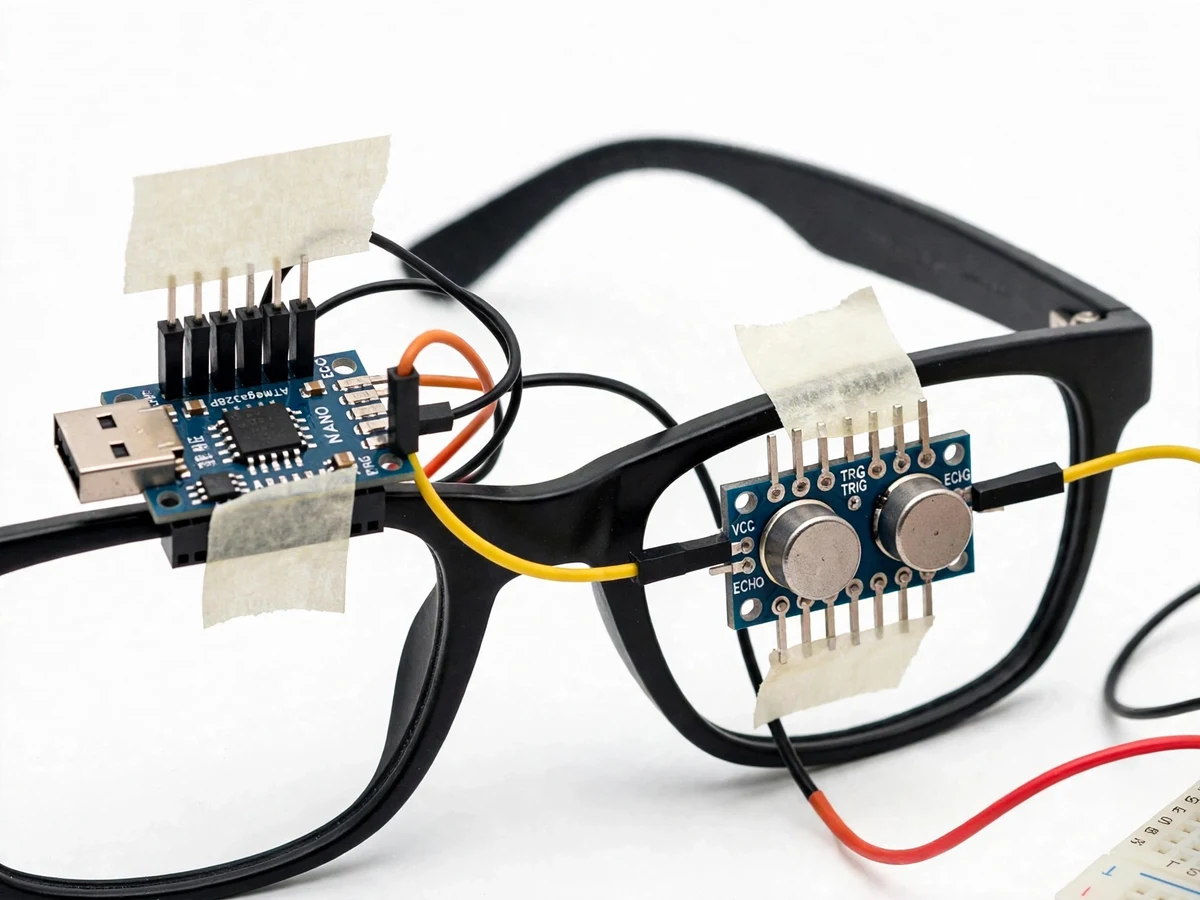
Navigating unfamiliar spaces is harder for people with severe visual impairment: a white cane only detects obstacles at ground level within arm's reach, and it gives no warning about head-height obstacles such as open windows, signboards or low branches. Commercial electronic travel aids exist but are usually expensive, bulky, or tied to a smartphone app. That leaves a real engineering gap for an affordable, self-contained wearable that extends the wearer's sensing range beyond arm's length with intuitive alerts. This project fills it with smart glasses built around an Arduino Nano and an HC-SR04 ultrasonic sensor mounted on a standard spectacle frame: the sensor continuously measures the distance to whatever lies ahead, and the Nano translates that distance into two warning channels — a piezo buzzer whose beep rate rises as the obstacle nears, and a small vibration motor for situations where traffic noise masks sound. Everything runs from a battery with no network or phone dependency.
Visually impaired wearer receiving distance alerts by sound and touch.
Follow the working sequence
How it works
- The HC-SR04 transmits an ultrasonic pulse on a 10 µs trigger signal from the Arduino Nano.
- The sensor's echo pin stays high for the pulse's travel time; the Nano measures it with pulseIn and converts time-of-flight to centimetres (distance = duration × speed of sound / 2).
- Each reading is compared against four configured zones: clear (beyond 150 cm), caution (60–150 cm), near (25–60 cm), urgent (under 25 cm).
- In caution and nearer zones the buzzer sounds with a beep rate that increases as the distance shrinks; the mapping is a direct lookup, with no hidden filtering.
- The vibration motor pulses alongside the buzzer in the near and urgent zones; both outputs fall silent once the path clears beyond the far threshold, with a small hysteresis to avoid flickering alerts.
- The whole loop repeats roughly every 50 ms. A power switch and LED confirm the unit is on, and the battery pack keeps the glasses tether-free.
Tech stack:
- Arduino Nano (ATmega328P)
- HC-SR04 ultrasonic sensor
- Arduino IDE · C/C++ firmware
- Piezo buzzer (5 V)
- Coin vibration motor
- 9 V battery pack · power wiring
- Breadboard · jumper-wire prototyping
- Multimeter (circuit verification)
| Parameter | Value |
|---|---|
| Controller | Arduino Nano (ATmega328P), 16 MHz, 5 V logic |
| Distance sensor | HC-SR04 ultrasonic module, 2–400 cm range (datasheet), ~15° beam angle (datasheet) |
| Ranging rate | Approximately 20 measurements/second (expected) |
| Alert zones | 4 configurable zones: clear >150 cm, caution 60–150 cm, near 25–60 cm, urgent <25 cm (design targets) |
| Audio alert | 5 V piezo buzzer; beep rate increases as distance decreases |
| Haptic alert | Coin vibration motor, pulsed in near/urgent zones |
| Power | 9 V battery block or USB 5 V; expected ~2–4 h on a 9 V block, alert-frequency dependent (expected) |
| Mount | Standard spectacle frame; sensor forward-facing |
| Added weight | Approximately 60–90 g on the frame (expected) |
| Firmware | Arduino C/C++; alert thresholds as editable constants |
Project features
- [Front-facing ultrasonic ranging] The HC-SR04 continuously measures the distance to obstacles ahead, firing roughly 20 times per second, and the Arduino converts each echo into a distance reading and an alert zone.
- [Distance-graded buzzer alerts] The piezo buzzer beeps slowly beyond about 150 cm, quickens under 60 cm and sounds urgently under about 25 cm — the wearer judges closeness by sound alone.
- [Vibration alert channel] A coin vibration motor pulses in the nearer zones, giving the wearer a second alert channel that works when traffic or crowd noise masks the buzzer.
- [Compact Arduino Nano controller] The ATmega328P runs the full sense–decide–alert loop; the board is small and light enough to mount on a spectacle frame.
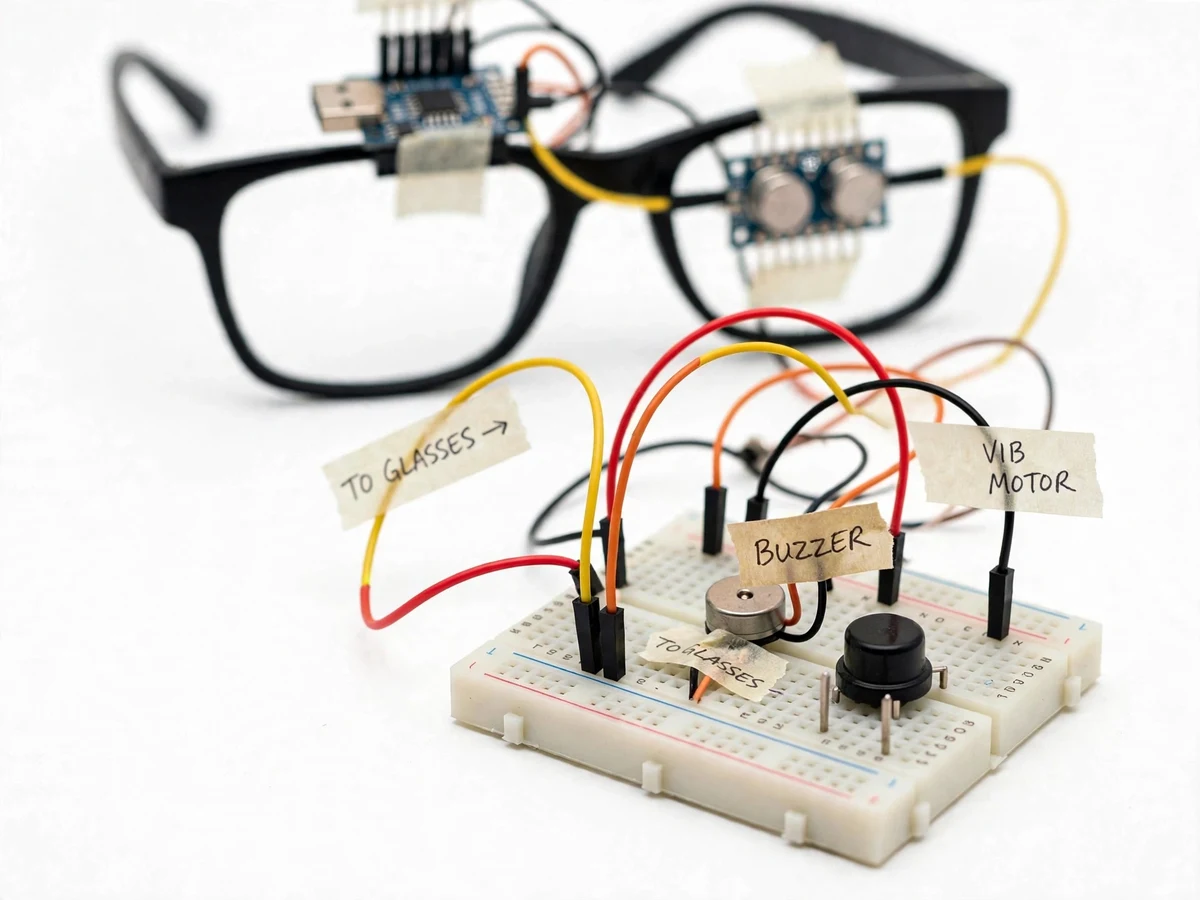
- [Wearable frame build] Sensor and controller are mounted on a standard spectacle frame with the sensor facing forward and wires routed along the arms; a breadboard demo unit shows the full circuit before miniaturization.
- [Battery-powered and standalone] A 9 V battery pack powers the unit with no phone, app or internet — the glasses work anywhere, indoors or outdoors.
- [Configurable alert zones] The distance thresholds for each alert zone are constants in the firmware, so the student can retune them for a quiet classroom demo versus a busy corridor.
What is included
- Working smart-glasses prototype (frame, Nano, HC-SR04, buzzer, vibration motor, battery pack)
- Firmware source code (Arduino C/C++) with commented alert-zone constants
- Circuit/wiring diagram and component list
- Assembly and wearing guide with the buyer-run range-verification procedure
- Project report PDF (background, ultrasonic ranging theory, methodology, observations)
- PPT presentation for final review
- Viva Q&A preparation document (ultrasonic sensing, time-of-flight, Arduino interfacing)
- Abstract PDF (10-section, matching the page)
Limitations & prerequisites
- The ultrasonic beam covers only about a 15° cone ahead — side obstacles, thin poles and overhangs outside the cone can be missed.
- Soft materials (thick fabric, foam) and sharply angled surfaces absorb or deflect the pulse and can return weak or wrong echoes; reliable detection is a design target, not a guarantee.
- The sensor looks forward, not down — it cannot detect drop-offs such as stairs or curbs, and it is not a replacement for a white cane or professional mobility training.
- The effective alerting range is tuned to about 1.5 m for demos even though the module's datasheet range is 2–400 cm.
- Battery life depends on how often alerts fire; heavy use drains a 9 V block faster than the ~2–4 h expected figure.
- This is an academic assistive prototype, not a certified medical device; no clinical or safety certification is claimed.
Frequently Asked Questions
Which controller and sensor are used?
An Arduino Nano (ATmega328P) runs the firmware, and an HC-SR04 ultrasonic module measures distance ahead. The Nano reads the sensor's echo time-of-flight and drives the buzzer and vibration motor directly — no extra boards are needed, which keeps the build light enough to wear.
How does the wearer judge how close an obstacle is?
Two channels work together: the buzzer's beep rate increases as the distance shrinks across four zones (beyond about 150 cm stays silent), and the vibration motor pulses in the nearer zones. Distance becomes something the wearer hears and feels, which is why the system still works in noisy surroundings.
Does it detect every obstacle?
No — and the report is honest about this. The ultrasonic beam is a ~15° cone facing forward, so side obstacles and thin objects can be missed; soft fabrics absorb the pulse; and it cannot detect stairs going down. It supplements a white cane, it does not replace one.
What power supply is needed and how long does it last?
A standard 9 V battery block powers the wearable unit (USB 5 V works on the bench). Expected runtime is roughly 2–4 hours depending on how frequently alerts fire; a slide switch turns the unit off between demos to save the battery.
Can the project be customized?
Yes. Realistic extensions include a second sensor angled to the side, threshold retuning for indoor versus outdoor demos, a head-strap variant of the mount, or a cane-mounted version of the same circuit. The report lists these as future scope rather than included features.
Is this project suitable for a final-year project?
Yes — for Electronics, E&TC and IoT programs. It demonstrates embedded C programming, sensor interfacing, time-of-flight measurement, power design for wearables and honest limitation analysis — all strong viva material. Suitable for B.E./B.Tech final-year projects in Electronics, E&TC and IoT.
Components & software requirements
- Arduino Nano (ATmega328P)
- HC-SR04 ultrasonic sensor
- Arduino IDE · C/C++ firmware
- Piezo buzzer (5 V)
- Coin vibration motor
- 9 V battery pack · power wiring
- Breadboard · jumper-wire prototyping
- Multimeter (circuit verification)
Delivery information
Built-to-order project. Delivery timeline is shared after order confirmation based on current queue.
Support terms
Complete documentation, setup guide, and viva preparation included. Support for setup and explanation provided.
Download free synopsis (PDF)
Enter your name and email — the synopsis PDF downloads immediately. We may send occasional project updates; no spam, unsubscribe anytime.