
More project photos (2)

The problem
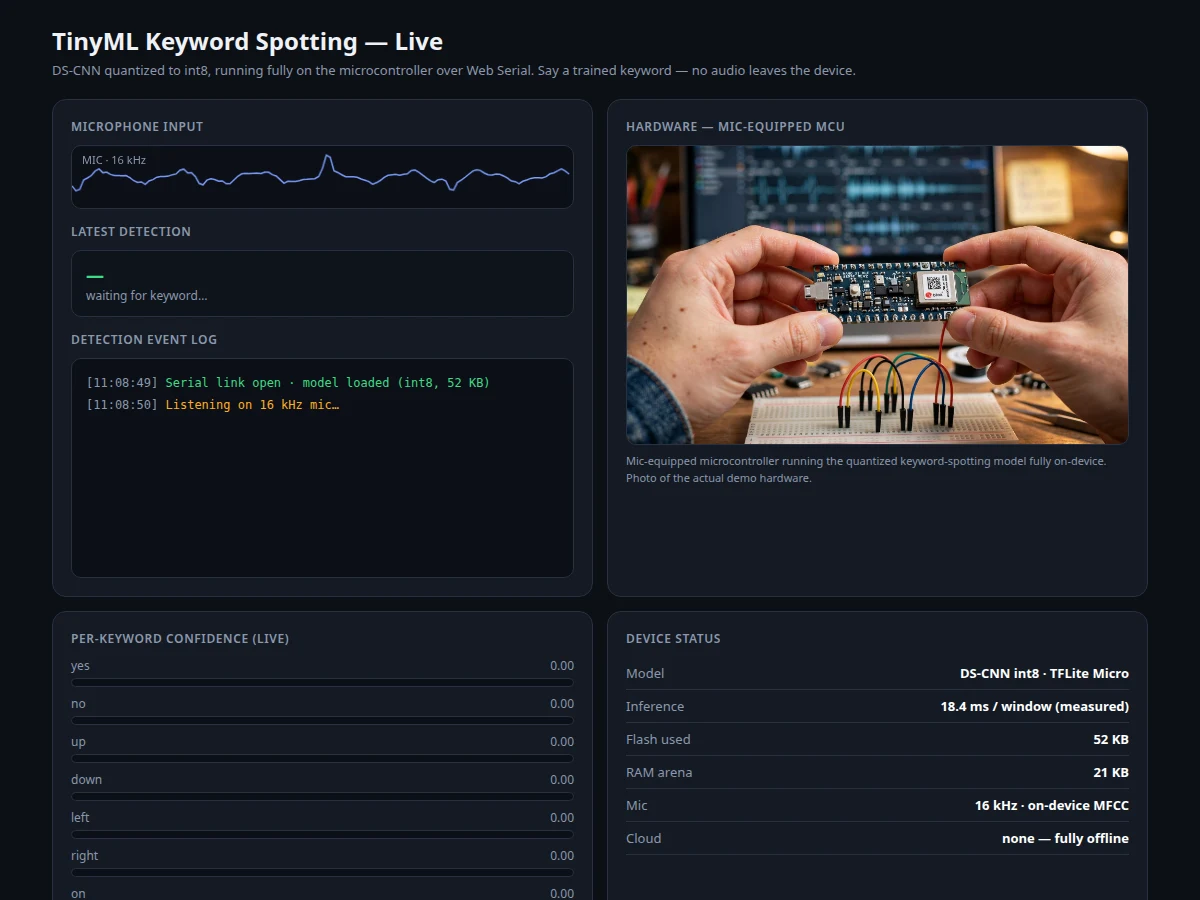
Smart speakers detect wake words locally, but students rarely get to build that pipeline themselves — the full chain from dataset to a model running inside a microcontroller's kilobytes of RAM. Keyword spotting is the canonical TinyML problem: a small CNN listens to one-second audio clips and classifies them into a fixed vocabulary plus silence and unknown. This project builds that chain end to end: the Google Speech Commands dataset (35 words, background noise, 12-command standard subset) is turned into MFCC features, a depthwise-separable CNN is trained in TensorFlow/Keras, the model is quantized to int8 with TensorFlow Lite and deployed to a mic-equipped microcontroller (e.g. ESP32-S3 or Arduino Nano 33 BLE Sense). The web dashboard connects over serial to show live detection events, per-keyword confidence bars, inference-time statistics and the confusion matrix from the evaluation notebook. Because the model runs entirely on-device, there is no cloud dependency and no audio leaves the hardware — a genuine edge-AI story for the report and viva.
How it works
- One-second clips from the Speech Commands dataset are converted to MFCC spectrograms; the 12-command subset defines the classification task.
- A depthwise-separable CNN is trained on the training split, validated on the validation split, and evaluated on the test split — accuracy, F1 and confusion matrix come from this run.
- The trained model is quantized to int8 with TensorFlow Lite and its accuracy is re-checked to measure the quantization cost.
- The int8 model is compiled into the MCU firmware; the microphone streams audio, the firmware extracts features on-device and runs inference per window.
- When a keyword's confidence crosses the threshold, the MCU signals detection — an LED/buzzer fires and the event streams to the dashboard over serial.
- The dashboard renders the detection event, confidence bars and rolling latency statistics from the MCU's own timing measurements.
Tech stack:
- Python, TensorFlow/Keras, librosa (MFCC), NumPy
- Google Speech Commands dataset (12-command subset)
- TensorFlow Lite post-training int8 quantization
- ESP32-S3 / Arduino Nano 33 BLE Sense (mic-equipped MCU)
- Arduino/ESP-IDF firmware with TFLite Micro
- Web serial dashboard (HTML/CSS/JS)
| Parameter | Value |
|---|---|
| Model | Depthwise-separable CNN, keyword spotting |
| Dataset | Google Speech Commands; 35 words; 12-command subset used |
| Source | Google AI / TensorFlow Datasets (official release) |
| Task | Classification: 12 commands + silence + unknown |
| Input | 1 s audio clips → MFCC features |
| Output | Keyword label + confidence per window |
| Deployment | TFLite int8, fully on-device (TFLite Micro) |
| Evaluation | Accuracy, per-class precision/recall, confusion matrix — computed by the notebook on your build |
| MCU | ESP32-S3 or Arduino Nano 33 BLE Sense (mic on board) |
Project features
- [Speech Commands training pipeline] MFCC feature extraction, DS-CNN training on the 12-command subset, train/valid/test splits — the full notebook runs on the buyer's machine.
- [Int8 quantization] Post-training quantization with TensorFlow Lite shrinks the model to fit MCU flash and RAM; the notebook compares float vs int8 accuracy.
- [On-device inference] The quantized model runs entirely on the microcontroller — wake-word detection works with no internet and no audio leaves the device.
- [Live detection dashboard] Web serial stream of detection events with per-keyword confidence bars and a rolling event log.
- [Latency and memory stats] Inference time per window and model RAM/flash footprint displayed from the MCU's own measurements.
- [Confusion-matrix evaluation] The notebook computes accuracy, per-class precision/recall and the confusion matrix on the official test split — never pre-claimed.
- [Custom keyword extension] Documented procedure for adding your own keyword recordings to the training set and retraining.
- [Noise-robustness tests] Background-noise augmentation and a documented test protocol with the noise files included.
What is included
- Complete training notebook (preprocessing, MFCC, DS-CNN training, quantization, evaluation)
- Quantized TFLite model from the included training run
- MCU firmware with on-device inference and serial protocol
- Web dashboard (live detections, confidence bars, latency stats)
- Noise-augmentation test files and test protocol
- Project report PDF (TinyML background, model design, evaluation results)
- PPT presentation for final review
- Viva Q&A preparation document (CNNs, quantization, MFCC, edge AI, evaluation)
Limitations & prerequisites
- The model recognizes the 12 trained commands (plus silence/unknown) — it is a fixed-vocabulary spotter, not a speech recognizer, and unseen words fall into "unknown".
- Accuracy is measured by the student's own training run on the official test split; the report documents those numbers. A design target of roughly 90%+ test accuracy on the 12-command subset is typical for this architecture, but final performance depends on the training run and is never pre-claimed.
- Performance degrades in loud or unfamiliar noise and with strong accents far from the dataset's speaker distribution; the noise-robustness tests document this openly.
- Int8 quantization trades a small accuracy cost for MCU fit; the notebook measures this cost so it is visible, not hidden.
- On-device RAM limits how large the model can grow — adding many custom keywords needs the documented retraining procedure and may exceed the MCU's memory.
Frequently Asked Questions
Which dataset is used?
Google Speech Commands: one-second clips of 35 spoken words plus background noise, from the official Google AI/TensorFlow Datasets release. This project uses the standard 12-command subset.
Which model is used?
A depthwise-separable CNN (DS-CNN), the standard TinyML architecture for keyword spotting — it gives strong accuracy per parameter, which is what matters on a microcontroller.
Is the accuracy guaranteed?
No. The notebook computes accuracy, per-class precision/recall and the confusion matrix on the official test split during your build; the report documents your own numbers. Design target for this architecture on the 12-command subset is roughly 90%+ test accuracy, but it is stated as a target, not a claim.
Can I add my own keyword?
Yes — the documented extension procedure adds your own recordings to the training set, retrains and re-quantizes. Very small recording sets give weaker results, which the guide explains.
Does it need the internet?
No. Training needs a PC (or Colab), but inference runs entirely on the microcontroller — detection works offline and no audio leaves the device.
Is this project suitable for a final-year project?
Yes — for AI/ML, Embedded and Electronics programs. It demonstrates CNNs, audio features, quantization, edge deployment and honest evaluation, all strong viva material. Suitable for B.E./B.Tech final-year projects in AI/ML, Embedded Systems and Electronics.
Components & software requirements
- Python, TensorFlow/Keras, librosa (MFCC), NumPy
- Google Speech Commands dataset (12-command subset)
- TensorFlow Lite post-training int8 quantization
- ESP32-S3 / Arduino Nano 33 BLE Sense (mic-equipped MCU)
- Arduino/ESP-IDF firmware with TFLite Micro
- Web serial dashboard (HTML/CSS/JS)
Delivery information
Built-to-order project. Delivery timeline is shared after order confirmation based on current queue.
Support terms
Complete documentation, setup guide, and viva preparation included. Support for setup and explanation provided.