
More project photos (2)
The problem
News readers drown in articles they will never finish: readers face more long-form reporting than they can finish, and newsrooms need reliable auto-generated briefs and digests. Extractive methods — picking whole sentences — hit a ceiling decades ago because they cannot paraphrase, compress or fuse information across sentences. Transformer encoder-decoders changed this: BART, T5 and PEGASUS read the full article with self-attention and write a new, shorter text like a human sub-editor. The CNN/DailyMail corpus (Hermann et al., 2015; 287,113 training articles paired with journalist-written highlights) is the standard benchmark that made this progress measurable. This project fine-tunes those models with the Hugging Face Transformers library, evaluates with ROUGE-1/2/L on the held-out test split, plus the two analyses that make the report credible: a hallucination audit and an entailment-based factual-consistency check. The honest limitations (hallucination, the 1024-token window, position bias in the highlights) are documented, not hidden.
How it works
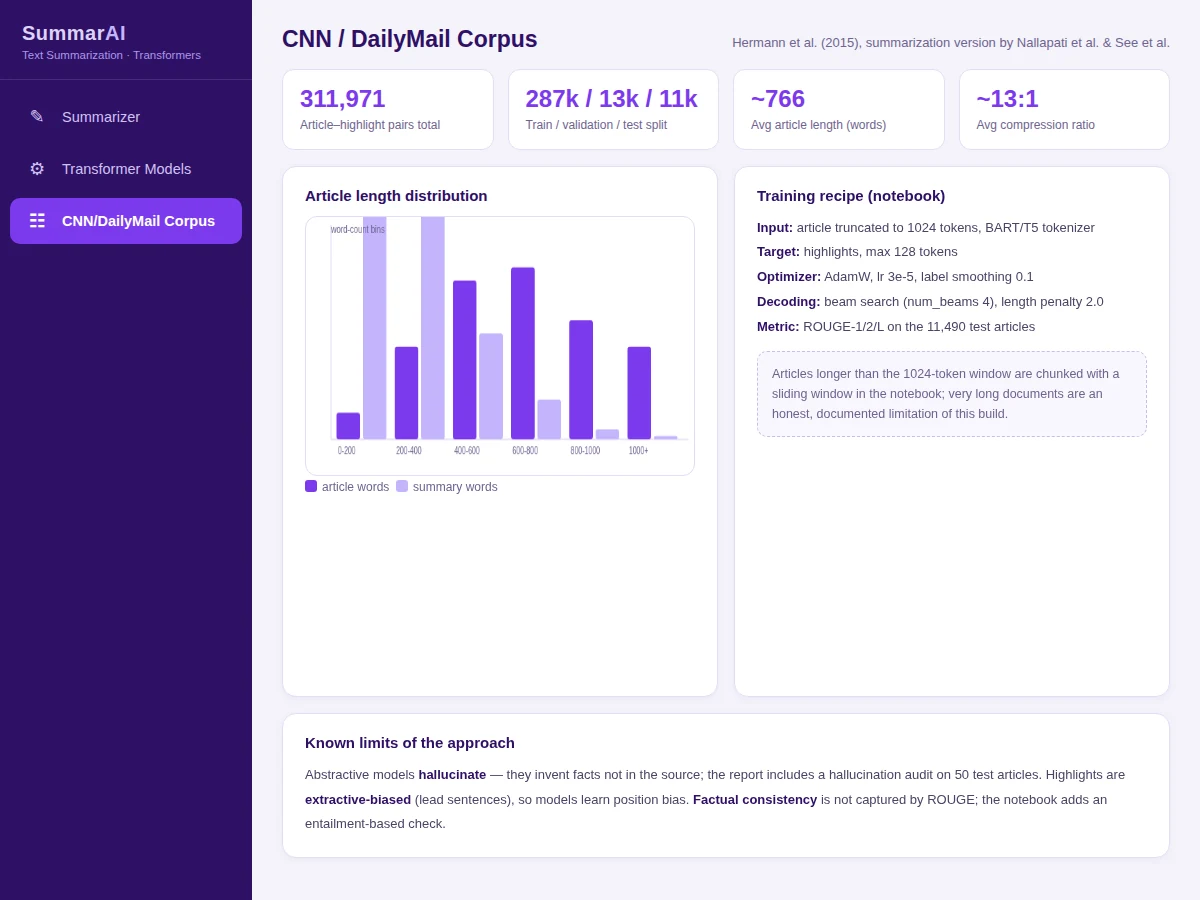
- The CNN/DailyMail corpus is loaded (287,113 train / 13,368 validation / 11,490 test article-highlight pairs) and profiled for length distributions.
- Articles are tokenized with the model tokenizer, truncated to 1024 input tokens; highlights become 128-token targets.
- BART-large (and T5-base / PEGASUS-large in the comparison runs) is fine-tuned with AdamW, learning rate 3e-5 and label smoothing; validation ROUGE is tracked per epoch.
- Summaries are generated on the test split with beam search (4 beams, length penalty 2.0) and scored with ROUGE-1/2/L.
- A 50-article hallucination audit and an entailment-based factual-consistency check are run on sampled outputs and reported next to the ROUGE numbers.
- The browser demo offers instant extractive summarization for interface testing, while the notebook holds the real transformer results.
Tech stack:
- Python 3.10, PyTorch, Hugging Face Transformers (BART, T5, PEGASUS)
- Hugging Face Datasets (cnn_dailymail loading and splits)
- rouge-score (ROUGE-1/2/L evaluation)
- NLTK (sentence tokenization for the demo and audit tooling)
- Jupyter notebook (buyer-run fine-tuning and evaluation)
- HTML/CSS/JS demo (live extractive summarizer)
| Parameter | Value |
|---|---|
| Corpus | CNN/DailyMail (Hermann et al., 2015): 287,113 train / 13,368 val / 11,490 test |
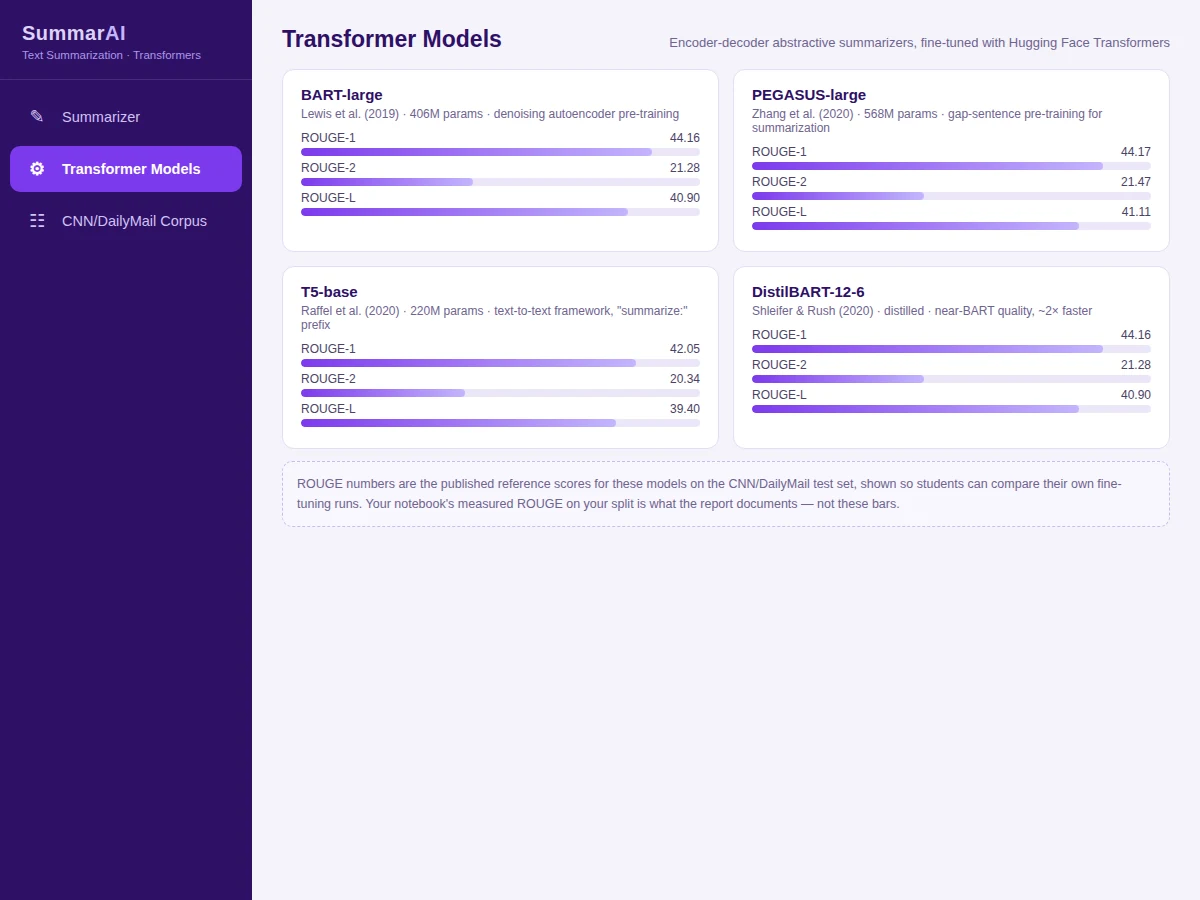
| Models | BART-large, T5-base, PEGASUS-large (Hugging Face Transformers) |
| Design target | ROUGE-1 ~0.44 / ROUGE-2 ~0.21 / ROUGE-L ~0.41 on test; measured by the notebook on your run |
| Evaluation | ROUGE-1/2/L + hallucination audit + entailment-based consistency check |
| Training | AdamW, lr 3e-5, label smoothing 0.1, beam search (4 beams, length penalty 2.0) |
| Input window | 1024 tokens; longer articles chunked with sliding window |
| Output | Abstractive summary (max 128 tokens) + evaluation report |
Project features
- [Three-model fine-tuning] BART-large, T5-base and PEGASUS-large fine-tuned on CNN/DailyMail with the Hugging Face Transformers trainer
- [Full training recipe] Tokenization, 1024-token truncation, 128-token targets, AdamW, label smoothing, beam-search decoding with length penalty — all in the notebook
- [ROUGE evaluation] ROUGE-1, ROUGE-2 and ROUGE-L computed on the 11,490-article test split with the standard rouge-score package
- [Hallucination audit] Manual audit protocol over 50 sampled summaries, categorizing invented facts — the section examiners actually read
- [Factual-consistency check] Entailment-based scoring of summary against source article, reported alongside ROUGE
- [Long-document handling] Sliding-window chunking strategy for articles beyond the 1024-token input limit, with its trade-offs documented
- [Live browser demo] Extractive frequency-based summarizer with ROUGE-1 vs reference, compression stats and adjustable summary length — runs with no GPU
- [Decoding experiments] Beam size, length penalty and repetition-penalty ablations showing how decoding choices move the scores
What is included
- Complete source code (data loading, fine-tuning, decoding, ROUGE evaluation, audit tooling, demo)
- Jupyter training and evaluation notebook (buyer-run: fine-tunes and evaluates on your GPU)
- Project report PDF (background, transformer architecture, methodology, results, hallucination audit)
- PPT presentation for final review
- Viva Q&A preparation document (attention, BART vs T5 vs PEGASUS, ROUGE, beam search, hallucination)
- Setup guide (environment, GPU notes, dataset download, running fine-tuning and the demo)
Limitations & prerequisites
- Abstractive models hallucinate — they invent facts absent from the source article; the report audits this on 50 samples instead of pretending ROUGE measures truth.
- The 1024-token input window truncates or chunks long documents; chunking loses cross-chunk context and the report documents the trade-off.
- CNN/DailyMail highlights are extractive-biased toward lead sentences, so fine-tuned models learn position bias — strong on news, weaker on other genres.
- ROUGE measures n-gram overlap, not factuality or readability; the report pairs it with the consistency check for that reason.
- Fine-tuning BART-large/PEGASUS needs a GPU with sufficient VRAM (16GB+ recommended); the setup guide gives realistic hardware guidance and a smaller-model fallback.
- The browser demo is extractive (frequency-ranked sentences), not a transformer — it demonstrates the interface, while the real abstractive results come from the notebook.
Frequently Asked Questions
Which dataset is used?
CNN/DailyMail (Hermann et al., 2015, summarization format): 287,113 training, 13,368 validation and 11,490 test news articles, each paired with journalist-written highlight summaries. Average article is ~766 words, average summary ~53 words.
Which models are fine-tuned?
BART-large as the primary model, with T5-base and PEGASUS-large as comparison runs — all encoder-decoder transformers via the Hugging Face Transformers library. DistilBART is included as a faster distilled option.
What ROUGE scores should I expect?
Published reference scores on this test set sit around ROUGE-1 0.44, ROUGE-2 0.21, ROUGE-L 0.41 for BART-large-class models. Your notebook's measured scores on your run are what the report documents.
Does the demo run the transformer in the browser?
No — honestly. Transformers need a GPU; the browser demo runs a fast extractive summarizer (frequency-ranked sentences with ROUGE-1 vs reference) so the interface is testable instantly, while the notebook produces the real abstractive results.
How does the project handle hallucination?
With a documented 50-article manual audit that categorizes invented facts, plus an entailment-based factual-consistency score reported alongside ROUGE. The report treats this as a core result, not a footnote.
What will I receive with the project?
Complete source code, the fine-tuning and evaluation notebook, the browser demo, project report PDF, PPT presentation, viva Q&A document and a setup guide. Suitable for B.E./B.Tech final-year projects in Computer Science, AI/ML and Data Science.
Components & software requirements
- Python 3.10, PyTorch, Hugging Face Transformers (BART, T5, PEGASUS)
- Hugging Face Datasets (cnn_dailymail loading and splits)
- rouge-score (ROUGE-1/2/L evaluation)
- NLTK (sentence tokenization for the demo and audit tooling)
- Jupyter notebook (buyer-run fine-tuning and evaluation)
- HTML/CSS/JS demo (live extractive summarizer)
Delivery information
Built-to-order project. Delivery timeline is shared after order confirmation based on current queue.
Support terms
Complete documentation, setup guide, and viva preparation included. Support for setup and explanation provided.