
More project photos (3)
The problem
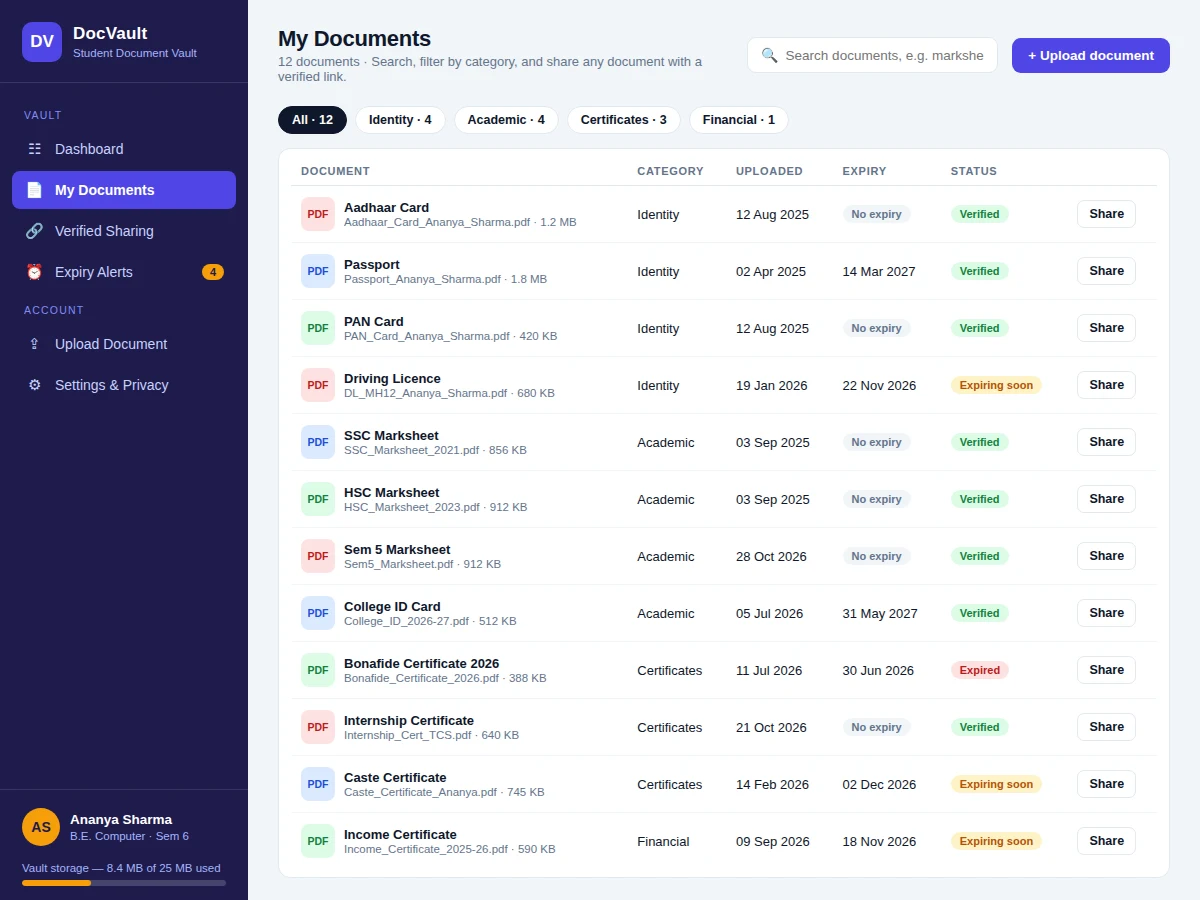
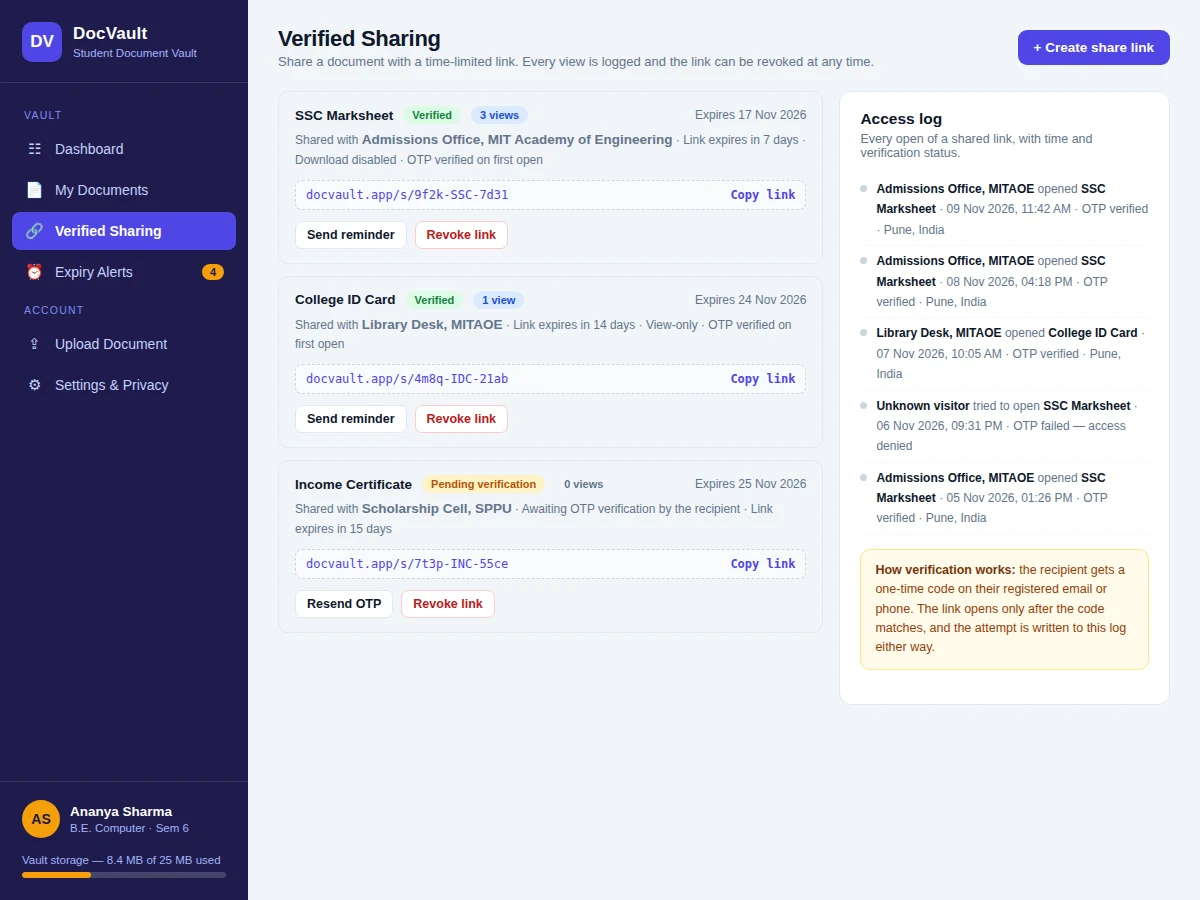
A Student Document Vault is a web app that stores a student's marksheets, certificates, Aadhaar card, PAN card, passport and college ID in one organised, searchable place, and shares any of them through a verified link that expires after a set number of days. The vault records an expiry date for every document that has one and alerts the student 30 days before it lapses, with reminders at 14 and 7 days, so no form is blocked by an expired paper. Sharing is verified: the recipient gets a one-time code by email or phone, the link opens only after the code matches, and every open — including failed attempts — is written to an access log. The owner can revoke a link and disable downloads. In the demo, 12 sample documents totalling 8.4 MB render across 3 views from a single 33 KB HTML file, and the vault flags 4 documents expiring within 30 days, including 1 already expired.
Students keep the same documents scattered across phone galleries, email attachments, chat apps and photocopy shops, and rediscover the mess at the worst moment — a scholarship deadline, an admission form, or a verification visit. A certificate that expired months ago only surfaces when an office rejects it, and a marksheet sent as a plain chat attachment can be forwarded to anyone with no record of who opened it. The vault fixes both problems in one place: every document has a known location, a category and an expiry date, and every share is a controlled, expiring, logged link instead of an open file. The demo shows this working end to end with realistic student documents, so the idea can be judged from the running app rather than from a description.
The student uploads a document, names it and picks a category.
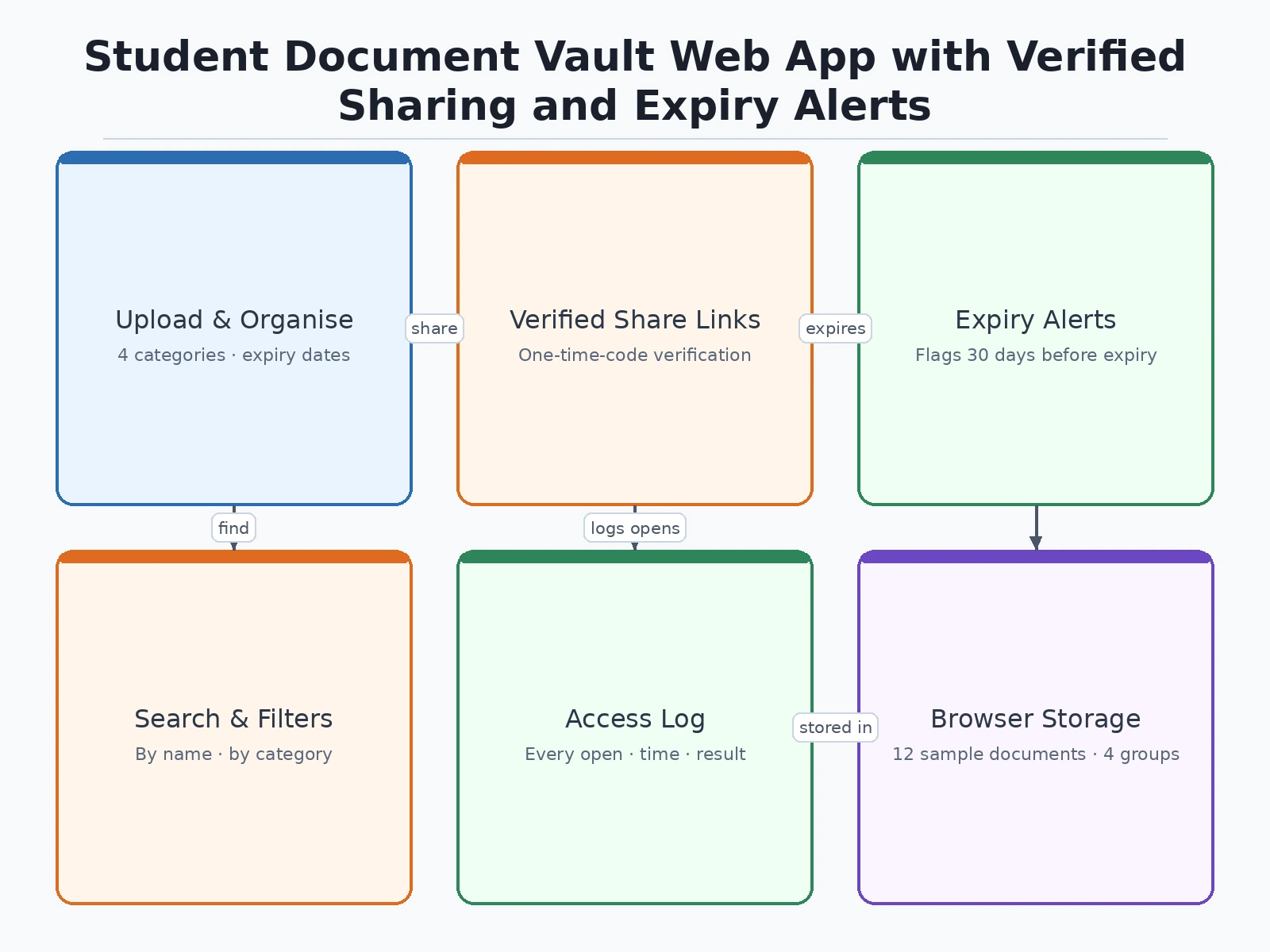
Follow the working sequence
How it works
The flow runs from upload to alert to share. A student uploads a document, names it, picks one of 4 categories, and enters an expiry date if the document has one; documents without an expiry, such as an Aadhaar card or a marksheet, are stored with no expiry and never raise alerts. The vault files the document with its name, size and upload date, and compares every dated document against today's date each time the dashboard loads, sorting alerts from the nearest expiry outward. When a document enters the 30-day window, an alert appears on the dashboard and in the alerts view, with reminders at 14 and 7 days. To share, the student picks a document, sets a 7 to 15 day expiry and permissions, and sends the link; the recipient verifies with a one-time code, and each open is written to the access log. Revoking a link stops access at once, while the document stays in the vault.
- The student uploads a document (PDF, JPG or PNG, up to 10 MB per file as a design target), names it and picks a category.
- An expiry date is entered where the document has one; documents with no expiry are stored with no expiry and never raise alerts.
- The vault stores the document's name, file name, size, upload date, category and expiry date in browser local storage.
- On every dashboard load, the expiry engine compares each dated document against the current date and sorts alerts from the nearest expiry outward.
- Documents entering the 30-day window raise an alert on the dashboard and in the alerts view, with reminders at 14 and 7 days; expired documents are marked and blocked from sharing.
- To share, the student selects a document, sets a 7 to 15 day link expiry and view-only or download permission, and copies the link.
- The recipient verifies with a one-time code, the document opens, and the attempt is written to the access log; the owner can revoke the link at any time.
Tech stack:
- HTML5 · CSS3 · JavaScript (vanilla, no framework)
- Browser local storage (Web Storage API)
- Single-file demo app (no build step)
- JSON sample dataset (12 documents)
- Flexbox · CSS Grid responsive layout
- Modern desktop browser (Chromium runtime)
- Git
| Parameter | Value |
|---|---|
| Documents in demo vault | 12 documents (sample data) |
| Demo vault size | 8.4 MB (sample data, measured in demo build) |
| Demo file size | Approximately 33 KB single HTML file (measured) |
| Vault storage limit | 25 MB (design target) |
| Max file size | 10 MB per file (design target) |
| Supported file types | PDF · JPG · PNG (design target) |
| Categories | 4 categories (Identity · Academic · Certificates · Financial) |
| Alert window | 30 days before expiry (configurable) |
| Reminder schedule | 30 / 14 / 7 days before expiry (design target) |
| Share link lifetime | 7–15 days (configurable, design target) |
| Access log entries | 5 entries in the demo (sample data) |
| Demo views | 3 views (Dashboard · Documents · Verified Sharing) |
Project features
The vault's strongest capabilities are its verified share links, its expiry alerts, and its plain, searchable document store. A verified share link carries a 7 to 15 day expiry, view-only and download controls, and an access log that records every open with its time and verification result, so the student always knows who saw a document and when. The expiry alerts watch every dated document and flag it 30 days before expiry, with reminders at 14 and 7 days, and mark anything past its date as expired so it cannot be shared until renewed. The document store itself keeps 12 sample documents across 4 categories — Identity, Academic, Certificates and Financial — with file names, sizes, upload dates and expiry dates for each, plus search and category filters that narrow the list. A settings view states plainly what the demo stores in the browser and what the optional server build adds, so nothing about verification or storage is oversold.
- [Document upload and categorisation] Upload a document, give it a name, pick one of 4 categories — Identity, Academic, Certificates or Financial — and enter an expiry date where one applies. The vault stores the file name, size and upload date with each entry.
- [Verified share links with expiry] Create a share link for any document with a 7 to 15 day expiry, view-only or download permission, and a copyable link. The demo shows the one-time-code verification step in the flow; real OTP delivery by email or SMS is an optional server customisation.
- [Expiry alerts dashboard] Every dated document is checked against the current date and flagged 30 days before expiry, with reminders at 14 and 7 days. Expired documents are marked clearly and cannot be shared until renewed.
- [Access log] Every open of a shared link is recorded with the recipient, date, time and verification result, including failed attempts that were denied access.
- [Search and category filters] Search documents by name or file name and filter by category, so a marksheet or certificate is found in seconds even as the vault grows.
- [Link revocation and download control] Revoke any share link at any time and disable downloads on a share, while the document itself stays safely in the vault.
- [Storage and privacy transparency] A settings view states exactly what the demo stores in the browser and what the full server build adds, so the limits of the front-end demo are never hidden.
What is included
- Complete single-file demo web app (HTML/CSS/JavaScript) with working upload, search, filter, share-link, access-log and expiry-alert flows
- Sample document set of 12 realistic documents with file names, sizes, upload dates and expiry dates
- Setup instructions for running the demo in any modern browser
- Project report outline and documentation (architecture, data flow, verification design, limitations)
- Project abstract PDF (background, problem, objectives, methodology, architecture, outcomes, applications, future scope)
- PPT presentation for final review
- Viva Q&A preparation document (local storage, share-link design, expiry logic, verification vs server builds)
Limitations & prerequisites
- The base build is a front-end demo: documents and metadata are stored in browser local storage, so clearing browser data deletes the vault.
- The one-time-code verification step is shown in the demo flow but not enforced by a server; real OTP delivery by email or SMS needs the optional server customisation.
- Share links in the demo are simulated addresses, not live URLs; real link delivery needs a server and a domain.
- Expiry alerts are computed when the dashboard loads; the demo sends no background email or push reminders without the server build.
- The demo lists documents by name and metadata and does not render PDF pages or extract text from uploaded files.
- Single-user demo: no multi-user accounts, roles or admin panel in the base build.
- The 25 MB vault limit and 10 MB per-file limit are design targets for the browser-storage build, not measured maximums.
Frequently Asked Questions
Is this project suitable for a final-year project?
Yes — for Computer Science, IT and Web Development programs, this project demonstrates front-end development, browser storage, state management, date-driven logic and a complete user workflow from upload to verified sharing. It is a self-contained web app with a working demo, clear documentation and honest scope, so a student can explain every part of it in a viva.
What is the main technology used?
The demo is a single-file web app built with HTML5, CSS3 and vanilla JavaScript, with no framework and no build step. Documents and metadata are stored with the browser's local storage API, and the expiry engine, share-link flow and access log are plain JavaScript that runs entirely in the browser.
Does the demo store my documents on a server?
No. The base build is a front-end demo, so documents and their metadata live in your browser's local storage and nothing leaves your machine. The settings view states this plainly. Server storage with per-user accounts and real OTP verification is an optional customisation that can be added on request.
How does verified sharing work?
A share link carries a 7 to 15 day expiry plus view-only or download permission, and the recipient must enter a one-time code sent to their registered email or phone before the document opens. Every open — including failed verification attempts — is written to the access log, and the owner can revoke the link at any time. In the demo the OTP step is shown in the flow; real code delivery needs the server build.
Can expiry alerts be customised?
Yes. The alert window starts 30 days before expiry with reminders at 14 and 7 days, and both the window and the reminder schedule can be changed in the code. Different document types can also get different windows — for example, a shorter window for a bonafide certificate and a longer one for a passport — as a customisation.
Can this be hosted online and extended later?
Yes. The demo runs from a single HTML file in any modern browser and can be hosted as a static page. The optional server build adds user accounts, server storage, real OTP verification by email or SMS, and email reminders, and further modules such as DigiLocker-style verification or a mobile app can be added on request.
Components & software requirements
- HTML5 · CSS3 · JavaScript (vanilla, no framework)
- Browser local storage (Web Storage API)
- Single-file demo app (no build step)
- JSON sample dataset (12 documents)
- Flexbox · CSS Grid responsive layout
- Modern desktop browser (Chromium runtime)
- Git
Delivery information
Built-to-order project. Delivery timeline is shared after order confirmation based on current queue.
Support terms
Complete documentation, setup guide, and viva preparation included. Support for setup and explanation provided.
Download free synopsis (PDF)
Enter your name and WhatsApp number — the synopsis PDF downloads immediately. We may send occasional project updates on WhatsApp; no spam.